
CYB-101 · Lesson 10 of 12 · 24 min
Security monitoring and logging
▶ Video coming soon A video version of this lesson is on the way.
Everything in the last few lessons has been about prevention: stronger accounts, segmented networks, hardened devices. Prevention matters most, but no prevention is perfect. A phishing email will eventually trick someone, a vulnerability will be exploited before the patch arrives, a password will leak from some other website. When that happens, the difference between a minor incident and a disaster is usually time: how quickly someone notices. Monitoring and logging are how an organization notices. This lesson covers what logs are, which ones matter, how they are collected and reviewed, and how to write simple rules that turn thousands of ordinary events into a handful of alerts worth a person's attention.
What logs are
A log is a record of events written by a system as it works: a sign-in, a failed sign-in, a file deleted, a firewall rule blocking a connection, a service starting, a program crashing. Each entry usually has a timestamp, the system that recorded it, a severity level, the account or address involved and a description. Logs serve several purposes at once. They support troubleshooting, which is how NET-101 used them. They provide accountability, showing who did what. They support detection, revealing attacks in progress. And they provide evidence after an incident, showing what happened, when and how far it spread.
Severity levels let systems and people sort the urgent from the routine. The classic syslog standard defines eight levels, from emergency through alert, critical, error, warning, notice and informational down to debug. Most tools use a shortened version such as INFO, WARN and ERROR. A healthy system logs a great deal of INFO and very little at the higher levels, so a sudden burst of errors is itself a signal.
| Source | Useful security events | Ridgeline example |
|---|---|---|
| Identity provider | Sign-ins, failures, MFA prompts, new devices, password changes | Microsoft business accounts |
| Windows computers | Logons (event 4624), failed logons (4625), lockouts (4740), new services, admin group changes | OFFICE-01, OFFICE-02, ROAST-LT |
| Firewall and router | Blocked and allowed connections, VPN sign-ins, configuration changes | NET-RTR |
| Endpoint protection | Malware detections, blocked actions, isolated devices | Defender console |
| Cloud services | Admin changes, exports, new API keys, payment setting changes | Shop platform, POS provider, payroll |
| NAS | Logins, deleted files, backup results | OFFICE-NAS |
Collecting logs in one place
Logs scattered across a dozen devices are almost useless for security. Nobody checks each device every day, logs on a compromised machine can be deleted by the attacker, and patterns that cross systems, such as a failed VPN sign-in followed by a new admin account on the NAS, are invisible when each piece sits somewhere different. The solution is centralized logging: every system sends its logs to one protected place, where they are stored, searched and analysed together.
In larger organizations that place is a security information and event management (SIEM) system, which collects logs, normalizes them into common fields, correlates events across sources and raises alerts. A small business rarely needs a full SIEM. Ridgeline relies on the security dashboards built into its Microsoft business plan, the alerting in the shop and payment platforms, and the router's ability to send its logs to the NAS. Sam's managed-services company also watches the endpoint protection alerts for all its clients, a common arrangement for small businesses that cannot staff security monitoring themselves.
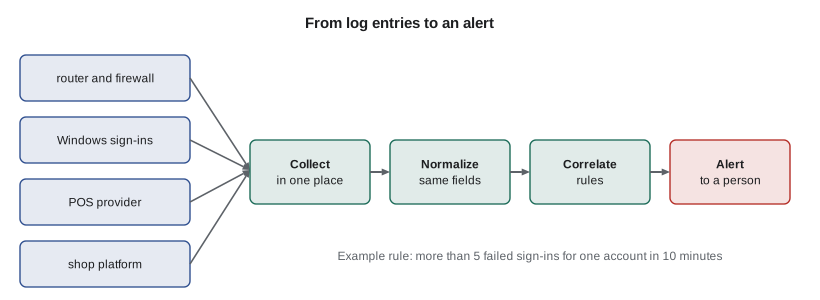
Two practical details make central logs trustworthy. First, every device's clock must be accurate and synchronized, normally with the Network Time Protocol (NTP), and timestamps should include the time zone or use UTC. An investigation that tries to line up a firewall entry stamped 14:02 with a sign-in stamped 13:58 on a computer whose clock runs four minutes slow will draw the wrong conclusions. Second, logs must be protected from tampering and kept long enough to be useful. Attackers often try to delete logs, so the central copy should be write-protected from the systems that send to it. PCI DSS requires at least a year of audit log history, with the most recent three months immediately available, and many breaches are discovered months after they begin.
Reading log entries
Log formats vary, but they share common parts, and much of the work of monitoring is extracting those parts so that they can be counted and compared. Here are a few lines from Ridgeline's sign-in log, in a simple format with a timestamp, a result, an account and a source address. A short Python script can split each line into fields.
lines = """2026-10-17T09:14:03Z OK anita 203.0.113.24
2026-10-17T09:31:47Z FAIL admin 198.51.100.7
2026-10-17T09:31:52Z FAIL admin 198.51.100.7
2026-10-17T09:32:01Z FAIL rosa 198.51.100.7
2026-10-17T09:40:15Z OK theo 203.0.113.24""".splitlines()

for line in lines:
    when, result, user, address = line.split()
    if result == "FAIL":
print(f"{when[11:19]} failed sign-in for {user:<6} from {address}")09:31:47 failed sign-in for admin from 198.51.100.7 09:31:52 failed sign-in for admin from 198.51.100.7 09:32:01 failed sign-in for rosa from 198.51.100.7
Try it yourself
Count failures by source address
Complete failures_by_address(lines) so that it returns a dictionary mapping each source address to the number of FAIL entries from it. Each line has four fields separated by spaces: timestamp, result, account and address. Then noisy(lines, n) returns a sorted list of addresses with at least n failures.
lines = [
    "2026-10-17T09:31:47Z FAIL admin 198.51.100.7",
    "2026-10-17T09:31:52Z FAIL admin 198.51.100.7",
    "2026-10-17T09:32:01Z FAIL rosa 198.51.100.7",
    "2026-10-17T09:40:15Z OK theo 203.0.113.24",
    "2026-10-17T10:02:11Z FAIL theo 203.0.113.24",
]

def failures_by_address(lines):
    counts = {}
    # split each line and count the FAIL entries per address
    return counts

def noisy(lines, n):
    return []

print(failures_by_address(lines))
print(noisy(lines, 3))
Detection rules and alerts
A detection rule describes a pattern worth a human's attention. Simple threshold rules catch a surprising amount: more than five failed sign-ins for one account within ten minutes; any sign-in to an administrator account outside business hours; any change to the payroll provider's bank details; a new mailbox forwarding rule that sends copies of all mail to an outside address, a favourite trick in business email compromise; a device reporting a malware detection; backups failing two nights running. Other rules look for the unusual: a sign-in from a country where Ridgeline has no staff, or two sign-ins for the same account from places too far apart to travel between in the time available, sometimes called impossible travel.
The hard part of monitoring is not writing rules but tuning them. A rule that fires too often produces false positives, and people quickly learn to ignore it, which is called alert fatigue. A rule that is too loose misses real attacks, which are false negatives. Good rules are specific, explained, owned by someone, reviewed when they misfire, and connected to a clear response: when this alert fires, here is what the person receiving it should do.
Try it yourself
Failed sign-ins inside a time window
A plain count over the whole day misses the point; what matters is many failures close together. Complete burst(times, limit, window) where times is a sorted list of failure times in minutes since midnight for one account. Return True if any limit failures fall within window minutes of each other (from the first to the last of them, inclusive), otherwise False.
def burst(times, limit, window):
    # look at each run of `limit` consecutive failures
    return False

quiet = [540, 600, 660, 720, 780, 840]          # one failure an hour
attack = [571, 571, 572, 572, 573, 574, 590]    # many in a few minutes
print(burst(quiet, 5, 10), burst(attack, 5, 10))
Watching cloud services
Much of Ridgeline's important activity happens in cloud services rather than on its own devices, so many of its most valuable alerts come from those providers. Sam turned on alerts for sign-ins from new devices and new countries on the Microsoft accounts, for any change to mailbox forwarding rules, for new administrator accounts, and for downloads of large numbers of files from the business file storage. The payroll provider emails Rosa and Anita whenever bank details change. The shop platform notifies Rosa of new staff accounts and changes to payout settings, and the payment provider sends a daily summary that Anita compares with the till.
Each alert has an owner and a response. A new-country sign-in alert goes to Jordan, who checks with the person; if they were not travelling, Jordan resets the password, signs out all sessions and reports to Sam. A forwarding-rule alert is treated as a likely compromise every time, because there is almost never a legitimate reason for staff to forward all their mail outside the company.
HOME = {"anita": "CA", "theo": "CA", "rosa": "CA", "jordan": "CA"}
signins = [("anita", "CA"), ("rosa", "US"), ("theo", "CA"), ("rosa", "NG"), ("jordan", "CA")]
travelling = {"rosa": {"US"}}          # Rosa told Jordan about her Seattle trip

for user, country in signins:
    if country != HOME[user] and country not in travelling.get(user, set()):
print(f"ALERT: {user} signed in from {country}; confirm with them and check the account")ALERT: rosa signed in from NG; confirm with them and check the account
Try it yourself
Unusual-country sign-ins
Complete alerts(signins, home, travelling). Each sign-in is a tuple (user, country code). home maps each user to their home country, and travelling maps some users to a set of countries they have said they are visiting. Return a list of (user, country) tuples, in the original order, for sign-ins that are neither from the user's home country nor from a country they declared. Users missing from home should always be alerted.
home = {"anita": "CA", "rosa": "CA", "theo": "CA"}
travelling = {"rosa": {"US"}}
signins = [("anita", "CA"), ("rosa", "US"), ("rosa", "NG"), ("ghost", "CA")]

def alerts(signins, home, travelling):
    found = []
    # keep sign-ins that are not from home or a declared country
    return found

print(alerts(signins, home, travelling))
Reviewing and responding
Automated alerts handle the urgent cases, but some monitoring is best done by a person on a schedule. Ridgeline's monitoring calendar has a short weekly review, where Jordan scans the security dashboard, checks that every device reported in and every backup succeeded, and looks at any blocked threats. Once a month Sam reviews firewall and VPN logs and the list of admin accounts. And every quarter there is the access review from lesson 7. These reviews are operational and detective controls, and they catch slow problems, such as a device that quietly stopped sending logs, that no single alert would notice.
When something does look wrong, monitoring hands over to incident response, the subject of lesson 11. The most important habits are to act on alerts rather than silencing them, to record what was seen and done, and to escalate early when unsure. An alert that turns out to be harmless is a small cost; an ignored alert that was real can cost the business.
Worked problem
Investigating a burst of failed sign-ins
On Saturday morning Jordan receives an alert: 14 failed sign-ins for rosa@ridgelinecoffee.example from one address in eight minutes, then nothing. What should Jordan do?
Show solution
- Check whether any sign-in for Rosa succeeded from that address or anywhere unusual: there were no successes, and MFA prompts were not triggered.
- Look for the same address in other logs: it also tried admin and anita, a sign of password spraying against several accounts.
- Because no attempt succeeded and MFA is on, the immediate risk is low; Jordan blocks the address at the identity provider and confirms with Rosa that she was not locked out.
- Record the event, and add a note for Sam's monthly review to check whether the attempts continue.
Answer: Confirm no success, look for related activity, block the source, check with the user, and record it for review.
Common mistakes
MistakeLeaving logs only on the devices that create them.
InsteadSend logs to a central, protected location where they can be searched together.
MistakeIgnoring clock settings.
InsteadSynchronize every device with NTP and record time zones or UTC, so events line up.
MistakeTurning on every possible alert.
InsteadStart with a few high-value rules, tune them, and give each an owner and a response.
MistakeSilencing an alert because it fires often.
InsteadTune or fix the rule; an ignored alert is worse than none.
MistakeKeeping logs for only a few days.
InsteadKeep at least a year where required, because breaches are often found months later.
MistakeWatching only on-site devices.
InsteadEnable and review alerts from cloud services, where much important activity happens.
Summary and key terms
- Logs record events for troubleshooting, accountability, detection and evidence.
- Severity levels help separate urgent events from routine ones.
- Centralized logging protects logs and reveals patterns across systems.
- Synchronized clocks and tamper-resistant, long-retained logs make investigations possible.
- Detection rules turn patterns into alerts; tuning avoids alert fatigue and missed attacks.
- Cloud service alerts, such as new-country sign-ins and forwarding rules, are especially valuable.
- Scheduled reviews catch slow problems that alerts miss.
- log
- A record of events written by a system.
- syslog
- A standard for sending and classifying log messages.
- SIEM
- Security information and event management: collecting, correlating and alerting on logs.
- NTP
- Network Time Protocol, used to synchronize clocks.
- detection rule
- A pattern in logs that triggers an alert.
- false positive
- An alert that fires when nothing bad is happening.
- false negative
- A real attack that does not trigger an alert.
- alert fatigue
- Ignoring alerts because too many are unimportant.
- impossible travel
- Sign-ins from places too far apart for the time between them.
- retention
- How long logs are kept.
Practice problems
Work each problem on paper first, then reveal the answer to check.
Why should logs be copied to a central location?
Show answer
So they can be searched together, patterns across systems can be seen, and an attacker on one device cannot delete them.
A Windows event log shows many event 4625 entries for one account. What do they indicate?
Show answer
Failed logons; many in a short time suggest password guessing.
Why is a new rule forwarding all of Anita's mail to an outside address treated as a likely compromise?
Show answer
Attackers who take over mailboxes commonly add forwarding rules to watch for invoices; staff almost never need one.
What is alert fatigue, and how is it avoided?
Show answer
Ignoring alerts because too many are unimportant; avoided by tuning rules, starting small and giving each alert an owner and response.
How long does PCI DSS require audit logs to be kept?
Show answer
At least a year, with the most recent three months immediately available.
Why do synchronized clocks matter in an investigation?
Show answer
Events from different systems must be put in the right order to understand what happened.
Lesson quiz · 5 questions
Score 60% or more to complete this lesson.
Create a free account to save your progress, take quizzes and earn a certificate.