
CSCO-190 · Lesson 10 of 12 · 24 min
Reviewing cybersecurity objectives
▶ Video coming soon A video version of this lesson is on the way.
On November 3, 2026, the receptionist at Prairie Paws forwarded Brightline an email that looked like an invoice from the clinic's laboratory supplier. It wasn't. Keisha Moreau, Brightline's security analyst, logged it as ticket BL-25102, confirmed that nobody had clicked the link or entered a password, blocked the sender, added a mail rule to flag similar messages and thanked the receptionist for reporting it. The whole response took forty minutes. "That is cybersecurity at most small organizations," she tells Jordan, who plans to sit the CCST Cybersecurity exam after Networking. "Not hackers in hoodies. A person who noticed something odd, reported it, and a process that worked." This lesson reviews the areas of the CCST Cybersecurity exam as commonly listed, with original practice items and worked examples. It assumes you have completed CSCO-121 and CSCO-122. Like those courses, it stays on the defensive side: attacks are described only so that you can recognize them and protect against them.
Area 1: Essential security principles
Everything in security rests on a few principles. The CIA triad names the three goals: confidentiality, keeping information from people who should not see it; integrity, keeping it accurate and unaltered; and availability, keeping it accessible to the people who need it when they need it. Know the vocabulary of risk: a threat is something that could cause harm, a vulnerability is a weakness it could exploit, and risk combines the likelihood of harm with its impact. Know the main categories of threat actor by motive, such as criminals seeking money, insiders acting carelessly or deliberately, and activists, and the main families of attack at a conceptual level: malware, social engineering, denial of service, password attacks and attacks on unpatched software.
Know the principles that guide defences: defence in depth, which layers several protections so that one failure is not fatal; least privilege, which gives people and programs only the access they need; separation of duties; and zero trust, which treats every access request as needing verification rather than trusting anything simply because it is inside the network. Know authentication, authorization and accounting, often called AAA: who you are, what you may do, and a record of what you did. Know the factors of authentication, something you know, something you have and something you are, and why multifactor authentication combines more than one. CSCO-121 lessons 1 to 5 cover these principles.
Area 2: Basic network security concepts
This area covers how networks are protected. Know what a firewall does and the difference between stateless rules, which judge each packet on its own, and stateful inspection, which tracks connections. Know how networks are divided into zones, such as an internal network, a guest network and a zone for public-facing servers, and why segmentation limits the spread of an attack, as Brightline did by moving Kettle & Crumb's card terminals onto their own network. Know the purpose of a VPN, of secure protocols such as SSH, HTTPS and SFTP compared with their insecure counterparts, of WPA3 and enterprise Wi-Fi authentication with a RADIUS server, and of basic cryptography: symmetric encryption, which uses one shared key, asymmetric encryption, which uses a public and private key pair, and hashing, which produces a fixed-length fingerprint used to check integrity. CSCO-121 lessons 6 to 11 cover network security.
| Insecure | Secure alternative | Why |
|---|---|---|
| Telnet (port 23) | SSH (port 22) | SSH encrypts the management session, including passwords. |
| HTTP (port 80) | HTTPS (port 443) | TLS encrypts web traffic and verifies the server. |
| FTP | SFTP or FTPS | Encrypts file transfers and credentials. |
| WEP or open Wi-Fi | WPA3, or WPA2 where WPA3 is unavailable | Modern Wi-Fi security protects traffic and passwords. |
| SNMP versions 1 and 2c | SNMPv3 | Adds authentication and encryption to device monitoring. |
Area 3: Endpoint security concepts
This area covers protecting individual devices. Know the elements of hardening: removing unneeded software and services, changing defaults, applying updates promptly, enabling the host firewall, encrypting storage and using standard rather than administrator accounts for everyday work. Know the role of endpoint protection software, from traditional antivirus based on known signatures to endpoint detection and response tools that watch behaviour and help investigators. Know how mobile device management applies policies to phones and laptops, why full-disk encryption protects lost devices, and why backups are a security control: a restorable, separate backup is the best answer to ransomware. CSCO-122 lessons 1 to 4 cover endpoint security.
Area 4: Vulnerability assessment and risk management
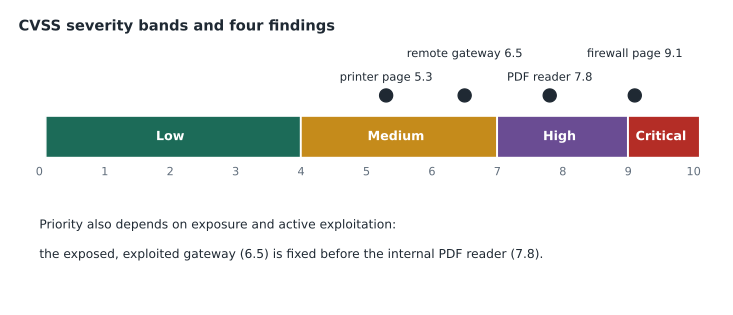
This area covers finding weaknesses and deciding what to do about them. Know that vulnerabilities in software are catalogued with CVE identifiers, which give each one a unique name, and scored with the Common Vulnerability Scoring System, CVSS, which rates severity from 0.0 to 10.0. Know the usual qualitative bands: 0.1 to 3.9 is Low, 4.0 to 6.9 Medium, 7.0 to 8.9 High and 9.0 to 10.0 Critical. Know that severity is not the same as risk: a critical flaw in software you do not run is no risk to you, while a medium flaw in an internet-facing system that attackers are actively exploiting may need attention first. Know the four ways to treat a risk: mitigate it, transfer it, for example through insurance, avoid it by stopping the risky activity, or accept it with a documented decision.
# Translate CVSS base scores into bands, then rank findings by a simple risk score
def band(score):
    if score == 0:
        return "None"
    if score < 4.0:
        return "Low"
    if score < 7.0:
        return "Medium"
    if score < 9.0:
        return "High"
    return "Critical"

# (finding, CVSS score, internet-facing?, known to be exploited?)
findings = [
    ("Old PDF reader on lab PCs", 7.8, False, False),
    ("Firewall management page", 9.1, True, True),
    ("Printer web interface", 5.3, False, False),
    ("Remote access gateway", 6.5, True, True),
]
def priority(f):
    name, score, exposed, exploited = f
    return score + (2 if exposed else 0) + (3 if exploited else 0)

for f in sorted(findings, key=priority, reverse=True):
print(f"{f[0]}: CVSS {f[1]} ({band(f[1])}), priority {priority(f):.1f}")Firewall management page: CVSS 9.1 (Critical), priority 14.1 Remote access gateway: CVSS 6.5 (Medium), priority 11.5 Old PDF reader on lab PCs: CVSS 7.8 (High), priority 7.8 Printer web interface: CVSS 5.3 (Medium), priority 5.3
The script, which Keisha uses to teach triage, is deliberately simple. It shows two ideas the exam tests: translating a score into its band, and adjusting priority for exposure and active exploitation. Real organizations use richer methods, but the logic is the same. Look closely: the remote access gateway, rated Medium, ranks above the High-rated PDF reader, because it faces the internet and is being exploited.
Worked problem
Scoring a risk on a simple matrix
Riverside Family Law keeps client files in a document management system. Keisha rates two risks on a five-point scale for likelihood and for impact: (a) a staff member's password is stolen by phishing, likelihood 4, impact 5; (b) the office's backup drive fails, likelihood 2, impact 3. What is each risk score, and what treatment fits?
Show solution
- A simple matrix multiplies likelihood by impact. Risk (a) scores 4 times 5, which is 20 of a possible 25.
- Risk (b) scores 2 times 3, which is 6.
- Risk (a) is high: mitigate it with multifactor authentication, which Riverside plans for December 2026, and phishing awareness training.
- Risk (b) is lower but still worth mitigating cheaply: monitor the backup and keep a second, cloud copy, following the 3-2-1 rule.
- Record both decisions, including any residual risk the partners accept.
Answer: Phishing scores 20 and calls for MFA and training; the backup drive scores 6 and calls for monitoring and a second copy.
The human layer
Many exam items about threats are really about people. Social engineering works by exploiting trust, urgency, fear or helpfulness: an email that claims an invoice is overdue, a phone call from someone claiming to be from the bank or from IT support, a text message about a parcel. The defences are partly technical, such as mail filtering and MFA, and partly habits that people can learn: pause when a message creates urgency, check the sender and the real destination of a link, verify requests for money or credentials through a separate channel, and report anything suspicious without fear of blame. The Prairie Paws receptionist did exactly that.
Policies turn those habits into expectations. An acceptable use policy explains how systems may be used, a password policy sets standards for credentials, and an incident reporting policy tells people what to report and to whom. Awareness training is most effective when it is short, regular and specific to the organization, and when reporting is praised rather than punished. A technician who answers a user's nervous question kindly, even when the email turns out to be harmless, makes the next report more likely.
Area 5: Incident handling
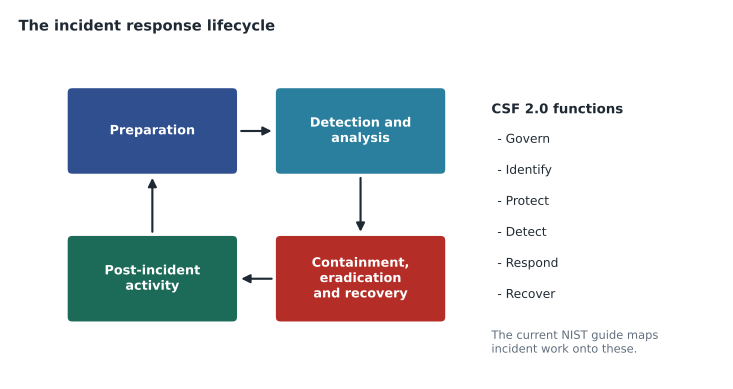
This area covers what happens when something goes wrong. Know the incident response lifecycle: many teams use the four phases from the long-standing NIST incident handling guide, preparation; detection and analysis; containment, eradication and recovery; and post-incident activity, while the guide's current revision, published in 2025, organizes the same work around the functions of the NIST Cybersecurity Framework 2.0. Either way, the logic is to prepare in advance, recognize and confirm an incident, stop it spreading, remove the cause, restore normal operations and learn from it. Know the basics of evidence handling: preserve logs and affected systems, record who handled what and when, which is the chain of custody, and avoid actions that destroy evidence, such as reimaging a machine before the investigation needs are clear.
Know the communication duties too. An incident often requires telling people: managers, affected users, sometimes the client's customers, and sometimes regulators. Under PIPEDA, organizations must report breaches of security safeguards involving personal information to the Office of the Privacy Commissioner of Canada and notify affected individuals when there is a real risk of significant harm, and some provinces have their own rules, such as Quebec's Law 25. A support technician's role is usually to report quickly to the right person and to preserve evidence, not to decide on notification. CSCO-122 lessons 8 to 12 cover incident handling.
Worked problem
Handling a reported phishing email
Walk through ticket BL-25102 using the incident lifecycle: the Prairie Paws receptionist forwards a suspicious invoice email.
Show solution
- Preparation, already in place: staff trained to report, a reporting address, a mail filter and Keisha's playbook for phishing.
- Detection and analysis: Keisha checks the sender, the link's real destination and the mail logs; she confirms that two staff received it and nobody clicked or entered credentials.
- Containment, eradication and recovery: block the sender and the link's domain, remove the message from both mailboxes, add a mail rule; no recovery is needed because nothing was compromised.
- Post-incident activity: record the indicators in the ticket, thank the reporter, and send all Brightline clients a short note with a screenshot of the lure.
- Had someone entered a password, containment would have included resetting it, ending active sessions and checking the account for changes.
Answer: A small incident still follows the whole lifecycle; the record and the lessons learned are what make the next response faster.
Common mistakes
MistakeTreating a high CVSS score as automatically the top priority.
InsteadAdjust for exposure, active exploitation and the value of the system.
MistakeReimaging a compromised machine immediately.
InsteadPreserve evidence first unless containment requires urgent action.
MistakeAssuming a firewall makes endpoints secure.
InsteadLayer defences: harden endpoints, patch, use MFA and keep backups.
MistakeUsing Telnet or HTTP for management.
InsteadUse SSH and HTTPS, which encrypt the session.
MistakeDeciding on breach notification yourself as a technician.
InsteadReport quickly to the responsible person and preserve evidence.
Summary and key terms
- Security rests on confidentiality, integrity and availability, and on understanding threats, vulnerabilities and risk.
- Defence in depth, least privilege, zero trust and AAA guide protections.
- Network security uses firewalls, segmentation, VPNs, secure protocols, WPA3 and basic cryptography.
- Endpoints are protected by hardening, patching, endpoint protection, encryption, MDM and tested backups.
- CVE names vulnerabilities and CVSS rates severity; priority also depends on exposure and exploitation.
- Incident response prepares, detects, contains, eradicates, recovers and learns, with careful evidence handling.
- Breach notification follows the privacy laws that apply; technicians report and preserve evidence.
- CIA triad
- Confidentiality, integrity and availability, the three goals of security.
- Defence in depth
- Layering several protections so one failure is not fatal.
- CVE
- Common Vulnerabilities and Exposures, a catalogue of unique identifiers for vulnerabilities.
- CVSS
- Common Vulnerability Scoring System, which rates severity from 0.0 to 10.0.
- Chain of custody
- A record of who handled evidence, when and how.
- Risk acceptance
- A documented decision to live with a risk rather than treat it.
Practice problems
Work each problem on paper first, then reveal the answer to check.
Which part of the CIA triad does ransomware attack most directly?
Show answer
Availability, by making data unusable; often confidentiality too, when data is stolen as well.
What CVSS band is a score of 7.2?
Show answer
High.
Name the four ways to treat a risk.
Show answer
Mitigate, transfer, avoid or accept.
Why might a Medium vulnerability be fixed before a High one?
Show answer
It may be internet-facing and actively exploited, making the real risk higher.
What is the secure replacement for Telnet?
Show answer
SSH.
What is chain of custody?
Show answer
A record of who handled evidence, when and how, so it can be trusted later.
A user reports clicking a phishing link and typing a password. What should happen first?
Show answer
Report it to the security contact, reset the password, end active sessions and check the account, following the incident process.
Lesson quiz · 5 questions
Score 60% or more to complete this lesson.
Create a free account to save your progress, take quizzes and earn a certificate.