
CRE-499 · Lesson 3 of 12 · 29 min
Brand, positioning and channel setup
With a validated niche, you can build the identity and foundations of the channel. This lesson turns your positioning statement into a brand, sets up your accounts properly, builds accessibility in from the start, writes the policies a professional channel needs and recaps the legal setup from CRE-320 and CRE-330 that applies even to a student project. The deliverable is a brand guide of one or two pages and a completed setup checklist with evidence such as screenshots.
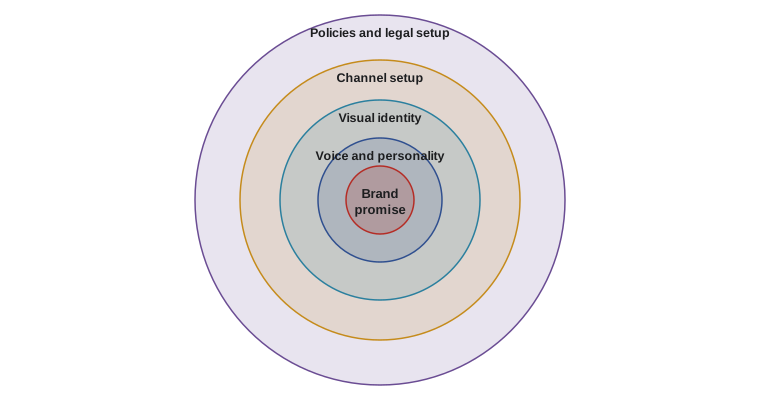
It is tempting to spend weeks on logos and colour schemes. Resist that. A brand is mainly a promise about what viewers will get, delivered consistently; the visual identity supports the promise but cannot replace it. Aim to finish this stage within about a week, with a clean, consistent look you can improve later.
From positioning to brand promise
Start from the positioning statement in your proposal and reduce it to a brand promise of a few words that a viewer could repeat: 'Cheap fixes, clear steps, safe rides,' or 'Real meals on a student budget in 20 minutes.' The promise guides every later decision. If a video idea does not fit it, it probably belongs on a different channel or in a clearly labelled experiment.
Next, define your voice and personality in three adjectives, and for each adjective say what it does and does not mean. 'Practical: we show the cheapest method that works, not the fanciest. Friendly: we explain jargon and never mock beginners. Honest: we say when a repair needs a professional.' These short definitions help keep scripts, thumbnails, replies and sponsor messages consistent, especially if a friend helps with editing or community management later, as CRE-401 described.
Name and handles
A good channel name is easy to say, spell and remember, hints at the topic or promise, and is available as a handle on your main platforms. Check availability on every platform you might use, even if you will not use some of them this term, and claim the same handle everywhere to prevent confusion and impersonation. Search the name to be sure it does not clash with an existing brand, especially one in a similar field; a name that infringes a trademark could force a rename later, after you have built recognition.
Avoid names that box you in too narrowly ('Jordan Fixes Brakes') or are so broad they say nothing ('Jordan Content'). Avoid numbers and underscores that people cannot hear when the name is spoken. And think about your future: a name tied to your current school, city or age may not age well.
Visual identity
Keep the visual identity simple: a logo or wordmark that reads clearly at small sizes such as a profile picture, two or three brand colours with good contrast, one or two fonts and a consistent thumbnail layout. Make a one-page style sheet with these elements and examples. Templates in your editing and design tools save time every week and make your content instantly recognizable in a feed.
Check contrast with the WCAG 2.2 guideline from CRE-450: text should have a contrast ratio of at least 4.5 to 1 against its background, or 3 to 1 for large text. Thumbnails viewed on small phone screens need even bolder contrast and fewer words. Test your thumbnail template at the size it appears in search results and suggested videos, not at full screen.
Worked problem
Checking a thumbnail colour pair
Jordan wants white text on an orange background. The relative luminance of white is 1.00 and of the orange is 0.30. Contrast ratio is \( (L_1 + 0.05)/(L_2 + 0.05) \) with the lighter colour as \( L_1 \). Does the pair meet the 4.5:1 guideline for normal text and 3:1 for large text?
Show solution
- Ratio: \( (1.00 + 0.05)/(0.30 + 0.05) = 1.05 / 0.35 = 3.0 \).
- Compared with 4.5:1, the pair fails for normal text.
- Compared with 3:1, it just meets the large-text level.
Answer: The pair works only for large, bold thumbnail text. For smaller text such as a lower third, Jordan should use a darker orange or dark text on a lighter background, or add an outline or shadow behind the white text.
Setting up the accounts
Set up each account carefully, because the details affect discoverability, security and trust. On your main platform, write a channel description that states the promise and audience in the first sentence, includes the main keywords naturally, gives your upload schedule and links to your owned channel. Add a banner that shows the promise and schedule, a profile image that matches your other platforms and links to your newsletter or website.
Security matters from day one. Use a separate email address for the channel, a password manager, unique strong passwords and two-step verification with an authenticator app or passkey rather than text messages where possible, as CRE-430 explained in its lesson on hacked accounts. Record recovery codes somewhere safe and offline. If anyone else will help manage the channel, use the platform's permission system to give them their own access instead of sharing your password.
- Channel description with promise, audience, schedule and link to your owned channel.
- Banner, profile image and handle consistent across platforms.
- Separate channel email, password manager and two-step verification.
- Recovery codes stored offline; team access through platform permissions.
- Default upload settings: category, language, captions, licence and audience setting (made for kids or not).
- Verified account features enabled where available, such as longer videos and custom thumbnails.
Set the audience setting correctly. On YouTube, you must declare whether content is made for kids; this affects features such as comments and personalized ads and carries legal weight under children's privacy rules, as CRE-450 explained. Most capstone channels aimed at teens and adults are not made for kids, but if your content targets children, read the platform's guidance carefully and adjust your plan.
Accessibility defaults
Accessible content reaches more people and is the right thing to do. Build it into your defaults now so it costs little later. Upload accurate captions for every video rather than relying on raw automatic captions, which often mangle names and technical terms; edit the automatic track or upload your own. Describe important visual information in speech ('now tighten the bolt a quarter turn clockwise') so viewers who cannot see the screen can follow. Write alt text for images on platforms that support it, avoid flashing effects, keep on-screen text large and readable, and use plain language. CRE-450 covered the details and the laws behind them; here, simply make them part of your checklist.
Worked problem
Caption reading speed
A 4-second caption contains 72 characters. CRE-460 suggested a reading speed of about 15 to 20 characters per second for comfortable subtitles. Is this caption too fast, and how should it be fixed?
Show solution
- Reading speed: \( 72 / 4 = 18 \) characters per second.
- This is inside the 15 to 20 range but near the top.
- For beginners or technical terms, splitting into two captions of about 36 characters over 2 seconds each keeps the same speed but is easier to read; trimming filler words lowers it.
Answer: At 18 characters per second the caption is acceptable, but trimming filler words or splitting it would make technical steps easier to follow.
Channel policies
A professional channel publishes short policies so that viewers and partners know what to expect. You will write a full community moderation policy in lesson 7; for now, draft three short documents and link them from your channel description or website.
- Community guidelines: what is welcome and what is not in comments and community spaces, and what happens when rules are broken.
- Sponsorship and affiliate policy: how you choose partners, that you will always disclose paid relationships, and that sponsors do not control your opinions.
- Corrections policy: how you will correct errors, such as a pinned comment and updated description, and when you will remove or re-upload a video.
These policies take an hour to write and save a great deal of trouble later. When a sponsor asks you to drop a disclosure, or a commenter demands you delete a video, you can point to a published policy instead of improvising under pressure, a lesson from CRE-430.
Legal setup recap
Even a student channel has legal obligations. In Canada, if you operate under a name other than your own legal name, most provinces require you to register the business name, for example under Ontario's Business Names Act or with your province's corporate registry. As a sole proprietor you report any channel income on your personal tax return using form T2125, and you keep records of income and expenses, as CRE-330 explained. You do not have to register for GST/HST until your worldwide taxable supplies exceed $30,000 in four consecutive calendar quarters (the small supplier threshold), though you may register voluntarily to claim input tax credits. If you collect email addresses, Canada's privacy law (PIPEDA, or Quebec's Law 25 for Quebec residents) applies to how you collect, use and protect them.
You do not need to incorporate for a capstone. Incorporation in Canada makes sense later, when profits are high enough that the tax and liability benefits outweigh the costs, and CRE-330 explained how to judge that point. For now, open a separate bank account for channel money if you can, so business and personal spending stay apart.
| Item | Required now? | Notes |
|---|---|---|
| Business name registration | If using a name other than your own | Provincial registry |
| Income records and T2125 | Yes, if any income | Keep receipts for six years |
| GST/HST registration | Over $30,000 in four quarters | Voluntary registration possible |
| Privacy notice for email list | Yes, if collecting emails | PIPEDA or Law 25 in Quebec; CASL for sending |
| Disclosure of paid content | Yes, always | Competition Act and Ad Standards guidelines |
| Incorporation | No | Consider later at higher profits |
Disclosure is the most important ongoing legal point. Whenever you receive money, free products, discounts, commissions or any other benefit connected to content, you must disclose it clearly and close to the claim, in the content itself and not only in a description, as CRE-320 explained. Build disclosure into your templates now so it is never forgotten. Platform tools such as paid promotion labels help but do not replace a clear statement in the video or post.
The brand guide
Assemble your work into a brand guide of one or two pages: name and handles, promise, three voice adjectives with definitions, logo, colours with contrast checks, fonts, thumbnail template, description template, accessibility defaults, links to the three policies and the legal setup checklist. Store it where you and any helpers can find it. Review it at mid-term; small adjustments are normal once real content and audience feedback arrive, but frequent rebrands confuse viewers and waste time.
Worked problem
Estimating setup time
Jordan plans the setup stage: name and handle checks 2 h, logo and style sheet 3 h, thumbnail and description templates 2 h, account setup and security 1.5 h, policies 1.5 h, legal checklist 1 h. With about 11 capstone hours a week, can setup fit in one week alongside a 1.5-hour charter revision?
Show solution
- Setup total: \( 2 + 3 + 2 + 1.5 + 1.5 + 1 = 11 \) hours.
- With the charter revision: \( 11 + 1.5 = 12.5 \) hours.
- Compared with 11 available hours, the week is over by 1.5 hours.
Answer: Setup slightly exceeds one week. Jordan can simplify the logo to a clean wordmark (saving about 1.5 hours) or move the policies into week 4. Small trade-offs like this keep the schedule realistic.
Common mistakes
MistakeSpending weeks perfecting a logo.
InsteadFinish a simple, consistent identity in about a week and improve it later.
MistakeSharing the channel password with helpers.
InsteadUse platform permissions, a password manager and two-step verification.
MistakeRelying on raw automatic captions.
InsteadEdit automatic captions or upload accurate ones, especially for names and technical terms.
MistakeLeaving disclosure until the first sponsor.
InsteadBuild disclosure into templates and policy from the start.
MistakeChoosing a name without checking handles and existing brands.
InsteadCheck availability on all platforms and search for conflicting trademarks before committing.
Summary and key terms
- A brand is mainly a promise delivered consistently; visual identity supports it.
- Define the promise and three voice adjectives with what each does and does not mean.
- Choose a clear, available name, claim matching handles and check for conflicting brands.
- Keep the visual identity simple, with templates and contrast that meets WCAG guidance.
- Set up accounts securely with a separate email, two-step verification and proper permissions.
- Build accessibility and three short policies (community, sponsorship, corrections) into the defaults.
- Recap the legal setup: name registration, records and tax, privacy for email lists and disclosure.
- Brand promise
- A short statement of what viewers can expect from a channel.
- Brand voice
- The consistent personality and tone of a channel's communication.
- Handle
- A unique account name on a platform.
- Style sheet
- A one-page record of logos, colours, fonts and templates.
- Contrast ratio
- A measure of the luminance difference between text and background.
- Two-step verification
- A login that needs a second factor beyond a password.
- Made for kids setting
- A platform declaration that content is directed at children, with legal and feature effects.
- Corrections policy
- A published statement of how a channel fixes errors.
- Assumed name
- A business name different from the owner's legal name, usually requiring registration.
- Disclosure
- A clear statement that content involves a paid or material relationship.
Practice problems
Work each problem on paper first, then reveal the answer to check.
Turn a positioning statement into a brand promise for a budget cooking channel.
Show answer
For example: "Real meals, student budget, 20 minutes."
Why define what each voice adjective does not mean?
Show answer
It prevents misinterpretation and keeps scripts and replies consistent.
Name two checks before choosing a channel name.
Show answer
Handle availability on all platforms and conflicts with existing brands or trademarks.
Luminances 0.90 and 0.20: contrast ratio?
Show answer
(0.95)/(0.25) = 3.8:1, enough only for large text.
List three account security steps.
Show answer
Separate email, password manager, two-step verification, offline recovery codes, permissions for helpers.
A 3-second caption has 63 characters. Characters per second?
Show answer
21, slightly fast; trim or split.
Name the three short policies to publish.
Show answer
Community guidelines, sponsorship and affiliate policy, corrections policy.
Why is the made for kids setting important?
Show answer
It affects features and carries legal weight under children's privacy rules.
When must paid relationships be disclosed?
Show answer
Always, whenever money, free products or other benefits are connected to content.
Why open a separate bank account?
Show answer
To keep business and personal money apart for records and taxes.
Lesson quiz · 5 questions
Score 60% or more to complete this lesson.
Create a free account to save your progress, take quizzes and earn a certificate.