
COMP-101 · Lesson 8 of 12 · 22 min
Testing rules, ID and accommodations
▶ Video coming soon A video version of this lesson is on the way.
Hana once watched a colleague lose an exam appointment before it started. He had driven forty minutes to a test centre, arrived with ten minutes to spare, and handed over a driver's licence that had expired the week before. The centre turned him away, and he paid for the exam again. At the eighth cert club session, she tells the story as a warning and Lorna follows it with a printed checklist. "Nobody fails an exam because of the ID rules," Lorna says. "They just never get to sit it." This lesson covers the identification CompTIA requires, the rules of the testing session at a centre and online, the candidate agreement, and how to request accommodations if you need them.
Identification
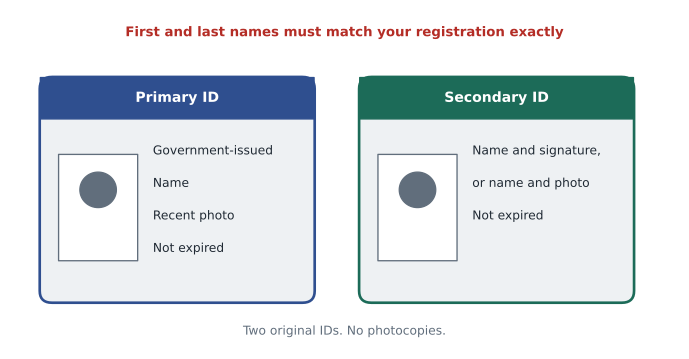
CompTIA's candidate ID policy requires two original, valid, unexpired forms of identification: a primary ID and a secondary ID. Photocopies are not accepted, and expired IDs are not accepted, which is exactly what caught Hana's colleague. The primary ID must be issued by a government and show your name and a recent, recognizable photo. The secondary ID must show at least your name and signature, or your name and a recent, recognizable photo. Employee or student IDs can serve as secondary IDs only if they meet the extra conditions in the policy, such as including your photo.
The policy lists examples of acceptable primary IDs at test centres: a passport, a driver's licence, a military ID, a national, provincial or territorial identity card, and certain immigration documents such as a permanent resident card. IDs must come from the country where you are testing; if you do not have a qualifying primary ID from that country, you need your passport from your country of citizenship plus a secondary ID. For candidates in Canada, a provincial driver's licence or a provincial photo identification card is a common primary ID. For the secondary ID, check the current policy for which cards qualify before relying on one.
Two rules catch people more than any others. The first is the name match from lesson 7: the first and last names you registered with must match exactly the first and last names on both IDs. The second is advance approval: if your situation does not fit the policy, for example because your IDs show different names after a recent name change, an exception must be approved by Pearson VUE in advance, and the policy says at least three business days before the appointment. Exceptions are not made at the door.
The candidate agreement
Before every CompTIA exam, you accept the candidate agreement. It is a legal agreement between you and CompTIA that sets the terms for taking the exam and holding the certification. In it, candidates agree to keep the exam content confidential, not to cheat or help others cheat, and to follow the testing rules. It also gives CompTIA the right to invalidate results, revoke certifications and ban candidates who break it. Read it once in full before your first exam, so that the agreement screen on exam day holds no surprises; you will not have time to read it carefully then, and the clock may already be running.
Confidentiality is the part people underestimate. After an exam, it is natural to want to tell friends what was on it. Talking about the topics you studied, the objectives and your general experience is fine. Describing specific questions, or posting them online, is not. This is one reason that study groups like the cert club discuss objectives and practice materials, never recalled exam questions.
Rules at a test centre
Test centres have their own procedures, set by Pearson VUE, and staff follow them strictly. Expect to show your IDs, sign in, have your photo taken, and store all personal belongings, including phones, watches, wallets, bags and often jackets, in a locker outside the testing room. You may be asked to turn out your pockets or roll up your sleeves. Staff will explain what you may take into the room, which is usually nothing except the ID and any approved items, and they will give you a way to make notes, which you return at the end. Proctors watch the room in person or by camera and can stop an exam if they see a rule broken.
CompTIA's testing policies say its exams are designed to be completed in one session without scheduled breaks. That does not always mean you cannot leave your seat at a centre, but the clock keeps running, and the rules about unscheduled breaks are strict, so plan as if you will be at your desk for the whole time. Use the washroom before you check in, eat beforehand, and arrive early enough that you are not rushed or anxious.
Rules for online exams
Online exams have stricter room rules than many candidates expect, because the proctor can see only what the webcam shows. CompTIA's online-proctored guidelines require a single display, with any additional monitors powered down. The room must be private, quiet and well lit, not a public area. The desk must be clear except for the exam computer and pre-approved items; paper, pens, food and drinks must be out of arm's reach. Whiteboards in the room must be cleared. Phones, tablets, smart watches, headphones and earbuds must be removed and placed out of reach, and you must not touch them during the exam.
You must stay in full view of the webcam, with your face and ears visible, for the whole exam, and looking away from the screen repeatedly may end your session. Restroom breaks are not permitted during an online exam unless you have an approved accommodation. If another person or a pet enters the room during the session, the exam may be terminated. For notes, OnVUE provides a built-in digital whiteboard; physical note-taking materials are not allowed. Violations can lead to revoked exams, invalidated results and, in serious cases, a permanent ban from CompTIA exams.
| Rule | Test centre | Online (OnVUE) |
|---|---|---|
| Identification | Two original, unexpired IDs, checked by staff | ID photographed at check-in |
| Personal items | Stored in a locker | Out of arm's reach, not touched |
| Notes | Usually an erasable board from the centre | Built-in digital whiteboard only |
| Breaks | No scheduled breaks; clock keeps running | No restroom breaks without an approved accommodation |
| Room | The centre's supervised room | Private, quiet, well lit, desk cleared, one screen |
| Watching | Proctor in person or by camera | Proctor by webcam, microphone and screen |
Accommodations
An accommodation is a change to the standard testing conditions for a candidate who needs it, for example because of a disability or a medical condition. CompTIA's testing policies say that accommodation requests are handled through Pearson VUE, which has an accommodations page with the forms and the documentation it needs. Examples of accommodations in testing generally include extra time, a separate room, permission to bring medication or medical devices, breaks, readers or assistive technology. CompTIA's policy names one specific accommodation, a separate room with snacks, for candidates who need to eat during the exam, with the snacks unwrapped and in a small, clear plastic bag.
Request accommodations early. They must be approved before you book the appointment that uses them, the review can take time, and the documentation may need to come from a doctor or other professional. In Canada, human rights codes generally require organizations to accommodate people with disabilities, and Pearson VUE's process applies to Canadian candidates in the same way. If you are not sure whether your situation qualifies, contact Pearson VUE's accommodations team and ask; they deal with these questions every day.
Separate from disability accommodations, CompTIA offers an English as a second language time extension. Its policy says this is a 30-minute extension for exams delivered in English in non-English-speaking countries, that it is not available in English-speaking countries, and that it is granted automatically at registration for eligible candidates. Candidates testing in Canada should check the current policy to see whether it applies to them before assuming it does.
Exam day, hour by hour
Most exam-day problems are avoidable with a simple timeline. The evening before, lay out both IDs and check their expiry dates one last time, re-read the confirmation email, and set two alarms. For a test centre, plan the route, allow for traffic or transit delays, and know where to park; for an online exam, restart the computer, close every other program, and check that the room meets the rules while it is still light enough to see clearly. Then stop studying. A rested mind recalls more than a crammed one, and the last hour of cramming rarely adds anything the exam will reward.
On the morning itself, eat something, use the washroom, and give yourself more time than you think you need. At a centre, arriving early lets you deal with a slow check-in without panic. Online, logging in at the start of the check-in window gives you time to fix a camera angle or a lighting problem before your appointment begins. Bring water if the centre allows it in the waiting area, but expect to leave it outside the testing room. Once the exam starts, the tutorial screens and the agreement come first; read them, because they explain the interface you are about to use, including how to move between questions and, where it is allowed, how to flag them.
If something goes wrong during the exam
Problems during an exam are rare but not unknown. At a test centre, if the computer freezes, a question will not load or the room becomes too noisy to concentrate, raise your hand and tell the proctor at once, and ask that the problem be recorded. Online, the OnVUE application includes a way to contact the proctor through chat; use it rather than leaving the camera view or picking up your phone, both of which break the rules. If the connection drops, follow the instructions on the screen and the guidance in Pearson VUE's online exam help pages.
After the exam, if you believe a technical problem affected your result, contact Pearson VUE or CompTIA promptly, describe what happened, and include any case number the proctor gave you. Reports made at the time, with details, are far more likely to be resolved in your favour than complaints made later from memory. Keep a short written note of anything unusual, with the time it happened, as soon as you leave the room.
Respecting the people who run the exam
Proctors and test centre staff apply rules they did not write and cannot bend. Being turned away for an ID problem is frustrating, but arguing rarely helps and the staff have no authority to make exceptions. The best response is preparation, so that the rules never become an issue. Lorna puts it simply to the cert club: treat exam day like a flight with strict baggage rules. Read the rules, pack accordingly, arrive early, and the trip itself is the easy part.
Worked problem
A pre-exam checklist
Noor plans to take Tech+ online from her spare room in March. Using the rules in this lesson, what should be on her checklist for the week before and the morning of the exam?
Show solution
- Week before: confirm both IDs are original and unexpired, and that the names match her registration exactly.
- Week before: re-run the system test on the same computer and home network, after a restart, with no VPN.
- Morning: clear the desk, power down the second monitor, move phone and watch out of reach, clear the whiteboard on her wall, and make sure no one will come in.
- Morning: use the washroom, eat, and log in at least 30 minutes before the appointment.
Answer: IDs and names, system test, a cleared room with one screen, devices out of reach, nobody entering, and logging in 30 minutes early.
Lorna adds one item to the bottom of everyone's checklist: "Read the candidate agreement once, calmly, before exam day." Dez admits he has never read one in full. He reads it that evening and reports at the next session that it was shorter and clearer than he expected.
Common mistakes
MistakeBringing an ID that expired last week.
InsteadCheck the expiry dates of both IDs well before exam day.
MistakeAsking for an ID exception at the test centre door.
InsteadExceptions must be approved by Pearson VUE in advance, at least three business days before.
MistakeKeeping a phone on the desk during an online exam.
InsteadPhones, watches and earbuds must be out of arm's reach.
MistakeBooking the exam, then requesting extra time.
InsteadGet accommodations approved first, then book.
MistakeSharing specific exam questions with friends afterwards.
InsteadDiscuss objectives and study methods, never exam content.
Summary and key terms
- Bring two original, unexpired IDs: a government-issued primary with name and photo, and a secondary with name and signature or photo.
- The registered first and last names must match both IDs exactly; exceptions need Pearson VUE approval in advance.
- The candidate agreement requires confidentiality and honesty and lets CompTIA invalidate results for violations.
- Exams are designed for one session with no scheduled breaks.
- Online exams require one screen, a private cleared room, devices out of reach, full camera view and no visitors.
- Accommodations are requested through Pearson VUE before booking; CompTIA's ESL extension applies only in non-English-speaking countries.
- Primary ID
- A government-issued ID with your name and a recent photo.
- Secondary ID
- An ID with at least your name and signature, or your name and photo.
- Candidate agreement
- The legal terms every candidate accepts before a CompTIA exam.
- Accommodation
- An approved change to standard testing conditions for a candidate who needs it.
- ESL extension
- A 30-minute extension for English exams in non-English-speaking countries.
Practice problems
Work each problem on paper first, then reveal the answer to check.
How many IDs does CompTIA require?
Show answer
Two original, unexpired IDs: a primary and a secondary.
What must a primary ID show?
Show answer
Your name and a recent, recognizable photo, and it must be government-issued.
How far ahead must an ID exception be approved?
Show answer
At least three business days before the appointment, by Pearson VUE.
Who handles accommodation requests for CompTIA exams?
Show answer
Pearson VUE.
What can you use for notes during an online exam?
Show answer
Only the built-in digital whiteboard.
Is it acceptable to post a question you remember from your exam on a forum?
Show answer
No. The candidate agreement requires keeping exam content confidential.
Lesson quiz · 5 questions
Score 60% or more to complete this lesson.
Create a free account to save your progress, take quizzes and earn a certificate.