
CMPUT-404 · Lesson 8 of 12 · 35 min
Data and persistence in web applications
Almost every web application stores data: accounts, bookings, posts, orders. CMPUT-291 covers relational design, SQL and query processing in depth; this lesson assumes that background and focuses on how a web application uses a database well. The topics are the ones that cause real production incidents: schema changes on a live system, queries built unsafely, too many queries per page, lost updates when requests race, slow pagination, and personal data kept longer than necessary. Examples use Python's built-in sqlite3 module so they run anywhere; the same ideas apply to PostgreSQL, MySQL and MariaDB, the database behind this site.
Choosing where data lives
Most web applications start with a relational database, because constraints, transactions and joins protect data integrity and SQL answers new questions without new code. PostgreSQL and MySQL or MariaDB are the common server choices; SQLite, an embedded database in a single file, is excellent for development, tests, small sites and even read-heavy production sites. Other stores serve particular needs: Redis or Memcached for caches and sessions, document databases such as MongoDB for flexible nested records, search engines such as Elasticsearch or OpenSearch for full-text search, and object storage such as Amazon S3 for uploaded files. Large uploads belong in object storage, with only their keys in the database.
Schema migrations
A live application's schema changes as features are added, and every environment, from each developer's laptop to production, must apply the same changes in the same order. Migrations are numbered scripts that each move the schema forward one step, with the database itself recording which have been applied. Frameworks provide them (Django migrations, Alembic for SQLAlchemy, Laravel migrations, Flyway and Liquibase for Java), but the mechanism is simple enough to write in a few lines.
# A minimal migration runner: numbered, ordered schema changes recorded in the database itself.
import sqlite3

MIGRATIONS = [
    (1, "create rooms",    "CREATE TABLE rooms (id TEXT PRIMARY KEY, building TEXT NOT NULL, seats INTEGER NOT NULL CHECK (seats > 0))"),
    (2, "create bookings", """CREATE TABLE bookings (id INTEGER PRIMARY KEY, room_id TEXT NOT NULL REFERENCES rooms(id),
                              user_email TEXT NOT NULL, day TEXT NOT NULL, slot INTEGER NOT NULL,
                              UNIQUE (room_id, day, slot))"""),
    (3, "add created_at",  "ALTER TABLE bookings ADD COLUMN created_at TEXT NOT NULL DEFAULT '2026-09-01'"),
    (4, "index by user",   "CREATE INDEX bookings_user ON bookings(user_email)"),
]

def migrate(db):
    db.execute("CREATE TABLE IF NOT EXISTS schema_version (version INTEGER PRIMARY KEY, name TEXT)")
    done = {v for (v,) in db.execute("SELECT version FROM schema_version")}
    for version, name, sql in MIGRATIONS:
        if version in done:
            continue
        with db:                                   # each migration in its own transaction
            db.execute(sql)
            db.execute("INSERT INTO schema_version VALUES (?, ?)", (version, name))
        print(f"applied {version}: {name}")

db = sqlite3.connect(":memory:")
db.execute("PRAGMA foreign_keys = ON")
migrate(db)
print("second run:"); migrate(db); print("(nothing to do)")
print("version:", db.execute("SELECT max(version) FROM schema_version").fetchone()[0])applied 1: create rooms applied 2: create bookings applied 3: add created_at applied 4: index by user second run: (nothing to do) version: 4
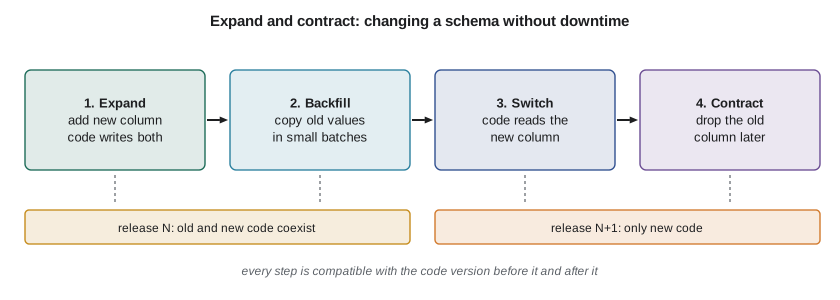
Running the migrator twice is safe because it records what it has done; this property, called idempotence, lets deployments run migrations automatically. On large production tables, some changes lock the table or rewrite every row, so teams use the expand-and-contract pattern: first add the new column or table (expand) and deploy code that writes to both old and new; then backfill existing rows in small batches; then switch reads to the new structure; and only in a later release remove the old one (contract). Each step is compatible with both the previous and the next version of the code, which allows zero-downtime deployments (lesson 11).
Talking to the database safely
Never build SQL by inserting user input into strings. Every database driver supports parameters, written ? in sqlite3 or %s in many others, which send values separately from the SQL text so they can never change its structure. This eliminates SQL injection, one of the most damaging web vulnerabilities. Identifiers such as table and column names cannot be parameters, so if they must vary, choose them from a fixed allowlist in code, as the data mapper below does with its column assertion.
Object-relational mappers (ORMs) such as SQLAlchemy, Django's ORM, Hibernate, Prisma and Eloquent map rows to objects and generate parameterized SQL, which saves repetitive code and makes injection unlikely. The data mapper below shows the core idea: a class describes the record, and a repository turns method calls into SQL.
import sqlite3
db = sqlite3.connect(":memory:"); db.execute("PRAGMA foreign_keys = ON")
db.executescript("""
CREATE TABLE rooms (id TEXT PRIMARY KEY, building TEXT NOT NULL, seats INTEGER NOT NULL CHECK (seats > 0));
CREATE TABLE bookings (id INTEGER PRIMARY KEY, room_id TEXT NOT NULL REFERENCES rooms(id),
  user_email TEXT NOT NULL, day TEXT NOT NULL, slot INTEGER NOT NULL, UNIQUE (room_id, day, slot));
INSERT INTO rooms VALUES ('L201','Library',6), ('S105','Science',12), ('G010','Gym',4);
""")

# A tiny data mapper: the idea behind ORMs, in thirty lines.
from dataclasses import dataclass, fields

@dataclass
class Room:
    id: str
    building: str
    seats: int

class Repo:
    def __init__(self, db, cls, table):
        self.db, self.cls, self.table = db, cls, table
        self.cols = [f.name for f in fields(cls)]
    def get(self, key):
        row = self.db.execute(f"SELECT {', '.join(self.cols)} FROM {self.table} WHERE id = ?", (key,)).fetchone()
        return self.cls(*row) if row else None
    def where(self, **conds):                          # column names come from code, values are parameters
        assert set(conds) <= set(self.cols), "unknown column"
        sql = f"SELECT {', '.join(self.cols)} FROM {self.table}"
        if conds: sql += " WHERE " + " AND ".join(f"{c} = ?" for c in conds)
        return [self.cls(*r) for r in self.db.execute(sql + " ORDER BY id", tuple(conds.values()))]
    def save(self, obj):
        vals = [getattr(obj, c) for c in self.cols]
        self.db.execute(f"INSERT INTO {self.table} VALUES ({', '.join('?' * len(vals))}) "
                        f"ON CONFLICT(id) DO UPDATE SET " + ", ".join(f"{c}=excluded.{c}" for c in self.cols[1:]), vals)

rooms = Repo(db, Room, "rooms")
print(rooms.get("L201"))
print(rooms.where(building="Science"))
rooms.save(Room("L201", "Library", 8))                 # update via upsert
rooms.save(Room("A300", "Arts", 30))                   # insert
print([r.id + ":" + str(r.seats) for r in rooms.where()])
print(rooms.where(building="Gym' OR '1'='1")) # injection attempt is just a value that matches nothingRoom(id='L201', building='Library', seats=6) [Room(id='S105', building='Science', seats=12)] ['A300:30', 'G010:4', 'L201:8', 'S105:12'] []
ORMs are convenient but can hide what the database is doing. The most common consequence is the N+1 query problem: code loads a list of N objects, then accesses a related object on each, and the ORM silently issues one more query per item. On a page with 30 bookings that is 31 queries, each with a network round trip in a client-server database. The fix is to fetch related data together, with a join or the ORM's eager-loading feature (select_related or prefetch_related in Django, joinedload or selectinload in SQLAlchemy, include in Prisma).
import sqlite3
db = sqlite3.connect(":memory:"); db.execute("PRAGMA foreign_keys = ON")
db.executescript("""
CREATE TABLE rooms (id TEXT PRIMARY KEY, building TEXT NOT NULL, seats INTEGER NOT NULL CHECK (seats > 0));
CREATE TABLE bookings (id INTEGER PRIMARY KEY, room_id TEXT NOT NULL REFERENCES rooms(id),
  user_email TEXT NOT NULL, day TEXT NOT NULL, slot INTEGER NOT NULL, UNIQUE (room_id, day, slot));
INSERT INTO rooms VALUES ('L201','Library',6), ('S105','Science',12), ('G010','Gym',4);
""")

# The N+1 query problem, measured with sqlite3's trace callback.
import random
rng = random.Random(404)
for i in range(30):
    db.execute("INSERT INTO bookings (room_id, user_email, day, slot) VALUES (?, ?, ?, ?)",
               (rng.choice(["L201", "S105", "G010"]), f"user{i}@example.ca", "2026-11-02", i))
queries = []
db.set_trace_callback(queries.append)

# N+1: one query for bookings, then one more per booking for its room.
bookings = db.execute("SELECT id, room_id FROM bookings ORDER BY id").fetchall()
lines = [(b, db.execute("SELECT building FROM rooms WHERE id = ?", (rid,)).fetchone()[0]) for b, rid in bookings]
print("N+1 approach:", len(queries), "queries for", len(lines), "rows")

queries.clear()
lines2 = db.execute("""SELECT b.id, r.building FROM bookings b JOIN rooms r ON r.id = b.room_id
                       ORDER BY b.id""").fetchall()
print("join approach:", len(queries), "query for", len(lines2), "rows")
print("same results:", [l[1] for l in lines] == [l[1] for l in lines2])N+1 approach: 31 queries for 30 rows join approach: 1 query for 30 rows same results: True
Two more practices matter for performance. Each new database connection costs time and server memory, so applications keep a pool of open connections and reuse them; PHP and serverless platforms, which start fresh for each request, often rely on an external pooler such as PgBouncer. And slow queries should be found with the database's query plan (EXPLAIN) and fixed with suitable indexes, a topic covered in depth in CMPUT-291.
Transactions and concurrency
Web servers handle many requests at once, so two users can try to book the last seat at the same moment. A naive check-then-insert, reading whether the slot is free and then inserting, has a race: both requests can read free before either inserts. The robust solution is to let the database enforce the rule: a UNIQUE constraint on room, day and slot means that only one insert can succeed, and the other receives an integrity error that the application turns into a polite message. Transactions group several statements so they succeed or fail together, preserving the ACID properties CMPUT-291 describes.
# Transactions and constraints keep bookings consistent, even when two requests race.
import sqlite3, threading, os, tempfile
path = os.path.join(tempfile.mkdtemp(), "app.db")
with sqlite3.connect(path) as setup:
    setup.executescript("""
    CREATE TABLE rooms (id TEXT PRIMARY KEY, building TEXT NOT NULL, seats INTEGER NOT NULL);
    CREATE TABLE bookings (id INTEGER PRIMARY KEY, room_id TEXT NOT NULL REFERENCES rooms(id),
      user_email TEXT NOT NULL, day TEXT NOT NULL, slot INTEGER NOT NULL, UNIQUE (room_id, day, slot));
    INSERT INTO rooms VALUES ('L201','Library',6), ('G010','Gym',4);""")

def book(email, results):
    conn = sqlite3.connect(path, timeout=5)
    try:
        with conn:                                          # commit on success, roll back on exception
            conn.execute("INSERT INTO bookings (room_id, user_email, day, slot) VALUES ('G010', ?, '2026-11-02', 9)", (email,))
        results.append((email, "booked"))
    except sqlite3.IntegrityError as e:
        results.append((email, f"refused ({e})"))
    finally:
        conn.close()

results = []
threads = [threading.Thread(target=book, args=(f"student{i}@example.ca", results)) for i in range(4)]
for t in threads: t.start()
for t in threads: t.join()
print(sorted(r[1] for r in results))
check = sqlite3.connect(path)
print("rows for G010 slot 9:", check.execute("SELECT count(*) FROM bookings WHERE room_id='G010' AND slot=9").fetchone()[0])

# A multi-step change is atomic: move a booking, and roll back everything if the target is taken.
check.execute("INSERT INTO bookings (room_id, user_email, day, slot) VALUES ('L201', 'x@example.ca', '2026-11-02', 10)")
check.commit()
try:
    with check:
        check.execute("DELETE FROM bookings WHERE room_id='G010' AND slot=9")
        check.execute("INSERT INTO bookings (room_id, user_email, day, slot) VALUES ('L201', 'mover@example.ca', '2026-11-02', 10)")
except sqlite3.IntegrityError:
    print("move failed and was rolled back")
print("G010 slot 9 still booked:", check.execute("SELECT count(*) FROM bookings WHERE room_id='G010' AND slot=9").fetchone()[0] == 1)['booked', 'refused (UNIQUE constraint failed: bookings.room_id, bookings.day, bookings.slot)', 'refused (UNIQUE constraint failed: bookings.room_id, bookings.day, bookings.slot)', 'refused (UNIQUE constraint failed: bookings.room_id, bookings.day, bookings.slot)'] rows for G010 slot 9: 1 move failed and was rolled back G010 slot 9 still booked: True
Exactly one of the four racing requests succeeded, and the failed move left the original booking intact because the deletion was rolled back with the failed insertion. Other techniques complement constraints: SELECT ... FOR UPDATE locks rows in PostgreSQL and MySQL; optimistic concurrency control adds a version column and updates only WHERE version = the value read, detecting lost updates when two people edit the same record; and idempotency keys (lesson 9) stop a retried request from creating a duplicate.
Pagination
Lists of records must be paginated. Offset pagination (LIMIT 20 OFFSET 80000) is simple but slows down on deep pages, because the database must walk past all the skipped rows, and it shows duplicates or skips items when rows are inserted while the user pages. Keyset or cursor pagination remembers the last key seen and asks for rows after it (WHERE id > 80000), which an index answers directly regardless of depth. APIs usually expose keyset pagination as an opaque cursor token (lesson 9).
# Offset versus keyset pagination over 100 000 rows, counting the database's internal work.
import sqlite3
db = sqlite3.connect(":memory:")
db.execute("CREATE TABLE events (id INTEGER PRIMARY KEY, title TEXT)")
db.executemany("INSERT INTO events (title) VALUES (?)", ((f"event {i}",) for i in range(100_000)))

ops = 0
def tick():
    global ops; ops += 100; return 0
db.set_progress_handler(tick, 100)           # called every 100 virtual-machine instructions

def run(sql, args):
    global ops; ops = 0
    rows = db.execute(sql, args).fetchall()
    return rows[0][0], ops

for depth in (0, 8_000, 80_000):
    first_o, work_o = run("SELECT id FROM events ORDER BY id LIMIT 20 OFFSET ?", (depth,))
    first_k, work_k = run("SELECT id FROM events WHERE id > ? ORDER BY id LIMIT 20", (depth,))
    print(f"depth {depth:>6}: offset starts at {first_o:>6} (~{work_o:>7} ops)   "
f"keyset starts at {first_k:>6} (~{work_k:>4} ops)")depth 0: offset starts at 1 (~ 100 ops) keyset starts at 1 (~ 0 ops) depth 8000: offset starts at 8001 (~ 16100 ops) keyset starts at 8001 (~ 100 ops) depth 80000: offset starts at 80001 (~ 160100 ops) keyset starts at 80001 (~ 100 ops)
Both approaches return identical pages, but the work tells the story. The progress handler counts the database engine's internal instructions in steps of 100: offset pagination's cost grows in proportion to the depth, about two instructions per skipped row, so page 4000 costs a thousand times more than page 1, while keyset pagination stays constant because the primary key index jumps straight to the starting row. On a busy server, a few crawlers paging deep through offset-based lists can noticeably load the database.
Personal data, privacy and retention
Databases in Canadian web applications are subject to privacy law. The federal Personal Information Protection and Electronic Documents Act (PIPEDA) governs personal information collected in commercial activity, built on ten fair information principles including identifying purposes, consent, limiting collection, limiting use and retention, safeguards, and individual access. Quebec's Law 25, phased in between 2022 and 2024, adds stricter rules for organizations handling Quebecers' data: a person in charge of privacy, privacy impact assessments before new systems or transfers outside Quebec, confidentiality by default, consent for cookies and tracking that is not essential, a right to data portability (from September 2024), and penalties of up to 25 million dollars or 4% of worldwide turnover. Alberta and British Columbia have their own private-sector acts, and breaches posing a real risk of significant harm must be reported to the Privacy Commissioner and affected individuals. For a developer, this translates into schema decisions: collect only what the purpose needs, record consent, support access and deletion requests, and delete or anonymize data when the retention period ends.
Practical techniques follow. Keep personal fields in identifiable columns so access and deletion requests can find them; store a retention date and run a scheduled job that deletes or anonymizes expired records; avoid copying personal data into logs, analytics events and search indexes, where it escapes deletion; encrypt backups and restrict who can query production. This site, for example, stores only the account details its features need and keeps its database credentials in configuration outside the code repository.
Worked examples
Worked problem
Fixing a lost update
Two staff members open the same room record (seats = 6) at once. One changes seats to 8 and saves; the other changes the building name and saves, writing seats = 6 back. How can the application detect this?
Show solution
- Add a version column, initially 1.
- Each save runs UPDATE rooms SET ..., version = version + 1 WHERE id = ? AND version = ? with the version originally read.
- The first save matches version 1 and sets version 2. The second save finds no row with version 1 and updates 0 rows.
- The application reports a conflict and asks the second user to reload and reapply the change.
Answer: Optimistic concurrency control with a version column detects the lost update.
Worked problem
Counting queries on a page
A bookings page lists 50 bookings, showing each booking's room building and the booker's name from a users table, loaded lazily by an ORM. How many queries run, and how many after eager loading?
Show solution
- One query for the 50 bookings.
- One query per booking for its room: 50.
- One query per booking for its user: 50.
- Total 101. With joins or eager loading (one query with two joins, or three queries with IN lists), it drops to 1 to 3.
Answer: 101 queries lazily versus at most 3 with eager loading.
Worked problem
Planning a column rename on a live table
The bookings table, with 40 million rows, must rename user_email to contact_email without downtime. Outline the steps.
Show solution
- Expand: add contact_email (nullable); deploy code that writes both columns.
- Backfill: copy user_email into contact_email in batches of, say, 10 000 rows to avoid long locks.
- Switch: deploy code that reads contact_email; add NOT NULL once all rows are filled.
- Contract: in a later release, stop writing user_email and drop it.
Answer: Expand, backfill, switch and contract over several deployments.
Common mistakes
MistakeEscaping quotes in user input prevents SQL injection.
InsteadUse parameterized queries; escaping by hand is error-prone and context-dependent.
MistakeCheck that a slot is free, then insert, and double bookings are impossible.
InsteadConcurrent requests race; enforce uniqueness with a database constraint or locking.
MistakeAn ORM makes query performance automatic.
InsteadLazy loading causes N+1 queries; inspect generated SQL and use eager loading.
MistakeEdit the production schema by hand when needed.
InsteadUse versioned migrations so every environment applies the same ordered changes.
MistakeOFFSET pagination is fine for any depth.
InsteadDeep offsets scan skipped rows; use keyset pagination for large or changing lists.
MistakeKeep all data forever in case it is useful.
InsteadPrivacy law requires limiting retention; delete or anonymize data when its purpose ends.
Summary and key terms
- Use a relational database as the system of record, adding caches, search and object storage where needed.
- Version schema changes as migrations; use expand-and-contract for live tables.
- Always use parameterized queries; ORMs help but can hide N+1 query problems.
- Pool connections and index according to query plans.
- Let constraints and transactions keep data consistent under concurrency.
- Prefer keyset pagination for large lists.
- Design schemas for privacy: minimal collection, consent, access, deletion and retention.
- Migration
- A versioned, ordered script that changes the database schema.
- Expand and contract
- Changing a schema in compatible steps across several deployments.
- Parameterized query
- SQL with placeholders whose values are sent separately.
- ORM
- Object-relational mapper: maps rows to objects and generates SQL.
- N+1 problem
- Issuing one query for a list plus one per item for related data.
- Connection pool
- A set of reusable open database connections.
- Optimistic concurrency
- Detecting conflicting updates with a version check instead of locks.
- Keyset pagination
- Paging by the last key seen rather than by offset.
- Data retention
- How long personal data is kept before deletion or anonymization.
- Idempotent
- Producing the same result when applied more than once.
Practice problems
Work each problem on paper first, then reveal the answer to check.
Why does the migration runner record versions in the database?
Show answer
So it can skip applied migrations and be run safely on every deployment.
Why can table names not be query parameters?
Show answer
Parameters carry values only; identifiers must come from an allowlist in code.
In the N+1 run, how many queries did each approach use?
Show answer
N+1 used 31 queries for 30 rows; the join used 1.
How did the booking example prevent double booking?
Show answer
A UNIQUE (room_id, day, slot) constraint let only one insert succeed.
What does with conn: do in sqlite3?
Show answer
Commits the transaction on success and rolls it back if an exception occurs.
Name two problems with deep OFFSET pagination.
Show answer
It scans skipped rows, and inserted or deleted rows cause duplicates or gaps.
What is the expand step in expand-and-contract?
Show answer
Adding the new schema element while keeping the old, with code writing to both.
Why use a connection pool?
Show answer
Opening connections is slow and uses server memory; reusing them improves latency and capacity.
Give two places personal data can escape deletion.
Show answer
Logs, analytics events, search indexes, backups and caches.
What is optimistic concurrency control?
Show answer
Updating only if a version column still has the value read, detecting conflicting edits.
Lesson quiz · 5 questions
Score 60% or more to complete this lesson.
Create a free account to save your progress, take quizzes and earn a certificate.