
CMPUT-404 · Lesson 4 of 12 · 33 min
JavaScript and TypeScript for the web
JavaScript is the only programming language that every browser runs natively, which makes it unavoidable in web development. It began in 1995 as a ten-day prototype by Brendan Eich at Netscape and has grown into a capable language standardized as ECMAScript, with a new edition each year from the TC39 committee. Outside the browser, Node.js, Deno and Bun run JavaScript on servers, and WebAssembly lets other languages run in the browser alongside it. TypeScript, created at Microsoft in 2012, adds a static type system on top of JavaScript and compiles to plain JavaScript; it has become the default for large web codebases because it catches whole classes of mistakes before code ships.
CMPUT-274 introduced closures, asynchronous code and the event loop, and CMPUT-325 placed JavaScript among other languages and showed microtasks running before timers. This lesson focuses on what a web developer needs: the language features used every day, asynchronous programming with promises and async/await, the browser's event loop and rendering, modules and tooling, safe handling of untrusted data, and TypeScript's types for real application code. Every Node.js and TypeScript example below was run with real compilers on this course's build machine.
The language in brief
Modern JavaScript code uses const and let rather than the older var, whose function-wide scope caused bugs. Functions are first-class values, and arrow functions give a compact syntax that also captures this from the surrounding scope. Objects and arrays have literal syntax, destructuring pulls out fields (const { id, seats } = room), the spread operator copies and merges (const copy = { ...room, seats: 8 }), and optional chaining (room?.building?.name) and nullish coalescing (value ?? 'none') handle missing data without long chains of checks. Classes exist, but much browser code is written with plain objects and functions. Equality deserves care: === compares without type conversion, while == converts types in surprising ways, so style guides ban it.
Asynchronous programming
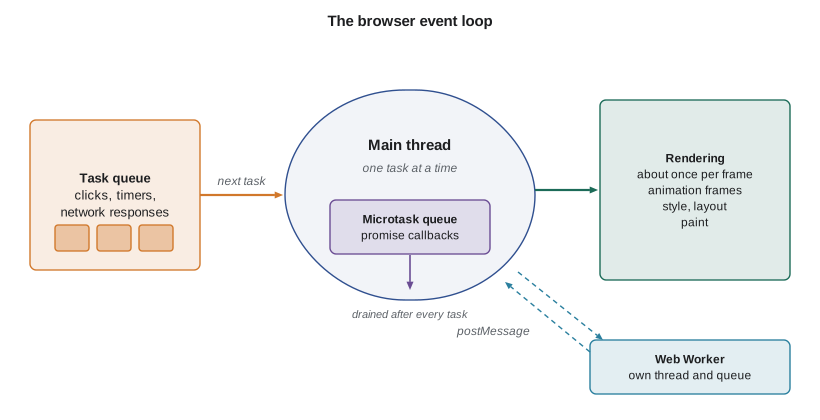
Browsers run each page's JavaScript on a single main thread that also handles layout, painting and user input. Anything slow, such as a network request, a timer or reading a file, must therefore be asynchronous: the code starts the operation and continues, and a callback runs when the result is ready. Promises represent such future results; async functions let you write await to pause until a promise settles without blocking the thread. Promise.all runs operations concurrently and waits for all of them; Promise.race settles with the first; Promise.allSettled waits for all and reports each outcome, which suits dashboards that should show partial results when one service fails.
// Simulating network calls with promises: sequential versus concurrent requests.
const sleep = (ms, value) => new Promise(resolve => setTimeout(() => resolve(value), ms));
const fakeFetch = (name, ms) => sleep(ms, { name, ms });   // stands in for fetch()

async function sequential() {
  const t0 = Date.now();
  const a = await fakeFetch('rooms', 120);
  const b = await fakeFetch('bookings', 150);
  const c = await fakeFetch('profile', 90);
  return { names: [a.name, b.name, c.name], ms: Date.now() - t0 };
}
async function concurrent() {
  const t0 = Date.now();
  const all = await Promise.all([fakeFetch('rooms', 120), fakeFetch('bookings', 150), fakeFetch('profile', 90)]);
  return { names: all.map(r => r.name), ms: Date.now() - t0 };
}
async function withTimeout(promise, ms) {
  const timeout = sleep(ms).then(() => { throw new Error(`timed out after ${ms} ms`); });
  return Promise.race([promise, timeout]);
}
(async () => {
  const s = await sequential(), c = await concurrent();
  // timers never fire early, so the totals are at least the sum (sequential) or the maximum (concurrent)
  console.log('sequential:', s.names.join(', '), '-', s.ms >= 360 ? 'at least 360 ms' : s.ms + ' ms');
  console.log('concurrent:', c.names.join(', '), '-', c.ms >= 150 && c.ms < 300 ? 'about 150 ms' : c.ms + ' ms');
  try { await withTimeout(fakeFetch('slow report', 500), 200); }
  catch (e) { console.log('error caught:', e.message); }
  const settled = await Promise.allSettled([fakeFetch('ok', 10), withTimeout(fakeFetch('late', 300), 50)]);
  console.log('allSettled:', settled.map(r => r.status).join(', '));
})();sequential: rooms, bookings, profile - at least 360 ms concurrent: rooms, bookings, profile - about 150 ms error caught: timed out after 200 ms allSettled: fulfilled, rejected
The timings show a common performance bug: awaiting independent requests one after another adds their latencies, while starting them together costs only the slowest. In real code the requests would use fetch, which returns a promise of a Response object; note that fetch rejects only on network failure, not on HTTP error statuses, so code must check response.ok. An AbortController can cancel a request, for example when the user navigates away or types a new search term.
The event loop and rendering
The event loop takes one task at a time from queues: a script to run, a user event, a timer callback, a message from a worker. After each task it runs all pending microtasks, which include promise callbacks, and then, roughly once per display frame (about every 16.7 ms on a 60 Hz screen), it may update the rendering: run requestAnimationFrame callbacks, recalculate styles, lay out and paint. A task that runs for 200 ms blocks everything else for 200 ms, so clicks feel ignored. Lesson 6 measures this as Interaction to Next Paint. Long computations should be split into chunks, moved to a Web Worker (a separate thread without DOM access), or done on the server.
// Closures in practice: debounce a search box so we do not send a request on every keystroke.
function debounce(fn, waitMs) {
  let timer = null;                       // captured by the returned function
  return (...args) => {
    clearTimeout(timer);
    timer = setTimeout(() => fn(...args), waitMs);
  };
}
const sent = [];
const search = debounce(q => sent.push(q), 100);

// A user types "lab" quickly, pauses, then types "library".
const keys = [[0, 'l'], [30, 'la'], [60, 'lab'], [300, 'lib'], [330, 'libr'], [360, 'libra'], [390, 'library']];
for (const [t, text] of keys) setTimeout(() => search(text), t);
setTimeout(() => {
  console.log('keystrokes:', keys.length);
  console.log('requests sent:', sent.length, '->', JSON.stringify(sent));
}, 700);keystrokes: 7 requests sent: 2 -> ["lab","library"]
Debouncing waits until input pauses before acting; throttling, its cousin, acts at most once per interval. Both protect servers and keep interfaces responsive. They also show closures at work: the timer variable lives on inside the returned function, private to it, long after debounce itself has returned.
Modules, packages and build tools
ES modules (import and export) are supported natively by all modern browsers with script type='module'. Modules are deferred by default, run in strict mode and allow top-level await. Packages come from the npm registry, the largest software registry in the world, managed with npm, pnpm or Yarn and pinned with a lock file. Because shipping hundreds of small files is slow and some packages target Node rather than browsers, applications usually use a bundler or build tool such as Vite, esbuild, Rollup or webpack. Build tools combine modules, remove unused code (tree shaking), minify, split code into chunks loaded on demand, and compile TypeScript and newer syntax. Every dependency is code you are trusting, a supply-chain risk that lesson 10 and CMPUT-331 discuss.
<!-- index.html: native ES modules in the browser -->
<script type="module" src="/js/app.js"></script>

// js/rooms.js
export async function loadRooms(signal) {
  const resp = await fetch('/api/v1/rooms', { headers: { Accept: 'application/json' }, signal });
  if (!resp.ok) throw new Error(`HTTP ${resp.status}`);
  return resp.json();
}

// js/app.js
import { loadRooms } from './rooms.js';
const controller = new AbortController();           // lets us cancel if the user navigates away
const list = document.querySelector('#rooms');
try {
  const rooms = await loadRooms(controller.signal);  // top-level await works in modules
  list.replaceChildren(...rooms.map(r => Object.assign(document.createElement('li'),
    { textContent: `${r.id} (${r.seats} seats)` })));  // textContent, never innerHTML, for data
} catch (e) {
  list.textContent = 'Could not load rooms. Please try again.';
}
Note how the listing inserts data: it sets textContent, which treats the string as text, rather than assigning to innerHTML, which would parse it as HTML. If a room name contained markup, innerHTML would execute it as part of the page, the root of cross-site scripting. Building HTML strings from data with template literals is the same mistake in disguise. Frameworks escape values by default for exactly this reason.
TypeScript
TypeScript adds optional static types to JavaScript. Types are erased at compile time, so they cost nothing at run time, but the compiler checks that values are used consistently: calling a method that does not exist, passing a string where a number is expected, forgetting that a value may be undefined, or mistyping a property name are all reported before the code runs. TypeScript's type system is structural: an object fits a type if it has the right shape, regardless of where it came from. Union types and narrowing let the compiler track which case a value is in, and generics let functions and types work over many data types safely. CMPUT-325 discussed gradual typing in theory; here is what it catches in practice.
// A typed client for a JSON API. The compiler catches mistakes before any user sees them.
type Room = { id: string; seats: number; building: string };
type ApiResult<T> =
  | { ok: true; data: T }
  | { ok: false; error: { code: number; message: string } };

function seatsText(result: ApiResult<Room[]>): string {
  // Mistake 1: using .data without checking ok first
  const total = result.data.reduce((n: number, r: Room) => n + r.seats, 0);
  return `${total} seats`;
}
function roomLabel(room: Room): string {
  // Mistake 2: a typo in a property name
  return `${room.id} in ${room.bulding}`;
}
console.log(seatsText({ ok: true, data: [{ id: 'L201', seats: 6, building: 'Library' }] }));$ tsc --strict app.ts
app.ts(9,24): error TS2339: Property 'data' does not exist on type 'ApiResult<Room[]>'.
Property 'data' does not exist on type '{ ok: false; error: { code: number; message: string; }; }'.
app.ts(14,32): error TS2551: Property 'bulding' does not exist on type 'Room'. Did you mean 'building'?type Room = { id: string; seats: number; building: string };
type ApiResult<T> =
| { ok: true; data: T }
| { ok: false; error: { code: number; message: string } };
function seatsText(result: ApiResult<Room[]>): string {
if (!result.ok) { // narrowing on the discriminant
return `Error ${result.error.code}: ${result.error.message}`;
}
const total = result.data.reduce((n, r) => n + r.seats, 0);
const buildings = [...new Set(result.data.map(r => r.building))].join(', ');
return `${total} seats in ${buildings}`;
}
// JSON from the network is untyped; validate it at the boundary before trusting the type.
function parseRooms(json: unknown): ApiResult<Room[]> {
if (!Array.isArray(json)) return { ok: false, error: { code: 422, message: 'expected an array' } };
const rooms: Room[] = [];
for (const x of json) {
if (typeof x?.id !== 'string' || typeof x?.seats !== 'number' || typeof x?.building !== 'string')
return { ok: false, error: { code: 422, message: 'bad room record' } };
rooms.push({ id: x.id, seats: x.seats, building: x.building });
}
return { ok: true, data: rooms };
}
console.log(seatsText(parseRooms(JSON.parse('[{"id":"L201","seats":6,"building":"Library"},{"id":"S105","seats":12,"building":"Science"}]'))));
console.log(seatsText(parseRooms(JSON.parse('[{"id":"L201","seats":"six"}]'))));$ tsc --strict app.ts (no errors) $ node app.js 18 seats in Library, Science Error 422: bad room record
The second version shows a pattern worth adopting everywhere: treat data from the network, local storage or users as unknown and validate it before assigning a precise type. TypeScript's types describe what you believe; validation makes the belief true. Libraries such as Zod or Valibot generate both the validator and the type from one schema. The strict compiler flag, which enables checks such as strictNullChecks, should be on for every new project; turning it on later in a large codebase is painful.
Worked examples
Worked problem
Speeding up a dashboard
A dashboard awaits three independent API calls in sequence, taking 120, 150 and 90 ms. How long does loading take, how can it be improved, and what if one call can fail?
Show solution
- Sequential awaits add the latencies: 120 + 150 + 90 = 360 ms.
- Starting all three with Promise.all costs only the slowest, about 150 ms, as the Node.js run showed.
- Promise.all rejects as soon as any call fails, discarding the others' results.
- Promise.allSettled waits for all and reports each status, so the dashboard can show two panels and an error message for the third.
Answer: Use concurrency (about 150 ms instead of 360 ms) and allSettled if partial results are acceptable.
Worked problem
Spotting an injection risk
A developer writes list.innerHTML += `<li>${room.name}</li>` for each room returned by the API. What is wrong and how should it be fixed?
Show solution
- innerHTML parses the string as HTML, so a room name containing markup or a script handler becomes part of the page.
- If any user can set room names, this is stored cross-site scripting.
- Repeated += on innerHTML also re-parses the whole list each time, which is slow.
- Create elements and set textContent, or use a framework that escapes by default; build the list once and insert it with replaceChildren.
Answer: Never insert data with innerHTML; use textContent (or framework templating) and batch DOM updates.
Worked problem
Typing an API response
An endpoint returns either { ok: true, data: [...] } or { ok: false, error: {...} }. Write a TypeScript type and explain how code safely reads data.
Show solution
- Declare a discriminated union with ok: true in one member and ok: false in the other.
- Make it generic over the data type: ApiResult<T>.
- Check result.ok before touching result.data; TypeScript narrows the type inside the branch.
- Validate the raw JSON first, because the compiler cannot check data arriving at run time.
Answer: type ApiResult<T> = { ok: true; data: T } | { ok: false; error: {...} }, used with narrowing and boundary validation as in the corrected example.
Common mistakes
Mistakefetch rejects when the server returns 404 or 500.
Insteadfetch rejects only on network failure; check response.ok or response.status.
MistakeAwaiting each request in turn is fine for independent requests.
InsteadIndependent requests should run concurrently with Promise.all or allSettled.
MistakeTemplate literals are a safe way to build HTML from data.
InsteadInterpolated data is parsed as markup; use textContent or a framework that escapes.
MistakeTypeScript types validate data at run time.
InsteadTypes are erased; validate untrusted data explicitly at the boundary.
MistakeA long loop in a click handler is harmless.
InsteadIt blocks the main thread, so the page cannot respond or repaint; chunk the work or use a worker.
Summary and key terms
- JavaScript is the browser's language; TypeScript adds static types that compile away.
- Modern syntax (const, arrows, destructuring, spread, optional chaining) keeps code clear.
- Asynchronous work uses promises and async/await; run independent requests concurrently.
- One main thread runs tasks, microtasks and rendering; long tasks freeze the page.
- ES modules load natively; bundlers optimize and package npm dependencies.
- Insert data with textContent, never innerHTML, to avoid cross-site scripting.
- Narrow discriminated unions and validate unknown data at boundaries.
- Promise
- An object representing the eventual result or failure of an asynchronous operation.
- async / await
- Syntax for writing promise-based code that reads like sequential code.
- Event loop
- The mechanism that runs tasks, then microtasks, then rendering on the main thread.
- Microtask
- A short callback, such as a promise reaction, run after the current task and before rendering.
- Web Worker
- A background thread for JavaScript without access to the DOM.
- Debounce
- Delaying an action until input has paused for a set time.
- ES module
- A JavaScript file with explicit import and export statements.
- Bundler
- A build tool that combines and optimizes modules for the browser.
- Structural typing
- Type compatibility based on an object's shape rather than its declared name.
- Discriminated union
- A union of object types distinguished by a common literal field.
Practice problems
Work each problem on paper first, then reveal the answer to check.
Why does === exist alongside ==?
Show answer
=== compares without type conversion; == converts types in surprising ways.
What does Promise.allSettled return that Promise.all does not?
Show answer
The status and value or reason of every promise, even when some fail.
In the debounce run, why were only two requests sent?
Show answer
Each keystroke reset the 100 ms timer; requests fired only after the two pauses.
What happens to rendering while a 300 ms task runs?
Show answer
Nothing renders and input is not handled until the task finishes.
Name two jobs a bundler performs.
Show answer
Combining modules, tree shaking, minifying, code splitting or compiling TypeScript.
Why is textContent safer than innerHTML for data?
Show answer
textContent treats the string as text, so markup in data cannot run.
What did tsc report about result.data in the first TypeScript example?
Show answer
That data does not exist on the error member of the union, because ok was not checked.
Why validate JSON even when the API is typed?
Show answer
Types are erased and the network may send anything; validation enforces the type at run time.
What does an AbortController do?
Show answer
It lets code cancel an in-flight fetch or other abortable operation.
Which compiler option should every new TypeScript project enable?
Show answer
strict, which includes strictNullChecks and other safety checks.
Lesson quiz · 5 questions
Score 60% or more to complete this lesson.
Create a free account to save your progress, take quizzes and earn a certificate.