
CMPUT-404 · Lesson 6 of 12 · 33 min
Web performance
Performance is a feature users notice even when they cannot name it. Slow pages lose visitors, frustrate people on older phones and expensive data plans, and fail people in rural areas with weaker connections. This lesson explains how to measure what users actually experience, the Core Web Vitals that summarize it, and the main techniques for improving it: sending fewer bytes, sending them sooner, caching them, and doing less work on the main thread. Network fundamentals such as TCP and TLS round trips were covered in CMPUT-313; here we focus on what application developers control.
Measuring what users experience
Two kinds of data complement each other. Lab data comes from controlled tests such as Lighthouse in Chrome DevTools or WebPageTest: a fixed device, network and location, repeatable and good for debugging. Field data, also called real-user monitoring (RUM), comes from actual visitors' browsers through APIs such as PerformanceObserver; it captures the real mix of devices and networks and is what matters in the end. Google's Chrome User Experience Report publishes aggregated field data for popular sites. Because experiences vary widely, performance is judged at a high percentile, not the average: the Core Web Vitals use the 75th percentile, so a page passes only if three quarters of visits meet the threshold.
Core Web Vitals
The Core Web Vitals are three metrics chosen to capture loading, responsiveness and visual stability. Largest Contentful Paint (LCP) measures when the largest image or text block in the viewport is rendered; it should be 2.5 seconds or less. Interaction to Next Paint (INP) measures how quickly the page responds to clicks, taps and key presses throughout the visit, reporting roughly the worst interaction; it should be 200 milliseconds or less. INP replaced First Input Delay (FID) as a Core Web Vital in March 2024, because FID measured only the delay before the first interaction's handler started, missing slow handlers and slow later interactions. Cumulative Layout Shift (CLS) measures how much visible content unexpectedly moves, such as text jumping down when an image or advertisement loads above it; it should be 0.1 or less.
# Classify field measurements against the Core Web Vitals thresholds, at the 75th percentile.
import math, random

THRESH = {"LCP": (2500, 4000), "INP": (200, 500), "CLS": (0.1, 0.25)}   # (good up to, poor above)

def p75(xs):
    s = sorted(xs)
    return s[math.ceil(0.75 * len(s)) - 1]          # nearest-rank percentile

def rate(metric, value):
    good, poor = THRESH[metric]
    return "good" if value <= good else ("poor" if value > poor else "needs improvement")

rng = random.Random(404)
# Simulated real-user samples for a booking page: most visits fast, a tail on slow phones.
lcp = [rng.lognormvariate(math.log(1900), 0.45) for _ in range(1000)]
inp = [rng.lognormvariate(math.log(120), 0.6) for _ in range(1000)]
cls = [max(0, rng.gauss(0.05, 0.05)) for _ in range(1000)]

for name, xs, unit in [("LCP", lcp, "ms"), ("INP", inp, "ms"), ("CLS", cls, "")]:
    v = p75(xs)
    fmt = (lambda x: f"{x:.0f} {unit}") if unit else (lambda x: f"{x:.3f}")
print(f"{name}: median {fmt(sorted(xs)[499]):>8} p75 {fmt(v):>8} -> {rate(name, v)}")LCP: median 1912 ms p75 2533 ms -> needs improvement INP: median 119 ms p75 182 ms -> good CLS: median 0.052 p75 0.086 -> good
The simulation shows why the 75th percentile matters: the median LCP is comfortably under 2 seconds, but the slower quarter of visits pushes the 75th percentile just past 2.5 seconds, rating the page as needing improvement even though most visits are fast. Those slower visits are often people on older phones or congested networks, and optimizing for the median alone would leave them behind. Time to First Byte (TTFB) is not a Core Web Vital but strongly affects LCP, since nothing can render before the first bytes arrive.
Sending fewer bytes
Text resources (HTML, CSS, JavaScript, JSON, SVG) compress very well because they are repetitive. Servers compress responses with gzip or Brotli when the browser's Accept-Encoding header allows, and mark them with Content-Encoding. Brotli typically achieves 15 to 25% smaller files than gzip on text, and Zstandard support arrived in Chrome in 2024. The measurement below compresses a table-heavy HTML page, the kind of page this site produces.
# How much does compression save? Measure gzip on a realistic, repetitive HTML page.
import gzip, zlib

rows = "".join(f'<tr><td class="code">CMPUT-{100 + i}</td><td class="title">Course {i}</td>'
               f'<td class="seats">{(i * 7) % 40}</td></tr>\n' for i in range(300))
page = f"<!doctype html><html lang='en'><head><title>Courses</title></head><body><table>{rows}</table></body></html>"
raw = page.encode()

for level in (1, 6, 9):
    size = len(gzip.compress(raw, compresslevel=level, mtime=0))
    print(f"gzip level {level}: {len(raw):6d} -> {size:5d} bytes  ratio {len(raw)/size:4.1f}:1  saved {1 - size/len(raw):.0%}")

# High-entropy data, like an already-compressed JPEG or AVIF, does not shrink: it even grows a little.
import random
photo_like = random.Random(1).randbytes(len(raw))
print(f"photo-like bytes: {len(photo_like)} -> {len(gzip.compress(photo_like, mtime=0))} bytes")gzip level 1: 29615 -> 3067 bytes ratio 9.7:1 saved 90% gzip level 6: 29615 -> 2320 bytes ratio 12.8:1 saved 92% gzip level 9: 29615 -> 2015 bytes ratio 14.7:1 saved 93% photo-like bytes: 29615 -> 29643 bytes
Repetitive markup compresses by an order of magnitude, and higher levels buy a few more percentage points at extra CPU cost (servers often pre-compress static files at the highest level once, and use a middle level for dynamic responses). High-entropy bytes, which is what compressed images look like, grow slightly because gzip adds headers and cannot find patterns, so servers should not gzip JPEG, PNG, WebP, AVIF, video or archives. Beyond compression, the largest savings usually come from shipping less JavaScript: remove unused dependencies, split code by route so each page loads only what it needs, and let the build tool remove unused exports (tree shaking). Minification removes whitespace and shortens names, a smaller but worthwhile gain.
Images are usually the heaviest resources. Modern formats save substantially: WebP is supported by all current browsers, and AVIF, widely supported since 2023, is often smaller still for photographs. SVG suits icons and diagrams such as the figures in this course. Responsive images let the browser choose an appropriate size: the srcset attribute lists candidates by width and sizes describes how wide the image will display, so a phone downloads a small version. Always set width and height attributes (or CSS aspect-ratio) so the browser reserves space, preventing layout shift, and add loading=\"lazy\" to images below the fold, but never to the LCP image.
# Image budget: bytes for one hero image at several widths and formats (typical bits per pixel).
BPP = {"JPEG q75": 1.8, "WebP q75": 1.2, "AVIF q60": 0.8}   # rough averages for photographs
WIDTHS = [480, 960, 1920]                                  # srcset candidates, 16:9

print(f"{'width':>6} " + " ".join(f"{f:>10}" for f in BPP))
for w in WIDTHS:
    h = w * 9 // 16
    print(f"{w:>6} " + " ".join(f"{w * h * b / 8 / 1024:>8.0f}KB" for b in BPP.values()))

# A phone 400 CSS px wide at device pixel ratio 2 needs about 800 px: srcset picks 960, not 1920.
need = 400 * 2
pick = min(w for w in WIDTHS if w >= need)
saving = 1 - (pick * pick) / (1920 * 1920)
print(f"phone needs ~{need}px -> picks {pick}px, about {saving:.0%} fewer pixels than the 1920px image")width JPEG q75 WebP q75 AVIF q60 480 28KB 19KB 13KB 960 114KB 76KB 51KB 1920 456KB 304KB 202KB phone needs ~800px -> picks 960px, about 75% fewer pixels than the 1920px image
Caching
The fastest request is the one never made. HTTP caching, covered in principle in CMPUT-313, is controlled by the Cache-Control header. The key application-level technique is fingerprinting: the build tool puts a hash of each file's content into its name (app.v8f3a2.js), so the file can be cached for a year with the immutable directive; when the content changes, the name changes, and the HTML references the new file. HTML itself uses no-cache, which allows storing but requires revalidation each time, so users get new deployments promptly. Personal responses must be marked private or no-store so shared caches never serve one user's data to another.
# Choose Cache-Control headers by resource type, as a web server or CDN configuration would.
RULES = [
    (lambda p: p.endswith((".js", ".css", ".woff2")) and ".v" in p,
     "public, max-age=31536000, immutable"),             # fingerprinted asset: cache for a year
    (lambda p: p.endswith((".png", ".webp", ".avif", ".svg")),
     "public, max-age=86400"),                            # images: a day
    (lambda p: p.startswith("/api/") and "account" in p,
     "private, no-store"),                                # personal data: never store
    (lambda p: p.startswith("/api/"),
     "public, max-age=30, stale-while-revalidate=300"),   # shared data: short TTL
    (lambda p: True, "no-cache"),                         # HTML: always revalidate (ETag)
]

def cache_control(path):
    return next(v for test, v in RULES if test(path))

for path in ["/static/app.v8f3a2.js", "/static/site.v19c4.css", "/img/library.avif",
             "/api/rooms", "/api/account/bookings", "/course/cmput-404"]:
print(f"{path:26s} Cache-Control: {cache_control(path)}")/static/app.v8f3a2.js Cache-Control: public, max-age=31536000, immutable /static/site.v19c4.css Cache-Control: public, max-age=31536000, immutable /img/library.avif Cache-Control: public, max-age=86400 /api/rooms Cache-Control: public, max-age=30, stale-while-revalidate=300 /api/account/bookings Cache-Control: private, no-store /course/cmput-404 Cache-Control: no-cache
# Conditional requests: an ETag lets the browser revalidate and receive 304 with no body.
import hashlib, http.server, threading, urllib.request, urllib.error

BODY = b"<h1>Room bookings</h1>" * 50
TAG = '"' + hashlib.sha256(BODY).hexdigest()[:16] + '"'

class H(http.server.BaseHTTPRequestHandler):
    def do_GET(self):
        if self.headers.get("If-None-Match") == TAG:
            self.send_response(304); self.send_header("ETag", TAG); self.end_headers(); return
        self.send_response(200); self.send_header("ETag", TAG)
        self.send_header("Cache-Control", "no-cache"); self.send_header("Content-Length", str(len(BODY)))
        self.end_headers(); self.wfile.write(BODY)
    def log_message(self, *a): pass

srv = http.server.HTTPServer(("127.0.0.1", 0), H)
threading.Thread(target=srv.serve_forever, daemon=True).start()
url = f"http://127.0.0.1:{srv.server_port}/"

r = urllib.request.urlopen(url); body = r.read()
print("first request:", r.status, "body", len(body), "bytes, ETag", r.headers["ETag"])
try:
    urllib.request.urlopen(urllib.request.Request(url, headers={"If-None-Match": r.headers["ETag"]}))
except urllib.error.HTTPError as e:                    # urllib reports 304 as an "error"
    print("revalidation: ", e.code, "body", len(e.read()), "bytes")
srv.shutdown()first request: 200 body 1100 bytes, ETag "90196c5081f4b1b7" revalidation: 304 body 0 bytes
Revalidation still costs a round trip but saves transferring the body. The stale-while-revalidate directive lets a cache serve a slightly old response immediately while fetching a fresh one in the background, a good fit for shared data that changes occasionally, such as room lists. Content delivery networks (CDNs) apply the same headers at servers close to users; lesson 11 returns to caches when discussing scaling, and service workers (lesson 2's progressive enhancement) can cache resources for offline use.
Loading in the right order
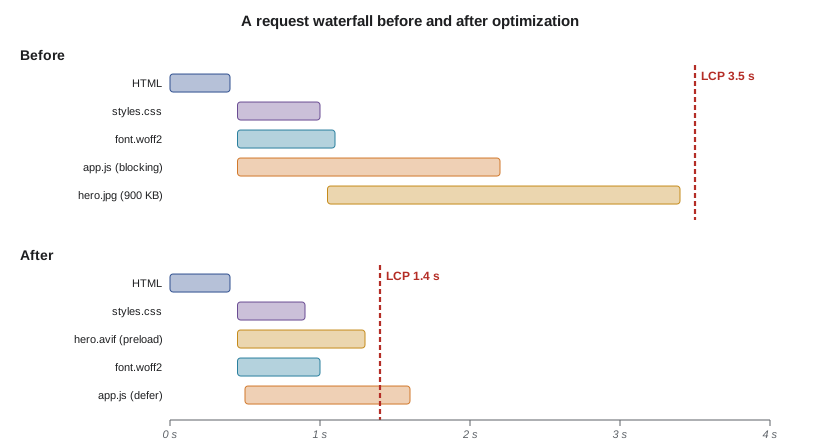
Browsers discover resources as they parse HTML. CSS in the head blocks rendering, because the browser will not paint unstyled content, so keep critical CSS small. Classic scripts block parsing; add defer (run after parsing, in order) or type=\"module\", which defers by default, and use async only for independent scripts such as analytics. If the LCP image is referenced only from CSS or inserted by JavaScript, the browser discovers it late; reference it in HTML, or use <link rel=\"preload\"> and fetchpriority=\"high\" to request it early. Use preconnect for third-party origins you will certainly need. Web fonts should use font-display: swap or optional and be preloaded if critical, and self-hosting avoids an extra connection.
Responsiveness and the main thread
INP is dominated by the main thread, where JavaScript, style calculation, layout and painting all run. A long task, anything over 50 milliseconds, delays responses to input. Remedies follow from lesson 4's event loop: break work into smaller chunks and yield between them (scheduler.yield() where supported, or setTimeout), debounce expensive handlers, give immediate visual feedback before heavy work, move computation to a Web Worker, and avoid layout thrashing by batching DOM reads before writes. Reducing DOM size and third-party scripts also helps, since tag managers, chat widgets and advertising often account for many long tasks.
Performance budgets
A performance budget sets limits that the team agrees not to exceed, such as 170 KB of compressed JavaScript for the initial route, LCP under 2.5 seconds on a mid-range phone on a 4G connection, and no more than 50 requests. Budgets are enforced in continuous integration (Lighthouse CI, bundle size checks), so regressions are caught when introduced rather than months later. Budgets work because performance usually degrades by many small additions, each reasonable on its own.
Worked examples
Worked problem
Diagnosing a poor LCP
A course page has p75 LCP of 4.6 s. The LCP element is a hero image set as a CSS background, 2400 px wide JPEG (900 KB), and TTFB is 0.4 s. What should change?
Show solution
- TTFB is good, so the server is not the bottleneck.
- The image is discovered late (only after CSS loads): move it to an <img> in HTML with fetchpriority="high", or preload it.
- It is far too large: serve AVIF or WebP with srcset widths such as 480, 960 and 1920.
- Set width and height to avoid layout shift, and do not lazy-load it.
- Re-measure in the field after deployment, since lab tests may not reflect real devices.
Answer: Make the image discoverable early, serve smaller modern formats responsively, and verify with field data.
Worked problem
Computing a compression saving
An API response is 240 KB of JSON and compresses with gzip to 30 KB. On a connection delivering 2 Mbit/s, how much transfer time is saved?
Show solution
- Uncompressed: 240 KB × 8 = 1920 kbit, so 1920 / 2000 = 0.96 s.
- Compressed: 30 KB × 8 = 240 kbit, so 0.12 s.
- Saving: 0.84 s, an 8:1 ratio, at a small CPU cost on both ends.
Answer: About 0.84 seconds per response; compression is almost always worth it for text.
Worked problem
Choosing cache headers for a deployment
A site deploys new code daily. Users complain that after a deployment they see a broken page with new HTML and old JavaScript. What is wrong?
Show solution
- The JavaScript file has a fixed name (app.js) with a long max-age, so browsers keep the old copy.
- Fingerprint asset names (app.v8f3a2.js) so each deployment produces new URLs.
- Serve HTML with no-cache so it is revalidated and references the new asset names.
- Keep old fingerprinted assets available briefly for users with pages already open.
Answer: Fingerprinted, immutable assets plus revalidated HTML make deployments consistent.
Common mistakes
MistakeFirst Input Delay is the responsiveness Core Web Vital.
InsteadINP replaced FID in March 2024; it covers all interactions, including handler and rendering time.
MistakePerformance should be judged by average load time.
InsteadCore Web Vitals use the 75th percentile so slow devices and networks count.
MistakeLazy-load every image for speed.
InsteadNever lazy-load the LCP image; lazy-load only images below the fold.
MistakeGzip everything, including images.
InsteadJPEG, WebP, AVIF and video are already compressed; recompressing wastes CPU.
MistakeA long max-age on app.js is fine.
InsteadWithout a fingerprinted name, users keep stale code after deployments; fingerprint or revalidate.
MistakeA good Lighthouse score means real users are happy.
InsteadLab tests use one device and network; confirm with field data.
Summary and key terms
- Combine lab data for debugging with field data for truth; judge at the 75th percentile.
- Core Web Vitals: LCP ≤ 2.5 s, INP ≤ 200 ms, CLS ≤ 0.1; INP replaced FID in March 2024.
- Compress text with gzip or Brotli; ship less JavaScript; use modern, responsive images.
- Fingerprint assets with long immutable caching; revalidate HTML; keep personal data out of shared caches.
- Help the browser discover critical resources early and defer the rest.
- Keep main-thread tasks short to improve INP.
- Enforce performance budgets in continuous integration.
- LCP
- Largest Contentful Paint: when the largest visible content element renders.
- INP
- Interaction to Next Paint: latency of user interactions until the next frame.
- CLS
- Cumulative Layout Shift: a score for unexpected movement of visible content.
- TTFB
- Time to First Byte: delay before the first response byte arrives.
- Field data
- Performance measured in real users' browsers.
- Fingerprinting
- Embedding a content hash in a file name so it can be cached indefinitely.
- ETag
- A response validator used in conditional requests.
- srcset
- An image attribute listing candidate files so the browser can choose a size.
- Long task
- Main-thread work lasting more than 50 ms.
- Performance budget
- Agreed limits on metrics or resource sizes, enforced automatically.
Practice problems
Work each problem on paper first, then reveal the answer to check.
State the good thresholds for the three Core Web Vitals.
Show answer
LCP ≤ 2.5 s, INP ≤ 200 ms, CLS ≤ 0.1.
Why was FID replaced by INP?
Show answer
FID measured only input delay of the first interaction; INP covers all interactions and full latency to the next paint.
At what percentile are Core Web Vitals assessed?
Show answer
The 75th percentile of page loads.
Why should the LCP image not be lazy-loaded?
Show answer
Lazy loading delays its request, increasing LCP.
What does immutable in Cache-Control promise?
Show answer
The resource at this URL will never change, so the browser need not revalidate it.
In the gzip run, why did the photo-like bytes grow slightly?
Show answer
High-entropy data has no redundancy to remove, and gzip adds its own header and framing.
What causes most layout shift from images?
Show answer
Missing width and height, so space is not reserved before the image loads.
Name two ways to improve INP.
Show answer
Break up long tasks and yield; move work to a Web Worker; debounce handlers; reduce third-party scripts.
What is the difference between defer and async on scripts?
Show answer
defer runs after parsing in order; async runs as soon as downloaded, in any order.
Why mark an account API response private or no-store?
Show answer
So shared caches do not serve one user's data to others.
Lesson quiz · 5 questions
Score 60% or more to complete this lesson.
Create a free account to save your progress, take quizzes and earn a certificate.