
CMPUT-404 · Lesson 1 of 12 · 33 min
How the web works for application developers
A web application is a program whose user interface runs in a browser and whose data and rules live mostly on servers. That simple description hides a large stack of technologies: HTML for structure, CSS for presentation, JavaScript for behaviour in the browser, HTTP for communication, a server-side language and framework for business logic, a database for persistence, and a deployment platform that keeps everything running for thousands or millions of users. This course is about designing and building that whole stack well. You will write HTML and CSS, JavaScript and TypeScript, a small server-side application, a database-backed API and tests, and you will learn how real systems are deployed, secured, measured and scaled.
Several earlier courses supply foundations we will lean on rather than repeat. CMPUT-313 explained the network underneath the web: DNS, TCP, TLS and the evolution of HTTP from version 1.1 to HTTP/2 and HTTP/3. CMPUT-291 taught relational databases, SQL, normalization and transactions. CMPUT-301 covered requirements, design, testing, Git and continuous integration. CMPUT-331 explained the security mechanisms behind HTTPS and the classes of web vulnerability. Here we take the application developer's seat: given those building blocks, how do we structure an application that is correct, fast, accessible, secure and maintainable?
A familiar example runs through the course. The site you are reading, HSM University, is itself a web application: a PHP program renders each lesson page on the server, a router maps tidy addresses such as /ca/course/cmput-404 to code, sessions remember who is signed in, and a MariaDB database stores accounts and quiz results. We will compare its server-rendered design with single-page applications, static sites and hybrids, and by the capstone you will design a small full-stack application of your own.
The parts of a web application
Every web application has a client side and a server side. The client is usually a browser, which downloads HTML, CSS, JavaScript, images and fonts, builds a model of the page called the Document Object Model (DOM), lays it out, paints pixels and runs scripts in response to user events. The server side receives HTTP requests, runs application code, reads and writes a database, calls other services and returns responses. Between them sit caches, content delivery networks (CDNs), load balancers and reverse proxies, which lesson 11 explores.
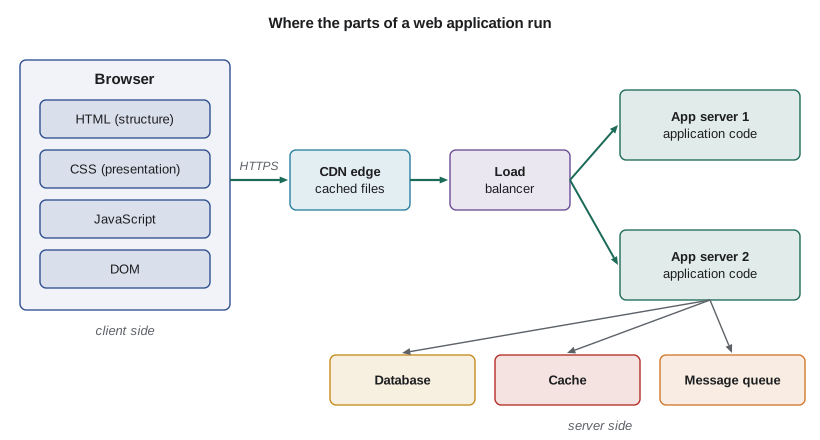
It helps to separate three questions that are easy to blur. Where is the HTML produced: on the server for each request, at build time, or in the browser by JavaScript? Where does application state live: in the database, in server memory, in a cookie, or in the browser? And how do the two sides talk: by full page loads, by fetching JSON from an API, or over a long-lived channel such as WebSockets? Different answers give the architectural styles in the table below, and real applications often mix them.
URLs, resources and representations
The web's central abstraction is the resource: anything worth naming, such as a course, a lesson, a user's registration or a search result. Each resource is identified by a Uniform Resource Locator (URL), and clients exchange representations of it, such as an HTML page, a JSON document or an image. A URL has a scheme (https), a host and optional port, a path that names the resource, an optional query string that refines it, and an optional fragment that points inside the representation. The fragment is handled entirely by the browser and is never sent to the server, which is why single-page applications once used it for client-side routing.
# How a browser and a server see the same URL.
from urllib.parse import urlsplit, parse_qs, urlencode, quote

url = "https://courses.example.ca:8443/courses/search?q=web+apps&year=4&page=2#results"
p = urlsplit(url)
print("scheme  :", p.scheme)
print("host    :", p.hostname)
print("port    :", p.port)
print("path    :", p.path)
print("query   :", parse_qs(p.query))
print("fragment:", p.fragment, "(never sent to the server)")

# Building a query string safely: spaces, ampersands and accents must be encoded
params = {"q": "Montréal & Toronto", "sort": "date"}
print("encoded :", urlencode(params))
print("path seg:", quote("notes/week 1/intro.pdf"))scheme : https
host : courses.example.ca
port : 8443
path : /courses/search
query : {'q': ['web apps'], 'year': ['4'], 'page': ['2']}
fragment: results (never sent to the server)
encoded : q=Montr%C3%A9al+%26+Toronto&sort=date
path seg: notes/week%201/intro.pdfGood URL design is part of application design. Paths should name resources with nouns and stable identifiers, such as /courses/cmput-404/lessons/1, rather than actions such as /getLesson?id=1. Query strings are best for filtering, sorting and pagination. Characters with special meaning, such as spaces, ampersands and non-ASCII letters, must be URL-encoded; forgetting to do so is a common source of broken links and, in the worst case, of injection bugs. A URL is also a promise: once published, it may be bookmarked, shared and indexed, so changing it later needs a redirect.
HTTP from the application's point of view
CMPUT-313 dissected HTTP as a protocol. For an application developer, the key facts are these. HTTP is request–response: the client sends a method (GET, POST, PUT, PATCH, DELETE and a few others), a target, headers and an optional body; the server replies with a status code, headers and an optional body. HTTP is stateless: each request stands alone, so anything the server must remember between requests, such as who is signed in, has to be carried by a cookie or token or looked up in a store. Methods carry meaning that infrastructure relies on: GET must be safe (no side effects) so caches and crawlers can repeat it freely, while PUT and DELETE must be idempotent, meaning repeating them has the same effect as doing them once.
# A real HTTP exchange on the loopback interface: one server, one client, one process.
import threading, urllib.request
from http.server import BaseHTTPRequestHandler, HTTPServer

class Hello(BaseHTTPRequestHandler):
    def do_GET(self):
        body = f"<h1>Hello</h1><p>You asked for {self.path}</p>".encode()
        self.send_response(200)
        self.send_header("Content-Type", "text/html; charset=utf-8")
        self.send_header("Content-Length", str(len(body)))
        self.send_header("Cache-Control", "no-store")
        self.end_headers()
        self.wfile.write(body)
    def log_message(self, *args):        # keep the transcript quiet
        pass

srv = HTTPServer(("127.0.0.1", 0), Hello)          # port 0: the OS picks a free port
threading.Thread(target=srv.serve_forever, daemon=True).start()
port = srv.server_address[1]

req = urllib.request.Request(f"http://127.0.0.1:{port}/courses/cmput-404?lang=en",
                             headers={"Accept": "text/html", "User-Agent": "demo-client/1.0"})
with urllib.request.urlopen(req) as resp:
    print("status :", resp.status, resp.reason)
    for h in ("Content-Type", "Content-Length", "Cache-Control"):
        print(f"{h:14}:", resp.headers[h])
    print("body   :", resp.read().decode())
srv.shutdown()status : 200 OK Content-Type : text/html; charset=utf-8 Content-Length: 61 Cache-Control : no-store body : <h1>Hello</h1><p>You asked for /courses/cmput-404?lang=en</p>
Even this tiny exchange shows the pieces every web framework handles for you: parsing the request line and headers, routing by path, choosing a status code, setting the Content-Type so the browser knows how to interpret the bytes, giving the body length, and setting caching rules. Lesson 7 builds a small server-side application on Python's Web Server Gateway Interface (WSGI), and lesson 9 designs JSON APIs on top of these same mechanics.
What happens when a page loads
When a user follows a link, the browser resolves the host name, opens a connection (TCP plus TLS, or QUIC for HTTP/3), sends the request and waits for the first byte of the response. As HTML arrives, the browser parses it incrementally. When it meets a stylesheet it must download and parse the CSS before it can paint, because CSS can change everything about layout; when it meets an ordinary script tag it pauses parsing to download and run the script, because scripts can modify the document. Images and fonts are fetched in parallel. Finally the browser lays out the page, paints it and starts responding to input. Lesson 6 measures this pipeline with Core Web Vitals.
# A rough latency budget for the first visit to a page (illustrative numbers).
# Round-trip time (RTT) dominates: each step that waits for the other side costs at least one RTT.
rtt_ms = 40                       # a Canadian or US user reaching a server in another region
steps = [
    ("DNS lookup (cache miss)",          1 * rtt_ms),
    ("TCP handshake",                    1 * rtt_ms),
    ("TLS 1.3 handshake",                1 * rtt_ms),
    ("Request + server think time (TTFB)", 1 * rtt_ms + 120),
    ("Download 60 kB of HTML",           25),
    ("Fetch CSS and JS (new round trip)", 1 * rtt_ms + 30),
]
t = 0
for name, ms in steps:
    t += ms
    print(f"{name:36} +{ms:4d} ms  -> {t:4d} ms")
print()
print("Same page with a warm connection and a CDN edge 10 ms away:")
rtt_ms = 10
warm = 1 * rtt_ms + 120 + 25 + 1 * rtt_ms + 30
print(f" about {warm} ms - the server's 120 ms of work is now the biggest single cost")DNS lookup (cache miss) + 40 ms -> 40 ms TCP handshake + 40 ms -> 80 ms TLS 1.3 handshake + 40 ms -> 120 ms Request + server think time (TTFB) + 160 ms -> 280 ms Download 60 kB of HTML + 25 ms -> 305 ms Fetch CSS and JS (new round trip) + 70 ms -> 375 ms Same page with a warm connection and a CDN edge 10 ms away: about 195 ms - the server's 120 ms of work is now the biggest single cost
The budget shows why web performance work focuses on round trips, caching and server time rather than raw bandwidth. Each new connection costs several round trips before any useful byte arrives; CDNs shorten round trips by serving from nearby; reusing connections and HTTP/2 multiplexing avoid repeating handshakes; and caching removes requests entirely. Once the network is fast, the application's own work, such as slow database queries, becomes the bottleneck, which is where lessons 8 and 11 help.
Standards, browsers and the open web
The web works because many independent parties agree on standards. The WHATWG, a group led by browser makers, maintains living standards for HTML, the DOM, URLs and Fetch. The W3C publishes CSS specifications, the Web Content Accessibility Guidelines (WCAG) and many web APIs. The IETF standardizes protocols such as HTTP, TLS and QUIC. ECMA International's TC39 committee evolves JavaScript, formally ECMAScript, with a new edition each year. Browser engines implement these standards: Blink (Chrome, Edge, Opera), WebKit (Safari) and Gecko (Firefox). Because users run different browsers and versions, developers check feature support and design so that pages still work, perhaps more simply, when a feature is missing. This idea, progressive enhancement, recurs throughout the course.
Two non-technical constraints shape every serious web application. Accessibility law requires many organizations to make their sites usable by people with disabilities, and privacy law governs what data an application may collect and how; both differ between countries and are introduced in lessons 2 and 10. And the web is a public platform: anything sent to the browser, including JavaScript source and API responses, can be read and modified by the user. Never trust the client is the first rule of web security, and lesson 10 builds on it.
Worked examples
Worked problem
Choosing an architectural style
A college wants a public course catalogue that changes twice a year, plus a student portal showing each student's schedule and grades. Which styles fit each part?
Show solution
- The catalogue is the same for everyone and changes rarely, so it can be generated at build time as a static site and served from a CDN.
- The portal shows per-user, frequently changing, private data, so it needs server-side logic and authentication.
- A server-rendered portal works without heavy JavaScript and is simple to secure; small interactive parts (such as a schedule filter) can be enhanced with scripts.
- Both can share one domain with different paths, so users see a single site.
Answer: Use a static site for the catalogue and a server-rendered application, with light enhancement, for the portal.
Worked problem
Reading a URL
For https://shop.example.com/products/42/reviews?sort=new&page=3#top, identify the resource, the refinements and what the server receives.
Show solution
- Scheme https, host shop.example.com, default port 443.
- The path /products/42/reviews names the reviews of product 42.
- The query sort=new&page=3 refines the representation: newest first, page 3.
- The fragment #top stays in the browser; the server receives only the path and query.
Answer: The resource is the reviews of product 42; sorting and paging are query refinements; the server sees /products/42/reviews?sort=new&page=3.
Worked problem
Picking status codes
An API receives a request to create an registration. Choose status codes for: success; a missing required field; a course that is already full; a user who is not signed in.
Show solution
- A created resource returns 201 Created with a Location header naming the new registration.
- A missing or malformed field is the client's error: 400 Bad Request, or 422 if the body parsed but failed validation.
- A full course conflicts with the current state of the resource: 409 Conflict.
- No credentials means 401 Unauthorized; signed in but not allowed would be 403 Forbidden.
Answer: 201, 400 or 422, 409 and 401 respectively.
Common mistakes
MistakeThe fragment part of a URL is sent to the server.
InsteadThe fragment after # is handled only by the browser; the server never sees it.
MistakeGET requests can safely change data if the URL is secret.
InsteadGET must be safe; caches, prefetchers and crawlers repeat GETs, so state changes belong in POST, PUT, PATCH or DELETE.
MistakeEvery error can be reported as 200 with an error message in the body.
InsteadStatus codes tell clients, caches and monitoring what happened; use 4xx for client errors and 5xx for server errors.
MistakeBandwidth is the main reason pages are slow.
InsteadRound trips, render-blocking resources and server time usually matter more than raw bandwidth.
MistakeCode running in the browser can enforce business rules.
InsteadUsers control their browsers; every rule must be enforced again on the server.
Summary and key terms
- A web application spans the browser, the network, servers and data stores.
- Architectural styles differ in where HTML is built: at build time, on the server, in the browser, or a hybrid.
- URLs name resources; query strings refine representations; fragments stay in the browser.
- HTTP is stateless request–response; methods carry meaning (safe, idempotent) that infrastructure relies on.
- Status codes are part of an application's interface.
- Page loads are dominated by round trips, render-blocking resources and server time.
- Standards from the WHATWG, W3C, IETF and TC39 make the web interoperable; never trust the client.
- Resource
- Anything identified by a URL, such as a course, a user or a search result.
- Representation
- A concrete form of a resource sent over HTTP, such as HTML or JSON.
- Document Object Model
- The browser's tree model of a page, which scripts can read and modify.
- Stateless protocol
- A protocol in which each request is understood on its own, without memory of earlier requests.
- Safe method
- An HTTP method, such as GET, that must not change server state.
- Idempotent method
- A method whose repeated application has the same effect as one application, such as PUT or DELETE.
- Single-page application
- An application that loads once and then builds views in the browser with JavaScript.
- Server-side rendering
- Producing HTML on the server for each request.
- Content delivery network
- A network of servers that caches content close to users.
- Progressive enhancement
- Building a working basic page first and adding richer behaviour where the browser supports it.
Practice problems
Work each problem on paper first, then reveal the answer to check.
Name four places where HTML can be produced in a web architecture.
Show answer
At build time (static), on the server per request, in the browser by JavaScript, or a hybrid of server rendering followed by browser enhancement.
Why is the URL fragment useful for in-page navigation but useless for server routing?
Show answer
The browser keeps it local and never sends it, so the server cannot see it.
What does it mean for PUT to be idempotent?
Show answer
Sending the same PUT twice leaves the resource in the same state as sending it once.
Which status code should follow a successful form POST that redirects to a results page?
Show answer
303 See Other, so the browser fetches the results page with GET and a reload does not resubmit the form.
In the latency budget, what became the largest cost once the network was fast?
Show answer
The server's own processing time (about 120 ms).
Which organization maintains the HTML living standard?
Show answer
The WHATWG.
Name the three main browser engines.
Show answer
Blink, WebKit and Gecko.
Why must stylesheets be downloaded before the first paint?
Show answer
CSS can change layout and appearance of any element, so painting without it would show the wrong page.
Give one reason a college might choose server rendering for a student portal.
Show answer
It works without heavy JavaScript, gives a fast first view and keeps private data and rules on the server.
State the first rule of web security introduced in this lesson.
Show answer
Never trust the client: anything the browser sends can be altered.
Lesson quiz · 5 questions
Score 60% or more to complete this lesson.
Create a free account to save your progress, take quizzes and earn a certificate.