
CMPUT-379 · Lesson 11 of 12 · 38 min
File systems II: implementation, journaling, RAID and reliability
Lesson 10 showed what programs see: files, directories, links and permissions. This lesson opens the box. A file system is a data structure stored on a block device, and like any data structure it must answer questions efficiently: where are this file's blocks, which blocks are free, how do I find a name in a directory? Unlike most data structures, it must also survive having the power cut in the middle of an update, and survive whole drives failing. We look at how files are laid out, how free space and directories are tracked, how journaling and copy-on-write keep a file system consistent through crashes, and how RAID protects against disk failure.
On-disk layout
A typical Unix file system divides the device into a few regions. The superblock, at a fixed location, records global facts: block size, total and free counts, where the other structures start and a magic number identifying the type. Bitmaps record which blocks and which inodes are free, one bit each. The inode table holds a fixed-size inode for every file, and the rest of the space holds data blocks, which store file contents and directory contents. ext2, ext3 and ext4 split the disk into block groups, each with its own bitmaps and inode table, so that a file's inode and data can be placed near each other and near its directory, reducing seeks on hard disks.
The transcript below creates a small real ext4 file system inside an 8 MiB file, writes two files into it with the debugfs tool (without mounting), and inspects the directory and the inodes.
mkfs.ext4 -q -F -N 64 -U 3a7f0000-0000-4000-8000-000000000379 disk.img
dumpe2fs -h disk.img 2>/dev/null | grep -E '^(Inode count|Block count|Block size|Inode size|Free blocks)'
debugfs -w -R 'write numbers.txt numbers.txt' disk.img 2>/dev/null
debugfs -w -R 'write hi.txt hi.txt' disk.img 2>/dev/null
debugfs -R 'ls /' disk.img 2>/dev/null
debugfs -R 'stat numbers.txt' disk.img 2>/dev/null | grep -E '^(Inode:|User:|Links:|EXTENTS:)|^[(]'
debugfs -R 'stat hi.txt' disk.img 2>/dev/null | grep -E '^(EXTENTS:)|^[(]'$ mkfs.ext4 -q -F -N 64 -U 3a7f0000-0000-4000-8000-000000000379 disk.img $ dumpe2fs -h disk.img 2>/dev/null | grep -E '^(Inode count|Block count|Block size|Inode size|Free blocks)' Inode count: 64 Block count: 2048 Free blocks: 1010 Block size: 4096 Inode size: 256 $ debugfs -w -R 'write numbers.txt numbers.txt' disk.img 2>/dev/null Allocated inode: 12 $ debugfs -w -R 'write hi.txt hi.txt' disk.img 2>/dev/null Allocated inode: 13 $ debugfs -R 'ls /' disk.img 2>/dev/null 2 (12) . 2 (12) .. 11 (20) lost+found 12 (20) numbers.txt 13 (4020) hi.txt $ debugfs -R 'stat numbers.txt' disk.img 2>/dev/null | grep -E '^(Inode:|User:|Links:|EXTENTS:)|^[(]' Inode: 12 Type: regular Mode: 0644 Flags: 0x80000 User: 0 Group: 0 Project: 0 Size: 8893 Links: 1 Blockcount: 24 EXTENTS: (0-2):1038-1040 $ debugfs -R 'stat hi.txt' disk.img 2>/dev/null | grep -E '^(EXTENTS:)|^[(]' EXTENTS: (0):1041
The directory listing shows exactly what Lesson 10 described: names mapped to inode numbers. Inode 2 is always the root directory, so both . and .. in the root point to it; 11 is lost+found, where the checker puts orphaned files; and our two files received inodes 12 and 13. The numbers in parentheses are record lengths: ext4 directory entries are variable-length records, and the last entry's length stretches to the end of the 4 KiB block. numbers.txt is 8,893 bytes, so it needs three 4 KiB blocks, and the inode records them as one extent: file blocks 0 to 2 live in disk blocks 1038 to 1040.
Allocation methods
How does an inode record where a file's data lives? There are three classic answers. Contiguous allocation stores each file in consecutive blocks, so the inode needs only a start and a length, reading is fast, and any block can be computed directly; but files cannot grow easily and free space fragments into unusable gaps, the same external fragmentation seen with memory segments in Lesson 8. Contiguous allocation survives where files never change, as on CD-ROMs and DVDs (ISO 9660).
Linked allocation chains blocks together, each block or a separate table recording the next. The file allocation table (FAT) used by MS-DOS and still by USB drives and camera memory cards keeps all the links in one table at the start of the disk, which can be cached in memory. Any free block can be used, so there is no external fragmentation, but reaching block k means following k links. Indexed allocation gives each file an index block listing all its data blocks, which gives direct access at the cost of the index itself.
# Three ways to record where a file's blocks are, and the cost of reaching block k
disk_free = list(range(100))
file_blocks = 6
# Contiguous: start + length; block k is simply start + k
start = 40
contiguous = (start, file_blocks)
# Linked through a file allocation table (FAT): fat[b] gives the next block, -1 ends the chain
chain = [40, 17, 63, 8, 91, 22]
fat = {b: n for b, n in zip(chain, chain[1:] + [-1])}
# Indexed: one index block lists every data block
index_block = list(chain)

def reach(method, k):
    if method == "contiguous":
        return contiguous[0] + k, 0                   # no extra lookups
    if method == "FAT":
        b, hops = chain[0], 0
        for _ in range(k):
            b, hops = fat[b], hops + 1                # follow the chain one link at a time
        return b, hops
    return index_block[k], 1                          # one read of the index block
for m in ("contiguous", "FAT", "indexed"):
    blk, extra = reach(m, 5)
    print(f"{m:<10} block 5 of the file is disk block {blk:>2}, extra lookups: {extra}")
print("FAT chain:", " -> ".join(str(b) for b in chain), "-> end")contiguous block 5 of the file is disk block 45, extra lookups: 0 FAT block 5 of the file is disk block 22, extra lookups: 5 indexed block 5 of the file is disk block 22, extra lookups: 1 FAT chain: 40 -> 17 -> 63 -> 8 -> 91 -> 22 -> end
The multilevel index in an inode
The classic Unix inode is a clever indexed scheme that keeps small files cheap and large files possible. It holds 12 direct pointers to data blocks, enough for files up to 48 KiB with 4 KiB blocks, which covers most files on a typical system. A thirteenth pointer leads to a single indirect block full of further pointers, a fourteenth to a double indirect block (pointers to blocks of pointers) and a fifteenth to a triple indirect block. Like the multilevel page tables of Lesson 8, the structure grows only as needed.
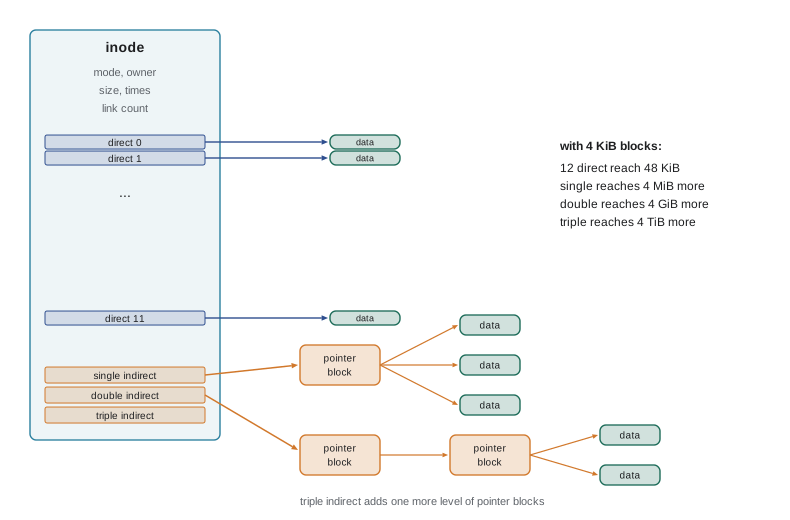
# Largest file in a classic ext2-style inode: 12 direct, 1 single, 1 double and 1 triple indirect pointer
def max_file(block, ptr=4, direct=12):
    per = block // ptr                                 # pointers per indirect block
    blocks = direct + per + per**2 + per**3
    return blocks * block, per
def human(n):
    for unit in ("B", "KiB", "MiB", "GiB", "TiB"):
        if n < 1024 or unit == "TiB":
            return f"{n:.1f} {unit}"
        n /= 1024
for bs in (1024, 4096):
    size, per = max_file(bs)
    print(f"block {bs:>4} B: {per:>4} pointers per block; direct reach {human(12 * bs)},",
          f"single {human(per * bs)}, double {human(per**2 * bs)}, total {human(size)}")
# How many disk reads to fetch the byte at offset 5 MiB with 4 KiB blocks (inode already in memory)?
bs, per, off = 4096, 1024, 5 * 1024 * 1024
k = off // bs
level = "direct" if k < 12 else "single indirect" if k < 12 + per else "double indirect"
reads = {"direct": 1, "single indirect": 2, "double indirect": 3}[level]
print(f"offset 5 MiB is file block {k}: {level}, {reads} disk reads")block 1024 B: 256 pointers per block; direct reach 12.0 KiB, single 256.0 KiB, double 64.0 MiB, total 16.1 GiB block 4096 B: 1024 pointers per block; direct reach 48.0 KiB, single 4.0 MiB, double 4.0 GiB, total 4.0 TiB offset 5 MiB is file block 1280: double indirect, 3 disk reads
ext4, XFS, Btrfs and NTFS improve on block pointers with extents: an extent records a run of contiguous blocks as a start and a length, so a 1 GiB file stored contiguously needs a single extent instead of 262,144 pointers. ext4 keeps up to four extents in the inode itself and moves to a small tree of extents for fragmented files. The transcript above shows the extent (0-2):1038-1040 for numbers.txt. Very small files can even be stored inside the inode (inline data), avoiding a data block altogether.
Free space and directories
Free space is usually tracked with a bitmap, one bit per block. A 1 TB disk with 4 KiB blocks has 244 million blocks, so its bitmap is about 30 MB, small enough to cache in pieces and convenient for finding runs of free blocks to allocate contiguously. Other approaches are free lists, grouping, and the extent-based free-space trees of XFS and Btrfs. Allocators also delay decisions: ext4's delayed allocation waits until data is written out from the page cache, when the final size is known, so it can choose one large contiguous run.
A directory is itself a file whose contents are entries mapping names to inode numbers. A simple linear list makes lookup in a directory with 100,000 entries slow, so ext4 uses a hashed B-tree index (htree) and XFS and Btrfs use B+ trees, making lookups logarithmic. Path resolution walks one directory per component, and the kernel caches results in the directory entry cache (dcache), so resolving /home/ana/cmput379/notes.txt a second time touches no disk at all.
Crash consistency
Many file system operations need several separate writes to disk. Appending a block to a file, for example, must mark the block used in the bitmap, add a pointer to it in the inode and write the data itself. The disk completes only one write at a time, and the drive may reorder them, so a crash can leave any subset done. Some subsets are harmless, but others leave the file system inconsistent: an inode pointing at a block the bitmap considers free (which will later be given to another file, so two files share data) or a block marked used that belongs to nobody.
# Appending one block to a file needs three writes. What does a crash leave behind?
WRITES = ["bitmap", "inode", "data"]                    # mark block used, point inode at it, write contents
def state(done):
    b, i, d = ("bitmap" in done), ("inode" in done), ("data" in done)
    if b and i: return "consistent" + (": new data present" if d else ", but the file now contains garbage")
    if not b and not i: return "consistent: as if the append never happened" + (" (data lost, harmless)" if d else "")
    if i: return "INCONSISTENT: inode points to a block the bitmap calls free"
    return "INCONSISTENT: block marked used but owned by no file (leak)"
for order in (("bitmap", "inode", "data"), ("data", "bitmap", "inode"), ("data", "inode", "bitmap")):
    print("order:", " -> ".join(order))
    for n in (1, 2):
        print(f"  crash after {n} write(s): {state(set(order[:n]))}")
print("with a journal: write all three to the log, then a commit record, then checkpoint in place")
for crash in ("before commit", "after commit, before checkpoint", "during checkpoint"):
    action = "discard the incomplete transaction" if crash == "before commit" else "replay the logged writes"
print(f" crash {crash:<32}: recovery will {action} -> consistent")order: bitmap -> inode -> data crash after 1 write(s): INCONSISTENT: block marked used but owned by no file (leak) crash after 2 write(s): consistent, but the file now contains garbage order: data -> bitmap -> inode crash after 1 write(s): consistent: as if the append never happened (data lost, harmless) crash after 2 write(s): INCONSISTENT: block marked used but owned by no file (leak) order: data -> inode -> bitmap crash after 1 write(s): consistent: as if the append never happened (data lost, harmless) crash after 2 write(s): INCONSISTENT: inode points to a block the bitmap calls free with a journal: write all three to the log, then a commit record, then checkpoint in place crash before commit : recovery will discard the incomplete transaction -> consistent crash after commit, before checkpoint : recovery will replay the logged writes -> consistent crash during checkpoint : recovery will replay the logged writes -> consistent
No ordering of the three writes is safe against every crash. Writing the data first is the best choice, because a file can then never expose garbage or another user's old data, and that is exactly what ext4's default mode enforces below. But the bitmap and inode still have to change together, and only some form of atomic update can guarantee that.
Early Unix file systems ran a checker, fsck, at boot after every crash. fsck scans every inode, bitmap and directory to rebuild consistency, which is correct but slow: on a multi-terabyte disk it can take hours, and it cannot recover the data whose writes were lost.
Journaling
Journaling, borrowed from database write-ahead logging, fixes this. Before changing anything in place, the file system writes a description of the whole update to a journal (a reserved log area) and then writes a commit record. Only after the commit is on disk does it write the changes to their real locations, the checkpoint. On recovery the file system reads the journal: complete, committed transactions are replayed (replaying is safe even if they were partly checkpointed, because the writes are idempotent), and uncommitted ones are discarded. Recovery takes seconds, because only the journal is read.
Ordered mode, the ext4 default, gets most of the safety of full data journaling at much lower cost: file data is written to its final location first, then the metadata transaction that points to it commits, so a crash never leaves an inode pointing at garbage. The journal protects the file system's own structures, not application-level consistency, which is still each program's job using fsync and atomic rename, as in Lesson 10. Drives with volatile write caches must also be told to flush; the kernel uses cache-flush and force-unit-access commands to make sure the commit record really reached stable storage.
Copy-on-write and log-structured file systems
Copy-on-write file systems such as ZFS, Btrfs and Apple's APFS never overwrite live data. An update writes new copies of the changed blocks, then new copies of the metadata blocks that point to them, all the way up the tree to the root, and finally atomically switches the root pointer. A crash before the switch leaves the old tree intact; after it, the new tree is complete. Because old trees remain valid, snapshots are almost free: keep a pointer to an old root. These file systems also checksum every block, detecting silent corruption (bit rot) that a disk returns without reporting an error, and with redundancy they can repair it automatically. Log-structured file systems, proposed by Rosenblum and Ousterhout in 1991, write everything sequentially to a log, an idea that lives on in F2FS and in SSD flash translation layers (Lesson 10).
RAID: surviving drive failures
Journaling protects against crashes; it does nothing if a drive dies. Drives fail: large studies of data-centre hard disks report annual failure rates of roughly 1 to 2 per cent. RAID (redundant array of independent disks) combines several drives so that data survives failures and, often, throughput improves. RAID 0 stripes data across drives for speed with no redundancy at all. RAID 1 mirrors identical copies. RAID 5 stripes data with one parity block per stripe, rotated across drives, so the array survives any one drive failure. RAID 6 adds a second, independent parity to survive two. RAID 10 stripes across mirrored pairs.
# RAID levels for six 4 TB drives: usable space and how many failures they survive
n, size = 6, 4
levels = [
    ("RAID 0", n * size, 0, "striping only"),
    ("RAID 1", size, n - 1, "every drive mirrors the others"),
    ("RAID 10", n // 2 * size, 1, "mirrored pairs, striped (survives one per pair)"),
    ("RAID 5", (n - 1) * size, 1, "striping with one parity block per stripe"),
    ("RAID 6", (n - 2) * size, 2, "two independent parity blocks per stripe"),
]
for name, usable, tolerate, how in levels:
    print(f"{name:<7} usable {usable:>2} TB ({usable / (n * size):>4.0%}), survives {tolerate} failure(s) - {how}")
# RAID 5 parity: XOR of the data blocks lets any one lost block be rebuilt
stripe = [0b1011_0010, 0b0110_1100, 0b1110_0001, 0b0001_1111, 0b1010_1010]
parity = 0
for blk in stripe:
    parity ^= blk
lost = 2
rebuilt = parity
for i, blk in enumerate(stripe):
    if i != lost:
        rebuilt ^= blk
print(f"parity {parity:08b}; drive {lost} lost, rebuilt {rebuilt:08b}, original {stripe[lost]:08b}, match {rebuilt == stripe[lost]}")RAID 0 usable 24 TB (100%), survives 0 failure(s) - striping only RAID 1 usable 4 TB ( 17%), survives 5 failure(s) - every drive mirrors the others RAID 10 usable 12 TB ( 50%), survives 1 failure(s) - mirrored pairs, striped (survives one per pair) RAID 5 usable 20 TB ( 83%), survives 1 failure(s) - striping with one parity block per stripe RAID 6 usable 16 TB ( 67%), survives 2 failure(s) - two independent parity blocks per stripe parity 10001010; drive 2 lost, rebuilt 11100001, original 11100001, match True
Parity works because XOR is its own inverse: the parity block is the XOR of the data blocks in its stripe, so XORing the parity with every surviving block reproduces the missing one. RAID 5 pays for this on small writes, which must read the old data and old parity, then write the new data and new parity: four input and output operations for one logical write. Rebuilding a failed drive in a large array reads every surviving drive in full, which can take a day or more on multi-terabyte disks; a second failure or an unreadable sector during the rebuild loses data, which is why large arrays prefer RAID 6. RAID can be done by a hardware controller, by the operating system (Linux md, Windows Storage Spaces) or inside a file system (ZFS and Btrfs).
Finally, RAID is not a backup. It protects against drive failure, but deleting a file, a ransomware attack or a bug that corrupts data is faithfully mirrored to every drive. Backups, ideally following the 3-2-1 rule (three copies, on two kinds of media, one off-site), and snapshots protect against those. Distributed file systems that spread data across many machines with replication and erasure coding, such as HDFS and Ceph, are covered in CMPUT-450.
Worked examples
Worked problem
Maximum file size
An inode has 12 direct pointers and one single, one double and one triple indirect pointer. Blocks are 1 KiB and pointers are 4 bytes. What is the largest file?
Show solution
- Each indirect block holds 1,024 / 4 = 256 pointers.
- Blocks reachable: 12 + 256 + 256^2 + 256^3 = 12 + 256 + 65,536 + 16,777,216 = 16,843,020.
- Size = 16,843,020 KiB, about 16.06 GiB.
Answer: About 16 GiB, matching the simulation for 1 KiB blocks.
Worked problem
Reads to reach an offset
With 4 KiB blocks and 12 direct pointers, how many disk reads fetch byte 5,000,000 of a file whose inode is cached?
Show solution
- File block = 5,000,000 // 4,096 = 1,220.
- Direct pointers cover blocks 0 to 11, and the single indirect block covers 12 to 1,035 (1,024 more).
- Block 1,220 is beyond 1,035, so it is in the double indirect range.
- Reads: double indirect block, then a single indirect block, then the data block.
Answer: Three disk reads (fewer if the indirect blocks are cached).
Worked problem
Choosing a RAID level
A lab has eight 10 TB drives for research data and wants at least 50 TB usable that survives any two drive failures. Which level?
Show solution
- RAID 5: 70 TB usable but survives only one failure.
- RAID 10: 40 TB usable; it survives two failures only if they are in different pairs.
- RAID 6: (8 - 2) x 10 = 60 TB usable and survives any two failures.
Answer: RAID 6, with 60 TB usable, plus off-site backups because RAID is not a backup.
Common mistakes
MistakeJournaling means no data can ever be lost in a crash.
InsteadIt keeps file system structures consistent; recently written data not yet committed can still be lost, so applications use fsync.
MistakeRAID 1 or RAID 5 replaces backups.
InsteadRAID survives drive failures but faithfully copies deletions and corruption; keep separate backups.
MistakeA FAT file can be read at any offset as quickly as an ext4 file.
InsteadFAT must follow the chain link by link (helped by caching the table); extents and indexes reach any block directly.
MistakeCopy-on-write file systems update blocks in place.
InsteadThey write new copies and switch the root pointer atomically, which is what makes snapshots cheap.
MistakeOnce a crash happens, fsck is always needed.
InsteadJournaling and copy-on-write file systems recover in seconds from the journal or the last root.
Summary and key terms
- A file system stores a superblock, free-space bitmaps, an inode table and data blocks, often in groups.
- Allocation can be contiguous, linked (FAT) or indexed; Unix inodes use direct and multilevel indirect pointers, and modern systems use extents.
- Directories map names to inode numbers, using hashed or B-tree indexes for large directories.
- Updates need several writes, so a crash can leave a file system inconsistent.
- Journaling writes a transaction and commit record before changing data in place; recovery replays committed work.
- Copy-on-write file systems never overwrite live data, which gives atomic updates, snapshots and checksums.
- RAID uses striping, mirroring and parity to survive drive failures, but it is not a backup.
- Superblock
- The block recording a file system's global parameters.
- Extent
- A run of contiguous blocks recorded as a start and a length.
- Indirect block
- A block holding pointers to further blocks of a file.
- File allocation table
- A table linking each block of a file to the next.
- fsck
- The file system checker that scans and repairs inconsistencies.
- Journal
- A log where updates are recorded and committed before being applied in place.
- Checkpoint
- Writing committed journal entries to their final locations.
- Copy-on-write
- Updating by writing new copies and switching pointers, never overwriting live data.
- Parity
- Redundant data, such as the XOR of blocks, used to rebuild a lost block.
- RAID
- Combining several drives for performance, redundancy or both.
Practice problems
Work each problem on paper first, then reveal the answer to check.
What does the superblock record?
Show answer
Global facts such as block size, block and inode counts, free counts and where structures start.
Why is contiguous allocation still used on optical discs?
Show answer
Files never change, so fragmentation and growth do not matter and access is fast.
How many data blocks can 12 direct pointers reach with 4 KiB blocks?
Show answer
12 blocks, 48 KiB.
What advantage do extents have over block pointers?
Show answer
One extent describes a long contiguous run, so large files need far less metadata.
Why can a crash during an append corrupt a file system without journaling?
Show answer
The bitmap, inode and data writes are separate and a crash can leave a partial, inconsistent subset.
During recovery, what happens to an uncommitted journal transaction?
Show answer
It is discarded.
What does ext4 ordered mode guarantee?
Show answer
Data blocks are written before the metadata that refers to them commits, so files never point at stale data.
How do copy-on-write file systems make snapshots cheap?
Show answer
Old trees stay valid, so a snapshot just keeps a pointer to an old root.
How much usable space do six 4 TB drives give in RAID 6?
Show answer
16 TB.
How is a lost block rebuilt in RAID 5?
Show answer
XOR the parity block with all surviving data blocks of the stripe.
Lesson quiz · 5 questions
Score 60% or more to complete this lesson.
Create a free account to save your progress, take quizzes and earn a certificate.