
CMPUT-379 · Lesson 10 of 12 · 35 min
Storage and file systems I: devices, scheduling and the file system interface
Memory forgets everything when the power goes off; storage remembers. Operating systems turn raw storage devices, which only know how to read and write numbered blocks, into the familiar world of named files organized in directories, shared safely between users and surviving crashes. This lesson starts at the bottom, with how hard disks and solid-state drives work and how the kernel schedules requests to them, then moves up to the interface that programs see: files, directories, links and permissions. Lesson 11 looks inside file systems at how they store files on disk and stay consistent through crashes.
CMPUT-229 covered input and output at the hardware level: memory-mapped device registers, interrupts and direct memory access. CMPUT-291 covered databases, which sit on top of file systems and add their own structures.
Hard disk drives
A hard disk drive (HDD) stores data magnetically on spinning platters. Each surface is divided into concentric tracks, the tracks into sectors (traditionally 512 bytes, now usually 4,096), and the set of tracks at the same position on all surfaces forms a cylinder. A read or write needs three steps: a seek, moving the arm to the right cylinder (several milliseconds on average); rotational latency, waiting for the sector to spin under the head (half a rotation on average, 4.17 ms at 7,200 revolutions per minute); and transfer, which for one sector is tiny. A random 4 KiB read therefore takes about 13 ms, so a disk manages only about 80 random reads per second, while reading sequentially it streams 200 MB/s or more.
# Why SSDs changed storage: time to read 4 KiB randomly vs sequentially
hdd_rpm, hdd_seek_ms, hdd_mb_s = 7200, 8.5, 200
rot_ms = 0.5 * 60_000 / hdd_rpm                    # average rotational delay: half a turn
xfer_ms = 4 / 1024 / hdd_mb_s * 1000
hdd_random = hdd_seek_ms + rot_ms + xfer_ms
ssd_random_us = 80                                 # typical NVMe random 4 KiB read latency
print(f"HDD random 4 KiB read: seek {hdd_seek_ms} + rotation {rot_ms:.2f} + transfer {xfer_ms:.3f} = {hdd_random:.2f} ms")
print(f"  -> about {1000 / hdd_random:.0f} random reads per second")
print(f"SSD random 4 KiB read: about {ssd_random_us} microseconds -> {1_000_000 // ssd_random_us:,} per second per queue")
print(f"ratio: an SSD random read is about {hdd_random * 1000 / ssd_random_us:.0f} times faster")
print(f"HDD sequential: {hdd_mb_s} MB/s, so a 1 GB file streams in {1000 / hdd_mb_s:.0f} s")HDD random 4 KiB read: seek 8.5 + rotation 4.17 + transfer 0.020 = 12.69 ms -> about 79 random reads per second SSD random 4 KiB read: about 80 microseconds -> 12,500 per second per queue ratio: an SSD random read is about 159 times faster HDD sequential: 200 MB/s, so a 1 GB file streams in 5 s
This enormous gap between random and sequential access shaped decades of operating system and database design: file systems try to place related blocks close together, the kernel reorders and merges requests, and databases prefer sequential logs. Hard disks remain the cheapest storage per terabyte, so they still hold most of the world's bulk data in data centres and backup systems, now usually behind large caches.
Disk scheduling
When many requests are waiting, the order in which the kernel sends them to a hard disk changes how far the arm travels. First-come, first-served (FCFS) is fair but can swing the arm back and forth. Shortest seek time first (SSTF) always serves the nearest request, minimizing movement but possibly starving distant requests. SCAN, the elevator algorithm, sweeps the arm in one direction serving requests on the way, then reverses. C-SCAN sweeps in one direction only and returns to the start without serving requests, giving more uniform waiting times. LOOK and C-LOOK are variants that reverse at the last request rather than at the edge of the disk.
# Disk scheduling: total head movement for FCFS, SSTF, SCAN (elevator) and C-SCAN
queue = [98, 183, 37, 122, 14, 124, 65, 67]      # requested cylinders, in arrival order
start, max_cyl = 53, 199
def fcfs(q, h):
    order = list(q); return order
def sstf(q, h):
    pending, order = list(q), []
    while pending:
        nxt = min(pending, key=lambda c: (abs(c - h), c)); order.append(nxt); pending.remove(nxt); h = nxt
    return order
def scan(q, h):                                   # sweep toward 0 first, then reverse
    down = sorted([c for c in q if c <= h], reverse=True); up = sorted(c for c in q if c > h)
    return down + [0] + up
def cscan(q, h):                                  # sweep up to the end, jump to 0, continue up
    up = sorted(c for c in q if c >= h); low = sorted(c for c in q if c < h)
    return up + [max_cyl, 0] + low
def movement(order, h, jump_free=False):
    total = 0
    for i, c in enumerate(order):
        if jump_free and i > 0 and order[i - 1] == max_cyl and c == 0:
            h = c; continue                       # the return sweep is not counted as seeking
        total += abs(c - h); h = c
    return total
for name, f, jf in (("FCFS", fcfs, False), ("SSTF", sstf, False), ("SCAN", scan, False), ("C-SCAN", cscan, True)):
    order = f(queue, start)
    shown = [c for c in order if c in queue]
print(f"{name:<6} order {shown} head movement {movement(order, start, jf)} cylinders")FCFS order [98, 183, 37, 122, 14, 124, 65, 67] head movement 640 cylinders SSTF order [65, 67, 37, 14, 98, 122, 124, 183] head movement 236 cylinders SCAN order [37, 14, 65, 67, 98, 122, 124, 183] head movement 236 cylinders C-SCAN order [65, 67, 98, 122, 124, 183, 14, 37] head movement 183 cylinders
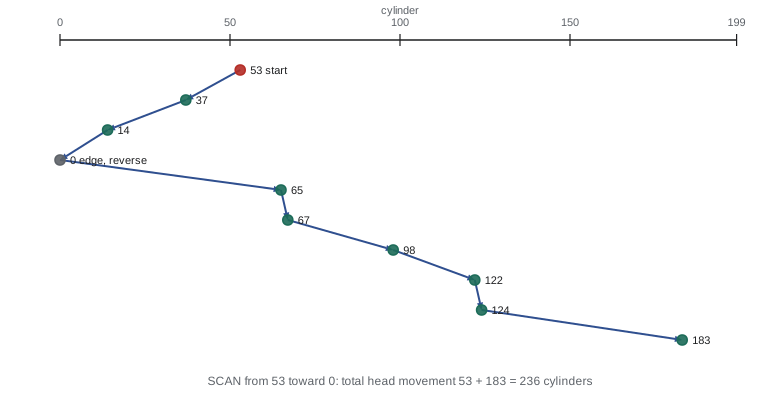
Linux's block layer hands requests to an input-and-output scheduler. For hard disks, mq-deadline sorts requests by position while guaranteeing each a deadline so none starves, and BFQ (budget fair queueing) divides bandwidth fairly between processes, which helps interactive responsiveness on desktops. Modern drives also reorder requests internally, using native command queuing with up to 32 outstanding requests. For fast NVMe solid-state drives, the best scheduler is often none: requests go straight to the device's many hardware queues, because reordering costs more processor time than it saves.
Solid-state drives and flash memory
A solid-state drive (SSD) stores data in NAND flash memory with no moving parts. Random reads take tens of microseconds, more than a hundred times faster than a hard disk, and NVMe drives connected over PCI Express accept tens of thousands of outstanding requests across many queues, delivering hundreds of thousands to millions of operations per second. Flash has peculiar rules, though. Data is written in pages (typically 4 to 16 KiB) but erased only in much larger blocks (hundreds of pages), and a page cannot be overwritten until its whole block is erased. Each block also survives only a limited number of erase cycles, from about 100,000 for single-level cells down to a few thousand for the four-bit (QLC) cells in cheap drives.
The drive's firmware hides these rules behind a flash translation layer (FTL), which maps the logical block addresses the operating system uses to physical flash pages. To overwrite a logical block, the FTL writes the new data to a fresh page elsewhere and marks the old page invalid. A garbage collector later copies the remaining valid pages out of mostly invalid blocks and erases them. Wear levelling spreads writes across all blocks so that a frequently rewritten logical block does not wear out one physical block early.
# Flash translation layer that spreads wear: a hot logical block is spread over many physical blocks
import random
random.seed(379)
PHYS, ERASE_LIMIT = 16, 3000
def run(spread, writes=20000):
    erases = [0] * PHYS
    mapping = {l: l for l in range(12)}          # 12 logical blocks on 16 physical blocks
    free = list(range(12, PHYS))
    for _ in range(writes):
        lb = 0 if random.random() < 0.7 else random.randrange(12)   # block 0 is very hot
        old = mapping[lb]
        if spread:
            new = min(free, key=lambda p: erases[p])  # write to the least-worn free block
        else:
            new = old                                 # rewrite in place (erase the same block)
        if spread:
            free.remove(new); free.append(old); mapping[lb] = new
        erases[new] += 1
    return max(erases), sum(erases) / PHYS
for lv in (False, True):
    worst, avg = run(lv)
    print(f"{'spreading writes' if lv else 'rewriting in place'}: worst block erased {worst} times (average {avg:.0f});",
"worn out" if worst > ERASE_LIMIT else "within limit")rewriting in place: worst block erased 14393 times (average 1250); worn out spreading writes: worst block erased 1258 times (average 1250); within limit
The operating system can help. The TRIM command (DISCARD in Linux, deallocate in NVMe) tells the drive which blocks no longer hold useful data after files are deleted, so the garbage collector need not copy them. Write amplification, the ratio of bytes the drive physically writes to bytes the host asked it to write, grows when the drive is nearly full; leaving free space keeps it low. Some file systems are designed for flash, such as F2FS on Android phones, which writes sequentially in a log-like way that suits the FTL. Zoned namespace (ZNS) SSDs go further and expose append-only zones directly to software.
The file abstraction
A file is a named, persistent sequence of bytes with attributes (metadata): size, owner, permissions, timestamps for creation, last modification, last status change and last access, and the location of its data. The operating system treats file contents as an uninterpreted byte stream; meaning comes from the applications that read them, guided by conventions such as file name extensions and magic numbers at the start of the file. On Unix, many things that are not disk files also look like files: devices in /dev, process information in /proc, kernel settings in /sys, pipes and sockets. This 'everything is a file' design lets the same read and write calls work on all of them.
Programs use files through file descriptors, small integers returned by open that index the process's table of open files. Each open file description in the kernel records the current position (offset), the access mode and flags. The core system calls are open, read, write, lseek to move the offset, fsync to force data to stable storage, close, and stat to read metadata. Because the kernel buffers writes in the page cache, a successful write only means the data reached kernel memory; a crash before the kernel writes it out loses it, which is why databases call fsync at commit time.
#include <fcntl.h>
#include <stdio.h>
#include <string.h>
#include <sys/stat.h>
#include <unistd.h>

int main(void) {
    const char *msg = "grade,student\nA,ana\nB,raj\n";
    int fd = open("grades.csv", O_WRONLY | O_CREAT | O_TRUNC, 0640);   /* rw-r----- */
    if (fd < 0) { perror("open"); return 1; }
    write(fd, msg, strlen(msg));
    fsync(fd);                                   /* force data to stable storage */
    close(fd);

    char buf[8] = {0};
    fd = open("grades.csv", O_RDONLY);
    lseek(fd, 14, SEEK_SET);                     /* jump to the second line */
    read(fd, buf, 5);
    printf("bytes 14-18: \"%s\"\n", buf);
    close(fd);

    link("grades.csv", "backup.csv");            /* a second name for the same inode */
    symlink("grades.csv", "latest");             /* a file whose content is a path */
    struct stat a, b, l;
    stat("grades.csv", &a); stat("backup.csv", &b); lstat("latest", &l);
    printf("size %lld bytes, mode %o, link count %ld\n", (long long)a.st_size, a.st_mode & 0777, (long)a.st_nlink);
    printf("hard link shares the inode: %s\n", a.st_ino == b.st_ino ? "yes" : "no");
    printf("symbolic link has its own inode: %s, and is %lld bytes (the path)\n",
           l.st_ino != a.st_ino ? "yes" : "no", (long long)l.st_size);
    unlink("grades.csv");                        /* remove one name */
    stat("backup.csv", &b);
    printf("after unlink: backup.csv still readable, link count %ld; 'latest' now dangles: %s\n",
           (long)b.st_nlink, access("latest", F_OK) == 0 ? "no" : "yes");
    unlink("backup.csv"); unlink("latest");
    return 0;
}$ gcc -Wall -g -fsanitize=address,undefined toy.c -o toy $ ./toy bytes 14-18: "A,ana" size 26 bytes, mode 640, link count 2 hard link shares the inode: yes symbolic link has its own inode: yes, and is 10 bytes (the path) after unlink: backup.csv still readable, link count 1; 'latest' now dangles: yes
Directories, paths and links
Directories organize files into a tree: each directory maps names to files or to further directories, and an absolute path such as /home/ana/cmput379/notes.txt is resolved one component at a time from the root. Unix directories map names to inode numbers, where an inode is the on-disk record holding a file's metadata and data locations (Lesson 11). This separation allows hard links, several names for the same inode, possibly in different directories. The inode keeps a link count and the file's data is freed only when the count reaches zero and no process still has the file open. That is why a running program can keep using a file that has been deleted, and why unlink, not delete, is the Unix system call.
A symbolic (soft) link is different: it is a small file whose content is a path. The kernel follows the path when the link is used, so symbolic links can cross file systems and point at directories, but they dangle if the target is removed or renamed. The program above shows both: the hard link keeps the data alive after the original name is unlinked, while the symbolic link becomes a dangling pointer.
Protection and permissions
Every Unix file has an owner, a group and nine permission bits: read, write and execute for the owner, the group and everyone else, written as rwxr-x--- or in octal as 750. For directories, read means listing names, write means creating and deleting entries, and execute means the right to pass through the directory to reach its contents. The program above created grades.csv with mode 0640: the owner can read and write, the group can read and others have no access. The process's umask clears bits from requested modes by default. Access control lists (ACLs) extend this with per-user and per-group entries when nine bits are not enough, and Windows NTFS uses ACLs throughout. CMPUT-331 and CISSP-114 cover access control models more broadly.
Mounting and the virtual file system
A Unix system presents one directory tree even though data lives on many devices and in many file system formats. Mounting attaches a file system's root at a directory in the existing tree, the mount point: a USB drive might appear at /media/usb, a network share at /mnt/projects. Inside the kernel, the virtual file system (VFS) layer defines a common interface of operations (lookup, open, read, write, create and others) that every file system type implements, so system calls work identically on ext4, XFS, Btrfs, FAT, NFS network shares or in-memory systems such as tmpfs and procfs.
Worked examples
Worked problem
Disk scheduling by hand
The head is at cylinder 53. Requests arrive for 98, 183, 37, 122, 14, 124, 65 and 67. Compute the head movement for SSTF.
Show solution
- From 53 the nearest is 65 (12), then 67 (2), then 37 (30), then 14 (23).
- From 14 the nearest remaining is 98 (84), then 122 (24), 124 (2) and 183 (59).
- Total = 12 + 2 + 30 + 23 + 84 + 24 + 2 + 59 = 236 cylinders.
- FCFS would move 640 cylinders, so SSTF cuts movement by almost two-thirds, at the risk of starving far requests.
Answer: 236 cylinders, matching the simulation.
Worked problem
Interpreting permissions
A directory /course/marks has mode drwx--x--- and is owned by user prof and group tas. Inside, grades.csv has mode -rw-r-----. Can a TA (in group tas) read the file? Can another student?
Show solution
- The TA is in group tas: the directory's group bits are --x, so the TA may pass through it (but not list it); the file's group bits are r--, so the TA may read it if the name is known.
- Another student is in "others": the directory's other bits are ---, so the student cannot even reach the file.
- The prof can read, write and list everything.
Answer: The TA can read the file (by name, without listing the directory); other students cannot reach it.
Worked problem
Why fsync matters
A to-do app writes the new list to todo.txt with write and exits. The laptop loses power 2 seconds later and the file is empty afterwards. Why, and how should the app save safely?
Show solution
- write copied the data into the page cache; the kernel had not yet written it to the drive.
- Safe pattern: write the new contents to todo.txt.tmp, call fsync on it, rename it over todo.txt (rename is atomic), then fsync the directory so the rename itself is durable.
- After a crash, todo.txt is either the complete old version or the complete new one, never empty or half-written.
Answer: Data was still in the page cache; write to a temporary file, fsync, atomically rename and fsync the directory.
Common mistakes
MistakeA successful write means the data is safely on disk.
InsteadIt means the data reached the kernel's page cache; call fsync when durability matters.
MistakeDeleting a file always frees its space immediately.
Insteadunlink removes a name; the data is freed only when the link count is zero and no process has the file open.
MistakeSSDs can overwrite data in place like memory.
InsteadFlash must erase whole blocks before rewriting; the FTL writes elsewhere and garbage-collects, so wear levelling and TRIM matter.
MistakeDisk scheduling helps NVMe SSDs as much as hard disks.
InsteadWith no seek time and many hardware queues, reordering helps little; Linux often uses no scheduler for NVMe.
MistakeExecute permission on a directory means you can run programs in it.
InsteadFor directories, execute means permission to traverse into it and reach entries by name.
Summary and key terms
- Hard disks are slow for random access because of seeks and rotation; sequential access is far faster.
- Disk scheduling (SSTF, SCAN, C-SCAN, deadline, BFQ) reduces arm movement and balances fairness.
- SSDs use flash with an FTL that remaps writes, garbage-collects and levels wear; TRIM helps it.
- A file is a named byte sequence with metadata, accessed through file descriptors and system calls such as open, read, write, lseek and fsync.
- Directories map names to inodes; hard links share an inode, symbolic links store a path.
- Unix permissions give read, write and execute rights to owner, group and others, with ACLs for finer control.
- Mounting and the VFS present many devices and file system types as one tree.
- Seek time
- The time to move a disk arm to the required cylinder.
- Rotational latency
- The time for the required sector to rotate under the head.
- Elevator algorithm
- SCAN disk scheduling, which sweeps the head back and forth.
- Flash translation layer
- SSD firmware mapping logical blocks to physical flash pages.
- Wear levelling
- Spreading writes so that flash blocks wear evenly.
- TRIM
- A command telling an SSD which blocks no longer hold useful data.
- File descriptor
- A small integer naming an open file in a process.
- Inode
- The on-disk structure holding a file's metadata and data locations.
- Hard link
- An additional directory entry for an existing inode.
- Virtual file system
- The kernel layer giving all file system types a common interface.
Practice problems
Work each problem on paper first, then reveal the answer to check.
Name the three components of a hard disk access time.
Show answer
Seek time, rotational latency and transfer time.
What is the average rotational latency of a 7,200 rpm disk?
Show answer
About 4.17 ms, half of one 8.33 ms rotation.
Which disk-scheduling algorithm can starve distant requests?
Show answer
SSTF.
How does C-SCAN differ from SCAN?
Show answer
It serves requests in one direction only, returning to the start without serving, for more uniform waits.
Why can an SSD page not be overwritten in place?
Show answer
Flash must be erased in whole blocks before pages are rewritten.
What does wear levelling achieve?
Show answer
It spreads erases across blocks so no block wears out early.
What does fsync guarantee?
Show answer
That the file's data and metadata have been written to stable storage before it returns.
After unlink("grades.csv"), why could backup.csv still be read?
Show answer
It was a hard link to the same inode, whose link count was still above zero.
What does mode 0640 mean?
Show answer
Owner read and write, group read, others nothing.
What is the role of the VFS layer?
Show answer
It provides one interface so system calls work the same on every file system type.
Lesson quiz · 5 questions
Score 60% or more to complete this lesson.
Create a free account to save your progress, take quizzes and earn a certificate.