
CMPUT-379 · Lesson 1 of 12 · 32 min
What an operating system does
Every program you have written in this degree so far has leaned on a piece of software you rarely see: the operating system. When a Python script opens a file, when a C program calls printf, when a browser plays a video while a compiler runs in another window, the operating system is deciding who gets the processor, which memory belongs to whom, how bytes reach the disk and how the network card is shared. This course opens that box. We study the operating system as a resource manager, as a provider of clean abstractions over messy hardware, and as the protector that keeps one program's mistakes from becoming everyone's problem.
CMPUT-229 showed what the hardware provides: privilege levels, interrupts, virtual memory hardware, the TLB and memory-mapped input and output. CMPUT-201 taught C and the Unix tool chain, and CMPUT-274 introduced concurrency from Python. This course builds on all three. Here the questions are about policy and design: given the hardware mechanisms, how should an operating system schedule work, share memory, store files reliably and keep programs apart? Lesson 12 connects these ideas to virtual machines and containers, and CMPUT-331 treats operating system security from the attacker-and-defender point of view.
Three jobs: referee, illusionist and glue
A useful way to think about an operating system is through three roles. As a referee, it shares limited resources (processor time, memory, disk bandwidth, network capacity) among competing programs and users, and it enforces the rules: one process cannot read another's memory or delete another user's files. As an illusionist, it creates abstractions that do not physically exist: each process believes it has its own processor and a private, contiguous address space; a file looks like a neat sequence of bytes even though its blocks are scattered across a flash chip. As glue, it provides common services, such as file systems, networking stacks, device drivers and windowing, so that every application does not have to reinvent them.
These roles are in tension. A referee wants strict checks, which cost time. An illusionist wants abstractions that hide hardware details, but performance-sensitive programs sometimes need to see those details. Much of operating system design is about striking that balance, and the right balance differs between a phone, a database server, a car's braking controller and a supercomputer.
The kernel and the hardware boundary
The kernel is the part of the operating system that runs with full hardware privilege. Modern processors provide at least two modes: kernel mode (also called supervisor mode or ring 0 on x86) and user mode (ring 3). In kernel mode, software may execute privileged instructions: changing page tables, disabling interrupts, talking to devices directly or halting the processor. In user mode, any attempt to do these things causes a trap into the kernel, which normally ends the offending program. Applications, libraries and most system utilities run in user mode.
Control passes from user mode to kernel mode in only three ways. A system call is a deliberate request from a program, made with a special instruction such as syscall on x86-64 or ecall on RISC-V. An exception happens when the running instruction cannot complete, for example a page fault, a division by zero or an illegal instruction. An interrupt comes from a device or timer, unrelated to the current instruction. In every case the processor saves enough state to resume later, switches to kernel mode and jumps to a handler address the kernel set up in advance. Because user code cannot choose where in the kernel it lands, the kernel can check every request.
The timer interrupt deserves special mention. Before starting a program, the kernel programs a hardware timer to interrupt after a few milliseconds. Even if the program loops forever and never makes a system call, the timer brings control back to the kernel, which can then let another program run. This is what makes preemptive multitasking possible, and it is why a buggy infinite loop in one application does not freeze a modern computer.
System calls: the operating system's interface
Programs ask for operating system services through system calls. Linux on x86-64 has a few hundred: openat, read, write, close, mmap, clone, execve, wait4, kill, socket and many more. Programmers rarely make system calls directly. Instead they call library functions in the C library (glibc, musl) or a language runtime, which prepare the arguments in registers, execute the system call instruction and turn the kernel's return value into a result or an error code in errno. A single printf may produce zero system calls, because it only fills a buffer, or one write call when the buffer is flushed.
#include <string.h>
#include <unistd.h>

int main(void) {
    const char *msg = "hello, kernel\n";
    /* write() is a thin library wrapper around the write system call */
    ssize_t n = write(STDOUT_FILENO, msg, strlen(msg));
    return n < 0 ? 1 : 0;
}$ ./hello
hello, kernel
$ strace -qq -e trace=write,exit_group -o trace.txt ./hello > /dev/null
$ cat trace.txt
write(1, "hello, kernel\n", 14) = 14
exit_group(0) = ?
$ strace -qq -o all.txt ./hello > /dev/null
$ cut -d'(' -f1 all.txt | sort | uniq -c | sort -rn | head -8
8 mmap
3 mprotect
2 pread64
2 openat
2 fstat
2 close
1 write
1 set_tid_addressThe trace shows something surprising: even this tiny program makes dozens of system calls before main runs. The dynamic loader opens and maps the C library with openat and mmap, sets memory protections with mprotect and configures thread-local storage. Only then does our single write appear, followed by exit_group. Tools such as strace on Linux, dtruss on macOS and Process Monitor on Windows let you watch this conversation, which is one of the best ways to understand what a program is really doing.
# How often does an ordinary Python program cross into the kernel?
# We count system calls indirectly: each os.write() on an unbuffered file is one write syscall.
import os, time, tempfile
fd, path = tempfile.mkstemp()
N = 20000
t0 = time.perf_counter()
for _ in range(N):
    os.write(fd, b"x")            # one system call per byte
t1 = time.perf_counter()
os.lseek(fd, 0, os.SEEK_SET)
buf = b"x" * N
t2 = time.perf_counter()
os.write(fd, buf)                 # one system call for all bytes
t3 = time.perf_counter()
os.close(fd); os.remove(path)
per_call = (t1 - t0) / N
print(f"{N} one-byte writes: {N} system calls")
print("1 large write:        1 system call")
ratio = (t1 - t0) / max(t3 - t2, 1e-9)
print("many small writes were", "much slower" if ratio > 5 else "slower", "than one large write")
print("lesson: batching work reduces user/kernel mode switches")20000 one-byte writes: 20000 system calls 1 large write: 1 system call many small writes were much slower than one large write lesson: batching work reduces user/kernel mode switches
Crossing into the kernel costs time: saving registers, switching stacks, checking arguments and, on processors affected by speculative-execution flaws, extra steps to isolate kernel memory. A system call typically costs from a hundred nanoseconds to a few microseconds, which is tiny for opening a file but huge compared with adding two numbers. That is why buffered input and output exists, why databases batch writes and why newer Linux interfaces such as io_uring let programs submit many requests at once.
How operating systems are structured
Linux is monolithic with loadable modules: the kernel is one large program, but drivers can be added and removed while the system runs. The seL4 microkernel takes the opposite approach; it is small enough (around ten thousand lines of C) that its implementation has been formally proved to match its specification, which is why it appears in defence and aviation systems. Windows and macOS sit in between. The choice is a trade-off between performance, reliability, security and the effort of maintenance, not a contest with a single winner.
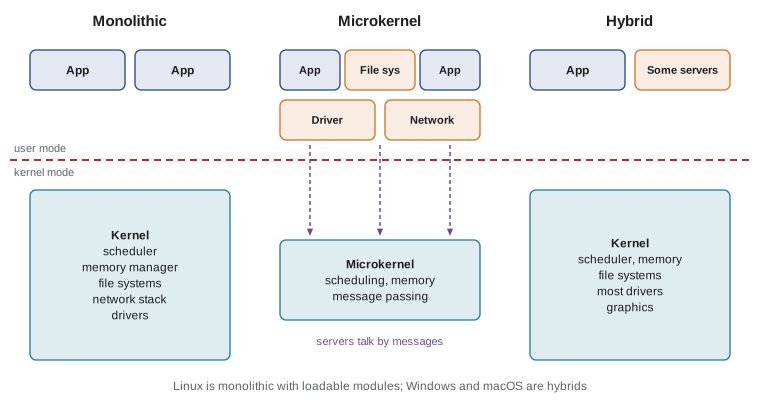
The operating systems you will meet
Most of the world's computers run one of a handful of kernels. Linux dominates servers, cloud platforms, supercomputers and embedded devices, and it is the kernel underneath Android, which runs on most of the world's phones. Windows runs most desktop and laptop computers in offices. Apple's XNU kernel underlies macOS, iOS and the other Apple platforms. Real-time operating systems such as FreeRTOS, Zephyr and QNX run in cars, medical devices, industrial controllers and robots, where meeting deadlines matters more than raw throughput; the robotics courses in this university (ROB-200, ROB-110) use some of them.
This course uses Linux and the POSIX interfaces for its examples because they are open, well documented and close to what most servers run. The concepts carry over: Windows has processes, threads, virtual memory and file systems too, with different names and system calls (CreateProcess rather than fork and exec, for example). When this course says 'the kernel', it usually means a general-purpose kernel such as Linux unless it says otherwise.
Booting: how the operating system gets control
When a computer powers on, firmware (UEFI on most modern PCs, or a boot ROM on phones and boards) initializes the hardware, checks the boot media and loads a boot loader such as GRUB or systemd-boot. With Secure Boot enabled, each stage verifies the digital signature of the next, a chain of trust discussed in CMPUT-331. The boot loader loads the kernel image and an initial RAM file system into memory and jumps to the kernel's entry point. The kernel sets up page tables, interrupt handlers and device drivers, mounts the root file system and starts the first user process, process 1 (systemd on most Linux distributions), which starts every other service. Everything after that point is the subject of this course.
Worked examples
Worked problem
Mode switches in a file copy
A program copies a 1 MiB file by reading and writing 1 byte at a time. Roughly how many system calls does it make, and how could it make far fewer?
Show solution
- One mebibyte is 1,048,576 bytes; reading and writing each byte separately needs about 1,048,576 read calls and 1,048,576 write calls, roughly 2.1 million system calls.
- At about one microsecond per call, that is around two seconds of pure overhead before any disk time.
- Using a 64 KiB buffer, the program needs 16 reads and 16 writes: 32 system calls.
- An even better option on Linux is copy_file_range or sendfile, which ask the kernel to move the data without copying it through user space.
Answer: About 2.1 million system calls; buffering with 64 KiB blocks cuts this to 32, and kernel copy calls reduce copying further.
Worked problem
What happens on an illegal instruction
A user program tries to execute the privileged instruction that disables interrupts. What does the hardware do, and what does the user see?
Show solution
- The processor is in user mode, so the privileged instruction raises an exception instead of executing.
- The processor saves the program counter and switches to kernel mode, jumping to the kernel's handler for general protection faults.
- The kernel decides the instruction was illegal for this process and sends it a signal (SIGILL or SIGSEGV on Linux).
- Unless the program handles the signal, it is terminated, and the shell reports something like a segmentation fault or illegal instruction.
Answer: The instruction traps into the kernel, which signals and normally terminates the process; interrupts stay enabled.
Worked problem
Choosing a kernel structure
A company builds a controller for an infusion pump that must keep running even if the network driver crashes. Which structure fits best?
Show solution
- The critical requirement is fault isolation: a failure in one component must not stop dosing.
- In a monolithic kernel, a driver bug can crash the whole kernel.
- A microkernel runs the network driver as a separate user-mode server that can crash and restart while the dosing task keeps running.
- A certified real-time microkernel such as QNX or seL4 also provides timing guarantees and a small base to verify.
Answer: A real-time microkernel, because it contains driver faults and makes timing and verification easier.
Common mistakes
MistakeThe operating system is the graphical desktop.
InsteadThe desktop is one application; the operating system kernel manages processors, memory, devices and protection underneath it.
MistakeA function such as printf is a system call.
Insteadprintf is a library function that may or may not make a write system call when its buffer is flushed.
MistakeUser programs can disable interrupts if they need to.
InsteadDisabling interrupts is a privileged instruction; in user mode it traps into the kernel.
MistakeA program that never makes a system call can keep the processor forever.
InsteadThe timer interrupt returns control to the kernel, which can preempt the program.
MistakeMicrokernels are always better because they are more modular.
InsteadThey trade some speed for isolation; the best structure depends on reliability, performance and maintenance needs.
Summary and key terms
- An operating system shares resources, creates abstractions such as processes and files, and provides common services.
- The kernel runs in privileged kernel mode; applications run in user mode and cannot execute privileged instructions.
- Control enters the kernel only through system calls, exceptions and interrupts, at entry points the kernel controls.
- The timer interrupt enables preemption, so no program can monopolize the processor.
- System calls cost time, so buffering and batching matter for performance.
- Kernels may be monolithic, microkernel, hybrid or modular, each with different trade-offs.
- Booting passes control from firmware to boot loader to kernel to the first user process.
- Kernel
- The privileged core of an operating system that manages hardware and enforces protection.
- Kernel mode
- A processor mode in which privileged instructions may run.
- User mode
- A restricted processor mode for applications.
- System call
- A controlled request from a program to the kernel for a service.
- Trap
- A synchronous transfer into the kernel caused by an instruction, such as a system call or fault.
- Interrupt
- An asynchronous signal from hardware that diverts the processor to a handler.
- Timer interrupt
- A periodic interrupt that lets the kernel regain control and preempt programs.
- Monolithic kernel
- A kernel in which all core services run in one privileged program.
- Microkernel
- A minimal kernel with most services running as user-mode servers.
- Boot loader
- The program that loads the kernel into memory and starts it.
Practice problems
Work each problem on paper first, then reveal the answer to check.
Name the three roles an operating system plays.
Show answer
Referee (resource sharing and protection), illusionist (abstractions) and glue (common services).
What are the three ways control enters the kernel?
Show answer
System calls, exceptions and interrupts.
Why can a program not escape the kernel's checks by jumping into the middle of kernel code?
Show answer
Entry is only through handler addresses set by the kernel; user code cannot choose where it lands, and kernel memory is not accessible in user mode.
What hardware feature prevents an infinite loop from freezing the computer?
Show answer
The timer interrupt, which lets the kernel preempt the running program.
In the strace output, which system call printed the message?
Show answer
write, with file descriptor 1 (standard output) and 14 bytes.
Why did the traced program make many system calls before main ran?
Show answer
The dynamic loader opened and mapped shared libraries and set up memory protections and thread-local storage.
Give one advantage and one disadvantage of a monolithic kernel.
Show answer
Advantage: speed, because services call each other directly. Disadvantage: a bug in any component can crash or compromise the whole kernel.
Which kernel runs on most smartphones?
Show answer
Linux, as part of Android.
What is process 1 on most Linux systems?
Show answer
systemd, the first user process, which starts other services.
How does Secure Boot protect the boot process?
Show answer
Each stage verifies the digital signature of the next before running it.
Lesson quiz · 5 questions
Score 60% or more to complete this lesson.
Create a free account to save your progress, take quizzes and earn a certificate.