
CMPUT-313 · Lesson 5 of 12 · 34 min
Socket programming
So far we have described protocols. Now we write programs that use them. Applications reach the transport layer through the socket interface, an application programming interface that first appeared in 4.2BSD Unix in 1983 and is now available in essentially every operating system and language. A socket is an endpoint for communication: the application writes data into it and reads data out of it, and the operating system's transport layer does the rest. This lesson builds UDP and TCP clients and servers in Python, shows why TCP's byte-stream nature forces applications to frame their own messages, and compares three ways for a server to handle many clients at once: threads, an event loop with selectors, and Python's asyncio. Every program here runs for real on the local machine, using the loopback interface at 127.0.0.1, so you can see exactly how the API behaves.
The calls are nearly identical in C, where the API was born: CMPUT-201 introduced C system calls, and the Python socket module is a thin layer over the same functions. CMPUT-379 explains how the kernel implements them.
Addresses, ports and the two socket types
A transport-layer endpoint is identified by an IP address and a 16-bit port number. Well-known ports below 1024 are assigned to standard services (80 for HTTP, 443 for HTTPS, 53 for DNS, 25 for SMTP); registered ports run up to 49151; and the operating system chooses ephemeral ports, usually above 32768 on Linux and above 49152 on Windows and macOS, for the client side of connections. Binding a server to port 0, as our examples do, asks the operating system to choose any free port, which avoids conflicts when tests run in parallel.
The two main socket types correspond to the two main transport protocols. A datagram socket (SOCK_DGRAM) uses UDP: each send produces one datagram that is delivered whole or not at all, possibly out of order and possibly duplicated, with no connection. A stream socket (SOCK_STREAM) uses TCP: after a connection is established, each side sees a reliable, ordered stream of bytes, with no record of where one send ended and the next began.
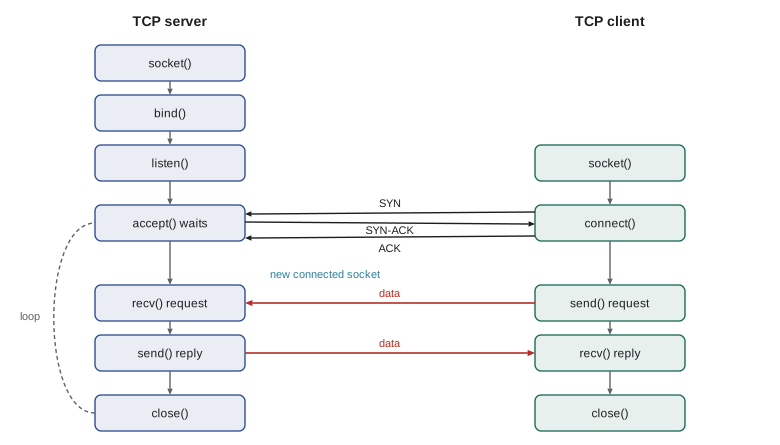
| Step | TCP server | TCP client | UDP (either side) |
|---|---|---|---|
| Create | socket(AF_INET, SOCK_STREAM) | socket(AF_INET, SOCK_STREAM) | socket(AF_INET, SOCK_DGRAM) |
| Name | bind(address, port) | usually automatic | bind for a server; automatic for a client |
| Prepare | listen(backlog) | ||
| Connect | accept() returns a new socket per client | connect(server) triggers the handshake | none: no connection |
| Transfer | recv / send / sendall | recv / send / sendall | recvfrom / sendto, one datagram each |
| Finish | close the connected socket; the listener stays open | shutdown and close | close |
A UDP client and server
UDP sockets are the simpler of the two. The server binds to an address and loops, receiving a datagram and the sender's address with recvfrom, and replying with sendto. There is no connection: the same server socket talks to any number of clients, and each datagram stands alone. The client simply sends datagrams to the server's address. Because UDP does not retransmit, a real client must set a timeout and decide what to do when no reply arrives: retry, as DNS resolvers do, or give up.
import socket, threading
# UDP server: one socket, no connection; each datagram carries the sender's address
server = socket.socket(socket.AF_INET, socket.SOCK_DGRAM)
server.bind(("127.0.0.1", 0))                 # port 0: let the OS choose a free port
addr = server.getsockname()
def serve():
    for _ in range(3):
        data, client = server.recvfrom(2048)
        server.sendto(data.upper(), client)   # reply to whoever sent this datagram
threading.Thread(target=serve, daemon=True).start()

client = socket.socket(socket.AF_INET, socket.SOCK_DGRAM)
client.settimeout(1.0)                        # UDP may lose packets: never wait forever
for msg in (b"shift sign-up", b"saturday 9am", b"confirm"):
    client.sendto(msg, addr)
    reply, _ = client.recvfrom(2048)
    print(f"sent {msg!r:18} got {reply!r}")
client.close(); server.close()sent b'shift sign-up' got b'SHIFT SIGN-UP' sent b'saturday 9am' got b'SATURDAY 9AM' sent b'confirm' got b'CONFIRM'
Each recvfrom call returns exactly one datagram. If the buffer passed to recvfrom is smaller than the datagram, the rest is silently discarded, so applications choose a buffer at least as large as the largest message they expect. The maximum UDP payload is 65,507 bytes over IPv4, but datagrams larger than the path's maximum transmission unit (about 1,500 bytes on Ethernet) are fragmented by IP, and losing any fragment loses the whole datagram. Practical UDP protocols such as DNS and QUIC keep datagrams below about 1,200 to 1,450 bytes for this reason.
A TCP client and server
TCP servers use two kinds of socket. The listening socket is bound to the server's port and placed in the listening state; it never carries data. Each call to accept waits for a client to complete the three-way handshake (lesson 7) and returns a new connected socket dedicated to that client, identified by the four values of source address, source port, destination address and destination port. The listening socket goes on accepting other clients. The client creates a socket and calls connect, which performs the handshake; create_connection does this in one step and also handles name lookup and IPv6.
import socket, threading
listener = socket.socket(socket.AF_INET, socket.SOCK_STREAM)
listener.setsockopt(socket.SOL_SOCKET, socket.SO_REUSEADDR, 1)
listener.bind(("127.0.0.1", 0)); listener.listen()
addr = listener.getsockname()
info = {}
def serve():
    conn, peer = listener.accept()            # a NEW socket for this connection
    info["same port"] = conn.getsockname() == listener.getsockname()
    info["different socket"] = conn.fileno() != listener.fileno()
    with conn:
        while data := conn.recv(1024):        # empty bytes means the peer closed
            conn.sendall(b"echo: " + data)
threading.Thread(target=serve, daemon=True).start()

with socket.create_connection(addr) as s:    # connect performs the three-way handshake
    s.sendall(b"hello over TCP")
    print(s.recv(1024).decode())
    print("connected socket on the server:", info)
    s.shutdown(socket.SHUT_WR)                # tell the server we are done sending
    print("after shutdown, recv returns:", s.recv(1024))
listener.close()echo: hello over TCP
connected socket on the server: {'same port': True, 'different socket': True}
after shutdown, recv returns: b''When recv returns an empty byte string, the peer has closed its side of the connection; this is how a TCP application detects the end of the stream. shutdown(SHUT_WR) sends a FIN to signal that this side has finished sending while still allowing it to receive, which is useful for request–response protocols where the server reads until end of stream. The SO_REUSEADDR option lets a restarted server bind to its port even while old connections linger in the TIME_WAIT state described in lesson 7, a common annoyance during development.
TCP is a byte stream: framing your messages
The most common bug in TCP programs is assuming that each recv returns exactly one send. TCP delivers bytes, not messages. Several small sends may arrive in one recv, and one large send may arrive in several. Nagle's algorithm, the sender's buffering, segment sizes and timing all affect where the boundaries fall. Applications must therefore define their own message framing: a delimiter such as the newline that ends lines in SMTP and HTTP headers, a length prefix as in HTTP's Content-Length and in most binary protocols, or a self-describing format. The program below demonstrates the problem and the length-prefix fix.
import socket, threading, struct, time
# TCP is a byte stream: message boundaries are NOT preserved
listener = socket.create_server(("127.0.0.1", 0)); addr = listener.getsockname()
received = []
def serve():
    conn, _ = listener.accept()
    time.sleep(0.2)                           # let several sends pile up in the receive buffer
    with conn:
        while chunk := conn.recv(4096):
            received.append(chunk)
t = threading.Thread(target=serve); t.start()
with socket.create_connection(addr) as s:
    for word in (b"alpha", b"beta", b"gamma"):
        s.sendall(word)
t.join()
print("three sends arrived as", len(received), "recv call(s):", received)

# Fix: frame each message with a 4-byte length prefix
def send_msg(sock, payload):
    sock.sendall(struct.pack("!I", len(payload)) + payload)
def recv_exact(sock, n):
    buf = b""
    while len(buf) < n:
        part = sock.recv(n - len(buf))
        if not part:
            raise ConnectionError("peer closed mid-message")
        buf += part
    return buf
def recv_msg(sock):
    (length,) = struct.unpack("!I", recv_exact(sock, 4))
    return recv_exact(sock, length)
msgs = []
def serve2():
    conn, _ = listener.accept()
    time.sleep(0.2)
    with conn:
        for _ in range(3):
            msgs.append(recv_msg(conn))
t = threading.Thread(target=serve2); t.start()
with socket.create_connection(addr) as s:
    for word in (b"alpha", b"beta", b"gamma"):
        send_msg(s, word)
t.join(); listener.close()
print("with length prefixes:", msgs)three sends arrived as 1 recv call(s): [b'alphabetagamma'] with length prefixes: [b'alpha', b'beta', b'gamma']
Two helper functions do the real work: recv_exact loops until it has read exactly n bytes, and recv_msg reads a 4-byte big-endian length followed by that many bytes. Note too that send may transmit only part of the data you give it if the socket's send buffer is full; sendall loops until everything is sent. Forgetting this produces programs that work on a fast local network and fail mysteriously over a slow one.
Worked problem
Designing a framing scheme
A robot sends sensor readings to a control station over TCP. Each reading has a sensor name of variable length and a list of floating-point values. Propose a framing scheme, give the byte layout of one message for sensor "lidar" with two values, and explain how the receiver handles a message split across two recv calls.
Show solution
- Use a length-prefixed frame: a 4-byte total length, then a 1-byte name length, the name in UTF-8, a 2-byte count of values and the values as 8-byte big-endian doubles.
- For "lidar" with two values: name length 1 byte, name 5 bytes, count 2 bytes, values 16 bytes, so the body is 24 bytes and the frame is \(4 + 24 = 28\) bytes.
- The receiver first reads exactly 4 bytes (looping if necessary), learns that 24 more bytes follow, then reads exactly 24 bytes before parsing. A split across recv calls simply means recv_exact loops again.
- For robustness, reject lengths above a sensible maximum so a corrupted or malicious length cannot make the receiver allocate gigabytes.
Answer: A 4-byte length prefix followed by a self-describing body; the receiver always reads the prefix, then exactly that many bytes, and validates the length.
Serving many clients
A server that handles one connection at a time leaves every other client waiting. There are three common designs. The first creates a thread (or a process) per connection: simple to write, since each connection's code can block on recv, but each thread costs memory, and thousands of threads strain the operating system. The second uses an event loop: one thread asks the operating system which sockets are ready, using select, poll, epoll on Linux or kqueue on BSD and macOS, and handles each ready socket without blocking. This scales to tens of thousands of connections, which is how servers such as nginx work, but turns the program inside out into callbacks and state machines. The third uses coroutines, as in Python's asyncio, Go's goroutines or JavaScript's async functions, which let code look sequential while an event loop runs underneath. CMPUT-274 lessons 9 to 11 compared these concurrency models in general; here we apply them to sockets.
import selectors, socket, threading
# One thread serves many clients by waiting for whichever socket is ready
sel = selectors.DefaultSelector()
listener = socket.create_server(("127.0.0.1", 0)); listener.setblocking(False)
sel.register(listener, selectors.EVENT_READ, data=None)
addr = listener.getsockname()
served = []
def loop(expected):
    done = 0
    while done < expected:
        for key, _ in sel.select(timeout=2):
            if key.data is None:                       # new connection
                conn, _ = key.fileobj.accept(); conn.setblocking(False)
                sel.register(conn, selectors.EVENT_READ, data=b"")
            else:
                conn = key.fileobj
                data = conn.recv(1024)
                if data:
                    served.append(data.decode()); conn.sendall(b"ok " + data)
                else:
                    sel.unregister(conn); conn.close(); done += 1
t = threading.Thread(target=loop, args=(5,)); t.start()
replies = []
for i in range(5):
    with socket.create_connection(addr) as c:
        c.sendall(f"volunteer-{i}".encode()); replies.append(c.recv(64).decode())
t.join(); listener.close()
print("one thread served:", sorted(served))
print("replies:", replies[:2], "...")one thread served: ['volunteer-0', 'volunteer-1', 'volunteer-2', 'volunteer-3', 'volunteer-4'] replies: ['ok volunteer-0', 'ok volunteer-1'] ...
import asyncio
async def handle(reader, writer):
    line = await reader.readline()
    writer.write(b"booked " + line); await writer.drain()
    writer.close(); await writer.wait_closed()

async def client(port, name, delay):
    await asyncio.sleep(delay)
    reader, writer = await asyncio.open_connection("127.0.0.1", port)
    writer.write(name.encode() + b"\n"); await writer.drain()
    reply = await reader.readline()
    writer.close(); await writer.wait_closed()
    return reply.decode().strip()

async def main():
    server = await asyncio.start_server(handle, "127.0.0.1", 0)
    port = server.sockets[0].getsockname()[1]
    async with server:
        results = await asyncio.gather(*(client(port, f"shift-{i}", 0.01 * (5 - i)) for i in range(5)))
    print(results)
asyncio.run(main())['booked shift-0', 'booked shift-1', 'booked shift-2', 'booked shift-3', 'booked shift-4']
In the asyncio version, each await marks a point where the coroutine may pause while waiting for the network, letting others run. Clients started at different times are served concurrently, and asyncio.gather returns results in the order the clients were listed, not the order they finished.
Worked problem
How many threads does a chat server need?
A chat server expects 50,000 mostly idle connections, each sending a short message every minute on average. A thread uses about 1 MB of stack and the server has 16 GB of memory for the application. Compare a thread-per-connection design with an event-loop design.
Show solution
- Thread per connection: \(50{,}000 \times 1\) MB = about 50 GB of stack address space, far more than the 16 GB available, and the scheduler would juggle 50,000 mostly sleeping threads.
- Message rate: \(50{,}000 / 60 \approx 833\) messages per second, which one or a few processor cores can handle easily.
- An event loop (or asyncio) needs only a few kilobytes of state per connection and one thread per core, so it fits comfortably.
Answer: An event-loop or coroutine design; thread-per-connection would need about 50 GB of stacks for mostly idle connections.
Robust socket programs
Network programs fail in ways local programs do not. Connections are refused because the server is down, time out because a firewall silently drops packets, reset because the peer crashed, or simply stall. A robust program sets timeouts on every blocking operation, handles ConnectionResetError and its relatives, retries idempotent operations with exponential backoff and jitter, validates every length and field it receives, and closes sockets reliably, which Python's with statement makes easy. It also supports IPv6: getaddrinfo, used inside create_connection, returns both IPv4 and IPv6 addresses for a name, and the Happy Eyeballs algorithm (RFC 8305) tries them in parallel so that a broken IPv6 path does not delay users. Finally, real applications almost always add TLS: Python's ssl module wraps a socket so that the same send and recv calls encrypt and authenticate the data, a topic CMPUT-331 and CISSP-112 cover.
Worked problem
Exponential backoff with jitter
A client retries a failed UDP request with timeouts that start at 0.5 s and double each time, up to 8 s, with a random factor between 0.5 and 1.5. List the expected timeouts for five attempts and explain why jitter matters.
Show solution
- Base timeouts: 0.5, 1, 2, 4 and 8 seconds.
- With jitter, each is multiplied by a random factor; the expected values are unchanged but individual clients differ.
- Without jitter, thousands of clients that failed at the same moment (for example, after a server restart) would all retry at the same instants, causing synchronized load spikes. Jitter spreads the retries out.
Answer: About 0.5, 1, 2, 4 and 8 seconds on average, randomized so that many clients do not retry in lockstep.
Common mistakes
MistakeAssuming one recv returns exactly one send on a TCP socket.
InsteadTCP is a byte stream; frame messages with delimiters or length prefixes and loop until a whole message has arrived.
MistakeUsing send and ignoring its return value.
Insteadsend may send only part of the data; use sendall or loop.
MistakeCalling recv on a UDP socket without a timeout.
InsteadUDP datagrams can be lost; set a timeout and retry or give up.
MistakeReading or writing data on the listening socket.
InsteadThe listening socket only accepts connections; accept returns a new socket for data.
MistakeHard-coding port numbers in tests.
InsteadBind to port 0 and read the assigned port to avoid conflicts.
MistakeTrusting a received length field without checking it.
InsteadValidate lengths against a maximum before allocating or reading.
Summary and key terms
- Sockets are the API between applications and the transport layer; an endpoint is an IP address and a port.
- Datagram sockets use UDP: one message per send, no connection, possible loss and reordering.
- Stream sockets use TCP: a listening socket accepts connections, each with its own connected socket.
- TCP preserves bytes, not message boundaries, so applications must frame messages.
- send may be partial; recv returning empty bytes means the peer closed.
- Servers handle many clients with threads, event loops over select or epoll, or coroutines such as asyncio.
- Robust programs use timeouts, retries with backoff and jitter, input validation, IPv6 and TLS.
- Socket
- An endpoint for network communication provided by the operating system to applications.
- Port number
- A 16-bit number identifying a process's endpoint on a host.
- Ephemeral port
- A temporary port chosen by the operating system for the client side of a connection.
- Listening socket
- A TCP socket that waits for incoming connections and never carries data.
- Connected socket
- A TCP socket returned by accept or connect that carries data for one connection.
- Message framing
- Marking where messages begin and end within a byte stream.
- Length prefix
- A field giving the size of the message that follows.
- Event loop
- A loop that waits for ready sockets and handles each without blocking.
- Exponential backoff
- Doubling the wait between retries, usually with random jitter.
- Loopback interface
- A virtual interface (127.0.0.1) that delivers packets back to the same host.
Practice problems
Work each problem on paper first, then reveal the answer to check.
What does binding to port 0 do?
Show answer
Asks the operating system to choose any free port.
Why does accept return a new socket?
Show answer
So each connection has its own socket while the listening socket keeps accepting others.
What four values identify a TCP connection?
Show answer
Source IP address, source port, destination IP address and destination port.
How does a TCP receiver know the sender has finished?
Show answer
recv returns an empty byte string after the sender closes or shuts down writing.
Give two ways to frame messages on a TCP stream.
Show answer
A delimiter such as a newline, or a length prefix.
Why should UDP datagrams usually stay below about 1,200 to 1,450 bytes?
Show answer
Larger datagrams are fragmented, and losing any fragment loses the whole datagram.
What is the difference between send and sendall?
Show answer
send may send only part of the buffer; sendall loops until all of it is sent.
Name the Linux system call that scales event-driven servers to many sockets.
Show answer
epoll.
Why add jitter to retry timers?
Show answer
To prevent many clients from retrying at the same moments and overloading a server.
What does Happy Eyeballs do?
Show answer
Tries IPv6 and IPv4 connections in parallel so a broken path does not delay the user.
Lesson quiz · 5 questions
Score 60% or more to complete this lesson.
Create a free account to save your progress, take quizzes and earn a certificate.