
CMPUT-313 · Lesson 2 of 12 · 31 min
Protocol layering and encapsulation
The internet is an enormously complicated system. A single click in a browser involves radio or electrical signalling, error detection, address lookup, routing across many independent networks, reliable delivery, congestion control, encryption and the formatting of web pages. No one could design or understand all of this as a single piece. Network designers manage the complexity with layering: each layer provides a service to the layer above, using only the services of the layer below. This lesson explains the internet's five-layer model, how data is wrapped in headers as it descends the layers and unwrapped as it climbs back up, and why layering is both powerful and sometimes awkward. We also write programs that build and take apart a real frame byte by byte, which is the best way to make the abstraction concrete.
CISSP-113 lesson 1 compared the OSI and TCP/IP models from a security point of view and mapped attacks to layers. Here we focus on what each layer does for the one above it, how headers implement that service, and what layering costs in overhead and performance.
Layers, services and protocols
A layered architecture is like an airline trip. You buy a ticket, check your bags, go through the gate, board, take off, fly, land, leave the plane, collect your bags and complain about the ticket price. Each step on the way out has a matching step on the way back, and each level relies only on the level below: the gate does not care how the aircraft is navigated, and the pilots do not care how your ticket was priced. In networking terms, each layer offers a service to the layer above through an interface, and implements that service by running a protocol with its peer layer on another machine, using the service of the layer below.
The benefit is modularity. As long as a layer keeps offering the same service, its implementation can change freely. Wi-Fi replaced many Ethernet cables without any change to web browsers; IPv6 is being deployed beneath existing applications; and the QUIC protocol in lesson 3 replaced TCP for much web traffic while HTTP semantics stayed the same. The cost is that layers sometimes duplicate work, such as error checking at several levels, and that a layer may need information that strict layering hides from it, such as whether a lost packet was caused by congestion or by a noisy radio link.
The five-layer internet model
| Layer | Service to the layer above | Example protocols | Unit of data | Where implemented |
|---|---|---|---|---|
| Application | Network applications and their message formats | HTTP, DNS, SMTP, TLS-protected protocols | Message | Host software |
| Transport | Process-to-process delivery, optionally reliable and congestion-controlled | TCP, UDP, QUIC (over UDP) | Segment (TCP) or datagram (UDP) | Host operating system |
| Network | Host-to-host delivery across many networks, best effort | IPv4, IPv6, ICMP, routing protocols | Datagram (packet) | Hosts and routers |
| Link | Delivery between neighbouring nodes over one link | Ethernet, Wi-Fi (802.11), PPP, cellular link layers | Frame | Network interface hardware and drivers |
| Physical | Moving individual bits over a medium | Copper, fibre, radio signalling | Bit | Hardware |
The ISO's Open Systems Interconnection (OSI) reference model has seven layers, adding a presentation layer (data formats, encryption, compression) and a session layer (synchronization, checkpointing) between transport and application. The internet leaves those functions to applications, so they are folded into the application layer. People still speak of layer 2 switches, layer 3 routers, layer 4 load balancers and layer 7 firewalls, using OSI numbers.
The narrow waist of the internet is the network layer. There are many link layers below IP and many transport and application protocols above it, but essentially every host and router speaks IP. This hourglass shape lets new link technologies and new applications appear independently, each needing only to work with IP. It also makes the network layer the hardest to change, which is one reason the move from IPv4 to IPv6 has taken more than 25 years.
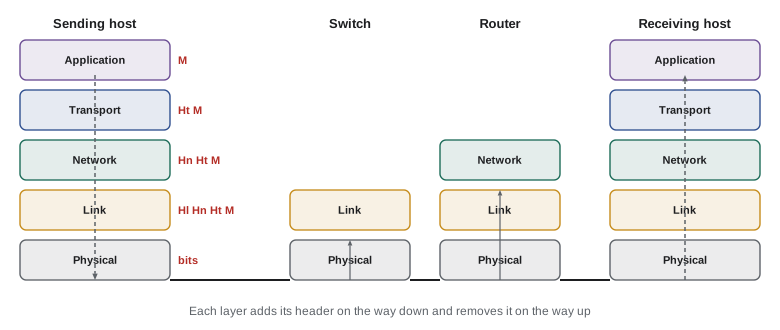
Encapsulation
As data moves down the sender's stack, each layer treats what it receives from above as payload and adds its own header, a process called encapsulation. The application's message gets a transport header to become a segment; the segment gets a network-layer header to become a datagram; the datagram gets a link-layer header and usually a trailer to become a frame, which the physical layer sends as bits. At the receiver, each layer reads and removes its own header and passes the payload up. Routers and switches in between open only as many layers as they need: a link-layer switch looks at the frame header, a router at the frame and the IP header. A router never needs to understand HTTP.
Each header carries what the peer layer needs: addresses so the right entity receives the data, a length or a type field so the receiver knows what comes next, sequence numbers for ordering and reliability, and checksums to detect errors. The type fields are what let layers be mixed and matched. The Ethernet header's EtherType field says whether the payload is IPv4 (0x0800), IPv6 (0x86DD) or ARP (0x0806); the IP header's protocol field says whether the payload is TCP (6), UDP (17) or ICMP (1); and port numbers in the transport header say which application gets the data. This demultiplexing chain is how a stream of bits on a wire ends up in the right browser tab.
The program below builds a real Ethernet frame containing an IPv4 datagram containing a TCP segment containing an HTTP request, using Python's struct module to pack each header field in network byte order (big-endian). It prints the size of each part and a hexadecimal dump of the start of the frame, as a packet analyzer such as Wireshark would show it.
import struct
# Build a minimal HTTP request and wrap it in TCP, IPv4 and Ethernet headers (checksums left at zero)
payload = b"GET / HTTP/1.1\r\nHost: example.org\r\n\r\n"
tcp = struct.pack("!HHIIBBHHH", 50514, 80, 1000, 0, 5 << 4, 0x18, 65535, 0, 0)    # 20 bytes, PSH+ACK
ip_total = 20 + len(tcp) + len(payload)
ip = struct.pack("!BBHHHBBH4s4s", (4 << 4) | 5, 0, ip_total, 1, 0x4000, 64, 6, 0,
                 bytes([192, 168, 1, 23]), bytes([93, 184, 216, 34]))           # 20 bytes
eth = bytes.fromhex("3c22fb112233") + bytes.fromhex("a4b1c2d3e4f5") + struct.pack("!H", 0x0800)  # 14 bytes
frame = eth + ip + tcp + payload
for name, part in (("Ethernet header", eth), ("IPv4 header", ip), ("TCP header", tcp), ("HTTP message", payload)):
    print(f"{name:16s} {len(part):3d} bytes")
print("frame total     ", len(frame), "bytes (plus 4-byte FCS, preamble and gap on the wire)")
print()
for off in range(0, 64, 16):
    chunk = frame[off:off + 16]
print(f"{off:04x} " + " ".join(f"{b:02x}" for b in chunk))Ethernet header 14 bytes IPv4 header 20 bytes TCP header 20 bytes HTTP message 37 bytes frame total 91 bytes (plus 4-byte FCS, preamble and gap on the wire) 0000 3c 22 fb 11 22 33 a4 b1 c2 d3 e4 f5 08 00 45 00 0010 00 4d 00 01 40 00 40 06 00 00 c0 a8 01 17 5d b8 0020 d8 22 c5 52 00 50 00 00 03 e8 00 00 00 00 50 18 0030 ff ff 00 00 00 00 47 45 54 20 2f 20 48 54 54 50
In the hex dump, the first six bytes are the destination MAC address and the next six the source MAC address. Bytes 12 and 13 are 08 00, the EtherType for IPv4. Byte 14 is 45: IP version 4 and a header length of five 32-bit words. Further along you can find the TTL of 64 (0x40), the protocol number 6 for TCP, the source address 192.168.1.23 (c0 a8 01 17) and, at the start of the TCP header, the source port 50514 (c5 52) and destination port 80 (00 50).
Decapsulation: reading a frame
Receiving software performs the reverse: it reads each header, uses the type field to decide how to interpret the payload, and moves on. The parser below takes raw bytes and walks up the stack. Real network stacks do exactly this, though with many more checks: verifying checksums, rejecting malformed headers, handling IP options and fragments, and matching segments to open connections.
import struct
frame = bytes.fromhex(
    "3c22fb112233a4b1c2d3e4f50800"            # Ethernet: dst, src, type
    "4500004d000140004006 0000c0a80117 5db8d822".replace(" ", "")
    + "c55200500000 03e8 0000 0000 5018 ffff 0000 0000".replace(" ", "")
) + b"GET / HTTP/1.1\r\nHost: example.org\r\n\r\n"
dst, src, etype = frame[:6], frame[6:12], struct.unpack("!H", frame[12:14])[0]
print("Ethernet  dst", dst.hex(":"), "src", src.hex(":"), f"type 0x{etype:04x} (IPv4)")
ip = frame[14:]
ver_ihl, tos, total, ident, flags, ttl, proto = struct.unpack("!BBHHHBB", ip[:10])
ihl = (ver_ihl & 0x0F) * 4
print("IPv4      version", ver_ihl >> 4, "header", ihl, "bytes, total", total, "TTL", ttl, "protocol", proto, "(TCP)")
print("          from", ".".join(map(str, ip[12:16])), "to", ".".join(map(str, ip[16:20])))
tcp = ip[ihl:]
sport, dport, seq, ack, off_flags = struct.unpack("!HHIIH", tcp[:14])
hlen = (off_flags >> 12) * 4
print("TCP       ports", sport, "->", dport, "seq", seq, "header", hlen, "bytes")
print("Payload ", tcp[hlen:].split(b"\r\n")[0].decode())Ethernet dst 3c:22:fb:11:22:33 src a4:b1:c2:d3:e4:f5 type 0x0800 (IPv4)
IPv4 version 4 header 20 bytes, total 77 TTL 64 protocol 6 (TCP)
from 192.168.1.23 to 93.184.216.34
TCP ports 50514 -> 80 seq 1000 header 20 bytes
Payload GET / HTTP/1.1Two details matter in every parser. First, multi-byte fields are sent in network byte order, most significant byte first; the exclamation mark in struct format strings selects it. Lesson 2 of CMPUT-229 explained endianness; on a little-endian processor such as x86 or most ARM systems, forgetting to convert gives wildly wrong port numbers and lengths. Second, header lengths are not always fixed: the IPv4 header length field and the TCP data offset field each give the header size in 32-bit words, because options may follow the fixed part. Parsers that assume 20 bytes break on packets with options, and malformed length fields are a classic source of security bugs, a topic for CMPUT-331.
The cost of layering: overhead
Every header costs bytes that carry no application data. On Ethernet, each frame also needs an 8-byte preamble, a 4-byte frame check sequence and a 12-byte interframe gap on the wire, and a minimum frame size of 64 bytes. For large transfers with 1,460-byte TCP payloads, overhead is small; for tiny messages such as keystrokes in a remote terminal or sensor readings, headers can outweigh the data many times over.
# Fraction of link capacity carrying application data, for different payload sizes
eth_wire = 8 + 14 + 4 + 12          # preamble, header, FCS, interframe gap (bytes)
ip, tcp = 20, 20                    # IPv4 and TCP headers without options
for payload in (1, 64, 512, 1460):
    on_wire = eth_wire + ip + tcp + payload
    on_wire = max(on_wire, 8 + 64 + 12)    # minimum Ethernet frame is 64 bytes
print(f"payload {payload:5d} B -> {on_wire:5d} B on the wire, efficiency {payload/on_wire:6.1%}")payload 1 B -> 84 B on the wire, efficiency 1.2% payload 64 B -> 142 B on the wire, efficiency 45.1% payload 512 B -> 590 B on the wire, efficiency 86.8% payload 1460 B -> 1538 B on the wire, efficiency 94.9%
Overhead explains several designs you will meet. TCP's Nagle algorithm delays small writes so that several can share one segment. Header compression schemes such as ROHC squeeze IP and transport headers on cellular and low-power radio links. IPv6 headers are a fixed 40 bytes, twice IPv4's minimum, which matters on constrained links and motivated 6LoWPAN compression for sensor networks. Encryption adds its own overhead: TLS records carry a header and an authentication tag, and QUIC's packet protection does the same.
Worked problem
Efficiency of a sensor network message
A temperature sensor sends a 4-byte reading every second over UDP, IPv6 and Ethernet. UDP adds 8 bytes, IPv6 40 bytes, and Ethernet 14 bytes of header plus 4 of FCS, padded to the 64-byte minimum frame, plus 20 bytes of preamble and gap. What fraction of the bits on the wire is sensor data?
Show solution
- Headers and payload: \(14 + 40 + 8 + 4 + 4 = 70\) bytes, which already exceeds the 64-byte minimum, so no padding is needed.
- On the wire: \(70 + 20 = 90\) bytes per reading.
- Efficiency: \(4/90 \approx 4.4\%\). More than 95% of the transmitted bits are overhead.
- Batching ten readings into one message gives \(40/(14 + 40 + 8 + 40 + 4 + 20) = 40/126 \approx 32\%\) efficiency, at the cost of up to ten seconds of extra latency.
Answer: About 4.4%; batching or header compression dramatically improves efficiency for tiny messages.
Where layers live
Layers are not just a diagram; they map onto real software and hardware. The physical and most of the link layer live in the network interface card (NIC) and its driver. The network and transport layers live in the operating system kernel, and applications reach them through the socket interface that lesson 5 explores. The application layer lives in user programs and libraries. This split has performance consequences: crossing from user space into the kernel and copying data between buffers costs time, so high-performance systems offload work to the NIC (checksums, segmentation of large sends into packets, receive-side scaling across processor cores) or bypass the kernel entirely with frameworks such as DPDK. Lesson 3 shows another trend: QUIC moves transport functions out of the kernel into a user-space library, so browsers can update them as often as they update themselves.
Not every device implements every layer. A host implements all five. A router implements the physical, link and network layers. A link-layer switch implements only the physical and link layers. Middleboxes such as firewalls, network address translators and load balancers break the rules on purpose, looking at or rewriting transport and even application headers; lesson 8 discusses NAT, and the trouble middleboxes cause for protocol evolution is part of why QUIC encrypts almost all of its own header.
Worked problem
Which layers does each device read?
A laptop on home Wi-Fi requests a web page from a server in a data centre. The packet passes through the home Wi-Fi access point (acting as a bridge), the home router with NAT, three ISP routers, a data centre load balancer that chooses a server by port number, and a top-of-rack Ethernet switch. List the highest layer each device must read.
Show solution
- Wi-Fi access point acting as a bridge: link layer (it translates 802.11 frames to Ethernet frames).
- Home router with NAT: transport layer, because NAT rewrites port numbers as well as IP addresses (lesson 8).
- ISP routers: network layer.
- Layer 4 load balancer: transport layer, choosing a server from the destination port and connection state.
- Top-of-rack switch: link layer.
- Server: all layers up to the application.
Answer: Only the two hosts read every layer; the access point and switch stop at the link layer, the ISP routers at the network layer, and the NAT router and load balancer peek at the transport layer.
Standards and the people who make them
Layering works across vendors and countries only because everyone implements the same protocols. The IETF standardizes the internet's network, transport and many application protocols through RFCs; IEEE 802 committees standardize Ethernet (802.3) and Wi-Fi (802.11); the 3rd Generation Partnership Project (3GPP) standardizes cellular networks; and the World Wide Web Consortium (W3C) and WHATWG maintain web standards such as HTML. IETF culture favours rough consensus and running code: protocols are expected to have working, interoperable implementations, and RFCs record how protocols actually behave. Reading RFCs is a skill worth developing; they are precise, freely available and often surprisingly readable. RFC 1122, Requirements for Internet Hosts, is a good place to start for the layers covered in this course.
When implementing a protocol, follow the robustness principle attributed to Jon Postel: be conservative in what you send and liberal in what you accept. Modern practice qualifies this: being too liberal lets broken implementations persist and can create security holes, so recent RFCs often specify exactly how to handle malformed input. RFC 9413 discusses this tension.
Common mistakes
MistakeThinking routers read application data.
InsteadRouters forward based on the network-layer header; they need not understand HTTP or any application protocol.
MistakeAssuming the OSI seven-layer model describes the internet's implementation.
InsteadThe internet uses five layers; presentation and session functions are left to applications.
MistakeParsing headers as if every field were in the processor's native byte order.
InsteadNetwork protocols use big-endian network byte order; use struct with "!" or functions like ntohs.
MistakeAssuming IPv4 and TCP headers are always 20 bytes.
InsteadOptions can extend both; read the header length and data offset fields.
MistakeIgnoring overhead for small messages.
InsteadHeaders can be many times larger than tiny payloads; batch messages or use header compression.
MistakeBelieving strict layering is never broken.
InsteadMiddleboxes such as NATs and load balancers deliberately inspect and rewrite higher-layer headers.
Summary and key terms
- Layering divides networking into five layers, each providing a service to the layer above using the layer below.
- The application, transport, network, link and physical layers exchange messages, segments, datagrams, frames and bits.
- Encapsulation adds a header at each layer on the way down; decapsulation removes them on the way up.
- Type and protocol fields and port numbers let receivers demultiplex data to the right protocol and application.
- IP is the narrow waist of the internet: many link layers below, many transport and application protocols above.
- Headers impose overhead that matters most for small messages.
- Hosts implement all layers; routers stop at the network layer and switches at the link layer, while middleboxes break layering on purpose.
- Layering
- Organizing a system so that each layer offers a service to the layer above using only the layer below.
- Protocol
- Rules for the format and order of messages between peer entities and the actions taken on them.
- Encapsulation
- Wrapping data from a higher layer as the payload of a lower layer, with a new header.
- Segment
- The unit of data at the transport layer, in particular for TCP.
- Datagram
- The unit of data at the network layer; also used for a UDP message.
- Frame
- The unit of data at the link layer, with a header and usually a trailer.
- Demultiplexing
- Using header fields to deliver incoming data to the correct higher-layer protocol or application.
- Network byte order
- Big-endian byte order used for multi-byte fields in internet protocol headers.
- Narrow waist
- The single common network layer, IP, on which many lower and higher protocols depend.
- Middlebox
- A device such as a NAT, firewall or load balancer that inspects or modifies traffic beyond its own layer.
Practice problems
Work each problem on paper first, then reveal the answer to check.
Name the unit of data at each of the five layers.
Show answer
Message, segment or datagram, datagram (packet), frame, bit.
Which header field tells an Ethernet receiver that the payload is IPv6?
Show answer
The EtherType field, with value 0x86DD.
Which IP header field identifies UDP as the payload, and with what value?
Show answer
The protocol field, value 17.
What layers does a router implement?
Show answer
Physical, link and network.
Give one advantage and one disadvantage of layering.
Show answer
Advantage: modularity lets layers change independently. Disadvantage: duplicated functions or hidden information that a layer could use.
Why does a 1-byte payload produce at least an 84-byte transmission on Ethernet?
Show answer
The 64-byte minimum frame plus 8 bytes of preamble and a 12-byte interframe gap.
What is the robustness principle?
Show answer
Be conservative in what you send and liberal in what you accept.
Which organization standardizes Wi-Fi?
Show answer
The IEEE 802.11 working group.
In struct.pack("!H", 80), what does the "!" mean?
Show answer
Use network (big-endian) byte order with standard sizes.
Why is the network layer the hardest to change?
Show answer
Every host and router must implement it, so changes require global deployment.
Lesson quiz · 5 questions
Score 60% or more to complete this lesson.
Create a free account to save your progress, take quizzes and earn a certificate.