
CMPUT-229 · Lesson 3 of 12 · 33 min
Data representation II: floating point, characters and endianness
Integers cover counting, indexing and addresses, but programs also need fractions, very large and very small quantities, and text. This lesson covers the three remaining representations every programmer meets: IEEE 754 floating point, which approximates real numbers with a fixed number of bits; character encodings, from ASCII to the UTF-8 encoding of Unicode; and byte order, the question of which end of a multi-byte value is stored first in memory. Each has consequences you have probably already run into without knowing their cause, such as 0.1 + 0.2 printing as 0.30000000000000004, a file that displays as gibberish, or a network program that reads 256 when 1 was sent.
From fixed point to floating point
One way to store fractions is fixed point: treat an integer as counting some small unit. Money is often handled this way, as a whole number of cents, and many digital signal processors work with integers scaled by \(2^{-15}\). Fixed point is exact and fast, but its range is limited: with 32 bits counting millionths, the largest value is about 2,147. Scientific notation solves the range problem by storing a significand and an exponent separately: \(6.022 \times 10^{23}\) and \(1.6 \times 10^{-19}\) need only a few digits each. Floating point is scientific notation in base 2. A number is written as \((-1)^s \times 1.f \times 2^{e}\), with a sign, a fraction \(f\) after an implied leading 1, and an exponent \(e\), and each of the three parts gets a fixed number of bits.
Before 1985, every computer manufacturer had its own floating-point format, with different precision, different rounding and different behaviour for errors, so numerical programs gave different answers on different machines. The IEEE 754 standard, led by William Kahan of Berkeley, fixed the formats and, just as importantly, fixed the rules: every basic operation must return the exactly rounded result of the true mathematical operation. It was revised in 2008 and again in 2019, and essentially every processor, from phones to supercomputers, implements it.
The IEEE 754 formats
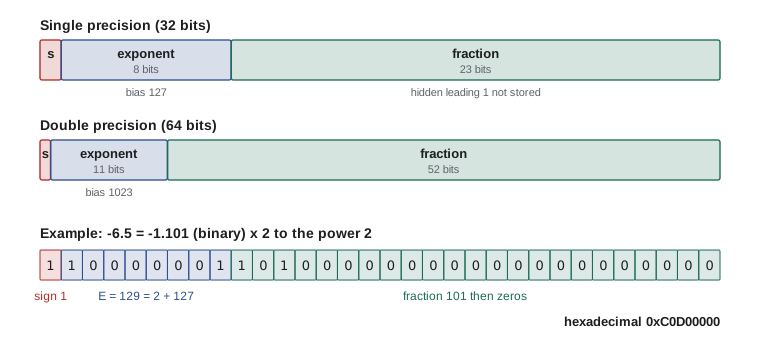
Single precision, the C type float, uses 32 bits: 1 sign bit, 8 exponent bits and 23 fraction bits. Double precision, the C type double and Python's float, uses 64 bits: 1 sign bit, 11 exponent bits and 52 fraction bits. The exponent is stored with a bias, an offset added so that the field is always non-negative: the bias is 127 for single and 1023 for double. A stored exponent field of 130 in single precision therefore means \(2^{3}\). Because a normalized binary number always starts with 1, that leading 1 is not stored, giving one extra bit of precision for free; it is called the hidden bit.
Worked problem
Encoding −6.5 in single precision
Find the 32-bit IEEE 754 pattern for −6.5.
Show solution
- The sign is negative, so s = 1.
- 6.5 in binary is 110.1, which normalizes to 1.101 × 2².
- The stored exponent is 2 + 127 = 129 = 1000 0001 in binary.
- The fraction is the bits after the binary point: 101 followed by twenty zeros.
- Assemble: 1 | 10000001 | 10100000000000000000000, which groups into hexadecimal as 1100 0000 1101 0000 0000 … = 0xC0D00000.
Answer: −6.5 is stored as 0xC0D00000 in single precision.
Python's struct module converts between numbers and their byte patterns, which makes it easy to check encodings like this one and to take any float apart into its fields.
import struct

def fields32(x):
    """Return the sign, stored exponent and fraction bits of x as a float32."""
    bits = struct.unpack('>I', struct.pack('>f', x))[0]
    return bits, bits >> 31, (bits >> 23) & 0xFF, bits & 0x7FFFFF

for x in (-6.5, 0.75, 1.0, 0.1, 3.0e38, 1e-40):
    bits, s, e, f = fields32(x)
    kind = 'subnormal' if e == 0 and f else 'normal'
    print(f'{x:>9}: 0x{bits:08X}  s={s} E={e:3d} (2^{max(e, 1) - 127:+4d})  '
f'f=0x{f:06X} {kind}') -6.5: 0xC0D00000 s=1 E=129 (2^ +2) f=0x500000 normal
0.75: 0x3F400000 s=0 E=126 (2^ -1) f=0x400000 normal
1.0: 0x3F800000 s=0 E=127 (2^ +0) f=0x000000 normal
0.1: 0x3DCCCCCD s=0 E=123 (2^ -4) f=0x4CCCCD normal
3e+38: 0x7F61B1E6 s=0 E=254 (2^+127) f=0x61B1E6 normal
1e-40: 0x000116C2 s=0 E= 0 (2^-126) f=0x0116C2 subnormalNote that 1e-40 is reported as subnormal. Single precision's smallest normal value is about 1.18 × 10⁻³⁸; values below it are stored without the hidden bit, as the next section explains. Note also that the fraction of 0.1 ends in a repeating pattern that has been cut off: 0.1 has no exact binary representation.
Special values
The extreme exponent fields are reserved. An exponent field of all zeros with a zero fraction represents zero, and since the sign bit is independent there are two zeros, +0 and −0, which compare equal but behave differently in a few operations such as 1 / x. An exponent field of zero with a non-zero fraction represents a subnormal (also called denormal) number, with no hidden bit and the smallest exponent. Subnormals fill the gap between zero and the smallest normal number, so that x − y = 0 only when x = y, a property called gradual underflow. Some processors handle subnormals slowly, in microcode, which can make numerical code mysteriously slow when values become tiny.
An exponent field of all ones means infinity if the fraction is zero, and NaN, not a number, otherwise. Overflow produces infinity, 1 / 0 produces infinity, and invalid operations such as 0 / 0, ∞ − ∞ and the square root of a negative number produce NaN. NaN has the peculiar property that it compares unequal to everything, including itself, so x != x is a standard test for NaN. Instead of stopping the program, IEEE 754 operations return these values and set status flags that a program can check, so a long computation can finish and report problems at the end.
| Exponent field | Fraction | Meaning | Example (single) |
|---|---|---|---|
| 0 | 0 | ±0 | 0x00000000 is +0, 0x80000000 is −0 |
| 0 | non-zero | Subnormal: ±0.f × 2⁻¹²⁶ | Smallest positive 0x00000001 ≈ 1.4 × 10⁻⁴⁵ |
| 1 to 254 | any | Normal: ±1.f × 2^(E − 127) | 1.0 is 0x3F800000 |
| 255 | 0 | ±infinity | 0x7F800000 is +∞ |
| 255 | non-zero | NaN | 0x7FC00000 is the usual quiet NaN |
import math, struct
def bits32(x):
    return struct.unpack('>I', struct.pack('>f', x))[0]

values = {'+0': 0.0, '-0': -0.0, '+inf': math.inf, 'nan': math.nan,
          'max float32': 3.4028234663852886e38, 'min normal': 1.1754943508222875e-38}
for name, x in values.items():
    print(f'{name:>12}: 0x{bits32(x):08X}')
nan = math.nan
print('nan == nan :', nan == nan, '  nan != nan :', nan != nan)
print('0.0 == -0.0:', 0.0 == -0.0, '  copysign(1, -0.0):', math.copysign(1, -0.0))
print('inf - inf :', math.inf - math.inf) +0: 0x00000000
-0: 0x80000000
+inf: 0x7F800000
nan: 0x7FC00000
max float32: 0x7F7FFFFF
min normal: 0x00800000
nan == nan : False nan != nan : True
0.0 == -0.0: True copysign(1, -0.0): -1.0
inf - inf : nanPrecision, rounding and the trouble with 0.1
A floating-point format has a fixed number of significant bits: 24 for single precision counting the hidden bit, and 53 for double. That corresponds to about 7 and about 16 significant decimal digits. The gap between 1.0 and the next larger representable number is called machine epsilon: \(2^{-23} \approx 1.19 \times 10^{-7}\) for single and \(2^{-52} \approx 2.22 \times 10^{-16}\) for double. Gaps scale with the size of the number, so between \(2^{24}\) and \(2^{25}\) single precision can represent only even integers, and float32 cannot distinguish 16,777,216 from 16,777,217.
When the exact result of an operation falls between two representable numbers, IEEE 754 rounds it. The default rule is round to nearest, ties to even: choose the nearer neighbour, and if the result is exactly halfway, choose the one whose last bit is 0. Rounding to even avoids the slow upward drift that always rounding halves up would cause over millions of operations. Each basic operation therefore has a relative error of at most half an epsilon, but errors accumulate across operations.
Most decimal fractions cannot be represented exactly in binary, for the same reason that 1/3 cannot be written exactly in decimal: 0.1 in binary is 0.000110011001100…, repeating forever. The stored double is the nearest representable value, which is very slightly more than 0.1. So is the stored 0.2, and when they are added the rounding errors combine to give a result one step above the double nearest 0.3. Python prints the shortest decimal string that reads back as the same double, which reveals the difference.
from decimal import Decimal
import struct

print('stored 0.1 is exactly ', Decimal(0.1))
print('stored 0.3 is exactly ', Decimal(0.3))
print('0.1 + 0.2 is exactly  ', Decimal(0.1 + 0.2))
print('0.1 + 0.2 == 0.3 ?    ', 0.1 + 0.2 == 0.3)
print('isclose               ', abs((0.1 + 0.2) - 0.3) <= 1e-9 * 0.3)

# Floating-point addition is not associative
a, b, c = 1e16, -1e16, 1.0
print('(a + b) + c =', (a + b) + c, '  a + (b + c) =', a + (b + c))

# float32 runs out of integers at 2**24
f32 = lambda x: struct.unpack('f', struct.pack('f', x))[0]
print('float32(16777217) =', f32(16777217.0))stored 0.1 is exactly 0.1000000000000000055511151231257827021181583404541015625 stored 0.3 is exactly 0.299999999999999988897769753748434595763683319091796875 0.1 + 0.2 is exactly 0.3000000000000000444089209850062616169452667236328125 0.1 + 0.2 == 0.3 ? False isclose True (a + b) + c = 1.0 a + (b + c) = 0.0 float32(16777217) = 16777216.0
The non-associativity example deserves attention. Mathematically both groupings give 1, but adding 1.0 to −1e16 first loses the 1 entirely, because doubles near 10¹⁶ are spaced 2 apart. The order of operations changes the answer, which is why compilers do not reorder floating-point arithmetic unless you allow it with options such as -ffast-math, and why parallel sums can give slightly different results from run to run. Two practical rules follow. Never compare floating-point results for exact equality; test whether they are within a tolerance appropriate to the problem. And never store money in binary floating point; use integer cents or a decimal type such as Python's decimal module.
Worked problem
Catastrophic cancellation
A program computes 1 − cos(x) for x = 10⁻⁸ in double precision. What goes wrong, and how can it be fixed?
Show solution
- cos(10⁻⁸) = 1 − 5 × 10⁻¹⁷ approximately, which is closer to 1 than half an epsilon, so the computed cosine rounds to exactly 1.0.
- The subtraction 1 − 1.0 gives 0, losing every significant digit: subtracting nearly equal numbers cancels the leading digits and leaves only rounding error.
- Use the identity 1 − cos x = 2 sin²(x/2) instead; sin(5 × 10⁻⁹) is computed accurately, giving 5 × 10⁻¹⁷.
Answer: The direct formula returns 0, a 100 per cent error. Rewriting it to avoid subtracting nearly equal quantities gives the correct 5.0 × 10⁻¹⁷.
Floating point in hardware
RISC-V puts floating point in optional extensions: F for single precision and D for double. They add 32 separate floating-point registers, f0 to f31, and instructions such as fadd.s, fmul.d, fdiv.d, fsqrt.d and the fused multiply-add fmadd.d, which computes a × b + c with a single rounding and is the building block of fast linear algebra. Loads and stores between memory and the f registers are flw, fsw, fld and fsd, and conversion instructions move values between integer and floating-point form. A floating-point add or multiply typically takes three to five cycles in a modern core, and divide and square root take longer. This course's assembly uses only the integer instructions, but lesson 10's pipelining discussion applies to floating-point units too.
Machine learning has driven a revival of shorter formats. Half precision (16 bits, 5 exponent and 10 fraction bits) is part of IEEE 754-2008. The bfloat16 format keeps single precision's 8-bit exponent but only 7 fraction bits, so it has float32's range with much less precision, which neural network training tolerates well. Recent accelerators go further, with 8-bit and even 4-bit floating-point formats for inference. Fewer bits per number means more numbers per memory transfer and more arithmetic units per chip, and memory bandwidth is usually the limiting factor.
Characters and text
Text is stored as a sequence of numbers, one or more per character, according to an encoding. The ASCII standard of 1963 assigns the numbers 0 to 127 to English letters, digits, punctuation and control characters such as newline (10) and tab (9). Its layout has useful regularities: digits '0' to '9' are 48 to 57, so subtracting 48 converts a digit character to its value, and upper- and lower-case letters differ only in bit 5 (value 32), so a single xor changes case.
ASCII covers only English. Unicode assigns a number, called a code point, to every character in every writing system, plus symbols and emoji, with room for over a million code points written as U+0041 for A or U+20AC for the euro sign. UTF-8, designed by Ken Thompson and Rob Pike in 1992, encodes each code point in one to four bytes. Code points up to U+007F use a single byte identical to ASCII, so every ASCII file is already valid UTF-8. Larger code points use a leading byte whose high bits announce the length (110 for two bytes, 1110 for three, 11110 for four) followed by continuation bytes that each start with 10 and carry six bits of the code point. UTF-8 is now used by the large majority of web pages and is the default encoding in Python 3, in Linux and, from Python 3.15, for Python's file operations on every platform.
def utf8_layout(ch):
    cp = ord(ch)
    data = ch.encode('utf-8')
    bits = ' '.join(f'{b:08b}' for b in data)
    return f'U+{cp:04X} {ch!r:>6}: {len(data)} byte(s)  {data.hex(" ").upper():<12} {bits}'

for ch in 'A', 'é', '€', '中', '🙂':
    print(utf8_layout(ch))

word = 'Café'
print(f'{word!r}: {len(word)} characters, {len(word.encode())} bytes in UTF-8')U+0041 'A': 1 byte(s) 41 01000001 U+00E9 'é': 2 byte(s) C3 A9 11000011 10101001 U+20AC '€': 3 byte(s) E2 82 AC 11100010 10000010 10101100 U+4E2D '中': 3 byte(s) E4 B8 AD 11100100 10111000 10101101 U+1F642 '🙂': 4 byte(s) F0 9F 99 82 11110000 10011111 10011001 10000010 'Café': 4 characters, 5 bytes in UTF-8
The variable length has consequences at the machine level. A C string is just a sequence of bytes ending with a zero byte, the null terminator, which is what the RISC-V assembler directive .asciz produces. The C function strlen counts bytes, not characters, so it reports 5 for the UTF-8 string Café. Indexing the nth character of a UTF-8 string requires scanning from the start, which is why some languages store strings internally in other ways; Python, for example, picks a fixed width per string based on its largest code point.
    .data
word:   .asciz "Café"           # UTF-8: the é takes two bytes
label:  .asciz "bytes before the terminator: "
    .text
    .globl main
main:
    la   t0, word           # t0 walks along the string
    li   t1, 0              # t1 counts bytes
count:
    lbu  t2, 0(t0)          # next byte, zero-extended
    beqz t2, done           # stop at the null terminator
    addi t1, t1, 1
    addi t0, t0, 1
    j    count
done:
    la   a0, label
    li   a7, 4
    ecall
    mv   a0, t1
    li   a7, 1
    ecall
    li   a7, 10
ecallbytes before the terminator: 5
Byte order: little-endian and big-endian
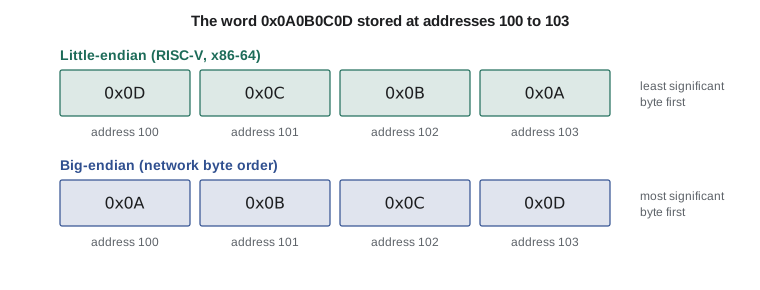
A 32-bit word occupies four consecutive bytes in memory, which raises a question with no natural answer: is the most significant byte stored at the lowest address, or the least significant? Storing the least significant byte first is called little-endian; storing the most significant byte first is big-endian. The names come from Jonathan Swift's Gulliver's Travels, in which two nations go to war over which end of a boiled egg to break, a joke about how arbitrary the choice is. RISC-V, x86-64 and, in practice, Arm are little-endian. Many older designs such as the IBM mainframes and the Motorola 68000 were big-endian, and so is the standard network byte order used in Internet protocol headers.
    .data
w:  .word 0x0A0B0C0D
sp_: .asciz " "
    .text
    .globl main
main:
    la   s0, w
    li   s1, 0              # byte offset 0 .. 3
loop:
    add  t0, s0, s1
    lbu  a0, 0(t0)          # read one byte of the word
    li   a7, 34             # print it in hexadecimal
    ecall
    la   a0, sp_
    li   a7, 4
    ecall
    addi s1, s1, 1
    li   t1, 4
    blt  s1, t1, loop
    li   a7, 10
ecall0x0000000d 0x0000000c 0x0000000b 0x0000000a
Byte order is invisible as long as a program reads data with the same width and machine that wrote it. It matters whenever bytes cross a boundary: when a binary file written on one machine is read on another, when a program inspects memory byte by byte as the code above does, and when data travels over a network. Programs that exchange binary data therefore convert explicitly, with functions such as htonl and ntohl in C or the byte-order characters in Python's struct module, where '<' means little-endian, '>' big-endian and '!' network order.
import struct
n = 0x0A0B0C0D
print('little-endian bytes:', struct.pack('<I', n).hex(' '))
print('big-endian bytes   :', struct.pack('>I', n).hex(' '))
wire = struct.pack('!H', 1)                 # port number 1 in network order
print('a big-endian 1 read as little-endian:', struct.unpack('<H', wire)[0])little-endian bytes: 0d 0c 0b 0a big-endian bytes : 0a 0b 0c 0d a big-endian 1 read as little-endian: 256
A related rule is alignment. A value is naturally aligned when its address is a multiple of its size: words at multiples of 4, halfwords at multiples of 2. Hardware fetches aligned values in one access. RISC-V allows misaligned loads and stores, but an implementation may perform them slowly or trap to software to emulate them, so compilers align data naturally and C structures contain padding bytes for this reason, as CMPUT-201 lesson 8 showed. The assembler directive .align, or .p2align, places the next item on an aligned address.
Common mistakes
MistakeTesting floating-point results with ==.
InsteadCompare with a tolerance suited to the problem, for example abs(a − b) <= rel_tol × max(abs(a), abs(b)).
MistakeStoring money in a float or double.
InsteadUse integer cents or a decimal type; binary floating point cannot represent most decimal fractions exactly.
MistakeAssuming floating-point addition is associative.
InsteadGrouping and order change rounding; add small numbers together first and expect parallel sums to vary slightly.
MistakeTreating the number of bytes in a string as the number of characters.
InsteadIn UTF-8, characters take one to four bytes; strlen and len(bytes) count bytes.
MistakeWriting binary data on one machine and reading it on another without specifying byte order.
InsteadChoose an explicit order, usually network (big-endian) order, and convert with htonl or struct.
Summary and key terms
- Floating point represents (−1)ˢ × 1.f × 2ᵉ with fixed-width sign, biased exponent and fraction fields; the leading 1 is hidden.
- Single precision has 1, 8 and 23 bits (bias 127); double has 1, 11 and 52 bits (bias 1023).
- Exponent fields of all zeros encode zero and subnormals; all ones encode infinity and NaN, which is unequal even to itself.
- Every IEEE 754 operation rounds the exact result, by default to nearest with ties to even, so each step has relative error at most half an epsilon.
- Most decimal fractions are not exact in binary, floating-point addition is not associative, and subtracting nearly equal values cancels significant digits.
- Text is stored with an encoding; UTF-8 represents Unicode code points in one to four bytes and is a superset of ASCII.
- RISC-V is little-endian; network protocols use big-endian order, so binary data crossing machines needs explicit conversion.
- IEEE 754
- The standard defining binary floating-point formats, rounding rules and special values.
- Bias
- A constant added to the true exponent so that the stored exponent field is non-negative.
- Hidden bit
- The leading 1 of a normalized significand, implied rather than stored.
- Subnormal number
- A value with exponent field zero and no hidden bit, filling the gap between zero and the smallest normal number.
- NaN
- Not a number: the result of invalid operations such as 0/0, unequal to every value including itself.
- Machine epsilon
- The gap between 1.0 and the next representable number: 2⁻²³ for single, 2⁻⁵² for double.
- Round to nearest, ties to even
- The default IEEE rounding rule: choose the nearer value, and at an exact tie the one with an even last bit.
- Code point
- The number Unicode assigns to a character, written U+ followed by hexadecimal digits.
- UTF-8
- A variable-length encoding of Unicode code points in one to four bytes, compatible with ASCII.
- Little-endian
- Storing the least significant byte of a multi-byte value at the lowest address.
Practice problems
Work each problem on paper first, then reveal the answer to check.
Encode 0.75 in single precision.
Show answer
0.75 = 1.1 × 2⁻¹, so s = 0, E = 126 = 01111110, f = 100…0: 0x3F400000.
Decode the single-precision pattern 0x41200000.
Show answer
s = 0, E = 130 so the exponent is 3, f = 0x200000 means 1.01 in binary = 1.25; value 1.25 × 8 = 10.0.
What is the bias for double precision, and why is one used?
Show answer
1023; it makes the stored exponent non-negative so patterns compare in the same order as values.
Which pattern represents −∞ in single precision?
Show answer
0xFF800000: sign 1, exponent all ones, fraction zero.
Why does x != x identify NaN?
Show answer
IEEE 754 defines NaN as unordered and unequal to every value, including itself; every other value equals itself.
About how many significant decimal digits does single precision carry?
Show answer
About 7, from 24 significant bits (24 × log₁₀2 ≈ 7.2).
How many bytes does the UTF-8 encoding of U+00F1 (ñ) take, and what is its first byte?
Show answer
Two bytes; the first is 110 followed by five code point bits: 0xC3 (the full encoding is C3 B1).
The word 0x12345678 is stored little-endian at address 0x100. What byte is at 0x102?
Show answer
0x34; the bytes from 0x100 upward are 78, 56, 34, 12.
Why might summing a large array of floats in a different order give a different answer?
Show answer
Each addition rounds, and the rounding depends on the magnitudes involved, so different groupings accumulate different errors.
Which RISC-V extension adds double-precision floating point, and what registers does it use?
Show answer
The D extension, which uses the floating-point registers f0 to f31 (shared with F).
Lesson quiz · 5 questions
Score 60% or more to complete this lesson.
Create a free account to save your progress, take quizzes and earn a certificate.