
CMPUT-229 · Lesson 11 of 12 · 30 min
The memory hierarchy: caches
The processors of lessons 9 and 10 assumed that memory answers in one cycle. Real main memory is nowhere near that fast. A modern core can execute several instructions every third of a nanosecond, while a read from main memory, built from DRAM chips, takes on the order of 80 to 100 nanoseconds: hundreds of cycles. If every load went to DRAM, the processor would spend almost all its time waiting. Caches close the gap. A cache is a small, fast memory close to the processor that holds copies of recently used data, so that most accesses can be served quickly. This lesson explains why caches work, how they are organized, how to analyse their performance, and how to write programs that use them well. The effect of a cache on running time is often larger than the effect of any other single factor in this course.
The processor–memory gap and the hierarchy
Memory technologies trade speed against capacity and cost. SRAM, static RAM, stores each bit in a cell of six transistors; it is fast but large and expensive, so it is used on the processor chip for caches. DRAM, dynamic RAM, stores each bit as charge on a tiny capacitor with one transistor; it is dense and cheap but slower, and it must be refreshed thousands of times per second because the charge leaks away. Flash memory in solid-state drives is cheaper and denser still and keeps its data without power, but takes tens of microseconds to read. Hard disks, with spinning platters, take milliseconds. No single technology is both fast and large.
The answer is a hierarchy: a few small, fast levels near the processor, backed by larger, slower levels further away, each holding a subset of the data in the level below. Registers are at the top, managed by the compiler. Next come the caches, typically three levels: a small L1 cache for each core, split into instruction and data halves; a larger L2 per core; and a large L3 shared by all cores. Main memory is below the caches, and storage below that. The goal is for the whole system to appear almost as fast as the top level and almost as large as the bottom.
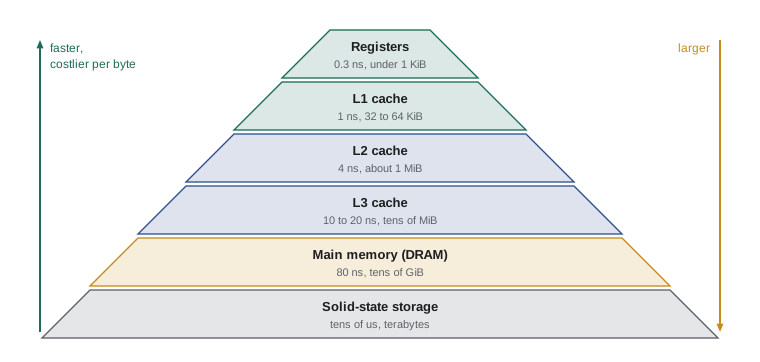
| Level | Typical access time | Typical size | Technology |
|---|---|---|---|
| Registers | ≈ 0.3 ns (1 cycle) | Under 1 KiB | Flip-flops |
| L1 cache | ≈ 1 ns (3–5 cycles) | 32–64 KiB per core, per half | SRAM |
| L2 cache | ≈ 4 ns (10–15 cycles) | 0.5–2 MiB per core | SRAM |
| L3 cache | ≈ 10–20 ns | 8–100+ MiB shared | SRAM |
| Main memory | ≈ 80–100 ns | 8–512 GiB | DRAM |
| Solid-state drive | ≈ 20–100 µs | Terabytes | Flash |
Locality
Caches work because programs do not access memory at random. They exhibit locality. Temporal locality means that data accessed recently is likely to be accessed again soon: a loop counter, a running sum, the instructions of a loop body. Spatial locality means that data near recently accessed data is likely to be accessed soon: the next element of an array, the next instruction, the next field of a structure. A cache exploits temporal locality by keeping recently used data, and spatial locality by moving data in blocks, also called lines, of typically 64 bytes, so that fetching one word brings its neighbours along.
When the processor requests data that is in the cache, the access is a hit; otherwise it is a miss, and the block containing the data must be fetched from the next level, taking the miss penalty. The fraction of accesses that hit is the hit rate, and one minus it is the miss rate. Because typical programs have strong locality, L1 data caches commonly achieve hit rates of 95 per cent or more on everyday code, though data-intensive programs can do far worse.
Direct-mapped caches
A cache must answer two questions quickly: is this address's block present, and where? The simplest organization, a direct-mapped cache, allows each memory block exactly one possible location in the cache. The address is split into three fields. The block offset, the lowest bits, selects a byte within the block. The index, the next bits, selects one cache line. The tag, the remaining high bits, is stored with the line and compared on each access to check that the line holds this particular block and not another one with the same index. Each line also has a valid bit, which is 0 until the line has been filled.
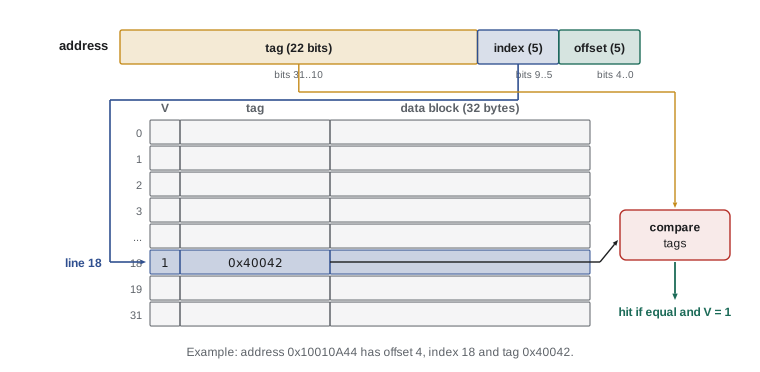
For a cache of \(C\) bytes with blocks of \(B\) bytes, there are \(C/B\) lines, so the offset needs \(\log_2 B\) bits and the index \(\log_2 (C/B)\) bits; the tag is whatever remains of the address. Because the tag is stored for every line, a cache also needs storage for tags and valid bits in addition to the data itself.
Worked problem
Splitting an address
A 1 KiB direct-mapped cache has 32-byte blocks. Which line, offset and tag does address 0x10010A44 use?
Show solution
- Offset bits = log₂ 32 = 5; lines = 1024 / 32 = 32, so index bits = 5; tag bits = 32 − 10 = 22.
- 0x10010A44 in binary ends in …1010 0100 0100. The low 5 bits are 00100, so the offset is 4.
- The next 5 bits, bits 5 to 9, are 10010, so the index is 18.
- The tag is the address shifted right by 10: 0x10010A44 >> 10 = 0x40042.
Answer: Line 18, byte offset 4, tag 0x40042. Any other address with index 18 but a different tag would evict this block.
The simulation below follows a short trace of word addresses through a tiny direct-mapped cache, reporting each hit or miss. It shows both kinds of locality at work and the main weakness of direct mapping: two addresses that share an index keep evicting each other even when the rest of the cache is empty.
def direct_mapped(trace, size=64, block=16):
    lines = size // block
    tags = [None] * lines
    hits = 0
    for addr in trace:
        offset, index, tag = addr % block, (addr // block) % lines, addr // (block * lines)
        if tags[index] == tag:
            result = 'hit'; hits += 1
        else:
            result = 'miss' + (' (evicts tag %d)' % tags[index] if tags[index] is not None else '')
            tags[index] = tag
        print(f'addr {addr:4d}: tag {tag} index {index} offset {offset:2d} -> {result}')
    print(f'hit rate {hits}/{len(trace)}')

# a 64-byte cache with 16-byte blocks (4 lines); word accesses
trace = [0, 4, 8, 12, 16, 0, 4, 64, 0, 64, 20]
direct_mapped(trace)addr 0: tag 0 index 0 offset 0 -> miss addr 4: tag 0 index 0 offset 4 -> hit addr 8: tag 0 index 0 offset 8 -> hit addr 12: tag 0 index 0 offset 12 -> hit addr 16: tag 0 index 1 offset 0 -> miss addr 0: tag 0 index 0 offset 0 -> hit addr 4: tag 0 index 0 offset 4 -> hit addr 64: tag 1 index 0 offset 0 -> miss (evicts tag 0) addr 0: tag 0 index 0 offset 0 -> miss (evicts tag 1) addr 64: tag 1 index 0 offset 0 -> miss (evicts tag 0) addr 20: tag 0 index 1 offset 4 -> hit hit rate 6/11
Addresses 4, 8 and 12 hit because they are in the same block as 0: spatial locality. The second access to 0 and 4 hits because the block is still there: temporal locality. But 64 maps to the same line as 0, index 0, with a different tag, so the accesses to 0 and 64 evict each other repeatedly while three other lines sit unused. Such conflict misses are the price of direct mapping.
Associativity and replacement
A set-associative cache relaxes the placement rule. The lines are grouped into sets of n lines, called ways, and a block may go in any way of the one set its index selects. On each access, the hardware compares the tag against all n ways of the set at once. A direct-mapped cache is one-way set associative; a fully associative cache has a single set containing every line, so a block can go anywhere, which eliminates conflict misses but requires comparing every tag on every access. Real L1 caches are typically 8- or 12-way set associative, and L2 and L3 caches more.
When a block must be brought into a full set, the cache must choose a victim to evict. The ideal policy would evict the block used furthest in the future, which is unknowable. Least recently used (LRU) replacement evicts the block unused for longest, a good approximation that is exact and cheap for two ways but expensive for many, so large caches use approximations such as pseudo-LRU. Random replacement is surprisingly close to LRU for large associativities.
Misses fall into three classes, known as the three Cs. Compulsory misses occur on the first access to a block, which could not have been in the cache. Capacity misses occur because the cache is too small to hold everything the program is using. Conflict misses occur because too many blocks compete for one set, even though the cache as a whole has room. Larger blocks reduce compulsory misses by exploiting spatial locality, larger caches reduce capacity misses, and higher associativity reduces conflict misses; each comes with costs in access time, power or miss penalty.
| Design choice | Reduces | Costs |
|---|---|---|
| Larger cache | Capacity misses | Longer hit time, more area and power |
| Larger blocks | Compulsory misses (spatial locality) | Higher miss penalty; fewer blocks, possibly more conflict misses |
| Higher associativity | Conflict misses | More comparators, longer hit time, more power |
| Better replacement policy | Capacity and conflict misses | Hardware to track usage |
| Prefetching | Compulsory misses for predictable patterns | Bandwidth and pollution if wrong |
Writes
Reads are the simple case. On a write that hits, the cache must decide when to update the next level. A write-through cache updates both the cache and the next level on every write, which is simple and keeps memory consistent but generates heavy traffic; a write buffer lets the processor continue while writes drain. A write-back cache updates only the cache and marks the line dirty; the block is written to the next level only when it is evicted. Write-back caches generate far less traffic and are standard for L1 data caches in high-performance processors. On a write miss, a write-allocate cache fetches the block and then writes into it, as for a read; a no-write-allocate cache sends the write to the next level without caching it. Write-back caches normally allocate on writes.
Measuring cache performance
Cache performance is summarized by the average memory access time, AMAT: the time for a hit plus the fraction of accesses that miss times the miss penalty. With several levels, the miss penalty of one level is the AMAT of the next.
def amat(levels, memory):
    """levels: list of (hit time in cycles, local miss rate). memory: memory access time."""
    t = memory
    for hit, miss in reversed(levels):
        t = hit + miss * t
    return t

mem = 300                                     # DRAM access in cycles (illustrative)
print(f'no cache                 : {mem} cycles')
print(f'L1 only (4, 5% miss)     : {amat([(4, 0.05)], mem):.1f} cycles')
print(f'L1 + L2 (12, 20% miss)   : {amat([(4, 0.05), (12, 0.20)], mem):.2f} cycles')
print(f'L1 + L2 + L3 (40, 30%)   : {amat([(4, 0.05), (12, 0.20), (40, 0.30)], mem):.2f} cycles')

# effect on CPI: 1.0 base CPI, 30% of instructions are loads or stores
for name, t in [('L1 only', amat([(4, 0.05)], mem)), ('three levels', amat([(4, 0.05), (12, 0.20), (40, 0.30)], mem))]:
    stall = 0.30 * (t - 4)                    # cycles beyond the pipelined L1 hit
print(f'CPI with {name:<12}: {1.0 + stall:.2f}')no cache : 300 cycles L1 only (4, 5% miss) : 19.0 cycles L1 + L2 (12, 20% miss) : 7.60 cycles L1 + L2 + L3 (40, 30%) : 5.90 cycles CPI with L1 only : 5.50 CPI with three levels: 1.57
With only an L1 cache, a 5 per cent miss rate to a 300-cycle memory more than quadruples the average access time and drives the CPI up several-fold; the L2 and L3 caches catch most of those misses and bring the CPI down to about 1.6. The numbers are illustrative, but the proportions are realistic, and they explain why a large share of a modern processor chip's area is cache. Local miss rates, the fraction of accesses reaching a level that miss there, are higher for lower levels because the easy hits have already been taken by the levels above.
Writing cache-friendly programs
Programmers cannot see caches, but they can see their effects, and the most important programming technique follows directly from spatial locality: access memory sequentially. C stores two-dimensional arrays in row-major order, each row contiguous in memory, so a loop nest that varies the last index fastest walks through memory one element at a time. Swapping the loops makes each access jump a whole row ahead, using one word of each fetched block before moving on. The two C programs below fill and sum a 64 × 64 matrix of ints, 16 KiB in all; they differ only in the order of the summing loops. Each was compiled with clang for RV32IM and run on the simulator, which recorded every data access; the trace was then fed to cache models of different sizes, block sizes and associativities.
void print_int(int);
void print_str(const char *);

#define N 64
int m[N][N];                      /* 64 x 64 ints = 16 KiB, row-major */

int cmain(void) {
    for (int i = 0; i < N; i++)          /* fill row by row */
        for (int j = 0; j < N; j++)
            m[i][j] = i + j;
    int s = 0;
    for (int i = 0; i < N; i++)          /* sum ROW by row */
        for (int j = 0; j < N; j++)
            s += m[i][j];
    print_str("sum = "); print_int(s); print_str("\n");
    return 0;
}sum = 258048 instructions executed: 33767, data accesses: 8196 4 KiB, 32-byte blocks, direct-mapped: miss rate 12.5% (1028 misses) 4 KiB, 32-byte blocks, 4-way: miss rate 12.5% (1028 misses) 32 KiB, 64-byte blocks, 8-way: miss rate 3.1% (258 misses)
void print_int(int);
void print_str(const char *);

#define N 64
int m[N][N];                      /* 64 x 64 ints = 16 KiB, row-major */

int cmain(void) {
    for (int i = 0; i < N; i++)          /* fill row by row */
        for (int j = 0; j < N; j++)
            m[i][j] = i + j;
    int s = 0;
    for (int j = 0; j < N; j++)          /* sum COLUMN by column */
        for (int i = 0; i < N; i++)
            s += m[i][j];
    print_str("sum = "); print_int(s); print_str("\n");
    return 0;
}sum = 258048 instructions executed: 33768, data accesses: 8196 4 KiB, 32-byte blocks, direct-mapped: miss rate 56.3% (4611 misses) 4 KiB, 32-byte blocks, 4-way: miss rate 56.3% (4611 misses) 32 KiB, 64-byte blocks, 8-way: miss rate 3.1% (258 misses)
The instruction counts are almost identical, but the column-order version misses far more often in the small caches, because each 32-byte block holds eight ints from one row and the column walk uses only one of them before the block is evicted. The filling loop is the same in both programs, so all of the difference comes from the summing loop. With a 32 KiB cache, the whole 16 KiB matrix fits, and both orders miss only on first touch: a reminder that cache effects depend on the relationship between data size and cache size, which is why programs can suddenly slow down when their data grows past a cache level. On real hardware, with caches that fill from DRAM at hundreds of cycles per miss, loop order can change running time by a factor of several.
Other techniques follow the same principles. Blocking, or tiling, restructures algorithms such as matrix multiplication to work on sub-blocks small enough to stay in the cache, reusing each loaded value many times. Choosing an array of structures or a structure of arrays to match the access pattern keeps each fetched block full of useful data. Linked data structures scattered across memory, such as linked lists and trees of small nodes, defeat spatial locality, which is one reason arrays often outperform them even when algorithm analysis says otherwise. And because instructions are cached too, small loops and compact code help the instruction cache. CMPUT-379 extends the hierarchy idea downward to disks, where the same principles appear again at a scale of milliseconds.
Common mistakes
MistakeAssuming all memory accesses cost the same.
InsteadAn L1 hit takes a few cycles and a DRAM access hundreds; access patterns matter as much as instruction counts.
MistakeComputing the index from the full address instead of removing the offset bits first.
InsteadIndex = (address / block size) mod number of sets; the low log₂B bits are the offset.
MistakeThinking higher associativity always improves performance.
InsteadIt reduces conflict misses but lengthens hit time and raises power; benefits fall off beyond about eight ways for L1.
MistakeTraversing a C two-dimensional array column by column in an inner loop.
InsteadMake the last index vary fastest to walk memory sequentially in row-major order.
MistakeUsing global miss rates for lower levels when computing AMAT.
InsteadIn the nested formula, use each level's local miss rate: the fraction of accesses reaching that level that miss there.
Summary and key terms
- Main memory is hundreds of times slower than the processor; a hierarchy of caches makes memory appear fast and large.
- SRAM is fast and expensive and used for caches; DRAM is dense, slower and used for main memory.
- Caches exploit temporal locality by keeping recent data and spatial locality by fetching whole blocks.
- Addresses split into tag, index and offset; a direct-mapped cache has one place for each block, a set-associative cache n places.
- Misses are compulsory, capacity or conflict; block size, cache size and associativity each target one kind, at a cost.
- Write-back caches with write allocation reduce traffic by writing dirty blocks only when they are evicted.
- AMAT = hit time + miss rate × miss penalty; sequential, cache-friendly access patterns can make programs several times faster.
- Cache
- A small, fast memory that holds copies of recently used data from a larger, slower memory.
- Temporal locality
- The tendency to reuse recently accessed data soon.
- Spatial locality
- The tendency to access data near recently accessed data.
- Block (line)
- The unit of data transferred between cache levels, typically 64 bytes.
- Tag
- The high address bits stored with a cache line to identify which block it holds.
- Direct-mapped cache
- A cache in which each block can occupy exactly one line.
- Set-associative cache
- A cache in which each block can occupy any of n lines in one set.
- LRU replacement
- Evicting the block in a set that has gone unused for the longest time.
- Write-back
- A policy that writes modified blocks to the next level only on eviction.
- AMAT
- Average memory access time: hit time plus miss rate times miss penalty.
Practice problems
Work each problem on paper first, then reveal the answer to check.
A 32 KiB direct-mapped cache has 64-byte blocks. How many offset, index and tag bits does a 32-bit address use?
Show answer
Offset 6, index log₂(512) = 9, tag 17.
The same 32 KiB cache is made 8-way set associative. How many index bits now?
Show answer
512 lines / 8 ways = 64 sets, so 6 index bits; the tag grows to 20 bits.
In a 1 KiB direct-mapped cache with 16-byte blocks, do addresses 0x1000 and 0x1400 conflict?
Show answer
Yes: there are 64 lines and both addresses have index (address / 16) mod 64 = 0.
L1 hit time 1 ns, miss rate 4 per cent, miss penalty 60 ns. What is the AMAT?
Show answer
1 + 0.04 × 60 = 3.4 ns.
Classify the first access ever to a block.
Show answer
A compulsory miss.
Why are write-back caches preferred for L1 data caches?
Show answer
Repeated writes to a block cost one write to the next level, on eviction, instead of one per store.
Why does summing a row-major matrix column by column miss more often?
Show answer
Each access is a row apart, so each fetched block contributes one element before it is evicted.
What is the difference between SRAM and DRAM?
Show answer
SRAM uses six transistors per bit and is fast; DRAM uses one transistor and a capacitor, is denser and slower, and needs refreshing.
Name a technique that improves cache use in matrix multiplication.
Show answer
Blocking (tiling): working on sub-matrices that fit in the cache.
Why might a linked list be slower to traverse than an array of the same length?
Show answer
Its nodes are scattered in memory, so each step may miss; the array is contiguous and benefits from spatial locality and prefetching.
Lesson quiz · 5 questions
Score 60% or more to complete this lesson.
Create a free account to save your progress, take quizzes and earn a certificate.