
CINE-302 · Lesson 9 of 12 · 25 min
Set extensions, digital environments and digital doubles
Building an entire world for the camera is expensive. Productions therefore build only what actors touch and what the camera sees up close, and extend the rest digitally: the upper floors of a street, the far side of a valley, the ceiling of a cathedral, the ocean beyond a ship's rail. Similarly, dangerous or impossible actions are performed by digital doubles of actors, and crowds are filled with digital people. For the cinematographer, these techniques create a split between what is lit on set and what will exist only in the computer, and the job is to make them feel like one photographed world. This lesson covers set extensions, partial sets and where to stop building, digital matte paintings and environments, lighting continuity between built and digital areas, atmosphere and depth, digital doubles and scanning, digital crowds, and the cinematographer's review of environment work.
Set extensions and partial sets
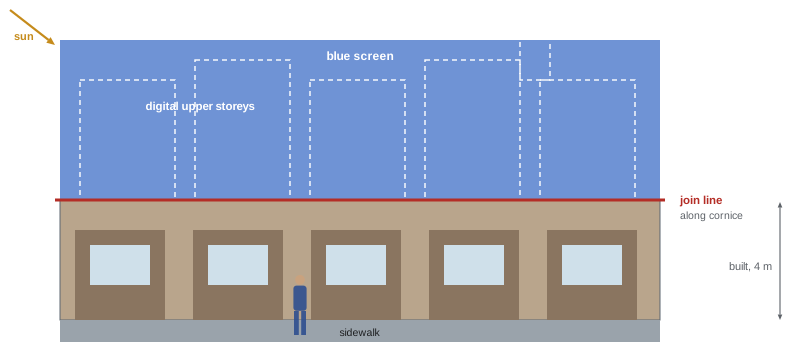
A set extension adds digital architecture or landscape to a physically built set. Typical approaches build the set to around the height of a door or a first storey, often 3 to 5 m, with green or blue screen above or beyond it, and extend upward and outward digitally. Others build a foreground and middle ground and replace a distant background. Deciding where the physical set ends is a collaboration between the production designer, VFX supervisor and cinematographer. Factors include where actors walk and touch; what the camera will see in wide shots and at low angles; where practical light, shadow and reflections must be real; the budget for construction versus VFX; and how easily the transition can be hidden, for example along a roofline, an awning or a band of foliage. Leaving the edge of the physical set where it can be lit and textured consistently, rather than in the middle of a large flat wall, makes the join easier.
Digital matte paintings and environments
Matte painting, once done on glass, is now digital: artists combine photographs, painting and 3D elements to create backgrounds and extensions. For static or nodal shots, a 2D matte painting may be enough. For moving cameras, artists project paintings onto simple 3D geometry, a technique called camera projection or 2.5D, so that parallax looks correct within a limited range of movement. For larger moves and complex worlds, full 3D environments are built with modelling, texturing, lighting and rendering, often using LiDAR scans and photogrammetry of real places (Lesson 7). Environments for LED volumes are built in real-time engines to similar standards (Lessons 10 and 11). The cinematographer's contribution is to define the light and atmosphere the environment should have, matching the photographed foreground, and to approve the look in review.
Lighting continuity between built and digital
The most common failure of set extensions is light that does not match: the built set is lit by soft overhead studio sources while the digital extension shows hard afternoon sun, or the extension is bright and crisp while the foreground is hazy and warm. To avoid this, the cinematographer and VFX supervisor agree on the light direction, quality, colour and time of day for each scene, and both the stage lighting and the digital lighting follow that plan. Practical considerations include:
- Lighting the built set as if by the same sun or sky the extension will show, with matching shadow direction and hardness.
- Lighting the screen or the area above the set so that edges of buildings and actors catch the right rim and bounce.
- Providing the VFX team with HDRIs, grey and chrome references, and photographs of the lighting setup (Lesson 7).
- Documenting stops, colour temperatures and gel choices, so that colours match.
- Considering shadows the extension would cast onto the built set, such as a tall building shading a street, and either lighting for them or planning them as digital shadows.
Atmosphere and depth
Real environments have atmosphere: haze, dust, humidity and light scattering that reduce contrast and shift colour with distance, a phenomenon painters call aerial perspective. Digital extensions without atmosphere look like cut-outs pasted behind the actors. Atmosphere can be created on set with haze machines, which also show light beams and soften contrast, and in the digital extension with depth-based haze. If the set is hazed, the extension must be hazed to match; if the set is clean, heavy digital haze will look wrong. Agreeing on an atmosphere level early, and shooting reference without haze when needed for keying, is part of planning.
This simple model of aerial perspective shows contrast \(C\) falling exponentially with distance \(d\) from its value \(C_0\) near the camera, at a rate set by the scattering coefficient \(\beta\); denser haze means a larger \(\beta\).
Worked problem
Matching atmosphere
On a hazed set, a building facade 20 m from camera shows about 70 % of the contrast of a similar facade at 2 m. Using \(C(d) = C_0 e^{-\beta d}\), estimate \(\beta\), and the contrast a digital tower 200 m away should show relative to the near facade.
Show solution
- Between 2 m and 20 m the distance increases by 18 m: \(0.70 = e^{-18\beta}\).
- So \(\beta = -\ln(0.70) / 18 \approx 0.0198\) per metre.
- At 200 m (198 m beyond the near facade): \(e^{-0.0198 \times 198} \approx e^{-3.92} \approx 0.02\).
- The tower should show only about 2 % of the near contrast, nearly lost in haze, unless the haze is reduced.
Answer: β ≈ 0.02 per metre; at 200 m the tower would retain only about 2 % of the near contrast, so either lighten the haze or accept a nearly invisible tower.
Digital doubles
A digital double is a computer-generated replica of an actor, used for dangerous stunts, impossible actions, crowd shots and shots in which the actor is unavailable. Creating one requires high-resolution scans of the actor's body and face, typically from photogrammetry rigs or light stages that capture geometry and how skin reflects light from many directions; reference photography of costumes, hair and makeup; and performance capture or reference footage of how the actor moves. Digital doubles may be used briefly in wide or fast shots, or for extended close-ups, which demand far more detail. Photographic reference matters: shooting the actor in the scene's lighting, and filming a stunt performer's action as reference, helps artists match the double to the plate. The use of digital replicas of performers is now governed by contracts and guild and union agreements that require consent, disclosure and, in many cases, compensation for their creation and use.
Digital crowds
Large crowds in stadiums, battles and cities are often created by combining a smaller group of extras with digital people. Approaches include tiling live-action sections with motion control (Lesson 8), sprites (2D cards of filmed extras placed in the scene), and full 3D crowd simulation with digital agents driven by motion capture libraries. For tiling and sprites, the extras must be shot under the same light as the main plate, with the same camera height and lens, and in costume variations to avoid obvious repetition. For 3D crowds, reference of real crowd behaviour and lighting is useful. Cinematographers can help by planning camera angles where the crowd needs the least work, such as placing real extras in the foreground and digital ones in the distance.
Interaction and contact
Digital elements must interact with the photographed world: a CG creature walking through grass displaces it; a digital vehicle kicks up dust; a set extension casts shadows; a digital double is lit by a practical fire. Planning interaction with special effects, such as air movers, practical dust hits, water splashes and light cues, gives real physical responses for the digital element to align with. Interactive light, for example a light on a dimmer or a moving rig that imitates a creature's glow or a passing spaceship, is valuable, as long as it matches the timing and position of the CG event, which previs and techvis help define.
| Technique | Physical build | Digital work |
|---|---|---|
| Ground-level set extension | Shopfronts, street and props to about 4 m | Upper storeys and skyline |
| Background replacement | Foreground set or location | Distant landscape or city |
| 2.5D projection | Plate with limited parallax | Paintings projected on simple geometry |
| Full 3D environment | Minimal or none | Complete modelled world |
| Crowd tiling and sprites | Small group of extras | Repeated and placed filmed people |
| Digital double | Actor scan and reference | CG replica for stunts or crowds |
Reviewing environment work
Cinematographers increasingly review VFX environments during post-production, either in VFX reviews or during the DI. Useful questions include: Does the light direction match the foreground? Are shadow hardness and colour consistent? Does the atmosphere increase believably with distance? Do black levels and contrast match between plate and extension? Are lens characteristics, such as flare, vignetting, distortion and bokeh, applied to the digital areas as they would be to photographed ones? Does the grain or noise match? Are there scale cues, such as windows, people and cars, that make sizes believable? Clear, specific notes in photographic terms help vendors improve shots efficiently (Lesson 12).
Lens matching for extensions
A set extension must look as though it was photographed through the same lens as the plate. That means the same perspective, from the same camera position and focal length; the same distortion, applied using the lens grid model; the same depth of field, with distant extensions softened if the lens was focused on foreground action; and the same lens character, including flares, vignetting, chromatic aberration and bokeh shape. Cinematographers can help by recording focus distances and stops, shooting lens grids and flare references, and avoiding unnecessary filtration changes between shots of the same sequence. If a diffusion filter is used, its effect on highlights must be recreated on the CG elements, so filter type and strength must be logged for every shot.
Interactive light and practical elements
Digital environments look most convincing when the real set responds to them. If a digital explosion lights the scene, the gaffer adds a flash of interactive light on the actors and set; if a digital fire burns in the background, flicker effects warm the foreground; if a CG vehicle passes, a moving light sweep or a shadow pass sells its presence. Agree the timing of these cues with the VFX supervisor and record them, so that the digital element can be animated to match. Interactive light is far cheaper to create on set than to add convincingly to every pixel of the actors in compositing.
Digital doubles in practice
Digital doubles are usually built from a scanning session in which the performer is photographed by dozens or hundreds of synchronized cameras, sometimes in a light stage that records how the skin responds to light from every direction. Costume, hair and makeup are scanned in the looks that will appear on screen. Even for brief appearances, such as a stunt replacement during a fall, the double must match the real performer's lighting and movement, so reference photography of the performer in the scene's light is valuable. Consent forms and union agreements cover what the scans may be used for, how long they are kept, and whether they can be reused in other productions.
Finally, think about the join between real and digital in every frame of a moving shot. A join line that hides neatly behind a practical wall in the first frame may slide across an actor's face as the camera cranes up, so check the full move in previs or rehearsal.
Common mistakes
MistakeEnding physical sets in the middle of flat walls.
InsteadPlace join lines along natural edges such as cornices.
MistakeLighting the set and extension differently.
InsteadAgree direction, quality, colour and time of day.
MistakeHazed sets with crisp digital backgrounds.
InsteadMatch atmosphere between built and digital areas.
MistakeUsing actors' scans without consent terms.
InsteadFollow contracts and union rules on digital replicas.
MistakeCrowd tiles under changing sun.
InsteadShoot tiles quickly under consistent light.
Summary and key terms
- Productions build what actors touch and extend the rest digitally.
- Choose join lines with the designer and VFX supervisor.
- Matte paintings, 2.5D projections and 3D environments suit different moves.
- Light built and digital areas as one world, with shared references.
- Atmosphere and aerial perspective must match across the join.
- Digital doubles need scans, reference and consent.
- Crowds and interactions are planned with matching light and practical effects.
- Set extension
- Digital addition to a physically built set.
- Join line
- Where the physical set meets the digital extension.
- Matte painting
- Painted or composited background image.
- Camera projection
- Projecting images onto simple 3D geometry for parallax.
- Aerial perspective
- Loss of contrast and colour shift with distance.
- Digital double
- CG replica of an actor.
- Light stage
- Rig capturing how skin reflects light from many directions.
- Sprite
- 2D card of a filmed element placed in a scene.
- Crowd simulation
- Digital agents animated as a crowd.
- Interactive light
- Practical light that matches a CG event.
Practice problems
Work each problem on paper first, then reveal the answer to check.
How high are ground-level set builds typically?
Show answer
About 3–5 m.
Name two factors in deciding where to stop building.
Show answer
Actor contact, camera angles, light, budget, hiding the join.
What is 2.5D projection?
Show answer
Projecting paintings onto simple geometry.
Name three things to match between set and extension.
Show answer
Light direction, hardness, colour, atmosphere, black levels.
What is aerial perspective?
Show answer
Contrast loss and colour shift with distance.
With β = 0.01 per m, contrast at 100 m relative to the camera?
Show answer
About 37 %.
What does a digital double require?
Show answer
Scans, reference photography and motion reference.
Why are digital replicas regulated?
Show answer
Contracts and union agreements require consent and compensation.
Name two crowd techniques.
Show answer
Tiling, sprites, 3D crowd simulation.
Name two review questions for environments.
Show answer
Light direction, shadows, atmosphere, black levels, lens effects, grain.
Lesson quiz · 5 questions
Score 60% or more to complete this lesson.
Create a free account to save your progress, take quizzes and earn a certificate.