
CINE-302 · Lesson 8 of 12 · 25 min
Motion control and repeatable moves for VFX
Many visual effects require the camera to do exactly the same thing more than once: shoot an actor and then the empty set for a clean plate, film a crowd section and then move it across the frame to multiply it, photograph a miniature and a full-size set with matching perspective, or combine several passes of a product with different lighting. A human operator cannot repeat a complex move with the precision compositing demands, so productions use motion control: computer-controlled rigs that record and replay camera moves exactly. CINE-230 introduced motion control as one of the small-move tools; this lesson concentrates on how it serves visual effects: multi-pass photography, clean plates for moving shots, crowd and twin shots, scaling moves for miniatures, exporting moves to CG and back, repeatable heads and lighter alternatives, and practical planning and safety.
What motion control does
A motion control rig is a camera support whose axes, such as track position, lift, arm swing, pan, tilt, roll, focus, iris and zoom, are driven by precise motors under computer control. The operator programs a move by setting key positions or by recording a move performed with handwheels or a controller, and the system can then repeat it any number of times with sub-millimetre accuracy, at the same speed or scaled in time. The rig also outputs the move as data, so that VFX artists can recreate the exact camera in 3D software, and it can import moves designed in previs or CG. Rigs range from small tabletop and slider systems to large track-mounted arms and high-speed robotic arms used for product and commercial work.
Multi-pass photography
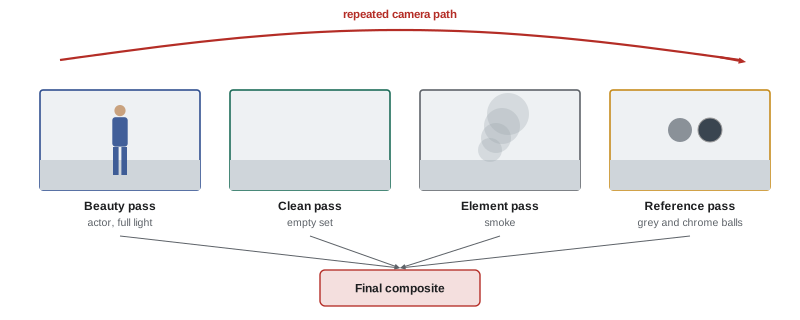
Multi-pass photography records the same move several times with different content or lighting, combining the passes in compositing. Common passes include:
- Beauty pass: the shot with actors and full lighting.
- Clean pass: the same move without actors or rigs, for removals and background reconstruction.
- Element passes: smoke, water or other effects added in a separate pass with the same move.
- Lighting passes: separate passes with key, fill, rim or practicals isolated, giving the compositor and colourist control over each light.
- Matte passes: passes with the subject lit against a black or illuminated background to create clean mattes.
- Reference passes: grey and chrome balls or stand-ins moving through the shot.
In product and commercial work, multi-pass photography allows perfect control over reflections and highlights, combining passes where each part of the product was lit separately (PHOT-211 and CINE-330).
Clean plates for moving shots
For moving shots that need removals, such as wires, rigs, stunt pads or crew reflections, motion control produces a clean plate that matches the move exactly. Without it, artists must reconstruct hidden backgrounds from other frames or paint them by hand. When full motion control is not available, remote heads and some dollies with encoders can record and replay pan, tilt and track moves with reasonable accuracy, and a skilled crew can perform a manual clean pass that is close enough for artists to align. Even an approximate clean pass is far better than none.
Crowds, twins and split screens
Motion control allows the same performers to appear many times in a shot. For crowd multiplication, a group of extras is filmed in one section of a stadium or street, then moved to the next section for another pass, and the passes are combined to fill the space. For twins and doubles, an actor plays one role in the first pass and the other in the second, with a stand-in or eyeline marks to guide timing. Split screens on locked-off shots need no motion control, but moving shots do. Matching lighting and timing between passes is essential: sun moving across the sky between passes on an exterior can make sections mismatch, so passes are shot quickly or under controlled light.
Scaling moves for miniatures
Miniatures remain useful for destruction, vehicles, models of buildings and fantastical environments. Combining a miniature with full-size elements or live action requires the camera move to be scaled: positions are scaled by the model's scale factor so that perspective matches, and time may be scaled so that motion and physics look natural. Falling objects, water and fire behave differently at small scale; filming at a higher frame rate and playing back at normal speed slows the motion. A common rule of thumb derived from gravity is that the frame rate should be multiplied by the square root of the scale factor.
Here \(k\) is the scale factor (for a 1:16 model, \(k = 16\)), \(f\) the frame rate and \(d\) a distance in the camera move.
Worked problem
Shooting a 1:9 miniature
A bridge collapse is filmed as a 1:9 miniature to be combined with a full-scale plate shot at 24 fps. The full-scale camera move is a 12 m dolly over 5 seconds at a height of 3 m. What frame rate, move length and camera height should the miniature pass use, and how long does the move take in real time on the model stage?
Show solution
- Scale factor \(k = 9\), so \(\sqrt{k} = 3\).
- Frame rate: 24 × 3 = 72 fps.
- Move length: 12 / 9 ≈ 1.33 m; camera height: 3 / 9 ≈ 0.33 m.
- Screen time of 5 s at 24 fps is 120 frames; at 72 fps, 120 frames take 120 / 72 ≈ 1.67 s on the stage.
Answer: 72 fps, a move of about 1.33 m at a height of about 0.33 m, performed in about 1.67 seconds.
Moves from CG and to CG
Because motion control systems output and import camera data, they connect live action with CG. A move designed in previs can be exported to the rig and photographed exactly, so that a CG creature animated to that move fits without a matchmove. Conversely, a move recorded on set can be exported to VFX artists as a ready-made camera, saving tracking work, although matchmovers often refine it to account for small mechanical deviations, lens distortion and synchronization. Units, coordinate systems, frame offsets and lens data must be agreed so that the data matches; testing the round trip before the shoot avoids errors.
Repeatable heads, encoded cranes and lighter alternatives
Full motion control rigs are heavy, expensive and time-consuming to set up, so many productions use lighter repeatable systems. Encoded remote heads record pan, tilt and roll and can replay them; encoded dollies and cranes record track and arm positions; some slider and cable systems include programmable moves. Real-time camera tracking systems used in virtual production (Lesson 6) record camera positions continuously, even for handheld shots, though they cannot replay a move. For many clean plates and simple multi-pass shots, these lighter systems are sufficient, and they integrate more easily into the pace of drama production.
| System | Repeatability | Typical use |
|---|---|---|
| Full motion control rig | Very high, all axes | Multi-pass, miniatures, commercials, complex VFX |
| Robotic arm (high speed) | Very high, fast moves | Product, tabletop, high-speed commercials |
| Encoded remote head | Good for pan, tilt, roll | Clean plates, simple passes |
| Encoded dolly or crane | Good for track and arm | Clean plates on moving shots |
| Real-time camera tracking | Records but does not replay | Data for VFX and LED volumes |
| Manual repeat with marks | Approximate | Low-budget clean passes |
Planning motion control shots
Motion control shots need careful planning. The rig's size and track limit where the camera can go; its maximum speeds and accelerations limit the move; setting up and programming takes time; and each pass takes as long as the move plus reset time. Planning includes: designing the move in previs or techvis with the rig's capabilities in mind; scheduling enough time for setup, programming and all passes; agreeing the passes and their order with the VFX supervisor; locking lenses, focus marks and lighting; and preparing performers for repeated, precise timing, often with playback or audible counts. On LED volumes and in commercials, motion control may be combined with real-time engines for live previews.
Safety with motion control and robotic arms
Motion control rigs and robotic arms move heavy cameras quickly and with great force, and high-speed robotic arms in particular can cause serious injury. Safety practices include exclusion zones around the rig while it runs, emergency stops within reach of the operator, clear warnings before each move, slow test runs before full speed, never placing people within the rig's reach during automatic operation, and following the manufacturer's procedures and applicable workplace safety rules for industrial robots. Only trained operators should program and run the systems.
How motion control systems work
A motion control rig is a camera support driven by motors under computer control, often a crane, track dolly, pan-tilt head or industrial robotic arm. Each axis, such as track, lift, swing, pan, tilt, roll, focus, iris and zoom, has an encoder that reports its position precisely, and the controller records and replays the position of every axis for every frame. A move can be programmed in several ways: by typing key positions, by importing a camera path from previs or a 3D animation, or by moving the rig manually while the system records, sometimes called learning a move. The system can then repeat the move with high accuracy as many times as needed, at different speeds if required, while the camera fires frame by frame or runs continuously.
Repeatable heads and lightweight options
Not every repeatable move needs a full motion control rig. Encoded remote heads and dollies can record a move performed by an operator and replay it with good accuracy, suitable for many clean-plate and twinning shots. Some cranes and sliders offer motorized repeat modes. For locked-off shots, a heavy tripod with the head locked and the camera untouched between passes can be enough, as long as no one bumps the legs and the lens is not changed. Matching passes with a handheld camera is possible only approximately, and compositors rely on tracking and warping to align such passes, which is slower and less reliable.
Lighting for multiple passes
Lighting must be consistent between passes, or carefully varied when the passes are designed to provide separate lighting elements. Daylight changes quickly, so outdoor multi-pass shots need fast turnarounds between passes, or plans for compositors to match changing light. Indoors, record every lamp's position, intensity and gel, and avoid changing anything between passes unless planned. Some motion control shots deliberately shoot separate light passes, such as a key pass, a fill pass and a practical lights pass, so that the balance can be adjusted in compositing.
Safety around motion control
Motion control rigs move quickly and with great force, and an arm or crane does not see people in its path. Productions using them establish exclusion zones, rehearse moves at reduced speed, appoint a dedicated operator with an emergency stop, and brief cast and crew before every new move. Industrial robotic arms used for high-speed work demand particular care, following the manufacturer's safety procedures and any applicable workplace safety rules.
Matching scale in miniature photography
Miniatures also need correct depth of field. A model a fraction of real size, photographed close, shows very shallow depth of field unless the lens is stopped down hard, which immediately reveals the scale. Miniature photography therefore uses small apertures, bright lighting and sometimes tilt lenses or focus stacking, balancing exposure against the higher frame rate needed for correct motion.
Whatever system is used, test the repeatability before the shoot day by running the same move twice and overlaying the two passes; any drift visible in the overlay will also appear in the final composite.
Common mistakes
MistakeSkipping clean passes on moving shots.
InsteadUse motion control or encoded heads for clean plates.
MistakeChanging lighting between passes.
InsteadLock lighting unless the pass requires a change.
MistakeShooting miniatures at normal frame rate.
InsteadScale frame rate by the square root of the scale factor.
MistakeMismatched units in exported moves.
InsteadAgree units, coordinates and offsets and test round trips.
MistakeStanding inside a robotic arm's reach.
InsteadKeep exclusion zones and emergency stops ready.
Summary and key terms
- Motion control repeats camera moves exactly and outputs move data.
- Multi-pass photography records beauty, clean, element, lighting and matte passes.
- Clean plates for moving shots need repeatable moves.
- Crowd multiplication and twins combine passes of the same move.
- Miniatures need scaled moves and frame rates of about \(f \sqrt{k}\).
- Moves can travel from previs to rig and from rig to CG.
- Lighter encoded systems often suffice; safety around rigs is essential.
- Motion control
- Computer-driven repeatable camera movement.
- Multi-pass
- Several recordings of the same move combined later.
- Beauty pass
- The main pass with actors and full lighting.
- Clean pass
- Pass without actors or rigs.
- Lighting pass
- Pass with individual lights isolated.
- Crowd multiplication
- Repeating a group across passes to fill space.
- Scale factor
- Ratio between full size and miniature.
- Encoded head
- Remote head that records its axis positions.
- Robotic arm
- Industrial robot used for fast, precise moves.
- Exclusion zone
- Area kept clear while a rig operates.
Practice problems
Work each problem on paper first, then reveal the answer to check.
Name four multi-pass types.
Show answer
Beauty, clean, element, lighting, matte, reference.
Why does motion control help removals?
Show answer
It provides matching clean plates.
How are crowds multiplied?
Show answer
Shooting groups in sections and combining passes.
Frame rate for a 1:4 miniature matched to 24 fps?
Show answer
48 fps.
Move length for a 20 m move at 1:10?
Show answer
2 m.
Why export moves to CG?
Show answer
To give artists a ready camera and avoid tracking.
What must be agreed for data round trips?
Show answer
Units, coordinate systems, frame offsets, lens data.
Name a lighter alternative to full motion control.
Show answer
Encoded remote heads, dollies or cranes.
What can real-time tracking not do?
Show answer
Replay a move.
Name two motion control safety practices.
Show answer
Exclusion zones, emergency stops, warnings, slow tests.
Lesson quiz · 5 questions
Score 60% or more to complete this lesson.
Create a free account to save your progress, take quizzes and earn a certificate.