
CINE-202 · Lesson 6 of 12 · 26 min
Log encoding, raw and bit depth
Digital cinema cameras capture a wide range of light, but files must store that range efficiently in a limited number of code values. Log encoding is the standard solution: a mathematical curve that distributes code values evenly across stops, preserving highlight and shadow detail for grading. Raw recording takes a different approach, storing sensor data before most processing. This lesson explains why linear encoding is inefficient, how log curves work, the major manufacturer log formats and where they place middle grey, bits per stop and the importance of bit depth, the difference between log and raw, compression and chroma subsampling in relation to log, and how to view and interpret log footage.
Why linear encoding is inefficient
A sensor's output is linear: twice the light produces twice the signal. If this linear signal were stored directly in a file, half of all code values would be used for the brightest stop, a quarter for the next stop, an eighth for the next, and so on. In a 10-bit file with 1,024 values, the brightest stop would have 512 values while the stops near black would have only a handful, far fewer than needed to represent smooth gradations. Human vision, by contrast, perceives brightness roughly logarithmically, so equal steps in stops look equal. Linear storage wastes values in the highlights, where small differences are hard to see, and starves the shadows, where banding and posterization would appear after grading.
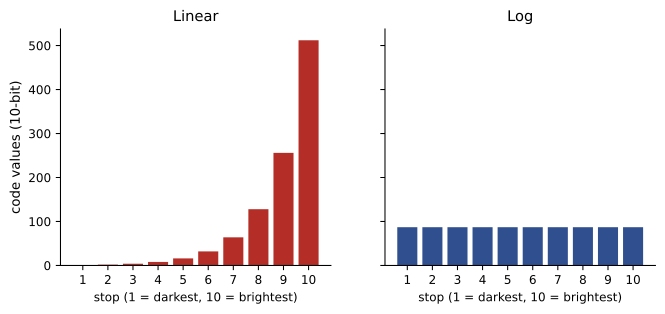
How log curves work
A log curve converts linear light into code values using a logarithmic function, so that each stop of light receives a similar number of code values. A simplified form is:
Here \(x\) is scene-linear light, with middle grey at 0.18, \(V\) is the encoded value between 0 and 1, and \(a\), \(b\), \(c\) and \(d\) are constants chosen by the manufacturer. Real curves often add a linear segment near black to handle noise and values close to zero. The result is an image in which mid-tones sit in the middle of the code range, highlights are compressed but still represented, and shadows have enough values for grading. On a normal display, log footage looks flat, low in contrast and desaturated, because the display expects a different encoding; it is not meant to be viewed directly without a transform.
Manufacturer log formats
Each camera manufacturer designs its own log curve, matched to its sensors and colour science, usually paired with a native wide-gamut colour space:
| Log format | Typical cameras | Middle grey (approx. % of range) | Paired gamut |
|---|---|---|---|
| ARRI LogC3 | ALEXA Mini, ALEXA Mini LF, AMIRA | About 39 % | ARRI Wide Gamut 3 |
| ARRI LogC4 | ALEXA 35, ALEXA 265 | About 28 % | ARRI Wide Gamut 4 |
| Sony S-Log3 | VENICE, FX series, BURANO | About 41 % | S-Gamut3 / S-Gamut3.Cine |
| RED Log3G10 | RED V-RAPTOR, KOMODO | About 33 % | REDWideGamutRGB |
| Canon Log 2 / Log 3 | C70, C300 Mark III, C500 Mark II | About 39 % / 34 % | Cinema Gamut |
| Panasonic V-Log | VariCam, EVA1, LUMIX S | About 42 % | V-Gamut |
| Blackmagic Film Gen 5 | URSA Mini Pro, Pocket Cinema | About 38 % | Blackmagic Wide Gamut |
Because middle grey is placed differently, the same exposure produces different waveform values in each format, which is why exposure targets and false colour must be interpreted for the specific log curve in use. ARRI's LogC4, introduced with the ALEXA 35 in 2022, places middle grey lower than LogC3 to make room for the camera's extended highlight range. Some log curves, such as Sony S-Log2 and the older Canon Log, differ from their successors, so it is important to know exactly which version a camera is recording.
Bits per stop and bit depth
Bit depth determines how many code values are available: 8 bits give 256, 10 bits 1,024, 12 bits 4,096 and 16 bits 65,536. With log encoding spreading values over, say, 14 stops, a 10-bit file provides roughly 60 to 80 values per stop across most of the range, enough for smooth gradations and moderate grading. An 8-bit file provides only about 15 to 20 values per stop, which can produce banding in skies and smooth gradients when log footage is graded strongly, which is why recording log in 8-bit is generally discouraged. Twelve-bit and higher formats, including most raw formats, give generous headroom for heavy grading and visual effects.
Worked problem
Values per stop
A camera records about 14 stops in log. Roughly how many code values per stop are available in 8-bit, 10-bit and 12-bit encodings, assuming the log curve uses about 85 % of the code range evenly?
Show solution
- 8-bit: 256 × 0.85 ≈ 218 values; 218 / 14 ≈ 15 per stop.
- 10-bit: 1,024 × 0.85 ≈ 870; 870 / 14 ≈ 62 per stop.
- 12-bit: 4,096 × 0.85 ≈ 3,480; 3,480 / 14 ≈ 250 per stop.
Answer: About 15, 62 and 250 values per stop respectively, showing why 8-bit log is risky and 10-bit or more is preferred.
Raw recording
Raw formats store the sensor's data before demosaicing and most processing, typically with 12 to 16 bits, and leave white balance, exposure index and some colour decisions as metadata that can be changed in post. Examples include ARRIRAW, REDCODE RAW (R3D), Sony X-OCN, Blackmagic RAW, Canon Cinema RAW Light, Apple ProRes RAW and Cinema DNG. Many raw formats are compressed, using lossless or visually lossless wavelet compression, to keep data rates manageable. Raw offers maximum flexibility and quality: exposure index and white balance can be adjusted after shooting without loss, and debayering can be redone with improved algorithms later. Its costs are higher data rates and storage, more processing power for playback and grading, and more complex pipelines. Some raw formats are encoded internally with a log-like curve to use bits efficiently; when raw footage is debayered, it is usually output as log or scene-linear data in the camera's wide gamut for grading.
Log, raw and display-referred recording compared
Cameras typically offer three kinds of recording, each suited to different productions:
- Raw: maximum quality and flexibility for features, high-end drama and commercials with full grading and visual effects.
- Log in a high-quality codec, such as Apple ProRes 4444 or 422 HQ, Avid DNxHR or high-bitrate camera codecs: excellent quality and grading room with smaller files and simpler workflows, widely used for television, documentary and many features.
- Display-referred recording, such as Rec.709 with a baked-in look or a LUT burned in: smallest effort in post, suited to fast-turnaround news, live events and productions without grading, but with little room for correction.
Many productions record log in a high-quality codec while monitoring through a show LUT, combining flexibility with a clear view of the intended look.
Compression and chroma subsampling
Video codecs reduce data by compression and often by chroma subsampling, which stores colour information at lower resolution than brightness. 4:4:4 keeps full colour resolution; 4:2:2 halves horizontal colour resolution; 4:2:0 halves both horizontal and vertical. Because log footage is graded and often keyed for visual effects, it benefits from higher quality: 4:2:2 10-bit is a common minimum for professional work, and 4:4:4 or raw is preferred for green screen and heavy VFX. Heavily compressed long-GOP codecs, which encode differences between frames, are efficient for storage but can show artefacts in grading and are slower to edit; intra-frame codecs, which compress each frame independently, are more robust. CINE-201 covered codecs and data rates in detail.
Viewing log footage
Log footage must be viewed through a transform to look correct. On set, monitors and the camera's viewfinder apply a display LUT, either the manufacturer's standard transform to Rec.709 or a production show LUT (Lesson 8). In editing, a LUT is usually applied to proxies or as a clip effect so that editors see a normal image. In grading, a colour-managed pipeline (Lessons 9 and 10) converts the log footage into a working space and finally to the display. Some cameras record the same signal with a LUT baked into a proxy file, giving editors normal-looking images while the original log files are preserved for grading. A common problem is footage arriving in editorial without any transform, looking flat, leading inexperienced editors to apply arbitrary contrast and saturation; a clear pipeline document prevents this.
Choosing a log or raw format for a production
The choice depends on the budget, delivery, post-production capacity and look. Considerations include the camera's native options and their quality; the data rate and storage required, including backups; the processing power of the editing and grading systems; the needs of visual effects; the deadline; and whether the production will deliver HDR, which benefits from the extra range and precision of raw or high-quality log. A documentary shot over many months might choose ProRes 422 HQ log for manageable data and robust editing, while a commercial with extensive compositing might choose raw. Testing formats in the actual pipeline before production, from camera to final export, reveals problems early.
Inside a log curve: a closer look
It helps to see how a real log curve maps exposure. In ARRI LogC3 at EI 800, middle grey (scene-linear 0.18) is recorded at a normalized value of about 0.39; one stop above grey (0.36) is recorded at about 0.46; two stops above at about 0.53; and diffuse white, about 2.5 stops above grey, at roughly 0.57. Each stop above grey therefore occupies about 0.07 of the normalized range, about 70 code values in 10-bit, and this spacing continues up to the clipping point, around 7 to 8 stops above grey depending on EI. Below grey, the spacing stays similar until the curve approaches its toe near black, where a linear segment takes over. Other manufacturers' curves use slightly different spacing and offsets, but the principle is the same: roughly equal code values per stop across most of the range.
Worked problem
Predicting log values
Using the approximate LogC3 spacing of 0.07 per stop above middle grey at 0.39, where would a highlight 5 stops above middle grey be recorded? Would it be clipped if the camera clips at about 0.92 at this EI?
Show solution
- Each stop adds about 0.07.
- Five stops: 0.39 + 5 × 0.07 = 0.74.
- 0.74 is below the clip value of about 0.92, leaving roughly 2.5 stops of headroom.
Answer: About 0.74 of the normalized range, still about 2.5 stops below clipping.
Log and visual effects
Visual effects artists usually convert log footage to scene-linear data for compositing, because operations such as adding light, blurring and combining elements behave physically only in linear light. They then convert back to log, or deliver in a linear format such as ACES2065-1 OpenEXR, for grading. Each conversion must use the exact log curve and gamut of the original camera; using the wrong curve introduces subtle errors that make composited elements look out of place. For this reason, visual effects vendors require precise information about camera, recording format, log curve, gamut and EI for every plate, and many productions deliver plates already converted to an agreed linear space.
Log on smaller cameras and phones
Log recording is no longer limited to cinema cameras. Mirrorless cameras from Sony, Canon, Panasonic, Fujifilm, Nikon and others record log in 10-bit, and smartphones such as recent iPhones and Android flagships record log formats such as Apple Log. These options bring cinema-style grading to small productions, but smaller sensors, compressed codecs and in-camera processing mean that their latitude and noise performance differ from high-end cameras. Exposing log on these cameras usually benefits from slightly brighter exposure than the manufacturer's base, to keep shadows clean, while protecting highlights.
Common mistakes
MistakeRecording log in 8-bit for heavy grading.
InsteadUse 10-bit or more for log.
MistakeUsing the same exposure targets for every log curve.
InsteadInterpret values for the specific curve.
MistakeViewing log footage without a transform.
InsteadApply the correct display LUT or colour management.
MistakeConfusing log versions such as S-Log2 and S-Log3.
InsteadRecord and document the exact curve and gamut.
MistakeChoosing raw without planning storage and processing.
InsteadTest the full pipeline before production.
Summary and key terms
- Linear encoding wastes code values on highlights.
- Log curves spread code values roughly evenly across stops.
- Each manufacturer's log curve places middle grey differently.
- 10-bit log gives about 60–80 values per stop; 8-bit is marginal.
- Raw stores sensor data with adjustable EI and white balance.
- High-quality codecs and 4:2:2 or 4:4:4 suit log grading and VFX.
- Log must be viewed through a transform and documented in the pipeline.
- Linear encoding
- Code values proportional to light.
- Log curve
- Logarithmic encoding of scene light.
- Code value
- Numeric level stored in a file.
- Bit depth
- Number of bits per value.
- Bits per stop
- Code values available for each stop.
- Raw
- Sensor data before demosaicing and most processing.
- Wide gamut
- Large colour space paired with a log curve.
- Chroma subsampling
- Storing colour at lower resolution than brightness.
- Intra-frame codec
- Codec compressing each frame independently.
- Long-GOP codec
- Codec encoding differences between frames.
Practice problems
Work each problem on paper first, then reveal the answer to check.
What fraction of code values does linear encoding give the brightest stop?
Show answer
Half.
Why does log footage look flat?
Show answer
It is designed for grading, not direct display.
Middle grey in LogC3 and LogC4?
Show answer
About 39 % and 28 %.
Values in 10-bit and 12-bit?
Show answer
1,024 and 4,096.
Approximate values per stop in 8-bit log over 14 stops?
Show answer
About 15.
Name three raw formats.
Show answer
ARRIRAW, R3D, X-OCN, BRAW, ProRes RAW, Cinema RAW Light.
What can be changed after shooting raw?
Show answer
EI, white balance, debayering.
What does 4:2:2 mean?
Show answer
Colour at half horizontal resolution.
Why prefer intra-frame codecs for grading?
Show answer
Robust to artefacts and faster to edit.
How do editors see normal images from log?
Show answer
LUTs on proxies or clips.
Lesson quiz · 5 questions
Score 60% or more to complete this lesson.
Create a free account to save your progress, take quizzes and earn a certificate.