
CINE-202 · Lesson 10 of 12 · 25 min
ACES and standardized colour pipelines
Feature films, series and commercials routinely combine footage from several camera models, visual effects from multiple vendors, archive material and computer-generated imagery, and deliver to cinemas, HDR and SDR streaming, broadcast and archives. Without a common framework, each facility might interpret the images differently, and colours could shift as files pass between companies. The Academy Color Encoding System (ACES), developed by the Academy of Motion Picture Arts and Sciences with industry partners, provides an open, standardized framework for colour management across production and post-production. This lesson covers the goals and history of ACES, its colour spaces, the transforms that make up an ACES pipeline, the changes introduced in ACES 2.0, the ACES Metadata File, practical ACES workflows, and its advantages and limitations.
Goals and history
Work on ACES began in the mid-2000s, and ACES 1.0 was released in 2014. Its goals were to provide a common, scene-referred encoding for all images regardless of the camera that captured them; to standardize the conversion of each camera's data into that encoding; to provide consistent, well-designed display transforms for each output; to support an archival master that would remain usable as display technologies changed; and to make it easier for facilities to exchange images without colour errors. ACES is open and free to implement, and it is supported in most professional grading, compositing, editing and rendering software, as well as by camera manufacturers, who supply the input transforms for their cameras. Streaming services and studios have adopted ACES for many productions, and it is widely used in visual effects. ACES 2.0, released in 2025, introduced redesigned output transforms and other improvements described below.
ACES colour spaces
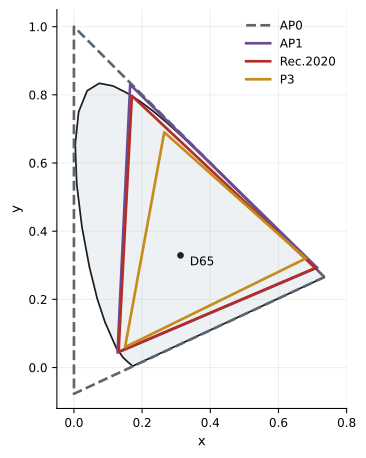
ACES defines several colour spaces for different purposes, all scene-referred and sharing a common white point close to D60:
- ACES2065-1: the archival and interchange encoding, linear light with AP0 primaries, a gamut large enough to contain all colours visible to humans. It is used for exchanging files between facilities and for archival masters, usually stored as 16-bit half-float OpenEXR files.
- ACEScg: linear light with AP1 primaries, a slightly smaller gamut closer to the colours that real images contain, used as the working space for compositing and computer graphics rendering.
- ACEScct: a logarithmic encoding with AP1 primaries, designed for colour grading, with a small toe near black that makes lift controls behave like those in traditional log grading. Its predecessor, ACEScc, is purely logarithmic and is less commonly used.
- ACESproxy: a lightweight log encoding for on-set transmission over SDI, used in some early on-set systems.
| ACES space | Encoding | Primaries | Primary use |
|---|---|---|---|
| ACES2065-1 | Linear | AP0 | Interchange and archive |
| ACEScg | Linear | AP1 | Compositing and CG rendering |
| ACEScct | Log with toe | AP1 | Colour grading |
| ACEScc | Pure log | AP1 | Colour grading (older) |
| ACESproxy | Log, integer | AP1 | On-set transmission |
The ACES pipeline
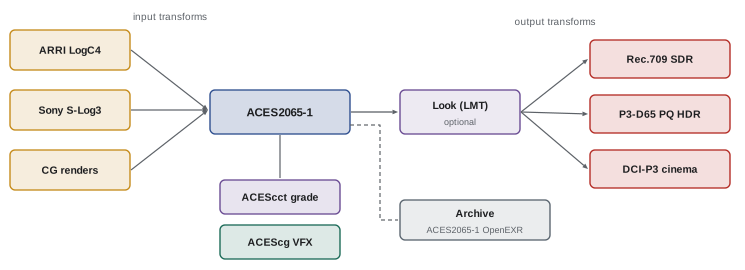
An ACES pipeline consists of transforms that convert images into and out of the ACES spaces:
- Input transforms (formerly called IDTs, Input Device Transforms) convert each camera's log and native gamut, or other sources such as film scans and graphics, into ACES2065-1. Camera manufacturers provide input transforms for each camera and recording mode, and choosing the correct one, such as the right log curve, gamut and EI where relevant, is essential.
- Working-space conversions move images between ACES2065-1, ACEScct for grading and ACEScg for compositing; these are exact mathematical conversions.
- Look transforms (LMTs, Look Modification Transforms) can apply a show look, such as a film emulation, consistently in ACES space before the output transform.
- Output transforms convert the scene-referred ACES image to a specific display, such as Rec.709 at 100 nits, P3-D65 PQ at 1,000 nits, DCI-P3 cinema at 48 nits or Rec.2020 PQ at 4,000 nits. In ACES 1.x, the output transform combined a Reference Rendering Transform (RRT), which applied the standard ACES "film-like" tone mapping, and an Output Device Transform (ODT) for each display.
Because every camera is converted into the same space and every display receives a standardized output transform, footage from different sources and facilities can be combined and viewed consistently.
ACES 2.0
ACES 2.0, released by the Academy in 2025, replaced the ACES 1.x output transforms with a new, unified rendering system designed to address common criticisms: harsh behaviour of very saturated colours, which could produce hue shifts and hard clipping in bright, saturated lights such as neon signs and LED panels; differences in look between SDR and HDR outputs; and difficulties creating smooth gradations near the edge of the display gamut. The new output transforms use an improved tone scale and gamut compression model, with more consistent appearance across SDR and HDR at different peak brightness levels and better handling of out-of-gamut colours. ACES 2.0 also updated documentation, naming conventions and the reference implementation. Projects begun in ACES 1.x can continue in that version, since changing output transforms mid-project changes the look; new projects increasingly adopt 2.0 as software support matures.
The ACES Metadata File
The ACES Metadata File (AMF), introduced in 2020, is an XML file that records how an image should be processed in an ACES pipeline: which input transform was used, any look transforms or CDL values applied, and the output transform used for viewing. AMFs can be created on set and travel with footage to dailies, editorial, visual effects and grading, so that every department applies the same transforms. They address a longstanding problem in which metadata about input transforms and looks was lost or misinterpreted between facilities, leading to mismatched images.
Practical ACES workflows
A typical ACES workflow for a feature or series involves:
- Pre-production: choosing ACES and the version, confirming input transforms for each camera with the manufacturer's documentation, designing a show look as an LMT or a CDL-plus-output combination, and testing the pipeline with camera tests through to final display.
- On set: monitoring through the ACES output transform for Rec.709 or HDR, applying CDLs in ACEScct, and saving AMFs or CDLs for each setup.
- Dailies and editorial: generating dailies and proxies with the same transforms and looks.
- Visual effects: receiving plates as ACES2065-1 OpenEXR files, working in ACEScg, and delivering finished shots back in ACES2065-1, so they match the surrounding footage.
- Grading: working in ACEScct with the show look, producing masters through the output transforms for each deliverable.
- Archive: storing the final graded master in ACES2065-1, from which new deliverables can be created for future display formats.
Worked problem
Diagnosing an ACES mismatch
A VFX vendor returns shots that look slightly darker and more saturated than the surrounding plates in the grade. Both were supposed to be in ACES2065-1. What might have gone wrong?
Show solution
- Check whether the vendor received plates with the correct input transform, for example the right camera log curve and EI.
- Check whether the vendor delivered in ACES2065-1 (AP0 linear) or by mistake in ACEScg (AP1 linear); the colourist interpreting AP1 data as AP0 would see shifted saturation.
- Check whether a look or output transform was accidentally baked into the returned shots.
- Use the AMF or pipeline document to confirm the expected transforms, and compare a grey card or chart in the plate and the returned shot.
Answer: Likely causes are a wrong input transform, the wrong ACES space (AP1 delivered as AP0) or a baked-in transform; verify with the pipeline document and reference charts.
Advantages and limitations
ACES offers clear advantages: an open, documented standard; consistent handling of multiple cameras and vendors; a future-proof archive; and standardized output transforms for many displays. It is particularly valuable for productions with extensive visual effects and many facilities. It also has limitations. The standard output transforms impose a particular look, which some cinematographers and colourists find too contrasty or saturated, or simply different from the camera manufacturer's own display transforms, which many prefer for their cameras. Some colourists prefer manufacturer pipelines or other colour management systems, such as DaVinci Wide Gamut or Baselight's system, which offer different tone mapping. Implementations in different software have sometimes differed slightly. ACES requires understanding and discipline; a poorly implemented ACES pipeline causes as many problems as no colour management at all. Many productions therefore use ACES for interchange and archive while choosing other output rendering for the creative look, or use non-ACES colour management altogether with clear documentation.
Choosing a pipeline
The right pipeline depends on the production. A single-camera documentary graded in one facility may use the camera manufacturer's colour management or DaVinci Wide Gamut with a manufacturer LUT for the look. A series with several cameras and visual effects vendors may adopt ACES for consistency. A studio feature may be required by the distributor to deliver an ACES archival master. In every case, the cinematographer should be involved in choosing the pipeline in pre-production, because it affects how images are monitored and how the look is created, and the decisions should be recorded in a pipeline document distributed to all departments.
ACES in visual effects facilities
Visual effects facilities were among the earliest and most enthusiastic adopters of ACES. Before ACES, each facility had its own colour pipeline, and shots passing between vendors on large films required careful conversion and testing. With ACES, plates arrive as ACES2065-1 OpenEXR files, artists work in ACEScg, which provides a wide gamut suitable for physically based rendering, and finished shots return in ACES2065-1, so that the colourist receives consistent material from every vendor. Rendering engines, compositing applications such as Nuke, and colour management libraries such as OpenColorIO (OCIO) support ACES configurations, allowing artists to view their work through the same output transforms as the colourist.
OpenColorIO
OpenColorIO (OCIO), originally developed by Sony Pictures Imageworks and now part of the Academy Software Foundation, is an open-source colour management library used in many visual effects, animation and finishing applications. OCIO configurations define colour spaces, transforms between them and display views in a single file, which can be shared across a facility or a production so that every application interprets images identically. ACES configurations for OCIO are published for each ACES version, and productions can create custom configurations combining ACES with manufacturer transforms or show looks. OCIO has become a key tool for consistent colour across software from different vendors.
Using manufacturer transforms with ACES
Some productions prefer the look of a camera manufacturer's own display transform, such as ARRI's Rec.709 conversion for LogC4 or RED's IPP2 output transforms, while still using ACES for interchange and archiving. This can be done by building a look transform that reproduces the manufacturer's rendering within ACES, or by using ACES for VFX interchange only, with the grade performed in the manufacturer's pipeline. Either approach must be documented carefully so that every department knows which transforms define the intended look.
Planning an ACES archive
An ACES archive aims to preserve a film's images in a form that can generate new deliverables decades later. A typical archive includes the final graded master in ACES2065-1 OpenEXR, the original camera files, the colour decision information and AMFs, and documentation of the output transforms used for each original deliverable. Because ACES2065-1 is scene-referred and has a gamut covering all visible colours, it can be rendered for future display technologies with new output transforms. Studios and streamers increasingly specify ACES archival masters in their delivery requirements, alongside display-referred masters for current distribution.
Common ACES questions on set
Crews new to ACES often ask whether it changes how they expose. It does not: exposure is still set relative to the camera's own middle grey, using the same meters, waveforms on the log signal and false colour. What changes is the monitoring transform, which in an ACES pipeline is the ACES output transform, possibly with a show look, rather than the manufacturer's LUT. The image may therefore look somewhat different on set from what crews are used to, with different contrast and highlight handling, so tests and familiarization before production help everyone adapt.
Common mistakes
MistakeChoosing the wrong input transform for a camera.
InsteadMatch log curve, gamut and EI to manufacturer data.
MistakeGrading in ACEScg.
InsteadGrade in ACEScct and composite in ACEScg.
MistakeExchanging files in the wrong ACES space.
InsteadExchange in ACES2065-1 as agreed.
MistakeSwitching ACES versions mid-project.
InsteadLock the version for the project.
MistakeAdopting ACES without testing.
InsteadTest the full pipeline in pre-production.
Summary and key terms
- ACES is an open framework for scene-referred colour management.
- ACES2065-1 (AP0 linear) is for interchange and archive.
- ACEScg is for compositing; ACEScct for grading.
- Input transforms bring cameras in; output transforms serve each display.
- ACES 2.0 (2025) redesigned output transforms for better saturated colours and SDR/HDR consistency.
- The ACES Metadata File records transforms and looks for every department.
- ACES has clear benefits for multi-vendor work but requires discipline and testing.
- ACES
- Academy Color Encoding System.
- ACES2065-1
- Linear AP0 interchange and archive encoding.
- ACEScg
- Linear AP1 working space for compositing.
- ACEScct
- Log AP1 working space for grading.
- AP0
- ACES primaries enclosing all visible colours.
- AP1
- ACES working primaries close to real-world colours.
- Input transform
- Conversion from a camera encoding into ACES.
- Output transform
- Conversion from ACES to a display.
- LMT
- Look Modification Transform applying a look in ACES.
- AMF
- ACES Metadata File describing transforms.
Practice problems
Work each problem on paper first, then reveal the answer to check.
When was ACES 1.0 released?
Show answer
2014.
Which ACES space is used for archives?
Show answer
ACES2065-1.
Why composite in ACEScg?
Show answer
It is linear, so light adds correctly.
Why grade in ACEScct rather than ACEScc?
Show answer
Its toe makes lift controls behave naturally.
Who provides input transforms?
Show answer
Camera manufacturers.
What did the RRT do in ACES 1.x?
Show answer
Applied the standard tone mapping before the ODT.
Name two problems ACES 2.0 addressed.
Show answer
Harsh saturated colours, SDR/HDR inconsistency.
What does an AMF record?
Show answer
Input transform, looks and output transform.
What file format is used for ACES interchange?
Show answer
OpenEXR, usually 16-bit half float.
Name a limitation of ACES.
Show answer
Standard look may not suit all, needs discipline.
Lesson quiz · 5 questions
Score 60% or more to complete this lesson.
Create a free account to save your progress, take quizzes and earn a certificate.