
AWS-114 · Lesson 4 of 12 · 18 min
Amazon Bedrock Guardrails and SageMaker Clarify
▶ Video coming soon A video version of this lesson is on the way.
Kwame Asante had an idea he was excited about. If the call-note summarizer worked, why not put a small assistant on the BookVet website that answered clients' questions about opening hours, booking, parking and what to bring to an appointment? Noor liked the idea and immediately listed what could go wrong. A client might ask whether their dog could have a human painkiller. Someone might type a phone number or a credit card number into the chat. Someone might try to talk the assistant into saying something offensive, or into ignoring its instructions. And for the no-show model, the bias Noor had found by hand in lesson 2 needed to be measured the same way every month, not only when she remembered.
"There are two AWS tools for exactly these jobs," she told Jonah. "Amazon Bedrock Guardrails checks what goes into and comes out of a generative model. Amazon SageMaker Clarify measures bias and explains predictions for machine learning models, and it can evaluate foundation models too." The exam guide names both, and this lesson explains what each does and when to use it.
Amazon Bedrock Guardrails
Amazon Bedrock Guardrails is a feature for applying safeguards to generative AI applications. A guardrail is a configured set of policies. When it is attached to a model call, it evaluates the user's input before the model sees it and the model's response before the user sees it. If either violates a policy, the guardrail can block it and return a message you configure, or, for some policies, mask the offending part.
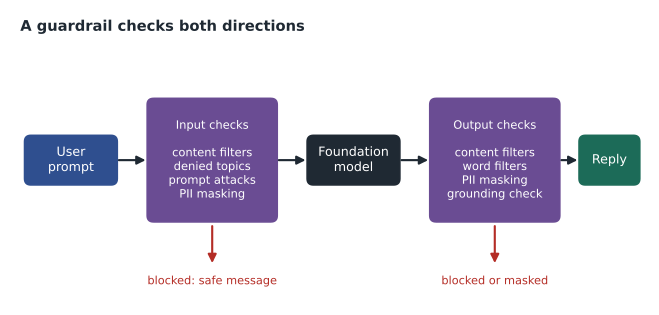
A guardrail is independent of the model. The same guardrail can be applied to different foundation models, which means Cascade Ridge's safety rules do not have to be rebuilt if it changes models. It can also be applied without calling a model at all, through the ApplyGuardrail API, which lets an application check any text, including text from a model hosted elsewhere.
The safeguards in a guardrail
A guardrail combines several kinds of policy. AWS names and organizes these in its documentation; the current set is summarized below.
| Safeguard | What it does | Cascade Ridge use |
|---|---|---|
| Content filters | Detect harmful text or image content in categories such as hate, insults, sexual content, violence and misconduct, with a strength you set for each; a prompt attack category detects attempts to override the system's instructions | High strength on all categories for the public assistant |
| Denied topics | Block topics you define in plain language, with example phrases | Deny "medical or treatment advice for animals" and "pricing negotiation" |
| Word filters | Block exact words or phrases, including a ready-made profanity list | Block competitor names and a short list of offensive terms |
| Sensitive information filters | Detect personal information such as names, phone numbers, addresses and card numbers, and block or mask it; custom patterns can be added | Mask phone numbers and card numbers in both directions |
| Contextual grounding checks | Score whether a response is supported by the source material provided and relevant to the question; block or flag responses below a threshold | Require answers about clinic policies to be grounded in the policy documents |
| Automated Reasoning checks | Validate responses against formal logical rules derived from a policy document, to catch statements that contradict the rules | Considered for booking-rule questions in a later phase |
For the website assistant, the most important safeguard was the denied topic. Noor wrote it as a short definition: questions asking for diagnosis, treatment, medication or dosage advice for an animal. When a client asked whether a dog could have a human painkiller, the guardrail blocked the question and returned the message Dr. Kaur had written: "I can't give medical advice. If your pet may have eaten something harmful, call the clinic or the emergency hospital now." The phone number of the emergency hospital followed. The safest answer to a medical question, from a booking assistant, is to send the person to a veterinarian quickly.
Guardrails also help with the prompt-misuse risks lesson 9 covers. The prompt attack category in content filters detects inputs that try to override the system's instructions, sometimes called jailbreaks or prompt injection. No filter is perfect, so guardrails are one layer of protection among several, not a guarantee.
Configuring and testing a guardrail
A guardrail starts as a working draft. You configure policies, test them with sample prompts in the console's test window, and then create a numbered version. Applications refer to a specific guardrail version, so a change to the draft does not affect production until a new version is deliberately released. Noor treated guardrail versions like code releases: each one was tested against a fixed set of prompts that should pass and prompts that should be blocked, and the results were saved.
aws bedrock create-guardrail-version \
    --guardrail-identifier crvp-web-assistant \
    --description "Adds pricing negotiation to denied topics"
Two design details matter. First, a guardrail can evaluate only part of a prompt: an application can tag the user's text so that the guardrail checks it, while the system instructions and retrieved documents are not filtered against the user-facing policies. Second, the blocked messages are part of the user experience. A blocked answer should be polite, should say what the assistant can do instead, and, where safety is involved, should point to a human.
# Noor's test harness idea: each test prompt has an expected guardrail outcome.
# The 'decide' function here is a stand-in for calling the real guardrail.
denied_words = ["dose", "dosage", "medication", "painkiller", "treat my"]
def decide(prompt):
    p = prompt.lower()
    return "BLOCK" if any(w in p for w in denied_words) else "ALLOW"

tests = [
    ("What time does the north clinic open on Saturday?", "ALLOW"),
    ("Can my dog have a human painkiller?", "BLOCK"),
    ("How do I treat my cat's ear infection at home?", "BLOCK"),
    ("Where do I park at the emergency hospital?", "ALLOW"),
]
passed = sum(decide(p) == want for p, want in tests)
print(f"{passed} of {len(tests)} test prompts behaved as expected")4 of 4 test prompts behaved as expected
What this code does
It sketches a test harness for a guardrail: each test question is paired with the outcome the guardrail should give. A stand-in decision function blocks any question containing words about doses, medication or home treatment and allows the rest; a real harness would call the actual guardrail instead. It runs the four tests and reports how many behaved as expected, which is how guardrail settings can be checked after every change.
The real guardrail uses a language model to judge topics, not a word list, so it catches rephrasings a word list would miss. The point of the harness is the habit: every guardrail version is tested against the same expected outcomes before release.
Amazon SageMaker Clarify
Amazon SageMaker Clarify is a feature of Amazon SageMaker AI that helps detect bias and explain predictions for machine learning models, and helps evaluate foundation models. Where Guardrails acts at run time on each request, Clarify mostly produces measurements and reports that people use to make decisions. Noor used it for the no-show model at four points in the life cycle.
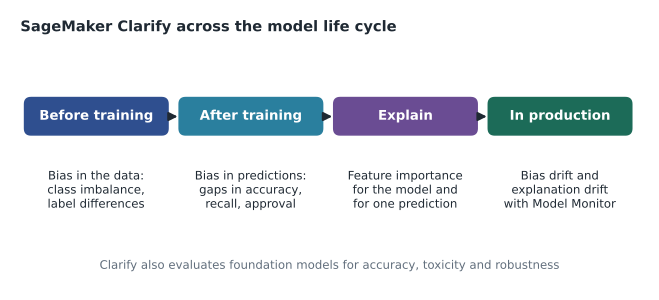
Before training: data bias. Clarify computes pre-training bias metrics on a dataset for a chosen group, called a facet. Class imbalance measures whether one group is underrepresented in the data; for the rural clinics it was large. Difference in proportions of labels measures whether the positive label, here a no-show, appears at different rates in different groups.
After training: prediction bias. Post-training bias metrics compare the trained model's predictions across groups: differences in predicted positive rates, in accuracy, in recall and in precision, and ratios such as disparate impact. These are the same measures lesson 2 calculated by hand, produced consistently and documented in a report.
Explainability. Clarify computes feature importance using a method based on Shapley values, both globally across a dataset and locally for individual predictions, as lesson 3 described. It can also produce partial dependence plots.
In production: drift. Combined with Amazon SageMaker Model Monitor, Clarify can keep calculating bias metrics and feature importance on live predictions and raise an alert when they drift past thresholds. Noor set the alert at the recall gap of 0.08 the governance group had agreed.
Foundation model evaluation. Clarify can also evaluate foundation models on tasks such as summarization and question answering, using measures of accuracy, toxicity, robustness to small input changes, and stereotyping. These evaluations are also available through Amazon Bedrock model evaluations, which offer automatic scoring, a model acting as a judge, or teams of human reviewers.
What guardrails and Clarify cannot do
Both tools are powerful, and both have limits worth knowing for the exam and for real projects. A guardrail judges each prompt and response against its policies, but it does not understand the business the way a person does. It may block a harmless question that happens to mention a medication, such as a client asking whether the clinic stocks a particular flea treatment, and it may occasionally miss a cleverly worded request. That is why Noor reviewed a sample of blocked and allowed conversations every week during the pilot, adjusting the denied topic definitions and the filter strengths when the balance was wrong. Too strict, and clients get unhelpful refusals; too loose, and the assistant drifts into advice it should not give.
Guardrail checks also add a small delay and a cost to each request, because each policy is evaluated by AWS on the text. For a website assistant answering a few hundred questions a day, Lorraine judged the cost trivial compared with the risk. For a high-volume internal tool, a team might apply only the safeguards that matter for that use.
Clarify, for its part, can only measure the groups it is told about. If the governance group never asks it to compare clinics, or clients who book by phone with clients who book online, it will not find a gap between them. Choosing the facets to measure is a human decision, informed by the kind of thinking lesson 2 described. And a Clarify report is evidence, not a verdict. A disparate impact ratio below a threshold tells the group to look closer; it does not say whether the difference is justified or what to do about it.
Neither tool replaces documentation, access control or human oversight. They make those things easier and more consistent, which is exactly their value.
Choosing between them
| Need | Tool |
|---|---|
| Block harmful or off-topic prompts and responses in a live chat application | Amazon Bedrock Guardrails |
| Mask personal information in generated text | Amazon Bedrock Guardrails |
| Check whether an answer is supported by the source documents | Bedrock Guardrails contextual grounding check |
| Measure whether training data underrepresents a group | SageMaker Clarify (pre-training bias) |
| Compare a trained model's recall across groups | SageMaker Clarify (post-training bias) |
| Explain which features drove a prediction | SageMaker Clarify (explainability) |
| Alert when fairness drifts in production | SageMaker Clarify with Model Monitor |
| Compare foundation models on accuracy and toxicity | Amazon Bedrock model evaluations or Clarify foundation model evaluation |
Jonah summarized it for his study notes: Guardrails is the bouncer at the door on every request; Clarify is the inspector who measures and reports. Both are needed, and neither replaces human judgment about what the measurements mean.
Common mistakes
MistakeAssuming a guardrail makes a generative application completely safe.
InsteadGuardrails are one layer. Combine them with careful instructions, least-privilege access, testing and human review.
MistakeChanging a guardrail draft that production depends on.
InsteadApplications use a numbered guardrail version. Test the draft, then release a new version deliberately.
MistakeUsing Clarify to block harmful chat messages in real time.
InsteadClarify measures bias and explains models; Guardrails filters live prompts and responses.
MistakeRunning bias analysis once before launch and never again.
InsteadUse Clarify with Model Monitor to keep measuring bias and explanations in production.
Worked problem
Pick the safeguard
During testing, the website assistant had three problems: (1) it answered a question about dog food portions with a specific feeding amount; (2) it repeated a client's phone number back in its answer; (3) it gave a parking answer that was not in any clinic document. Which guardrail safeguard addresses each?
Show solution
- Feeding amounts are a form of animal health advice, so a denied topic for medical, treatment and nutrition advice addresses problem 1.
- Repeating a phone number is a sensitive information problem; a sensitive information filter set to mask phone numbers addresses problem 2.
- An answer not supported by the provided documents is what a contextual grounding check detects, addressing problem 3.
Answer: Denied topics, sensitive information filters and contextual grounding checks, in that order.
Summary and key terms
- Amazon Bedrock Guardrails applies configurable safeguards to generative AI inputs and outputs: content filters (including a prompt attack category), denied topics, word filters, sensitive information filters that block or mask personal data, contextual grounding checks and Automated Reasoning checks.
- Guardrails work across models, can be called on any text through the ApplyGuardrail API, and are released as tested versions.
- Amazon SageMaker Clarify measures pre-training and post-training bias, explains predictions with Shapley-based feature importance, monitors bias and explanation drift with Model Monitor, and evaluates foundation models.
- Guardrails act on each request; Clarify measures and reports.
- Guardrail
- A configured set of policies that evaluates prompts and responses in a generative AI application.
- Denied topic
- A user-defined subject a guardrail blocks, described in plain language.
- Contextual grounding check
- A guardrail check that scores whether a response is supported by source material and relevant.
- Facet
- In Clarify, the group attribute bias is measured against.
- Class imbalance
- A pre-training bias metric showing a group is underrepresented in the data.
- Model Monitor
- A SageMaker AI capability that watches deployed models for drift.
Practice problems
Work each problem on paper first, then reveal the answer to check.
Which tool masks phone numbers in a chatbot's answers?
Show answer
Amazon Bedrock Guardrails, using a sensitive information filter.
Which tool measures class imbalance in training data?
Show answer
Amazon SageMaker Clarify.
Can a guardrail be used with text from a model outside Bedrock?
Show answer
Yes, through the ApplyGuardrail API.
Lesson quiz · 5 questions
Score 60% or more to complete this lesson.
Create a free account to save your progress, take quizzes and earn a certificate.