
SLS-140 · Lesson 8 of 12 · 19 min
Scheduling, video and e-signature tools
▶ Video coming soon A video version of this lesson is on the way.
The Keystone Grain Equipment deal took eleven emails to schedule its first demonstration. Linda Sorensen proposed a Tuesday; Dale Petrie could not make it; Maya offered three times on Thursday; the plant's IT contractor could only do Friday mornings; and by the time a slot was agreed, a week had gone by. For the second meeting, Maya sent a scheduling link that showed her open times and let each person pick. All three had booked within a day. Six weeks later, when the Keystone contract was ready, Dale signed it on his phone from a dealer meeting in Minneapolis, initials in four places and all, eleven minutes after Maya sent it. Neither the meeting nor the signature would have been faster with more effort from Maya. They were faster because of the tools.
This lesson covers three kinds of tool that remove friction from the middle and end of a sale: scheduling tools that make booking meetings easy, video-meeting tools that let conversations happen without travel, and e-signature tools that let customers sign agreements electronically. SLS-120 covered the conversation skills for video calls; this lesson covers the tools themselves, how they connect to the CRM and the rules that apply to recordings and electronic signatures.
Scheduling tools
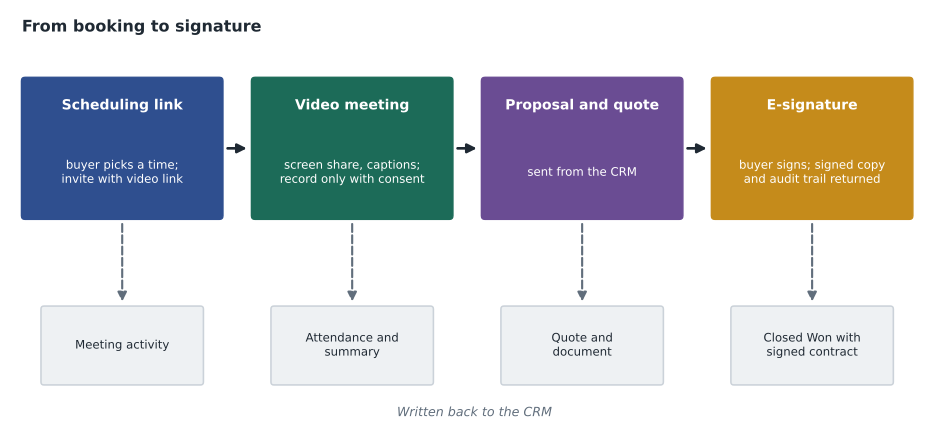
A scheduling tool connects to a seller's calendar and publishes a booking page or link that shows the times when the seller is free. The buyer chooses a time, enters their details and receives a calendar invitation, usually with a video-meeting link already included. The tool can add buffer time between meetings, limit how many meetings can be booked per day, ask a few questions when someone books, send reminders and handle rescheduling. Most connect to the CRM, so a booked meeting appears as an activity on the right contact and account.
Team scheduling features help when several people need to be involved. A round-robin link spreads first meetings fairly among a team, so Owen's inside reps share inbound demo requests. A collective link finds a time when all the required people on the seller's side, such as an account executive and a product specialist, are free.
| Situation | Use a link? | Why |
|---|---|---|
| A prospect asks for a meeting by email | Yes | Lets them choose without back-and-forth |
| A senior executive at a key account | Usually not at first | Offering two or three specific times feels more personal; their assistant may manage the calendar |
| A group of several buyer stakeholders | Yes, or a poll | Lets each person show availability |
| A first cold email | Use carefully | A link with no context can feel presumptuous; a simple question often works better |
| A retail customer wanting a design consultation | Yes | Juniper & Pine's booking page lets customers choose in-store or virtual |
A scheduling link should save the buyer effort, not shift the effort onto them. Sending a link to a senior buyer with "find a time on my calendar" can come across as making them do the seller's work. Darnell's guidance is to offer two or three specific times for important first meetings and to use links freely once a working relationship exists, or when the buyer asks for one.
Video-meeting tools
Video meetings, through tools such as Microsoft Teams, Zoom and Google Meet, have become a normal part of selling since 2020. In business sales, many first meetings and most follow-up meetings now happen on video, with in-person visits reserved for site surveys, important presentations and relationship-building. Juniper & Pine has offered virtual design consultations since 2025: customers show the room on their phone camera while an associate shows fabric samples and suggests layouts.
Beyond the basics of joining a call, sellers use several features: screen sharing to show proposals and demonstrations, breakout rooms for workshops, whiteboards for sketching layouts, chat for sharing links, live captions for accessibility, and recording and transcription. Most video tools connect to calendars and CRMs, so meeting attendance and, where enabled, transcripts and summaries can be logged automatically.
Recording meetings
Recording and transcribing sales meetings can be valuable: a seller can review what was said, a manager can coach from real conversations, and an AI assistant can draft a summary and follow-up tasks. Conversation intelligence tools go further, analyzing many recorded calls for patterns such as talk ratio, common questions and competitor mentions. Recording also raises legal and trust questions, and the safest practice is the same in both countries: tell everyone at the start that you would like to record, explain why, and record only if they agree.
In the United States, federal law allows a call to be recorded with the consent of one participant, and South Dakota follows the same one-party rule. Several states, however, require the consent of everyone on the call, and when participants are in different states the stricter rule is the safer one to follow. Ridgeline's practice is to ask everyone for permission at the start of any recorded meeting, which satisfies every state's rule and builds trust.
Recordings are customer data. They should be stored in the company's approved tools, shared only with people who need them, and deleted on the company's schedule. A recording downloaded to a personal laptop or shared in a public folder is a privacy problem waiting to happen; lesson 11 explains why.
E-signature tools
An e-signature tool lets people sign documents electronically. The seller uploads a contract or generates it from the CRM, marks where each person must sign or initial, and sends it. Each signer receives an email link, reviews the document and signs by typing, drawing or clicking. The tool emails everyone a final copy and keeps an audit trail: who opened the document, when, from what device, and when each signature was applied. Most e-signature tools connect to the CRM, so when the contract is signed the opportunity can move to Closed Won automatically and the signed copy is attached to the record.
E-signature tools can also route documents in a set order (the customer's operations director signs first, then their finance manager, then Ridgeline's vice-president), collect payment details or form information, and send reminders to people who have not signed. Templates for common agreements, such as Ridgeline's standard 36-month printer lease, reduce errors.
Are electronic signatures legal?
For most ordinary business contracts, yes. Both countries recognize electronic signatures, with some exceptions for particular kinds of documents.
In the United States, the federal Electronic Signatures in Global and National Commerce Act (ESIGN, 2000) and the Uniform Electronic Transactions Act (UETA), adopted by almost every state including South Dakota, give electronic signatures and records the same legal effect as paper ones for most transactions. Some documents, such as wills and certain notices, are excluded or need extra steps, and consumer transactions require specific disclosures and consent to electronic records under ESIGN. Ridgeline's leasing partner accepts e-signatures for equipment leases, and its legal team decides which documents need anything more.
Sellers do not need to be lawyers, but they should know three practical points. The person signing must have authority to sign for their organization; a contract signed by someone without authority can be challenged. The document sent for signature must be the final agreed version, because whatever is signed is what binds both sides. And the audit trail should be kept with the signed copy in the CRM.
Worked problem
Time saved by tools
Before scheduling links and e-signature, Grace estimated that each new Ridgeline deal took about 4 emails and 20 minutes of seller time to schedule each meeting, with 3 meetings per deal, plus 2 days and 45 minutes of seller time to print, send, chase and file a signed contract. With the tools, scheduling takes about 5 minutes per meeting and signature about 10 minutes of seller time. How much seller time is saved per deal, and over 120 deals a year?
Show solution
- Old scheduling time: 3 meetings times 20 minutes.
- \[3 \times 20 = 60\]
- New scheduling time: 3 meetings times 5 minutes.
- \[3 \times 5 = 15\]
- Old total per deal: 60 plus 45 minutes for the contract.
- \[60 + 45 = 105\]
- New total per deal: 15 plus 10 minutes.
- \[15 + 10 = 25\]
- Saving per deal.
- \[105 - 25 = 80\]
- Saving over 120 deals, in hours.
- \[80 \times 120 = 9600\]
- \[9600 \div 60 = 160\]
Answer: About 80 minutes per deal, or about 160 hours of seller time a year across 120 deals, roughly four working weeks. The estimate leaves out the days of waiting that the tools also remove from the sales cycle.
Using these tools well
The tools in this lesson work best when they are invisible to the buyer: the meeting just happens at a convenient time, the video works, the document arrives ready to sign. A few habits help. Test video setups before important meetings, especially screen sharing. Put a short agenda in every meeting invitation. Send documents for signature only after the terms have been agreed in conversation, so the e-signature request is a formality, not a surprise. Tell the buyer when to expect the document and who needs to sign. And check that each tool writes back to the CRM, so that the meeting, recording, document and signature are part of the customer's record rather than scattered across inboxes.
For Aiden at Juniper & Pine, the same tools appear on a smaller scale. Customers book design consultations from the store's website, virtual consultations happen on video, and financing applications and delivery agreements are signed on a tablet at the counter or by email link. The point is the same: take friction out of the customer's path without taking out the care.
Quoting tools and document templates
Between the meeting and the signature sits the quote. Many CRMs include quoting features, and larger companies use configure-price-quote (CPQ) tools that know which products can be sold together, apply approved discounts and price lists automatically and require a manager's approval for anything outside the rules. At Ridgeline, a printer lease quote pulls the equipment, the monthly payment for each lease term and the service plan from the price list, and any discount above 10 in 100 routes to Darnell for approval before the quote can be sent. Templates for proposals and contracts pull customer names, addresses and quote lines straight from the CRM records.
These tools reduce two common and costly errors: quoting a price the company cannot honor, and sending a contract that does not match what was agreed. They depend, again, on good data. A quote built from a contact record with an out-of-date address, or a contract template that pulls a misspelled legal name from a duplicate account, can delay a signature by days. Before sending any document, Maya checks the legal name, the billing and delivery addresses, the contact who will sign and every price line against what was agreed.
Keeping the buyer's experience smooth
From the buyer's side, the middle and end of a sale are often where frustration builds: waiting for a meeting time, struggling with a video link, receiving a long contract with no explanation. Small acts of service make a large difference. Maya sends a one-paragraph summary of the main terms before she sends any contract for signature, so that the buyer can check them in plain language, and she tells them exactly how many places they will need to sign or initial. When Keystone's IT contractor could not join the demo by video because of a firewall, she offered a phone dial-in and sent the slides by email beforehand, so the meeting went ahead on time.
Common mistakes
MistakeScheduling links are always the most convenient option for buyers.
InsteadFor important first meetings with senior buyers, offering two or three specific times often feels more respectful.
MistakeOne-party consent rules mean there is no need to tell anyone a call is recorded.
InsteadPrivacy law, stricter state rules and trust all favor asking everyone for permission before recording.
MistakeElectronic signatures are not legally binding.
InsteadCanadian and US law recognize electronic signatures for most business contracts, with some exceptions.
MistakeAnyone at the customer can sign the contract.
InsteadThe signer must have authority to bind their organization.
MistakeRecordings can be saved wherever is convenient.
InsteadRecordings are customer data; keep them in approved tools, share them narrowly and delete them on schedule.
Summary and key terms
- Scheduling tools publish availability and turn bookings into calendar invitations and CRM activities; team links spread or coordinate meetings.
- Use scheduling links to save the buyer effort, and offer specific times when a more personal approach fits.
- Video-meeting tools support screen sharing, captions, recording and transcription, and connect to calendars and CRMs.
- Tell everyone and get agreement before recording; privacy law and some state laws require it, and it builds trust.
- E-signature tools route documents for signature, keep an audit trail and update the CRM when contracts are signed.
- Electronic signatures are legally recognized for most business contracts in both countries; the signer needs authority and the document must be the final agreed version.
- Scheduling link
- A link to a booking page that shows a person's available times.
- Round-robin scheduling
- Spreading bookings fairly among a team.
- Conversation intelligence
- Software that records, transcribes and analyzes sales calls.
- E-signature
- A legally recognized electronic way of signing a document.
- Audit trail
- The record of who opened and signed a document, when and how.
- Signing authority
- The right of a person to sign agreements on behalf of an organization.
Practice problems
Work each problem on paper first, then reveal the answer to check.
Why did Darnell suggest offering specific times instead of a link for important first meetings?
Show answer
A link can feel like asking a senior buyer to do the seller's work; specific times feel more personal.
What three things does an e-signature audit trail record?
Show answer
Who opened and signed the document, when, and from what device or method.
A seller saves 80 minutes per deal on 45 deals a year. How many hours is that?
Show answer
80 times 45 is 3,600 minutes, or 60 hours.
What should a seller say at the start of a meeting they would like to record?
Show answer
Ask permission and explain why, for example: "Would it be all right if I record this so I can focus on our conversation and send an accurate summary?"
Lesson quiz · 5 questions
Score 60% or more to complete this lesson.
Create a free account to save your progress, take quizzes and earn a certificate.