
SLS-140 · Lesson 3 of 12 · 20 min
Accounts, contacts, leads and opportunities
▶ Video coming soon A video version of this lesson is on the way.
On a Monday in September, a web form landed in Ridgeline's CRM: a person named Linda Sorensen at Keystone Grain Equipment wanted information about meeting-room booking software. Owen Pelletier's inside team picked it up within an hour. By Thursday it had become something more: a meeting booked with Linda, the HR manager, and Dale Petrie, Keystone's operations director, about the plant's double-booked meeting rooms; a sales opportunity worth an estimated 38,000 dollars for room booking software, two video-meeting rooms and installation; and a set of linked records that showed who at Keystone was involved and what each person cared about. Grace used the Keystone example in her training session for new sellers. 'Watch how one web form turns into four kinds of record,' she said. 'If you understand those four, you understand the CRM.'
The four kinds of record are leads, accounts, contacts and opportunities. Almost every business CRM uses them, though vendors sometimes give them different names: an opportunity is called a deal in some systems, an account is sometimes called a company or organization, and some CRMs blur the line between leads and contacts. This lesson explains what each record is for, how they link, and how a lead is converted into the others.
Leads
A lead is a person or organization that has shown possible interest but has not yet been qualified: the seller does not yet know whether there is a real need, budget, authority or timing. Leads come from many sources: web forms, trade show badge scans, purchased lists, referrals, inbound phone calls, chat conversations on the website and replies to marketing emails. A lead record usually holds a name, company, contact details, where the lead came from and a status such as New, Working, Qualified or Disqualified.
Keeping leads separate from customers is useful for two reasons. First, it keeps unqualified names out of the main account and contact records, which would otherwise fill with people who were never real prospects. Second, it lets the company measure its lead sources: how many leads each source produced, how many were qualified and how many became customers. That measurement is how marketing and sales decide where to spend effort, and SLS-210 Prospecting and Lead Generation returns to it.
Not every company uses lead records. Some smaller sales teams create accounts and contacts directly and track early interest with a field or a stage instead. What matters is that the team agrees on one approach and uses it consistently.
Accounts
An account is an organization the company sells to or might sell to: Keystone Grain Equipment, Northfield Family Clinic, Halverson Law, the Prairie Valley School District. The account record holds facts about the organization: legal and trading name, address, phone, website, industry, number of employees, territory, account owner and status (prospect, customer or former customer). It is also the place where everything else is gathered: contacts, opportunities, activities, quotes, contracts, cases and files are all linked to the account.
Large customers raise a question: is the account the whole organization or one location? Prairie Valley has a district office and more than thirty schools. Ridgeline records the district as the parent account and creates child accounts for schools that have their own budgets and decision makers. Most CRMs support these account hierarchies. SLS-220 Key Account Management discusses how to manage them.
Contacts
A contact is a person, usually linked to an account. The contact record holds the person's name, job title, email, phone, preferred way of being contacted, their role in buying decisions and their communication consent, which lesson 7 and lesson 11 explain. One account usually has several contacts: at Halverson Law, Ridgeline's contacts include Ruth Halverson (managing partner), Tom Ostrowski (finance manager) and the office administrator who manages the printers day to day.
Contacts change jobs, titles and phone numbers often. Industry estimates of how quickly business contact data goes out of date vary, but every sales operations team knows that a contact list left untouched for a year will contain many people who have moved on. Lesson 6 covers how to keep contact data current.
A useful field on many contact records is the person's role in the purchase. SLS-110 introduced the buying center: users, influencers, buyers, deciders and gatekeepers. Recording roles such as "decision maker", "finance approver" or "day-to-day user" on contacts, or on the link between a contact and a specific opportunity, helps the whole team see who matters for a deal.
Opportunities
An opportunity is a potential sale: a specific chance to sell something to a specific account. It records what might be sold, its estimated value (the amount), the expected close date, the stage it has reached, the probability of winning, the competitors involved and the next step. An account can have many opportunities over time, some won, some lost and some open. Keystone's first opportunity was the room booking and video-room project; a later one might be a printer contract for the plant office.
Opportunities are where most of a seller's CRM work happens, because they track the progress of deals. They are also the records managers look at most, because they feed the pipeline and the forecast. Lesson 4 covers stages; the arithmetic of forecasting from opportunities belongs to SLS-214.
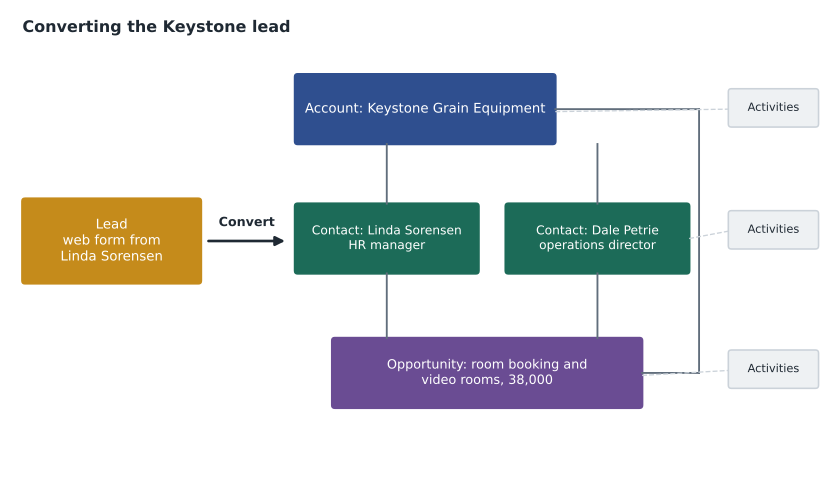
Converting a lead
When a lead is qualified, the seller converts it. Conversion creates (or links to existing) account, contact and opportunity records using the information on the lead, and marks the lead as converted. Before converting, a careful seller checks whether the account or contact already exists. In the Keystone case, Owen's rep found that Keystone was already an account: Ridgeline had sold the company a printer in 2023. Converting the lead into a second Keystone account would have created a duplicate, split the history and made reporting wrong. Instead, the rep linked Linda's new contact record and the new opportunity to the existing account.
Worked problem
Converting a lead without creating duplicates
A lead arrives: "L. Sorensen, Keystone Grain Equip., HR, asks about room booking." What should the inside rep do before and during conversion?
Show solution
- Search the CRM for the company by several forms of the name (Keystone, Keystone Grain, Keystone Grain Equipment) and by the website domain.
- Search contacts by email address and by surname at that company.
- Result: the account exists (a 2023 printer customer); no contact named Sorensen exists.
- Qualify the lead on a call: the need is real (double-booked rooms), Dale Petrie is the decision maker, and the plant wants a fix before its spring dealer meetings.
- Convert: link to the existing Keystone account, create a new contact for Linda Sorensen with her full name and title, create an opportunity named for what is being sold, and add Dale Petrie as a contact with the role "decision maker".
- Add the next step: discovery meeting with Linda and Dale, with a date.
Answer: The lead became one new contact, one new opportunity and a link to the existing account, with no duplicates and a clear next step.
Searching by more than one form of the name matters because people type company names in many ways: with or without "Inc.", "Ltd." or "LLC", with abbreviations, with "The" in front, and with typing mistakes. Many CRMs offer duplicate-matching rules that warn users when a new record looks like an existing one; lesson 6 describes them.
Naming and filling in records well
Small conventions make a large difference to how useful records are. Ridgeline's rules, which Grace wrote after the duplicate clean-up described in lesson 6, are typical.
| Record | Convention | Why |
|---|---|---|
| Account name | Legal or main trading name, no abbreviations, no "The"; legal suffix only if two companies share a name | Makes searching and duplicate matching reliable |
| Account website | Always filled in, as the main domain only | The domain is the most reliable way to match companies |
| Contact name | First and last name in separate fields; no titles such as "Dr." in the name field | Allows correct greetings and sorting |
| Contact role | One of: decision maker, finance approver, influencer, user, gatekeeper | Shows who matters in each deal |
| Opportunity name | Account, then what is being sold, then year: "Keystone Grain Equipment, room booking and video rooms, 2026" | Readable in lists without opening the record |
| Opportunity amount | Total contract value before tax, in dollars | Makes pipeline totals comparable |
| Close date | The seller's honest best estimate of signature date | Feeds the forecast; an old date signals a stuck deal |
Fields that hold choices from a list, such as industry, contact role or lead source, are called picklists. Picklists are better than free-typed text for anything that will be counted or filtered, because "Health care", "Healthcare", "Medical" and "Clinic" typed by four different people make a report almost impossible to read. Free-text fields are better for notes and descriptions.
Other record types
Most CRMs hold more than these four record types. Products and price lists hold what the company sells. Quotes hold specific offers to a customer. Contracts or orders hold what has been agreed. Cases hold service requests and complaints, often managed by the service team. Campaigns record marketing activities and the leads they produced. Companies can usually create custom record types too: Ridgeline has one for "installed equipment", so that the service team knows which printers and room systems are at each site and when leases end. Lease end dates are one of Ridgeline's best sources of renewal opportunities.
Records in retail
Juniper & Pine's system uses a simpler structure because it sells to households rather than organizations. The central record is the customer profile, which can link several people in a household. Purchases, deliveries, protection plans, special orders, service requests and associate notes hang off the profile. There is no pipeline of opportunities in the business sense, but the clienteling app has something similar: a list of "open interests", such as a customer who wants to be told when a particular dining table is back in stock, or a couple who plan to replace their washer and dryer in the spring. Aiden treats those open interests the way Maya treats opportunities: each one gets a next step and a date.
Duplicate risk at every step
Each record type has its own common source of duplicates, and knowing them helps sellers watch for trouble. Leads are duplicated when the same person fills in two web forms or is scanned at two trade show booths. Accounts are duplicated when sellers create them without searching, or when a company is entered once under its legal name and again under its trading name. Contacts are duplicated when a person changes email address and someone creates a new record instead of updating the old one. Opportunities are duplicated when two sellers each create one for the same project, which often happens when an inside rep and an account executive both talk to the same buyer in the same week.
The fix is the same in each case: search before creating, and when in doubt ask the record owner. Ridgeline's CRM now shows a warning when a new opportunity is created on an account that already has an open opportunity with a similar name, and sales operations reviews these warnings weekly. Lesson 6 explains how matching rules work and how duplicates that do slip through are merged.
Custom fields: useful, but use them sparingly
Most CRMs let administrators add custom fields to any record type, and it is tempting to add a field for every piece of information someone might want one day. Each extra field, though, adds clutter to the screen, makes records slower to complete and usually ends up mostly empty. Grace's rule is that a new field must answer a question someone actually asks regularly, have a named owner responsible for keeping it current, and be reviewed after six months. In 2026 she removed 23 custom fields from Ridgeline's opportunity record that had been filled in on fewer than 1 in 20 records.
Common mistakes
MistakeEvery new name should become a contact right away.
InsteadUnqualified names can stay as leads until there is a real reason to create account and contact records.
MistakeConverting a lead always creates a new account.
InsteadSearch first; link to the existing account and contacts when they already exist.
MistakeAn opportunity is the same as an account.
InsteadAn account is the organization; an opportunity is one specific potential sale to that organization.
MistakeFree-text fields are more flexible, so use them everywhere.
InsteadUse picklists for anything that will be counted or filtered, and free text for notes.
MistakeClose dates are targets set by the manager.
InsteadClose dates are the seller's honest estimate; unrealistic dates make the forecast wrong.
Summary and key terms
- Most business CRMs use four core record types: leads, accounts, contacts and opportunities.
- A lead is possible interest that has not been qualified; keeping leads separate protects the main records and lets the company measure lead sources.
- An account is an organization, a contact is a person linked to it, and an opportunity is a specific potential sale with an amount, close date, stage and next step.
- Converting a qualified lead creates or links account, contact and opportunity records; always search first to avoid duplicates.
- Clear naming conventions and picklists make records searchable and reports reliable.
- Retail systems center on household customer profiles, with purchases, deliveries and open interests linked to them.
- Lead
- A person or organization showing possible interest that has not yet been qualified.
- Account
- An organization the company sells to or might sell to.
- Contact
- A person, usually linked to an account.
- Opportunity
- A specific potential sale to an account, tracked through stages.
- Lead conversion
- Turning a qualified lead into linked account, contact and opportunity records.
- Picklist
- A field whose value is chosen from a fixed list.
- Account hierarchy
- Parent and child accounts that show how parts of a large organization relate.
Practice problems
Work each problem on paper first, then reveal the answer to check.
What is the difference between a lead and a contact?
Show answer
A lead is unqualified possible interest; a contact is a known person linked to an account.
Why should a seller search by website domain before creating an account?
Show answer
Company names are typed in many ways, but the domain is usually the same, so it finds existing records reliably.
Write an opportunity name for a 2027 printer lease renewal at Northfield Family Clinic using Ridgeline's convention.
Show answer
"Northfield Family Clinic, printer lease renewal, 2027".
Why is "industry" better as a picklist than a free-text field?
Show answer
Free text produces many spellings for the same thing, making counts and filters unreliable.
Lesson quiz · 5 questions
Score 60% or more to complete this lesson.
Create a free account to save your progress, take quizzes and earn a certificate.