
PYTH-240 · Lesson 6 of 12 · 29 min
Sockets and network programming
▶ Video coming soon A video version of this lesson is on the way.
Everything so far has used HTTP, and for talking to web services that is almost always the right choice. Underneath HTTP, though, every network program does the same few things: it opens a connection to another computer, sends bytes, receives bytes and closes the connection. The tool for this is the socket. Ridgeline meets sockets directly in the roastery. The new roast controller has a small temperature probe that speaks a simple text protocol on the local network: connect to port 5020, send a command, read a line back. No HTTP, no JSON, just bytes over TCP. Kai wants the bean temperature logged every few seconds during each roast, and that means writing a socket client.
This lesson explains what sockets are, how TCP and UDP differ from a program's point of view, how a client and a server use the socket API, and the most important practical lesson of network programming: a TCP connection delivers a stream of bytes, not messages, so a program must frame its messages itself. It also covers timeouts, encoding text as bytes, a first look at serving several clients, and the security habits that keep network services safe.
The browser version of Python on this page cannot open real network connections, so the socket listings that need a network are shown without a Run button, and the runnable listings and exercises work on simulated streams of bytes, which is where the interesting logic lives anyway.
Sockets, addresses and ports
NET-110 described how data crosses a network in layers: IP moves packets between addresses, and TCP and UDP sit on top of IP and deliver data to a particular program on the destination computer, identified by a port number. A socket is the operating system's handle for one end of such a conversation. A program asks the operating system for a socket, tells it which address and port to talk to or listen on, and then reads and writes bytes through it. The shop's web server listens on port 443 for HTTPS; the roast controller's probe listens on port 5020 at 10.20.40.11, the address NET-110 gave it on Ridgeline's roastery network.
TCP and UDP feel very different to a program. TCP is connection-oriented and reliable: the two ends set up a connection, every byte sent arrives exactly once and in order, or the connection reports an error. It delivers a continuous stream, with no built-in idea of where one message ends and the next begins. UDP is connectionless: each send is a separate datagram that may arrive, arrive out of order or not arrive at all, but when one does arrive, it arrives whole. HTTP, email and database connections use TCP. DNS lookups, time synchronization, video calls and many sensor broadcasts use UDP, because speed matters more than retrying a lost packet.
A TCP client
A TCP client follows four steps: create a socket, connect it to an address and port, exchange bytes, and close it. Python's socket module offers a convenient shortcut, socket.create_connection, that looks up the name, tries each address and connects, and the with statement makes sure the socket is closed even if something goes wrong. Here is Kai's first probe client, written against the probe manual.
import socket

PROBE = ("10.20.40.11", 5020)

with socket.create_connection(PROBE, timeout=3) as sock:
    sock.sendall(b"GET TEMP\n")            # commands end with a newline
    reply = b""
    while not reply.endswith(b"\n"):
        chunk = sock.recv(1024)             # up to 1024 bytes; may return fewer
        if not chunk:
            raise ConnectionError("probe closed the connection")
        reply += chunk
print(reply.decode("ascii").strip())        # e.g. T 201.5 1762700000
Three details in this short client prevent the most common bugs. The timeout of three seconds means a probe that is switched off or a cable that is unplugged produces a socket.timeout exception instead of a script that hangs. sendall sends every byte, retrying internally if the operating system accepts only part of the data at once; plain send may send less than you asked and leave you to send the rest. And recv returns whatever bytes have arrived so far, between one and the number requested, or an empty bytes object when the other end has closed the connection; it does not wait for "the whole message", because TCP has no idea what a message is. That is why the client loops until it sees the newline that ends the probe's reply.
Sockets carry bytes, not text. A string must be encoded to bytes before sending, with str.encode, and received bytes decoded with bytes.decode, using the encoding the protocol specifies: ASCII for the probe, UTF-8 for most modern text protocols. The b"..." literal in the listing is a bytes value. Mixing the two types raises a TypeError, which is a helpful reminder rather than a nuisance.
A TCP server
A server does the opposite. It creates a socket, binds it to a local address and port, tells the operating system to listen for connections, and then accepts them one at a time. Each call to accept waits for a client and returns a new socket for that conversation, together with the client's address, while the listening socket keeps waiting for the next client. The simulator below is what Jordan wrote so that Kai could test the logging script at home, without the roaster.
import socket, random, time

def probe_simulator(host="127.0.0.1", port=5020):
    with socket.create_server((host, port)) as server:     # bind and listen
        print("probe simulator on", host, port)
        while True:
            conn, addr = server.accept()                   # wait for a client
            with conn:
                data = conn.makefile("rb").readline()       # read one command line
                if data.strip() == b"GET TEMP":
                    temp = 180 + random.random() * 40
                    conn.sendall(f"T {temp:.1f} {int(time.time())}\n".encode("ascii"))
                else:
                    conn.sendall(b"ERR unknown command\n")

probe_simulator()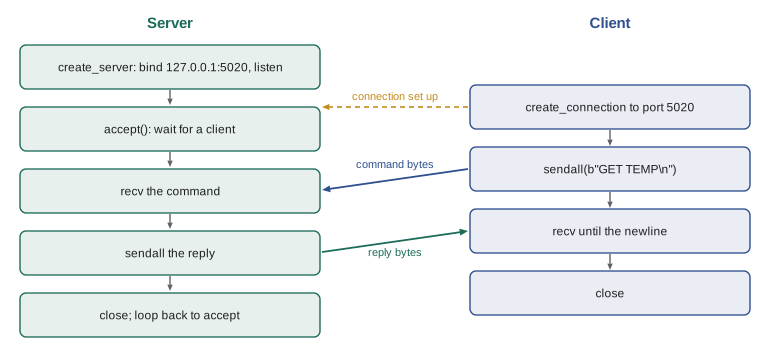
Binding to 127.0.0.1, the loopback address, means only programs on the same computer can connect, which is the safe default for a test server. Binding to 0.0.0.0 accepts connections from any network interface, which a real service needs and which must therefore be protected by a firewall and, for anything sensitive, by TLS and authentication. This server also handles one client at a time: while it talks to one, others wait. Real servers handle many clients at once, with a thread per client, with the selectors module, or with asyncio, which PYTH-250 covers. For production services, frameworks and established servers do this for you; writing your own is for learning, testing and small device protocols like the probe's.
Streams need framing
The single most important fact about TCP for programmers is that it delivers a stream of bytes with no message boundaries. If the probe sends two readings, "T 201.5 1762700000\n" and "T 202.1 1762700002\n", the client might receive them in one recv call, or the first in two pieces, or the end of the first and the start of the second together. All three happen in real networks, especially over Wi-Fi or when the receiver is slow. Code that assumes one recv returns one message works on the developer's desk and fails in the roastery.
The solution is framing: a rule, agreed by both ends, for where each message ends. Two methods cover nearly everything. A delimiter ends each message with a special byte or sequence, such as a newline; the receiver keeps a buffer, adds every chunk to it, and takes out complete messages up to each delimiter, leaving any partial message in the buffer for next time. A length prefix sends the size of each message first, in a fixed number of bytes; the receiver reads the size, then reads exactly that many bytes. Text protocols such as the probe's, SMTP and early HTTP use delimiters; binary protocols usually use length prefixes.
class LineReader:
    """Collect bytes from a stream and hand back complete lines."""
    def __init__(self):
        self.buffer = b""
    def feed(self, chunk):
        self.buffer += chunk
        lines = []
        while b"\n" in self.buffer:
            line, self.buffer = self.buffer.split(b"\n", 1)
            lines.append(line.decode("ascii"))
        return lines

# The same two readings, arriving split up in an awkward way
chunks = [b"T 201.", b"5 1762700000\nT 20", b"2.1 1762700002\n", b"T 203"]
reader = LineReader()
for chunk in chunks:
    print(repr(chunk), "->", reader.feed(chunk))
print("still waiting for the rest of:", reader.buffer)b'T 201.' -> [] b'5 1762700000\nT 20' -> ['T 201.5 1762700000'] b'2.1 1762700002\n' -> ['T 202.1 1762700002'] b'T 203' -> [] still waiting for the rest of: b'T 203'
Whatever the chunk boundaries, the reader produces exactly the complete lines, in order, and keeps the incomplete "T 203" until the rest arrives. A real client would call reader.feed(sock.recv(4096)) in a loop. The standard library also offers sock.makefile(), which wraps a socket in a file-like object whose readline method does this buffering for you, as the simulator above used. Writing the buffer yourself once is still worth it, because it makes the problem impossible to forget.
Try it yourself
Split a stream into lines
Write lines_from(chunks) that takes a list of byte chunks received from a newline-framed stream and returns a tuple (lines, leftover): the list of complete lines decoded as ASCII, without the newline, and the bytes left over after the last newline.
def lines_from(chunks):
    return [c.decode('ascii').strip() for c in chunks], b''

print(lines_from([b'T 201.', b'5 1\nT 2', b'02 2\n']))
Length-prefixed messages with struct
Binary protocols usually put the length first. The struct module converts between Python integers and fixed-size byte sequences: struct.pack("!I", 18) produces four bytes holding 18 in network byte order, the big-endian order that network protocols use by convention, and struct.unpack reverses it. The listing frames JSON messages this way, the way the roast controller's newer firmware sends whole roast profiles.
import json, struct

def frame(obj):
    body = json.dumps(obj, separators=(",", ":")).encode("utf-8")
    return struct.pack("!I", len(body)) + body          # 4-byte length, then the body

def unframe(data):
    """Return (messages, leftover) from a buffer of length-prefixed frames."""
    messages = []
    while len(data) >= 4:
        (size,) = struct.unpack("!I", data[:4])
        if len(data) < 4 + size:
            break                                         # wait for the rest
        messages.append(json.loads(data[4:4 + size]))
        data = data[4 + size:]
    return messages, data

stream = frame({"batch": "B-0412", "drop": 214.5}) + frame({"batch": "B-0413", "drop": 211.0})
print(len(stream), "bytes; the first length prefix is", stream[:4].hex(" "), "=", int.from_bytes(stream[:4], "big"), "bytes of JSON")
messages, rest = unframe(stream[:40])
print(messages, "|", len(rest), "bytes waiting for the rest")
messages, rest = unframe(stream)
print(messages, "|", len(rest), "bytes waiting")70 bytes; the first length prefix is 00 00 00 1f = 31 bytes of JSON
[{'batch': 'B-0412', 'drop': 214.5}] | 5 bytes waiting for the rest
[{'batch': 'B-0412', 'drop': 214.5}, {'batch': 'B-0413', 'drop': 211.0}] | 0 bytes waitingCut the stream at byte 40 and unframe returns the one complete message and leaves the rest waiting, exactly like the line reader. A careful receiver also sets a maximum message size and rejects any frame claiming to be larger, because a corrupted or malicious length of four billion bytes should not make the program try to wait for, or allocate, four gigabytes.
Try it yourself
Length-prefixed frames
Write pack_messages(texts) that encodes each string as UTF-8 and prefixes it with its length as a 2-byte unsigned big-endian integer (struct format !H), returning all the frames joined into one bytes value. Then write unpack_messages(data) that reverses it and returns the list of strings.
def pack_messages(texts):
    return '\n'.join(texts).encode()

def unpack_messages(data):
    return data.decode().split('\n')

print(unpack_messages(pack_messages(['GET TEMP', 'café'])))
Designing a small text protocol
The probe's protocol is a good model for a small device protocol: each message is one ASCII line, the first word says what kind of message it is, and fields are separated by single spaces. A reading is T, the temperature in degrees Celsius with one decimal place, and a Unix timestamp; an error is ERR followed by a description. Writing the protocol down in a few lines, with an example of each message, is the most valuable thing you can do before writing code, because both ends must agree exactly. Parsing then means splitting the line, checking the type and the number of fields, and converting each field, rejecting anything that does not fit.
def parse_reading(line):
    """Turn 'T 201.5 1762700000' into (201.5, 1762700000); raise ValueError otherwise."""
    parts = line.split()
    if not parts:
        raise ValueError("empty line")
    if parts[0] == "ERR":
        raise ValueError("probe error: " + " ".join(parts[1:]))
    if parts[0] != "T" or len(parts) != 3:
        raise ValueError(f"not a reading: {line!r}")
    temp, stamp = float(parts[1]), int(parts[2])
    if not -40 <= temp <= 300:
        raise ValueError(f"temperature {temp} outside the probe's range")
    return temp, stamp

for line in ("T 201.5 1762700000", "ERR sensor disconnected", "T hot 1762700001", "T 999.0 1762700002"):
    try:
        print(parse_reading(line))
    except ValueError as e:
print("rejected:", e)(201.5, 1762700000) rejected: probe error: sensor disconnected rejected: could not convert string to float: 'hot' rejected: temperature 999.0 outside the probe's range
Try it yourself
Parse a probe message
The probe also sends humidity readings in the roastery: H 41 1762700005 (the relative humidity as a whole number, and a timestamp). Write parse(line) that returns ("temp", float, int) for a T line, ("humidity", int, int) for an H line, and raises ValueError for anything else, including a line with the wrong number of fields.
def parse(line):
    kind, value, stamp = line.split()
    return kind, float(value), int(stamp)

print(parse('T 201.5 1762700000'))
UDP datagrams
UDP needs no connection: a program creates a socket with socket.SOCK_DGRAM and calls sendto with a message and an address, and the receiver calls recvfrom to get one whole datagram and the sender's address. Message boundaries come free, because each datagram arrives complete or not at all, but nothing guarantees delivery or order. That suits data where the latest value matters and a lost one does not, like the roaster's once-a-second status broadcast, and protocols with their own retry logic, like DNS. A UDP datagram should stay small, well under about 1,400 bytes, so it fits in a single packet on most networks.
import socket

# Receiver: listen for the roaster's status broadcasts on port 5021
with socket.socket(socket.AF_INET, socket.SOCK_DGRAM) as sock:
    sock.bind(("0.0.0.0", 5021))
    sock.settimeout(5)
    data, sender = sock.recvfrom(1500)        # one whole datagram, or a timeout
    print(sender, data.decode("ascii"))

# Sender (on another machine): one datagram, no connection
# socket.socket(socket.AF_INET, socket.SOCK_DGRAM).sendto(b"STATUS roasting 7:42", ("10.20.40.255", 5021))
Security and practical habits
Plain sockets send everything in the clear, so anything sensitive must travel over TLS. The ssl module wraps a socket in TLS with ssl.create_default_context().wrap_socket(sock, server_hostname=host), which encrypts the connection and checks the server's certificate, the same protection HTTPS gives. A server written for testing should listen only on 127.0.0.1, and any service that must listen on the network belongs behind the firewall rules NET-110 described: the probe's port 5020 is reachable only from the roastery and office networks, never from the guest Wi-Fi or the internet. Every receiver should treat incoming bytes as untrusted, limit sizes, validate each field and close connections that send nonsense.
Finally, reach for sockets only when you need them. For web services, use HTTP libraries; for email, smtplib; for databases, the database driver. Sockets are the right tool for small devices, custom protocols, testing and diagnostics. A short port check, which tries to connect with a one-second timeout and reports whether anything answered, is one of the handiest diagnostic scripts an IT person can keep.
Worked problem
Why the roast log had duplicate and missing readings
Kai's first logging script called sock.recv(64) once per reading and assumed it held exactly one line. On busy afternoons the log showed some readings glued together, such as 'T 201.5 1762700000\nT 20', and others missing their first characters. Explain the cause and the fix.
Show solution
- TCP is a byte stream; recv returns whatever has arrived, which may be part of a reading or more than one reading.
- When the Wi-Fi was busy, two readings arrived together, so one recv returned a reading and a half; the next recv returned the second half on its own.
- The script treated each recv result as a whole reading, so it logged a glued-together line and then a fragment.
- The fix is a line buffer: add each chunk to a buffer, take out complete lines up to each newline, and keep the remainder for next time.
Answer: Frame the stream: buffer the bytes and split on newlines, so readings are reassembled however the network splits them.
Common mistakes
MistakeAssuming one recv call returns exactly one message.
InsteadBuffer the received bytes and split them by delimiter or length prefix.
MistakeUsing send and assuming it sent everything.
InsteadUse sendall, which keeps sending until every byte is delivered.
MistakeConnecting or receiving without a timeout.
InsteadPass a timeout so dead devices and unplugged cables raise errors instead of hanging.
MistakeMixing str and bytes.
InsteadEncode text before sending and decode after receiving, with the protocol's encoding.
MistakeBinding a test server to 0.0.0.0 on a shared network.
InsteadBind test servers to 127.0.0.1, and protect real services with firewall rules and TLS.
MistakeTrusting a length prefix from the network without a limit.
InsteadReject frames larger than a sensible maximum size.
Summary and key terms
- A socket is the operating system's handle for one end of a network conversation, identified by an address and port.
- TCP gives a reliable, ordered byte stream; UDP sends separate datagrams that may be lost or reordered.
- A client connects, sends with sendall, receives with recv and closes; always set a timeout.
- A server binds, listens and accepts one socket per client; bind tests to 127.0.0.1.
- TCP has no message boundaries, so messages must be framed by a delimiter or a length prefix.
- struct packs integers into fixed-size bytes in network byte order for length prefixes and binary fields.
- Use TLS for anything sensitive, validate everything received, and prefer higher-level libraries when they exist.
- socket
- An endpoint for sending and receiving data over a network.
- port
- A number that identifies a program on a computer for network traffic.
- TCP
- A reliable, connection-oriented protocol that delivers an ordered byte stream.
- UDP
- A connectionless protocol that sends independent datagrams without guarantees.
- datagram
- One self-contained UDP message.
- framing
- The rule that marks where each message in a stream ends.
- length prefix
- A fixed-size count of bytes sent before each message.
- network byte order
- The big-endian byte order used by network protocols.
- loopback address
- 127.0.0.1, which reaches only the same computer.
- bytes
- Python's type for raw binary data, distinct from text strings.
Practice problems
Work each problem on paper first, then reveal the answer to check.
A client sends two lines quickly. How many recv calls might the server need to read them?
Show answer
Any number: one call might return both, or each might arrive in several pieces.
What does recv return when the other end closes the connection?
Show answer
An empty bytes object, b"".
Why does the probe client use sendall instead of send?
Show answer
send may transmit only part of the data; sendall keeps going until all of it is sent.
What does struct.pack("!I", 5) produce?
Show answer
Four bytes, b'\x00\x00\x00\x05', in big-endian order.
Give one use where UDP is a better fit than TCP.
Show answer
A frequent status broadcast where only the latest value matters, or DNS lookups.
Why should a test server bind to 127.0.0.1?
Show answer
So only programs on the same computer can connect to it.
Lesson quiz · 5 questions
Score 60% or more to complete this lesson.
Create a free account to save your progress, take quizzes and earn a certificate.