
PYTH-240 · Lesson 10 of 12 · 27 min
Command-line tools with argparse
▶ Video coming soon A video version of this lesson is on the way.
Ridgeline's scripts have grown up. The weekly report, the order sync, the arrivals check and the low-stock alert each started as a file that did one thing when run. Now people want options. Theo wants the report for the last 14 days instead of 7 at the end of a month. Kai wants the stock alert to print to the screen when he runs it by hand but send a chat message when it runs on a schedule. Anita wants the export in CSV for her spreadsheet and JSON for the accountant's import tool. Editing constants at the top of the file for each run is error-prone, and impossible for a scheduled job. The answer is a proper command-line interface.
This lesson shows how a program receives command-line arguments, and how the standard library's argparse module turns them into a clear, validated interface with help text: positional arguments, options, flags, types, choices, defaults and subcommands. It covers exit codes, where configuration should come from, how to write output that other programs can use, and how to structure a command-line program so it can be tested. It ends by replacing the hand-written command parsing in the ridgeline package from PYTH-102 with argparse.
Arguments and sys.argv
When you run python weekly_report.py --days 14 --format csv in a terminal, the operating system starts Python and passes it the words after python as a list of strings. Python makes them available as sys.argv: sys.argv[0] is the script name, and the rest are the arguments, exactly as typed, split on spaces, with quotes used to keep words together. Nothing has been checked or converted: "14" is a string, a typo in an option name is just another string, and a missing value is simply absent.
import shlex

typed = 'weekly_report.py --days 14 --format csv "Theo Barnes"'
argv = shlex.split(typed)          # how a shell splits the line into sys.argv
print(argv)
print(type(argv[2]).__name__, repr(argv[2]))['weekly_report.py', '--days', '14', '--format', 'csv', 'Theo Barnes'] str '14'
Parsing sys.argv by hand quickly becomes a tangle of index checks, and it never produces help text or friendly errors. argparse does all of that. You describe the arguments the program accepts, call parse_args, and receive an object whose attributes hold the converted, validated values. If the user types something wrong, argparse prints a usage line and a specific error message and exits with status 2, the conventional code for a usage error.
A first parser
An ArgumentParser has a program name and a description, and add_argument declares each argument. Arguments without dashes are positional: they are required and matched by position. Arguments with dashes are options: they are optional, matched by name, and may have a short form such as -d alongside the long form --days. type converts the string, choices restricts it to a set of values, default supplies a value when the option is absent, and help explains it in the automatically generated help. action="store_true" makes a flag that is False unless present.
import argparse

def build_parser():
    p = argparse.ArgumentParser(prog="weekly_report", description="Summarize shop sales and stock for a period.")
    p.add_argument("recipient", help="who the report is for, e.g. theo")
    p.add_argument("-d", "--days", type=int, default=7, help="how many days to cover (default: 7)")
    p.add_argument("-f", "--format", choices=["text", "csv", "json"], default="text", help="output format")
    p.add_argument("--dry-run", action="store_true", help="show what would be sent without sending")
    return p

parser = build_parser()
args = parser.parse_args(["theo", "--days", "14", "-f", "csv"])     # a real script calls parse_args()
print(args)
print(args.recipient, args.days + 1, args.format, args.dry_run)
print(parser.format_help())Namespace(recipient='theo', days=14, format='csv', dry_run=False)
theo 15 csv False
usage: weekly_report [-h] [-d DAYS] [-f {text,csv,json}] [--dry-run] recipient
Summarize shop sales and stock for a period.
positional arguments:
recipient who the report is for, e.g. theo
options:
-h, --help show this help message and exit
-d, --days DAYS how many days to cover (default: 7)
-f, --format {text,csv,json}
output format
--dry-run show what would be sent without sendingPassing a list to parse_args, as the listing does, parses that list instead of sys.argv. Real scripts call parse_args() with no argument, but the list form is what makes command-line programs easy to test, and it is how the exercises on this page work. Look at how the option --dry-run becomes the attribute dry_run, with the dash changed to an underscore, and that --days arrived as the integer 14, ready for arithmetic. The help text was written for you from the help strings, including the defaults and the allowed choices.
Try it yourself
A parser for the stock alert
Write build_parser() for the stock alert script. It takes an option --threshold (an integer, default 10), an option --notify that must be one of print, chat or email (default print), and a flag --verbose. Return the ArgumentParser.
import argparse

def build_parser():
    p = argparse.ArgumentParser(prog='stock_alert')
    p.add_argument('--threshold')
    return p

print(build_parser().parse_args(['--threshold', '12']))
Custom types and validation
The type argument accepts any function that takes a string and returns a value, which makes it the right place for validation. A function that parses an ISO date and raises argparse.ArgumentTypeError with a helpful message for anything else gives the user a clean error instead of a traceback. The same idea checks ranges, such as a number of days between 1 and 92, or file paths that must exist.
import argparse, contextlib, io
from datetime import date

def iso_date(text):
    try:
        return date.fromisoformat(text)
    except ValueError:
        raise argparse.ArgumentTypeError(f"{text!r} is not a date like 2026-11-02")

def day_count(text):
    n = int(text)
    if not 1 <= n <= 92:
        raise argparse.ArgumentTypeError("days must be between 1 and 92")
    return n

p = argparse.ArgumentParser(prog="weekly_report")
p.add_argument("--start", type=iso_date, required=True)
p.add_argument("--days", type=day_count, default=7)
args = p.parse_args(["--start", "2026-11-02", "--days", "7"])
print(args.start.strftime("%A %d %B %Y"), args.days)

for bad in (["--start", "2/11/2026"], ["--start", "2026-11-02", "--days", "400"]):
    err = io.StringIO()
    try:
        with contextlib.redirect_stderr(err):
            p.parse_args(bad)
    except SystemExit as e:
print("exit", e.code, "|", err.getvalue().strip().splitlines()[-1])Monday 02 November 2026 7 exit 2 | weekly_report: error: argument --start: '2/11/2026' is not a date like 2026-11-02 exit 2 | weekly_report: error: argument --days: days must be between 1 and 92
Try it yourself
A month option
Write a type function month(text) for an option such as --month 2026-11. It returns a tuple (year, month) of integers, and raises argparse.ArgumentTypeError if the text is not in the form YYYY-MM with a month from 1 to 12.
Then write parse(argv) that builds a parser with a required --month option using that type and returns the parsed arguments.
import argparse

def month(text):
    y, m = text.split('-')
    return int(y), int(m)

def parse(argv):
    p = argparse.ArgumentParser()
    p.add_argument('--month', type=month, required=True)
    return p.parse_args(argv)

print(parse(['--month', '2026-11']).month)
Subcommands
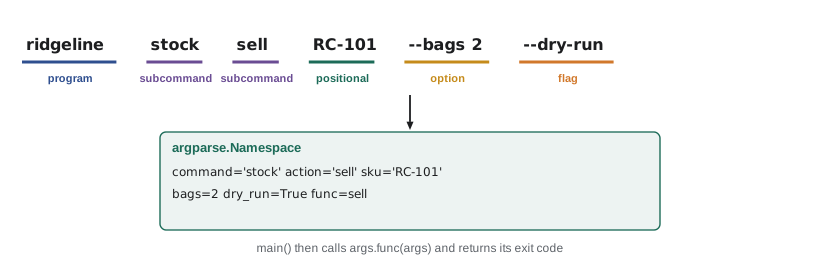
Tools that do several related jobs usually use subcommands, the way git has git commit and git log. Each subcommand has its own arguments. argparse supports this with add_subparsers: each subparser is a parser of its own, and set_defaults(func=...) attaches the function that should handle it, so the main program only needs to call args.func(args). PYTH-102's ridgeline package parsed commands such as sell RC-101 2 by splitting strings and looking words up in a dictionary; argparse does the same job with validation and help for free.
import argparse

STOCK = {"RC-101": 42, "RC-104": 9}

def cmd_list(args):
    for sku, bags in sorted(STOCK.items()):
        if bags < args.below:
            print(sku, bags)
    return 0

def cmd_sell(args):
    if args.sku not in STOCK:
        print("unknown coffee", args.sku)
        return 1
    if args.dry_run:
        print(f"would sell {args.bags} of {args.sku}")
        return 0
    STOCK[args.sku] -= args.bags
    print(args.sku, "now", STOCK[args.sku])
    return 0

def build_parser():
    p = argparse.ArgumentParser(prog="ridgeline")
    sub = p.add_subparsers(dest="command", required=True)
    ls = sub.add_parser("list", help="list coffees below a stock level")
    ls.add_argument("--below", type=int, default=1000)
    ls.set_defaults(func=cmd_list)
    sell = sub.add_parser("sell", help="record a sale")
    sell.add_argument("sku")
    sell.add_argument("--bags", type=int, default=1)
    sell.add_argument("--dry-run", action="store_true")
    sell.set_defaults(func=cmd_sell)
    return p

def main(argv=None):
    args = build_parser().parse_args(argv)
    return args.func(args)

for argv in (["list", "--below", "10"], ["sell", "RC-101", "--bags", "2"], ["sell", "RC-999"]):
print(argv, "-> exit", main(argv))RC-104 9 ['list', '--below', '10'] -> exit 0 RC-101 now 40 ['sell', 'RC-101', '--bags', '2'] -> exit 0 unknown coffee RC-999 ['sell', 'RC-999'] -> exit 1
Each handler returns an exit code, and main returns whatever the handler returned. In the real script the last line is sys.exit(main()) inside the main guard from PYTH-102, so the operating system receives the code. main takes an optional argv list for the same reason as before: tests call main(["sell", "RC-101"]) and check the result, while the real program passes nothing and argparse reads sys.argv.
Try it yourself
Dispatch to the right command
Write main(argv) for a tool with two subcommands: add A B prints and returns 0 after printing the sum of two integers, and check N returns 0 if the integer N is even and 1 if it is odd (printing nothing). Use add_subparsers with required=True and set_defaults(func=...); main returns the handler's exit code.
import argparse

def main(argv):
    if argv[0] == 'add':
        print(argv[1] + argv[2])
    return 0

print(main(['add', '2', '3']))
Options that cannot be combined
Some options make no sense together. The weekly report can cover the last N days or a named month, but not both at once, and a run can be quiet or verbose but not both. add_mutually_exclusive_group creates a group in which at most one option may be given; with required=True, exactly one must be. argparse then rejects a conflicting command line with a clear message, so the program never has to guess which option the user meant.
import argparse, contextlib, io

p = argparse.ArgumentParser(prog="weekly_report")
period = p.add_mutually_exclusive_group()
period.add_argument("--days", type=int)
period.add_argument("--month")
print(p.parse_args(["--days", "14"]))
print(p.parse_args(["--month", "2026-11"]))
err = io.StringIO()
try:
    with contextlib.redirect_stderr(err):
        p.parse_args(["--days", "14", "--month", "2026-11"])
except SystemExit as e:
print("exit", e.code, "|", err.getvalue().strip().splitlines()[-1])Namespace(days=14, month=None) Namespace(days=None, month='2026-11') exit 2 | weekly_report: error: argument --month: not allowed with argument --days
Exit codes and output streams
Command-line programs talk to the world in three ways: the exit code, standard output and standard error. The exit code is a number the program returns when it ends: 0 means success, anything else means failure, and argparse uses 2 for usage errors. Schedulers, shell scripts and continuous integration systems decide what to do next based on it, so a script that prints "ERROR" but exits with 0 is lying to them. Standard output, where print writes by default, is for the program's actual output, the report or the CSV. Standard error is for messages about the run, such as progress, warnings and errors, which you write with print(..., file=sys.stderr) or, better, with the logging module from PYTH-120. Keeping them apart means weekly_report.py --format csv > week45.csv produces a clean file even when the script also reports progress.
Two more conventions make tools pleasant. Offer --quiet and --verbose to control how much is reported, and keep the default output short. And when the output is meant for other programs, offer a machine-readable format such as --format json, rather than expecting someone to parse aligned text columns.
Where configuration comes from
A script's settings can come from several places, and a clear order of precedence avoids surprises. The usual rule, from strongest to weakest, is: command-line options, then environment variables, then a configuration file, then built-in defaults. Secrets, as lesson 3 explained, come from the environment or a secrets manager and never from the command line, where they would appear in the shell history and in process listings visible to other users. argparse can take its defaults from the environment directly.
import argparse, os

os.environ["RIDGELINE_REPORT_DAYS"] = "14"          # stands in for the real environment

p = argparse.ArgumentParser(prog="weekly_report")
p.add_argument("--days", type=int, default=int(os.environ.get("RIDGELINE_REPORT_DAYS", "7")))
print(p.parse_args([]).days)                      # from the environment
print(p.parse_args(["--days", "30"]).days) # the command line wins14 30
Installing a tool as a command
Typing python path/to/weekly_report.py gets tiresome. When a project is packaged with a pyproject.toml, as PYTH-110 set up for ridgeline-tools and PYTH-260 develops further, a [project.scripts] section maps command names to functions: ridgeline = "ridgeline.cli:main". After python -m pip install -e . inside the virtual environment, typing ridgeline stock list runs main, with sys.argv filled in as usual. This is how every command-line tool installed with pip, from pytest to ruff, gets its command.
[project]
name = "ridgeline-tools"
version = "0.6.0"
requires-python = ">=3.12"

[project.scripts]
ridgeline = "ridgeline.cli:main"
weekly-report = "ridgeline.reports:main"
Worked problem
Designing the weekly report command
Theo, Anita and the scheduler all run the weekly report differently. Theo wants a readable summary on screen, sometimes for 14 days. Anita wants CSV covering a given month. The scheduler runs it every Monday at 06:30 and emails the result, but should never email when someone runs it by hand. Design the interface.
Show solution
- Options: --days N (1 to 92, default 7) or --month YYYY-MM, in a mutually exclusive group so both cannot be given at once.
- --format text|csv|json, default text; the report goes to standard output so it can be redirected to a file.
- --email RECIPIENT sends the report instead of printing it; the scheduler passes it, people usually do not.
- --dry-run shows what would be emailed without sending; --verbose adds progress messages on standard error.
- Exit codes: 0 when the report was produced, 1 when a data source failed, 2 for usage errors (from argparse).
Answer: weekly-report --days 14 for Theo, weekly-report --month 2026-11 --format csv > nov.csv for Anita, and weekly-report --email theo@ridgelinecoffee.example in the scheduler.
Common mistakes
MistakeParsing sys.argv by hand with index checks.
InsteadDescribe the arguments with argparse, which validates them and writes the help.
MistakeConverting option values after parsing, scattered through the code.
InsteadUse type= functions so values arrive converted and validated.
MistakeExiting with 0 after an error.
InsteadReturn a non-zero exit code so schedulers and scripts can tell the run failed.
MistakeMixing progress messages into standard output.
InsteadWrite data to standard output and messages to standard error or the log.
MistakePassing passwords or API keys as command-line options.
InsteadRead secrets from the environment or a secrets manager.
MistakeWriting main() so it can only read sys.argv.
InsteadLet main take an optional argv list so tests can call it directly.
Summary and key terms
- Command-line arguments arrive as strings in sys.argv, unchecked and unconverted.
- argparse declares positional arguments, options and flags, converts them with type=, restricts them with choices= and writes help text.
- Custom type functions raise ArgumentTypeError to give clean, specific errors.
- Subcommands use add_subparsers, with set_defaults(func=...) to dispatch to handler functions.
- Exit codes report success (0) or failure (non-zero); argparse exits with 2 for usage errors.
- Data goes to standard output and messages to standard error; offer machine-readable formats.
- Settings come from the command line, then the environment, then config files, then defaults; [project.scripts] installs commands.
- command-line interface
- The arguments and options a program accepts when run from a terminal.
- sys.argv
- The list of command-line arguments, starting with the script name.
- positional argument
- A required argument matched by its position.
- option
- A named argument starting with dashes, usually optional.
- flag
- An option with no value that switches something on.
- subcommand
- A named action with its own arguments, such as git commit.
- exit code
- The number a program returns when it ends; 0 means success.
- standard output
- The stream for a program's results.
- standard error
- The stream for messages about a program's run.
- entry point
- A pyproject.toml mapping from a command name to a Python function.
Practice problems
Work each problem on paper first, then reveal the answer to check.
What is sys.argv[0]?
Show answer
The name of the script being run.
Which attribute holds the value of --dry-run?
Show answer
args.dry_run
What exit code does argparse use for a usage error?
Show answer
2
Why does main(argv=None) make a program easier to test?
Show answer
Tests can pass a list of arguments instead of changing sys.argv.
Where should a script write progress messages so that its CSV output stays clean?
Show answer
To standard error, or to the log.
Why should an API key never be a command-line option?
Show answer
It would appear in the shell history and in process listings.
Lesson quiz · 5 questions
Score 60% or more to complete this lesson.
Create a free account to save your progress, take quizzes and earn a certificate.