
PYTH-240 · Lesson 1 of 12 · 30 min
HTTP and the requests library
▶ Video coming soon A video version of this lesson is on the way.
Ridgeline Coffee Roasters now sells online. Orders arrive through the shop platform, parcels go out with a shipping carrier, and the green coffee importer publishes its prices as a feed that changes every week. Each of these services runs on someone else's computer, and until now Theo has been copying information between them by hand: orders from the shop dashboard into a spreadsheet, addresses from the spreadsheet into the carrier's website, and prices from the importer's list into the roast plan. It takes him most of Monday. Every one of these services also offers an API, a way for programs to ask for the same information directly, and almost all of them speak the same language: HTTP.
This course teaches you to use Python to talk to web services and networks and to automate the office work around them. This first lesson explains how HTTP works: what a request and a response contain, how URLs and query strings are built, what the methods and status codes mean, and which headers matter. It then introduces requests, the most widely used Python library for HTTP, and the standard library tools that do the same job. By the end you will be able to read an HTTP exchange, build a correct URL, and write code that reacts sensibly to every kind of response.
The browser version of Python on this page has no network access, so the runnable listings in this course talk to small fake services written in Python instead of real servers. The fake services behave like the real ones: they take the same requests and return the same kinds of responses, so everything you practice here carries straight over to real APIs.
Clients, servers and the request-response cycle
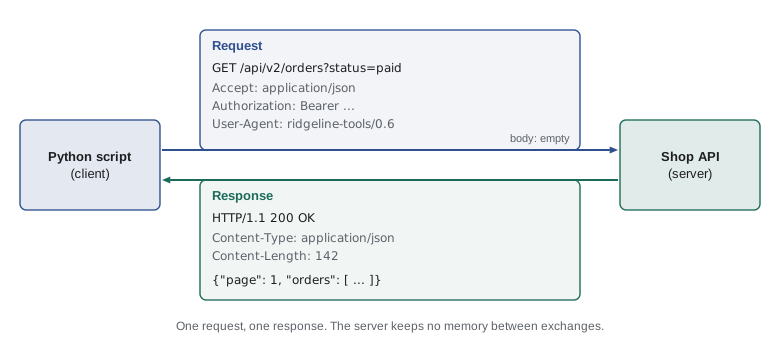
HTTP, the Hypertext Transfer Protocol, is the set of rules that web browsers, apps and scripts use to talk to web servers. The conversation always has the same shape. A client, such as a browser or a Python script, opens a connection to a server and sends a request: a message that says what it wants. The server sends back a response: a message that says what happened and usually carries some data. Then the exchange is over. HTTP is stateless, which means the server does not remember previous requests on its own; anything that must persist, such as who you are, is sent again with each request, usually in a header.
A request has three parts. The request line names the method, such as GET or POST, and the path of the resource on the server. Then come the headers, lines of name: value pairs that describe the request, such as which formats the client accepts or which credentials it carries. Finally there may be a body, the data being sent, which is empty for a simple GET. A response has the same structure: a status line with a three-digit status code and a short reason phrase, headers, and a body. Here is a real exchange as it travels over the connection, written out as text.
GET /api/v2/orders?status=paid&page=1 HTTP/1.1
Host: shop.ridgelinecoffee.example
Accept: application/json
Authorization: Bearer rk_live_EXAMPLE
User-Agent: ridgeline-tools/0.6 (jordan@ridgelinecoffee.example)

HTTP/1.1 200 OK
Content-Type: application/json; charset=utf-8
Content-Length: 142
Cache-Control: no-store

{"page": 1, "pages": 3, "orders": [{"id": 5012, "total": "41.75", "status": "paid"},
 {"id": 5013, "total": "18.50", "status": "paid"}]}
Read it from the top. The client asks for /api/v2/orders on the host shop.ridgelinecoffee.example, with a query string asking for paid orders, page one. It says it would like JSON back, gives an access token and identifies itself. The blank line ends the headers; this GET has no body. The server answers 200 OK, says the body is JSON encoded as UTF-8 and is 142 bytes long, asks that it not be cached, and then sends the data. Modern HTTP versions, HTTP/2 and HTTP/3, encode these messages more compactly in binary, but the meaning, the methods, headers and status codes, is exactly the same, and libraries hide the encoding from you.
URLs and query strings
Every request names a resource with a URL. A URL has several parts: the scheme (https), the host (shop.ridgelinecoffee.example), an optional port, the path (/api/v2/orders), an optional query string after a question mark (status=paid&page=1), and sometimes a fragment after a hash sign, which browsers use and servers never see. The query string is a list of name=value pairs joined with ampersands, and it is how most APIs accept filters, search terms and page numbers.
Building query strings by gluing strings together goes wrong quickly. A coffee called Ethiopia Guji & Sons, a search term with a space or an accented name such as Café Sumatra must be encoded so that the special characters do not break the URL: a space becomes %20 or a plus sign, and an ampersand inside a value becomes %26. The standard library module urllib.parse does this correctly, in both directions.
from urllib.parse import urlencode, urlsplit, parse_qs, quote

base = "https://shop.ridgelinecoffee.example/api/v2/products"
params = {"search": "Guji & Sons", "roast": "light", "page": 2}
url = base + "?" + urlencode(params)
print(url)

parts = urlsplit(url)
print(parts.scheme, parts.netloc, parts.path)
print(parse_qs(parts.query))
print(quote("Café Sumatra/Dark"), quote("Café Sumatra/Dark", safe=""))https://shop.ridgelinecoffee.example/api/v2/products?search=Guji+%26+Sons&roast=light&page=2
https shop.ridgelinecoffee.example /api/v2/products
{'search': ['Guji & Sons'], 'roast': ['light'], 'page': ['2']}
Caf%C3%A9%20Sumatra/Dark Caf%C3%A9%20Sumatra%2FDarkurlencode turns a dictionary into a properly encoded query string, and urlsplit breaks a URL into its parts. parse_qs reads a query string back into a dictionary whose values are lists, because the same name may appear more than once, as in tag=decaf&tag=organic. quote encodes a single piece of text for use inside a path; by default it leaves slashes alone, so pass safe="" when the slash is part of the value. In practice the requests library does this encoding for you when you pass a params dictionary, but you will still meet urllib.parse whenever you build links, read redirects or log URLs.
Try it yourself
Build a product search URL
Write a function search_url(term, page=1) that returns the URL for searching the shop API. The base is https://shop.ridgelinecoffee.example/api/v2/products and the query string has q set to the search term and page set to the page number, in that order.
Use urlencode so that spaces, ampersands and accented letters are encoded correctly.
BASE = 'https://shop.ridgelinecoffee.example/api/v2/products'

def search_url(term, page=1):
    return BASE + '?q=' + term + '&page=' + str(page)

print(search_url('Guji & Sons'))
Methods: what the client wants to do
The method in the request line tells the server what kind of action the client wants. Five methods cover almost all API work. GET reads a resource and never changes anything. POST creates something new, such as an order or a shipment, or triggers an action. PUT replaces a resource completely with the version in the body. PATCH changes part of a resource, such as only the stock count of one product. DELETE removes it. Two other methods appear now and then: HEAD is a GET that returns only the headers, useful for checking whether a file has changed, and OPTIONS asks which methods a resource allows.
Two properties of methods matter a great deal when you write automation. A method is safe if it does not change anything on the server; GET and HEAD are safe. A method is idempotent if sending the same request twice has the same effect as sending it once: GET, PUT and DELETE are idempotent, because setting the stock to 30 twice still leaves it at 30, and deleting something that is already gone leaves it gone. POST is not idempotent: sending a create-order request twice may create two orders. That difference decides which requests a script may safely repeat after a network error, a topic that returns in lessons 2 and 11.
| Method | Typical use at Ridgeline | Safe | Idempotent |
|---|---|---|---|
| GET | List paid orders, read one product | Yes | Yes |
| POST | Create a shipment, add a customer note | No | No |
| PUT | Replace a product description | No | Yes |
| PATCH | Change the stock count of one coffee | No | Not guaranteed |
| DELETE | Cancel a draft shipment | No | Yes |
Status codes: what happened
The three-digit status code in the response line is the first thing your code should look at. The first digit gives the class. Codes in the 200s mean success: 200 OK, 201 Created after a POST that made something, 204 No Content when there is nothing to send back. The 300s are redirections: the resource lives somewhere else, and the Location header says where. The 400s mean the client made a mistake: 400 Bad Request for malformed data, 401 Unauthorized when credentials are missing or wrong, 403 Forbidden when the credentials are valid but not allowed to do this, 404 Not Found, 409 Conflict when the change clashes with the current state, 422 when the data is well formed but fails validation, and 429 Too Many Requests when you have hit a rate limit. The 500s mean the server failed: 500 Internal Server Error, 502 Bad Gateway, 503 Service Unavailable and 504 Gateway Timeout.
The class tells you what to do next. A 2xx means carry on. A 4xx means fix the request: retrying the same request unchanged will fail the same way, with one exception, 429, which means wait and try again later. A 5xx often means a temporary problem on the server's side, so a careful retry after a pause is reasonable, at least for safe and idempotent requests. The standard library's http.HTTPStatus enumeration knows every code and its phrase.
from http import HTTPStatus

for code in (200, 201, 204, 301, 400, 401, 403, 404, 409, 422, 429, 500, 503):
    status = HTTPStatus(code)
    print(code, status.phrase)

print(HTTPStatus.TOO_MANY_REQUESTS.value, HTTPStatus(503).is_server_error)200 OK 201 Created 204 No Content 301 Moved Permanently 400 Bad Request 401 Unauthorized 403 Forbidden 404 Not Found 409 Conflict 422 Unprocessable Content 429 Too Many Requests 500 Internal Server Error 503 Service Unavailable 429 True
The is_server_error property and its siblings is_success, is_client_error and is_redirection were added in Python 3.12, which is the version used by the browser on this page. On an older Python, compare the code with ranges instead: 200 <= code < 300 means success, and so on, which is exactly what the next exercise asks you to do.
Try it yourself
What should the script do?
Write a function next_step(code) that takes a status code and returns one of four strings: "continue" for any 2xx code, "retry later" for 429 or any 5xx code, "fix request" for any other 4xx code, and "follow redirect" for any 3xx code.
def next_step(code):
    if code == 200:
        return 'continue'
    return 'fix request'

for c in (200, 201, 404, 429, 503, 301):
    print(c, next_step(c))
Headers worth knowing
Headers carry the details. A handful appear in nearly every API exchange. Content-Type says what format the body is in, such as application/json, text/csv or application/xml, and Accept tells the server which formats the client would like back. Authorization carries credentials, the subject of lesson 3. User-Agent identifies the client; a good script sends a name, a version and a way to contact its owner, which helps the service's operators if something goes wrong. Content-Length gives the size of the body in bytes.
Several response headers drive the logic of a careful client. Location points to the new address after a redirect, or to the resource just created by a POST. Retry-After, sent with 429 and 503, says how many seconds to wait. ETag and Last-Modified identify the version of a resource, so a client can ask "has this changed since?" with If-None-Match or If-Modified-Since and get a cheap 304 Not Modified when it has not. Many APIs also send their own headers, often starting with X-, such as X-RateLimit-Remaining, which counts how many requests you have left in the current window. Header names are not case sensitive, which is why libraries store them in a case-insensitive dictionary.
The requests library
Python's standard library can make HTTP requests with urllib.request, but the third-party requests library is far more pleasant and is used in most real projects. It is installed with python -m pip install requests, inside the project's virtual environment as PYTH-110 described. Here is the shape of a typical call, the version Jordan uses against the real shop.
import os
import requests

SHOP = "https://shop.ridgelinecoffee.example/api/v2"
headers = {
    "Accept": "application/json",
    "Authorization": "Bearer " + os.environ["RIDGELINE_SHOP_KEY"],
    "User-Agent": "ridgeline-tools/0.6 (jordan@ridgelinecoffee.example)",
}

response = requests.get(SHOP + "/orders", params={"status": "paid", "page": 1},
                        headers=headers, timeout=10)
print(response.status_code, response.headers["Content-Type"])
response.raise_for_status()          # raises requests.HTTPError for 4xx and 5xx
data = response.json()                # parse the JSON body
for order in data["orders"]:
    print(order["id"], order["total"])
Each part earns its place. params is encoded into the query string for you. headers is an ordinary dictionary. timeout is the number of seconds to wait for the server; without it, a request to a server that never answers can hang forever, so always pass one. The response object has status_code, headers, text for the body as a string, content for the raw bytes, and json() to parse a JSON body. raise_for_status() turns any 4xx or 5xx code into an exception, which is convenient when you have no special handling for errors. For other methods there are requests.post, put, patch and delete; requests.post(url, json=payload) sends a dictionary as a JSON body and sets the Content-Type header automatically.
When a script makes many requests to the same service, use a Session. A session reuses the underlying network connection, which is much faster, and holds headers that every request should carry, so you set the API key and User-Agent once. The standard library alternative, urllib.request, does the same jobs with more code; it is useful when you cannot install packages, for example on a locked-down server.
import json, urllib.request

req = urllib.request.Request(
    "https://shop.ridgelinecoffee.example/api/v2/orders?status=paid",
    headers={"Accept": "application/json", "User-Agent": "ridgeline-tools/0.6"},
)
with urllib.request.urlopen(req, timeout=10) as resp:     # raises HTTPError for 4xx/5xx
    print(resp.status, resp.headers.get("Content-Type"))
    data = json.load(resp)
Writing code you can test without a network
A script that only works when the real service is up and your API key is valid is hard to test. A good pattern is to keep the code that makes the request separate from the code that decides what to do with the response. The deciding code takes a response-like object, anything with status_code, headers and a json() method, and can be tested with a fake one. The listing below defines a tiny FakeResponse class with the same interface as a requests response and runs the deciding function against three situations.
import json

class FakeResponse:
    """Just enough of a requests.Response for testing."""
    def __init__(self, status_code, body="", headers=None):
        self.status_code = status_code
        self.text = body
        self.headers = headers or {}
    def json(self):
        return json.loads(self.text)

def paid_order_ids(response):
    if response.status_code == 429:
        wait = int(response.headers.get("Retry-After", "60"))
        return f"rate limited: wait {wait} s"
    if response.status_code != 200:
        return f"failed with {response.status_code}"
    return [order["id"] for order in response.json()["orders"]]

ok = FakeResponse(200, '{"orders": [{"id": 5012}, {"id": 5013}]}')
busy = FakeResponse(429, headers={"Retry-After": "30"})
gone = FakeResponse(404)
for r in (ok, busy, gone):
print(paid_order_ids(r))[5012, 5013] rate limited: wait 30 s failed with 404
Every runnable listing and exercise in this course uses this idea. Behind the scenes a real program would pass the object returned by requests.get; here we pass a fake. The function cannot tell the difference, and that is the point. PYTH-230 called this kind of stand-in a test double, and it is how professional teams test code that talks to services they do not control.
Worked problem
Reading three failed requests
Jordan's first script against the shop API fails in three different ways on three different days. On Monday the response is 401 with the body {"error": "invalid_token"}. On Tuesday it is 404 for the path /api/v2/order/5012. On Wednesday, during the Black Friday sale, it is 429 with Retry-After: 20. What went wrong each time, and what should the script do?
Show solution
- 401 Unauthorized means the credentials were missing or wrong. The body says the token is invalid, so the key was probably rotated or copied with a stray space. Retrying will not help; fix the key in the environment variable.
- 404 Not Found for /api/v2/order/5012 points at the path. The API documentation shows the collection is /orders, plural, so the URL should be /api/v2/orders/5012. Again, retrying unchanged will fail.
- 429 Too Many Requests during the sale means the script sent requests faster than the shop allows. The fix is to wait 20 seconds, as Retry-After says, and then continue more slowly.
Answer: Fix the key, fix the path, and wait before retrying. Only the 429 is worth retrying, and only after the pause the server asks for.
Try it yourself
Read a raw response
Write a function parse_response(raw) that takes the text of an HTTP response, as shown at the top of this lesson, and returns a tuple (status, headers, body): the status code as an integer, a dictionary of headers with names in lower case, and the body as a string.
Lines end with \n, and a blank line separates the headers from the body.
def parse_response(raw):
    first = raw.split('\n')[0]
    return first, {}, ''

print(parse_response(RAW))
Common mistakes
MistakeCalling requests.get without a timeout.
InsteadAlways pass timeout=, so a server that never answers cannot hang the script forever.
MistakeGluing query strings together by hand, so spaces and ampersands break the URL.
InsteadUse params= with requests, or urllib.parse.urlencode.
MistakeTreating every non-200 code the same way.
InsteadRead the class: fix the request for 4xx, wait for 429, consider a careful retry for 5xx.
MistakeRetrying a POST blindly after a timeout and creating a second order.
InsteadRetry only safe or idempotent requests automatically, or use an idempotency key (lesson 2).
MistakeSending no User-Agent, or pretending to be a browser.
InsteadIdentify the script honestly with a name, version and contact address.
MistakeMixing the code that sends requests with the code that interprets them.
InsteadKeep the decision logic in functions that take a response, so they can be tested with fakes.
Summary and key terms
- HTTP is a request-response protocol: the client sends a method, path, headers and optional body; the server returns a status, headers and a body.
- HTTP is stateless, so credentials and context travel with every request, usually in headers.
- urllib.parse builds and takes apart URLs and encodes query strings correctly.
- GET reads, POST creates, PUT replaces, PATCH changes part, DELETE removes; GET is safe, and GET, PUT and DELETE are idempotent.
- Status classes guide the next step: 2xx success, 3xx redirect, 4xx fix the request (except 429: wait), 5xx server trouble.
- requests makes HTTP calls simple; always pass a timeout, and use a Session for many calls to one service.
- Separate sending requests from interpreting responses so the logic can be tested with fake responses.
- HTTP
- The protocol web clients and servers use to exchange requests and responses.
- request
- A message from client to server with a method, path, headers and optional body.
- response
- A message from server to client with a status code, headers and body.
- status code
- The three-digit number that says how a request turned out.
- header
- A name: value line that describes a request or response.
- query string
- The name=value pairs after the question mark in a URL.
- idempotent
- Having the same effect whether sent once or several times.
- safe method
- A method that does not change anything on the server, such as GET.
- timeout
- The longest a client will wait for a server before giving up.
- session
- A requests object that reuses connections and shared headers across calls.
Practice problems
Work each problem on paper first, then reveal the answer to check.
What are the three parts of an HTTP request?
Show answer
The request line (method and path), the headers, and an optional body.
A response has status 201 and a Location header. What happened?
Show answer
A POST created a new resource, and Location gives its address.
Why is PUT idempotent but POST is not?
Show answer
Sending the same PUT twice leaves the same final state; sending a POST twice may create two resources.
What does urlencode({"q": "a b"}) return?
Show answer
q=a+b
Which header tells a client how long to wait after a 429?
Show answer
Retry-After.
Why should every requests call have a timeout?
Show answer
Without one, a server that never responds can make the script wait forever.
Lesson quiz · 5 questions
Score 60% or more to complete this lesson.
Create a free account to save your progress, take quizzes and earn a certificate.