
PHOT-201 · Lesson 4 of 12 · 27 min
Color capture, demosaicing and high-resolution modes
A photosite measures only how much light it receives, not what color that light is. To make color photographs with a single sensor, cameras cover the photosites with a mosaic of colored filters and then reconstruct full color for every pixel in software. This design choice affects sharpness, color accuracy, artifacts and how much real detail a camera can record. Photographers can also work around it, with pixel-shift modes that capture full color at every pixel, monochrome sensors that capture none, or alternative filter patterns. This lesson explains color filter arrays, demosaicing, the color response of sensors, aliasing and the optical low-pass filter, pixel-shift and high-resolution modes, and monochrome and other special sensors.
The Bayer pattern
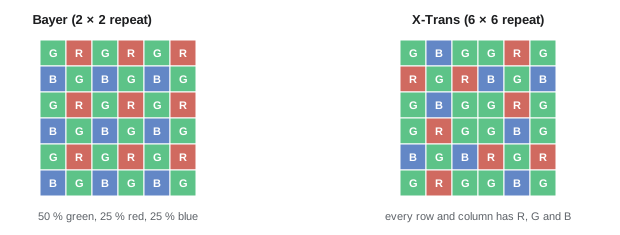
Almost all cameras use the color filter array patented by Bryce Bayer at Kodak in 1976. It arranges red, green and blue filters in repeating 2 × 2 blocks, each with two green, one red and one blue filter. Green is doubled because human vision is most sensitive to green light and draws most of its sense of detail from the middle of the spectrum. Each photosite records just one of the three colors, so two-thirds of the color information at each pixel must be estimated from neighboring photosites. Fujifilm's X-Trans sensors use a 6 × 6 pattern with a less regular arrangement, intended to reduce moiré, and some sensors include unfiltered white photosites for sensitivity.
Demosaicing
Demosaicing, also called debayering, reconstructs a full-color image by estimating the missing color values at each photosite. Simple methods average the nearest photosites of each color, which blurs edges and creates colored fringes along sharp boundaries. Better algorithms detect the direction of edges and interpolate along them, exploit the fact that fine detail usually appears in all three color channels at the same place, and suppress false color. Raw processing software uses sophisticated demosaicing, and some programs now use machine-learning methods that recover more detail with fewer artifacts. Demosaicing quality is one reason why raw files processed on a computer often look more detailed than the camera's own JPEGs.
Because each photosite sees only one color, a Bayer sensor cannot resolve quite as much detail as its pixel count suggests, especially in fine colored detail such as red text on a blue background. In black-and-white detail, good demosaicing recovers most of the sensor's resolution, often around 70 to 80 % in linear terms.
How sensors see color
The color filters are not perfect red, green and blue; each passes a broad range of wavelengths, and their response curves overlap, much like the cones of the human eye. The combination of the filters, the infrared-cut filter and the silicon's own response gives each camera its spectral sensitivity. To produce standard colors, the camera or raw processor applies a color matrix or profile that transforms the sensor's red, green and blue values into a standard color space. Differences in filters and profiles are part of why cameras from different manufacturers render skin tones, foliage and saturated colors differently, and why some photographers prefer a particular brand's "color science". Custom camera profiles, made by photographing a color chart such as a ColorChecker under the shooting light, give the most accurate color for reproduction work such as art, products and catalog photography.
Aliasing, moiré and the low-pass filter
A sensor samples the image at regular intervals. When the image contains detail finer than the sensor can resolve, such as the weave of fabric, distant brickwork or window screens, the sensor records false patterns called aliasing. In photography, aliasing appears as moiré, wavy bands or patterns that were not in the subject, and false color, rainbow fringes on fine black-and-white detail. Once recorded, moiré is difficult to remove completely.
Many cameras place an optical low-pass filter (OLPF), also called an anti-aliasing filter, in front of the sensor. It splits each point of light into several slightly displaced points, blurring detail just finer than the sensor can record, which suppresses moiré at the cost of a slight loss of sharpness. Since about 2012, many high-resolution cameras have omitted the OLPF, on the reasoning that their small pixels, lens limitations and slight camera movement provide enough blur in most situations, giving crisper images. Fashion, product and architectural photographers who often photograph fine regular patterns need to watch for moiré with such cameras, by changing distance, aperture or focus slightly, or by using pixel-shift modes.
Worked problem
Dealing with moiré in a shoot
A product photographer using a 45-megapixel camera without a low-pass filter sees strong moiré on a finely woven jacket in a test shot. What can be done during the shoot?
Show solution
- Change the camera distance or focal length slightly, which changes the pattern's frequency relative to the pixels.
- Stop down a little, so that diffraction softens the finest detail, or defocus very slightly.
- Use the camera's pixel-shift mode, if available, which captures full color at each pixel and greatly reduces false color.
- If moiré persists, reduce it in post-production with moiré removal tools on the affected area, checking the color of the fabric carefully.
Answer: Adjust distance, aperture or focus, use pixel shift where possible, and treat remaining moiré locally in post.
Pixel-shift and high-resolution modes
Cameras with sensor-shift stabilization (Lesson 8) can use the same mechanism to move the sensor by precise amounts between exposures. In one form of pixel shift, the sensor moves by exactly one pixel in each direction over four exposures, so that every point in the image is sampled through a red, a green (twice) and a blue filter. Combining the frames gives full color at every pixel without demosaicing, improving color accuracy and fine detail and eliminating false color. In a second form, the sensor also moves by half a pixel, sampling between the original pixel positions, and combining 8 or 16 frames produces files of much higher resolution, such as 240 megapixels from a 61-megapixel sensor.
Pixel-shift modes require static subjects and, usually, a tripod, because anything that moves between frames, such as leaves, water or people, produces artifacts, though some cameras and software detect and correct motion. Some cameras offer handheld high-resolution modes that use natural hand movement and multi-frame alignment instead of precise sensor shifts. These modes are valuable for art reproduction, architecture, landscapes and products, where maximum detail and color accuracy matter.
| Mode | How it works | Benefit | Limitation |
|---|---|---|---|
| Standard Bayer capture | One frame, demosaiced | Works with any subject | Some loss of color detail; possible false color |
| Four-shot pixel shift | Sensor moves one pixel between four frames | Full color at every pixel | Static subjects; tripod |
| High-resolution multi-shot | Half-pixel shifts, 8 to 16 frames | Very high resolution | Static subjects; large files; slow |
| Handheld high resolution | Natural movement plus alignment | More detail without a tripod | Processing time; artifacts with motion |
Monochrome sensors
A few cameras, such as Leica's Monochrom models, have sensors with no color filter array. Every photosite receives all visible wavelengths, so the sensor collects roughly twice as much light and resolves full detail at every pixel without demosaicing. The results are sharper and cleaner black-and-white images, with tonal control achieved by placing colored filters over the lens, as with black-and-white film: a red filter darkens blue skies, a green filter lightens foliage. Photographers who work mainly in black and white value these cameras, while others convert color files, which gives more flexibility in processing at some cost in detail and noise.
Infrared and other special sensors
Silicon is sensitive to near-infrared light up to about 1,100 nanometers, which cameras block with an infrared-cut filter. Removing or replacing that filter, a common modification, allows infrared photography, in which foliage appears bright white and skies dark, and full-spectrum conversion allows the use of filters to select ultraviolet, visible or infrared light for scientific, forensic and artistic work. Other specialized sensors include those in scientific cameras, which may be cooled to reduce noise for astronomy and microscopy, and layered sensors such as Sigma's Foveon design, which capture all three colors at each pixel by exploiting the different depths to which wavelengths penetrate silicon, at the cost of higher noise.
Alternative color filter arrays
The Bayer pattern is not the only way to arrange color filters. Fujifilm's X-Trans sensors, introduced in 2012, use a 6 × 6 pattern in which every row and column contains red, green and blue photosites in an irregular arrangement. The less regular pattern reduces the risk of moiré, allowing Fujifilm to omit the optical low-pass filter, but it requires more complex demosaicing, and some raw processors initially produced smeared or "wormy" fine detail from X-Trans files, though modern software handles them well. Quad Bayer sensors, common in smartphones, group four photosites of the same color together under each filter; in bright light, each photosite can be read individually and remosaiced for higher resolution, while in dim light, the four are combined (binned) into one larger effective pixel with lower noise, and the arrangement can also capture different exposures in neighboring photosites for single-shot HDR. Some sensors replace a portion of the green filters with clear or white photosites to collect more light, at the cost of color accuracy.
Stacked color sensors
A fundamentally different approach captures all three colors at every pixel location. Foveon sensors, used in Sigma cameras, exploit the fact that light of different wavelengths penetrates silicon to different depths: blue is absorbed near the surface, green deeper and red deepest. Three stacked photodiodes at each location record the three layers, so no demosaicing is needed and the images show very fine, artifact-free color detail at low ISO. The trade-offs have been higher noise, especially at higher ISO, less accurate color separation requiring strong processing, slow processing and limited software support. Research into organic and stacked-layer sensors continues, but color filter arrays remain dominant because of their efficiency and the maturity of demosaicing algorithms.
Why demosaicing quality matters
Demosaicing algorithms differ in how they handle edges, fine patterns and color transitions, and the choice of algorithm affects perceived sharpness and artifacts. Simple algorithms that average neighboring photosites produce soft images with color fringes along edges, called zippering. More advanced algorithms detect the direction of edges and interpolate along them rather than across, and the latest methods use machine learning trained on pairs of mosaiced and full-color images. Adobe's Enhance Details and similar AI-based demosaicing features in other raw processors can extract slightly more detail and fewer artifacts from difficult files, particularly X-Trans and high-frequency textures such as foliage, fabrics and architecture. Because the raw file preserves the original mosaic, photographers can reprocess older files with improved algorithms years later.
Worked problem
Effective color resolution of a Bayer sensor
A 24-megapixel Bayer sensor has 6,000 × 4,000 photosites. How many red, green and blue photosites does it have, and what does this mean for color detail?
Show solution
- Total photosites: 24 million.
- Green: half, 12 million; red and blue: a quarter each, 6 million.
- Luminance detail is estimated from all photosites, giving close to full resolution for brightness.
- Fine detail in saturated red or blue subjects is sampled at only a quarter of the photosites, so it is resolved less well.
Answer: 12 million green, 6 million red and 6 million blue photosites; brightness detail is near full resolution, but saturated red and blue detail is softer.
Pixel shift in practice
High-resolution pixel-shift modes produce remarkable results on static subjects, but they require care. The camera must be on a solid tripod, the subject must not move, and the exposure must be consistent across all frames; wind in foliage, moving water, people or clouds create artifacts such as checkerboard patterns or ghosting. Some processing software includes motion correction that replaces moving areas with a single frame. Handheld high-resolution modes, available on some cameras, rely on natural hand movement and alignment rather than precise sensor shifts and work surprisingly well in good light. Pixel shift is most valuable for art reproduction, product photography, architecture and landscapes where maximum detail and color accuracy matter. The resulting files can be very large, sometimes exceeding 200 megapixels, which demands substantial storage and computer power.
Common mistakes
MistakeJudging a camera's detail only from its JPEGs.
InsteadRaw processing with good demosaicing often recovers more.
MistakeIgnoring moiré risk on cameras without an OLPF.
InsteadCheck fine patterns and adjust distance, aperture or focus.
MistakeUsing pixel shift on moving subjects.
InsteadReserve it for static scenes on a tripod.
MistakeAssuming all cameras render color identically.
InsteadUse profiles and color charts for accurate work.
MistakeExpecting a converted color file to match a monochrome sensor.
InsteadMonochrome sensors gain detail and light.
Summary and key terms
- Color filter arrays let one sensor capture color; Bayer uses RGGB blocks.
- Demosaicing estimates missing colors; quality affects detail and artifacts.
- Sensor spectral response and profiles shape color rendering.
- Fine repeating detail can alias into moiré and false color.
- OLPFs suppress moiré at a small cost in sharpness; many cameras omit them.
- Pixel shift gives full color or higher resolution for static subjects.
- Monochrome and modified sensors serve black-and-white and infrared work.
- Color filter array
- Mosaic of color filters over a sensor.
- Bayer pattern
- RGGB filter arrangement.
- X-Trans
- Fujifilm's 6 × 6 filter arrangement.
- Demosaicing
- Reconstructing full color from the mosaic.
- Color profile
- Transform from sensor color to a standard space.
- Aliasing
- False patterns from undersampled detail.
- Moiré
- Interference patterns on fine repeating detail.
- OLPF
- Optical low-pass filter.
- Pixel shift
- Moving the sensor between frames to sample more.
- Monochrome sensor
- Sensor without a color filter array.
Practice problems
Work each problem on paper first, then reveal the answer to check.
Why does the Bayer pattern double green?
Show answer
Vision is most sensitive to green and draws detail from it.
What fraction of color values must be estimated at each pixel?
Show answer
Two-thirds.
Why may raw files look sharper than in-camera JPEGs?
Show answer
Better demosaicing and controlled processing.
How are custom camera profiles made?
Show answer
By photographing a color chart under the shooting light.
What subjects commonly cause moiré?
Show answer
Fabric weaves, screens, brickwork, fine patterns.
What does an OLPF trade?
Show answer
A little sharpness for freedom from moiré.
What does four-shot pixel shift achieve?
Show answer
Full color at every pixel.
What is the main limitation of pixel shift?
Show answer
Subjects must be static.
What does a red filter do on a monochrome camera?
Show answer
Darkens blue skies.
What modification enables infrared photography?
Show answer
Removing or replacing the infrared-cut filter.
Lesson quiz · 5 questions
Score 60% or more to complete this lesson.
Create a free account to save your progress, take quizzes and earn a certificate.