
PHOT-201 · Lesson 11 of 12 · 28 min
Storage, power, durability, connectivity and provenance
Some of the most important camera specifications appear in small print: memory card slots and speeds, battery life, weather sealing, operating temperatures, wireless connections, tethering support and, increasingly, the ability to record the provenance of images. These features rarely affect image quality directly, but they determine whether a camera keeps working through a long wedding, a rainy festival or an arctic expedition, whether images reach a client quickly, and whether a photograph can be trusted as authentic. This lesson covers memory cards and dual slots, batteries and power, durability and environmental sealing, connectivity and tethering, firmware, and content credentials for image provenance.
Memory cards
Cameras record to removable cards, and the card format and speed affect burst shooting, video recording and how quickly the buffer clears. The main formats are:
- SD cards: small, inexpensive and widely supported. UHS-I cards reach about 100 MB/s; UHS-II cards, with a second row of contacts, reach about 300 MB/s. Speed classes such as V30, V60 and V90 guarantee minimum sustained write speeds of 30, 60 and 90 MB/s, important for video.
- CFexpress cards: based on PCIe and NVMe technology. Type B cards, the size of the older XQD format, reach about 1,500 to 1,900 MB/s; smaller Type A cards reach about 800 MB/s. Required for the highest burst and video rates on professional cameras.
- Internal and external SSDs: some cameras record video directly to external solid-state drives.
Use cards from reputable sources, as counterfeits are common; format cards in the camera rather than on a computer; replace cards periodically; and never remove a card while the camera is writing.
| Card type | Approximate maximum write speed | Typical use |
|---|---|---|
| SD UHS-I | About 90–100 MB/s | Entry-level cameras, travel, backup slot |
| SD UHS-II (V90) | About 200–300 MB/s | Enthusiast and many professional cameras |
| CFexpress Type A | About 700–800 MB/s | Sony professional cameras |
| CFexpress Type B | About 1,500–1,900 MB/s | High-end stills and video cameras |
Worked problem
Will the buffer keep up?
A camera shoots 50 MB compressed raw files at 20 fps. How much data is produced per second, and how long would a 300 MB/s UHS-II card take to write a 4-second burst once the buffer is full?
Show solution
- Data rate: 50 MB × 20 fps = 1,000 MB/s, more than three times the card's speed.
- 4-second burst: 80 frames × 50 MB = 4,000 MB.
- Write time at 300 MB/s: about 13 seconds; with a 1,500 MB/s CFexpress card, under 3 seconds.
Answer: About 13 seconds to clear on the SD card versus under 3 seconds on CFexpress; for sustained action, the faster card keeps the camera ready.
Dual slots and backup strategies
Professional cameras usually have two card slots, which can be configured for overflow (filling one card then the next), separate formats (raw to one card, JPEG to the other), or backup (writing every image to both cards simultaneously). Backup mode protects against card failure, which is rare but catastrophic at once-only events such as weddings. Many wedding and event photographers consider dual-slot backup essential. After the shoot, a robust workflow copies images to at least two separate drives before cards are formatted, and keeps an off-site or cloud copy, following the widely recommended 3-2-1 approach: three copies, on two types of media, one off site.
Batteries and power
Mirrorless cameras use more power than DSLRs because the sensor, processor and EVF run continuously; manufacturers quote battery life using the CIPA standard, which typically underestimates real-world capacity for stills but may overestimate it with heavy autofocus, stabilization and EVF use. Practical strategies include carrying spare batteries, using battery grips that hold two batteries, enabling power-saving settings, and charging via USB-C in the field from power banks. Many cameras can be powered continuously over USB-C or with dummy batteries connected to mains adapters for studio and time-lapse work. Lithium-ion batteries lose capacity in the cold, so keep spares warm in an inside pocket.
Batteries for travel need special care, because lithium-ion cells can overheat and catch fire if damaged or short-circuited.
In the United States, FAA and PHMSA rules, based on international ICAO standards, generally permit spare lithium-ion batteries of up to 100 Wh in carry-on baggage only, allow up to two spares of 100 to 160 Wh with airline approval, and prohibit larger batteries on passenger aircraft. Terminals must be protected, for example in their own cases, and spare batteries must not be packed in checked bags.
Camera batteries are typically well under 100 Wh, but large batteries for lighting and video may exceed the limits.
Durability and environmental sealing
Cameras and lenses are built to different levels of robustness. Professional bodies use magnesium alloy frames and gaskets around buttons, dials, doors and the lens mount to resist dust and moisture; lenses designed for weather sealing have a rubber gasket at the mount. Manufacturers usually describe sealing qualitatively, and few cameras carry formal ingress protection (IP) ratings; a sealed camera is resistant to rain and dust, not waterproof. Rain covers, lens hoods and microfiber cloths extend protection in heavy weather, and underwater housings or waterproof cameras are needed for submersion. Shutter durability is rated in actuations, such as 200,000 or 500,000 cycles for professional bodies, though electronic shutters avoid mechanical wear. Operating temperature specifications, often 0 to 40 °C, are conservative; cameras can work in colder conditions with care, but batteries, LCDs and lubricants are affected, and condensation forms when cold equipment is brought into warm, humid rooms. Placing equipment in a sealed bag until it warms prevents condensation.
Connectivity and tethering
Cameras connect to phones, computers and networks for image transfer, remote control and backup. Bluetooth Low Energy maintains a constant low-power link for remote control, time synchronization and location data from a phone. Wi-Fi transfers images and enables remote live view. Wired Ethernet and USB-C allow fast transfer and tethered shooting, in which images go directly to a computer as they are taken, so that photographers, art directors and clients can review them on a large calibrated screen during studio, product and fashion shoots. Professional sports and news photographers use file transfer protocol (FTP) uploads over Ethernet, Wi-Fi or phone connections to send images to editors within seconds of capture. Tethering software can also control camera settings, focus and capture.
Firmware
Camera firmware, the software running inside the camera, controls autofocus algorithms, menus, processing and compatibility with lenses and accessories. Manufacturers release firmware updates to fix bugs, improve autofocus, add features and support new lenses. Update firmware before important projects rather than during them, read the release notes, use a fully charged battery, and keep the previous version's behavior in mind if settings change. Lens firmware can also be updated through some bodies or computer utilities.
Content credentials and provenance
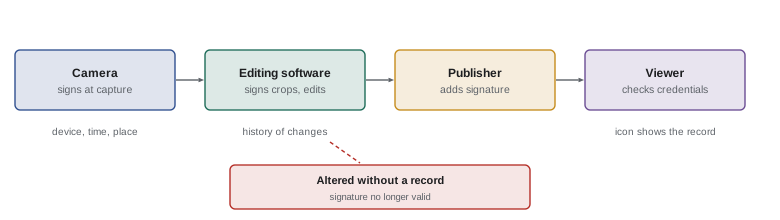
As generative AI makes realistic synthetic images easy to create, verifying the authenticity of photographs has become important for journalism, legal evidence and public trust. The Coalition for Content Provenance and Authenticity (C2PA), founded in 2021 by companies including Adobe, Microsoft, the BBC and others, developed an open standard for content credentials: cryptographically signed metadata that records who captured an image, with what device, when, and what edits were made afterwards. Leica's M11-P, released in 2023, was the first camera to sign images at capture, and other manufacturers have added support in professional models, along with editing software and some news and social media platforms that display the credentials. Content credentials do not prove that an image is truthful, since a staged scene can be signed honestly, but they make tampering detectable and help audiences understand an image's history. Photographers working in journalism and documentary should learn how to enable and preserve them.
Card reliability and handling in the field
Memory cards are generally reliable, but failures happen, usually through physical damage, counterfeits, worn-out cards, or user error such as removing a card while the camera is writing. Good habits reduce the risk. Use several smaller or medium-sized cards rather than one very large card for important events, so that a single failure loses fewer images, unless you use dual-slot backup. Keep cards in protective cases, label them, and use a consistent system, such as turning a card around in its case once it is full, so that you never accidentally format a card containing images that have not been backed up. Format cards in the camera after each successful backup rather than deleting images, which keeps the file system clean. If a card does fail, stop using it immediately; recovery software or professional data recovery services can often retrieve images as long as they have not been overwritten.
Ingesting and backing up on location
On multi-day trips, weddings and assignments, images must be backed up before cards are reused. Laptops with external drives, portable backup devices that copy cards without a computer, and rugged portable SSDs allow backup in the field. Copying to two separate drives that travel in different bags protects against loss or theft. Fast card readers, especially for CFexpress cards, reduce ingest time considerably; a 128 GB card might take several minutes over a slow reader and less than two minutes over a fast one. Software that verifies copies by comparing checksums ensures that files have been copied correctly, a practice standard in film and television data management and increasingly used by professional photographers. Cloud uploads over hotel or mobile connections add off-site protection when bandwidth allows.
Worked problem
Planning power for a day of mirrorless shooting
A camera is rated at about 400 shots per battery by CIPA, but in practice the photographer gets about 700 stills per battery when shooting bursts with the viewfinder. They expect to take 2,500 frames at an all-day event, with some short video clips that use roughly the equivalent of 300 frames of battery capacity. How many batteries should they carry?
Show solution
- Total demand: 2,500 + 300 = 2,800 frame-equivalents.
- Batteries needed: 2,800 / 700 = 4.
- Add a margin for cold, aging batteries and unexpected demands: carry 5 or 6, or 4 plus a USB-C power bank.
Answer: Four batteries meet the estimate; carry five or six, or add a power bank, for safety.
Batteries: care and aging
Lithium-ion batteries age with use and time, gradually losing capacity; most cameras show battery health in a menu, and batteries that hold much less charge than new should be replaced. Store batteries partly charged, around 40 to 60 %, in a cool place if they will not be used for months, avoid leaving them in hot cars, and do not fully discharge them repeatedly. Genuine batteries include protection circuits and communicate with the camera to report charge and health; inexpensive third-party batteries may work well but vary in quality, and damaged, swollen or counterfeit batteries can be dangerous and should be recycled at an appropriate facility rather than thrown away.
Working in extreme conditions
Cold weather shortens battery life dramatically, sometimes to half or less at −20 °C, makes LCD screens sluggish, and can make plastic parts brittle. Keep spare batteries warm in an inner pocket and rotate them, and avoid breathing on the viewfinder, which can fog or ice up. Heat can trigger overheating warnings, particularly when recording video or shooting long bursts in direct sun; shade the camera, turn it off between shots, and use external recorders or cameras with cooling fans for long video takes. Sand and dust are best kept out with sealed bodies, minimal lens changes and covers; salt spray should be wiped off promptly with a cloth dampened with fresh water. Humidity in tropical climates encourages fungus, so equipment should be dried and stored with desiccants afterwards.
Remote control and smartphone apps
Manufacturer smartphone apps connect to cameras over Bluetooth and Wi-Fi for remote shooting with live view, adjusting settings, transferring images and updating firmware. Remote shooting from a phone is valuable for self-portraits, group photos that include the photographer, wildlife photography with the camera placed near a nest or feeder, and positions where the camera cannot be reached, such as on a pole or in a vehicle. Wired and wireless remote releases and intervalometers remain useful because they are simpler, faster and use less power. Some cameras also offer automatic transfer of images to a phone or cloud service as they are taken, allowing social media posting or client delivery within minutes.
Provenance in practice
Using content credentials requires an enabled camera or app, a signing certificate, and software that preserves the credentials through editing and export. If any tool in the chain strips the metadata, the credentials are lost, though they can be stored separately in a cloud repository and recovered using a digital watermark or image matching. Photographers working with news organizations should follow their employer's procedures for enabling and preserving credentials, and all photographers should understand that credentials record facts about a file, not a judgment of whether the image tells the truth.
Common mistakes
MistakeUsing slow or counterfeit cards in a fast camera.
InsteadBuy reputable cards rated for the camera's needs.
MistakeShooting once-only events to a single card.
InsteadUse dual-slot backup and the 3-2-1 approach.
MistakePacking spare lithium batteries in checked luggage.
InsteadCarry spares in the cabin within Wh limits.
MistakeTreating weather sealing as waterproofing.
InsteadUse covers in heavy rain and housings underwater.
MistakeUpdating firmware the night before a big shoot.
InsteadUpdate and test well in advance.
Summary and key terms
- SD UHS-II and CFexpress cards differ greatly in speed; match cards to camera needs.
- Dual-slot backup and 3-2-1 storage protect irreplaceable images.
- Mirrorless cameras draw more power; carry spares and use USB-C charging.
- Spare lithium batteries travel in carry-on within watt-hour limits.
- Weather sealing resists rain and dust but is not waterproofing.
- Wireless, Ethernet and tethering speed transfer and client review.
- Content credentials record image provenance from capture onward.
- UHS-II
- Faster SD card bus with a second row of contacts.
- CFexpress
- PCIe-based high-speed memory card format.
- Video speed class
- Guaranteed minimum sustained write speed.
- Backup mode
- Writing every image to two cards.
- 3-2-1 backup
- Three copies, two media, one off site.
- CIPA rating
- Standardized battery life measurement.
- Weather sealing
- Gaskets resisting dust and moisture.
- Tethering
- Shooting directly to a computer.
- Firmware
- Software inside the camera.
- Content credentials
- Signed metadata recording an image's history.
Practice problems
Work each problem on paper first, then reveal the answer to check.
Approximate speed of UHS-II SD cards?
Show answer
About 300 MB/s.
What does V90 guarantee?
Show answer
Sustained writes of at least 90 MB/s.
Data rate of 40 MB files at 30 fps?
Show answer
1,200 MB/s.
What does dual-slot backup mode do?
Show answer
Writes each image to both cards.
What is the 3-2-1 approach?
Show answer
Three copies, two media types, one off site.
Why do mirrorless cameras use more power?
Show answer
Sensor, processor and EVF run continuously.
Largest spare battery allowed in carry-on without approval?
Show answer
100 Wh.
How do you avoid condensation after cold shooting?
Show answer
Let equipment warm up in a sealed bag.
What is tethered shooting?
Show answer
Sending images directly to a computer during the shoot.
What do content credentials record?
Show answer
Device, capture time and edit history, cryptographically signed.
Lesson quiz · 5 questions
Score 60% or more to complete this lesson.
Create a free account to save your progress, take quizzes and earn a certificate.