
NET-120 · Lesson 6 of 12 · 24 min
Cloud storage and databases
▶ Video coming soon A video version of this lesson is on the way.
Every application needs somewhere to keep data, and the cloud offers far more choices than a server's hard drive. The wholesale site alone needs three kinds of storage: a database for customers, prices and orders; a place to keep invoice PDFs and product photos; and a disk for the roast logger's virtual machine. Kai's roast logs, which go back six years, need a fourth: somewhere cheap to keep years of records that are rarely read. This lesson explains the three basic kinds of cloud storage, the storage tiers that trade price against access speed, and the main kinds of managed database.
Three kinds of storage
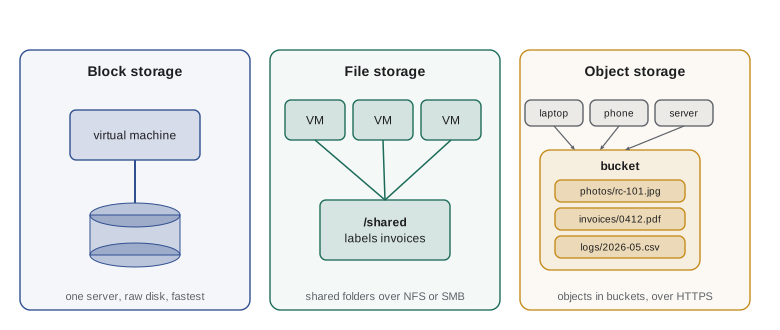
Cloud storage comes in three basic forms, which differ in how data is organized and how it is reached.
Block storage behaves like a hard drive attached to one virtual machine. The operating system sees a raw disk, formats it with a file system and reads and writes blocks of data at high speed. Block storage is what a server's operating system and databases run on. The providers' block storage services are Amazon Elastic Block Store, Azure Managed Disks and Google Persistent Disk. A block volume usually lives in one availability zone and attaches to one instance at a time, although some services allow limited sharing.
File storage presents a shared file system that many machines can mount at once over the network, using the NFS or SMB protocols familiar from office file servers. It suits applications that expect shared folders, such as content management systems or groups of servers that all need the same files. Examples are Amazon EFS and FSx, Azure Files and Google Filestore.
Object storage keeps data as objects, each a file of any size together with metadata and a unique key, in flat containers called buckets at AWS and Google Cloud and containers within storage accounts at Azure. Objects are reached over HTTPS through an API rather than mounted as a disk. Object storage is enormously scalable, very durable and cheap, which makes it the default home for documents, images, backups, logs and data for analysis. The services are Amazon S3, Azure Blob Storage and Google Cloud Storage.
| Kind | Reached by | Typical uses | AWS | Azure | Google Cloud |
|---|---|---|---|---|---|
| Block | One virtual machine, as a disk | Operating systems, databases on VMs | EBS | Managed Disks | Persistent Disk |
| File | Many machines, as a shared folder (NFS or SMB) | Shared content, lift-and-shift apps | EFS, FSx | Azure Files | Filestore |
| Object | Anything, over HTTPS and an API | Documents, images, backups, logs, data lakes | S3 | Blob Storage | Cloud Storage |
Durability and availability
Two different promises describe storage. Durability is the likelihood that data, once stored, is not lost. Availability is the likelihood that you can reach it when you ask. Object storage services are designed for extraordinary durability by keeping several copies across several availability zones: Amazon S3 Standard, for example, is designed for eleven nines of durability, 99.999999999. At that level, if you stored ten million objects, you would expect to lose one about every ten thousand years. Availability is lower, typically three or four nines, because a network or service problem can make data briefly unreachable without losing it.
High durability protects against hardware failure, not against people. If someone deletes a file or a program overwrites it with garbage, the provider faithfully keeps the deleted or damaged version across all its copies. That is why object storage offers versioning, which keeps previous versions of each object, and object lock or immutability settings, which prevent deletion for a set period. Ridgeline's cloud backup copy uses immutable versions kept for thirty days, as NET-101 described, so that even ransomware that reached the office could not destroy the backups.
Storage tiers
Not all data is used equally. Product photos on the wholesale site are read many times a day; invoices from last month are opened occasionally; roast logs from 2021 are almost never opened but must be kept. Object storage services therefore offer tiers, often called storage classes, that trade storage price against retrieval cost and speed. Hot tiers cost the most to store but nothing or very little to read. Cool tiers cost less to store but charge for each read and expect data to stay for at least a month. Archive tiers cost a small fraction to store but charge more to read, may take hours to return data, and expect data to stay for months.
| Tier | Access pattern | Retrieval | AWS S3 | Azure Blob | Google Cloud Storage |
|---|---|---|---|---|---|
| Hot | Read often | Immediate, no or low retrieval fee | Standard | Hot | Standard |
| Cool | Read about once a month or less | Immediate, retrieval fee | Standard-IA | Cool | Nearline |
| Cold | Read a few times a year | Immediate or fast, higher fee | Glacier Instant Retrieval | Cold | Coldline |
| Archive | Rarely read, kept for compliance | Minutes to hours, highest fee | Glacier Deep Archive | Archive | Archive |
Choosing a tier by hand for every object would be tedious, so the services offer lifecycle rules: policies that move objects to cheaper tiers as they age and delete them when they are no longer needed. Ridgeline's rule for invoices, for example, keeps them in the hot tier for 30 days, moves them to cool storage until they are a year old, then to archive storage for the rest of the seven years the tax authorities expect records to be kept, and then deletes them. Some services can also choose tiers automatically based on observed access, such as S3 Intelligent-Tiering and Azure's smart tiering options.
# Monthly cost of storing and reading data in each tier (illustrative prices)
tiers = {
    "hot":     {"store_gb": 0.023,  "read_gb": 0.00},
    "cool":    {"store_gb": 0.0125, "read_gb": 0.01},
    "cold":    {"store_gb": 0.004,  "read_gb": 0.03},
    "archive": {"store_gb": 0.001,  "read_gb": 0.10},
}

def monthly_cost(tier, stored_gb, read_gb):
    t = tiers[tier]
    return stored_gb * t["store_gb"] + read_gb * t["read_gb"]

for stored, read in [(500, 1000), (500, 40), (500, 0.5)]:
    costs = {name: monthly_cost(name, stored, read) for name in tiers}
    best = min(costs, key=costs.get)
print(f"{stored} GB stored, {read} GB read: cheapest tier is {best} ({costs[best]:.2f} dollars)")500 GB stored, 1000 GB read: cheapest tier is hot (11.50 dollars) 500 GB stored, 40 GB read: cheapest tier is cold (3.20 dollars) 500 GB stored, 0.5 GB read: cheapest tier is archive (0.55 dollars)
Try it yourself
Choose a storage tier
Using the tiers dictionary, complete cheapest_tier(stored_gb, read_gb, months_kept). A tier may only be chosen if months_kept is at least its min_months. Return the name of the allowed tier with the lowest monthly cost (storage plus reads).
If two tiers cost exactly the same, return the one that appears first in the dictionary.
tiers = {
    "hot":     {"store_gb": 0.023,  "read_gb": 0.00, "min_months": 0},
    "cool":    {"store_gb": 0.0125, "read_gb": 0.01, "min_months": 1},
    "cold":    {"store_gb": 0.004,  "read_gb": 0.03, "min_months": 3},
    "archive": {"store_gb": 0.001,  "read_gb": 0.10, "min_months": 6},
}

def cheapest_tier(stored_gb, read_gb, months_kept):
    return "hot"

print(cheapest_tier(500, 40, 12), cheapest_tier(500, 0.5, 2))
Protecting stored data
The most damaging cloud storage incidents are not lost disks but data accidentally made public. Over the years, misconfigured storage buckets have exposed voter records, medical files and millions of customer details, almost always because someone set a bucket or object to allow public access while testing and never changed it back. The providers have responded by blocking public access by default on new buckets, and Sam's rule for Ridgeline is that nothing in object storage is public. Product photos for the wholesale site will be served through the CDN with access controlled by the CDN, and invoices will be downloaded through short-lived signed links that the application creates for each signed-in customer.
Other protections are standard. Data at rest is encrypted by default at all three providers, with keys managed by the provider or, for more control, by the customer in a key management service, which lesson 8 mentions. Versioning protects against accidental overwrites and deletions. Access logs record who read or changed what. Snapshots copy block volumes at a point in time, and backups should be copied to a second region, as lesson 4 explained.
Managed databases
Running a database server well is hard work: installation, tuning, patching, backups, replication, failover and monitoring. Managed database services take most of that work away. The customer chooses the database engine and size, and the provider runs the servers, applies patches during a maintenance window, takes automatic backups with point-in-time recovery, and keeps a standby copy in another zone if asked. As lesson 2 explained, managed databases are usually counted as PaaS.
Relational databases store data in tables with fixed columns and relationships between them, and are queried with SQL. They suit structured business data such as customers, orders and invoices, and they guarantee that related changes happen together or not at all, which matters when money is involved. The managed services are Amazon RDS and Aurora, Azure SQL Database and Azure Database for PostgreSQL and MySQL, and Google Cloud SQL and AlloyDB, supporting engines such as PostgreSQL, MySQL, MariaDB, SQL Server and Oracle. PYTH-215 teaches SQL and relational design in depth.
NoSQL databases relax the fixed table structure in exchange for flexibility or scale. Key-value and document databases, such as Amazon DynamoDB, Azure Cosmos DB and Google Firestore, store items looked up by key, scale to enormous traffic and are popular for sessions, shopping carts and mobile apps. In-memory caches such as Amazon ElastiCache, Azure Cache for Redis and Google Memorystore keep frequently read data in memory for very fast access. Data warehouses such as Amazon Redshift, Microsoft Fabric's warehouse and Google BigQuery store large volumes of historical data for analysis and reporting.
| Kind | Data shape | Good for | AWS | Azure | Google Cloud |
|---|---|---|---|---|---|
| Relational | Tables with fixed columns and relationships | Orders, invoices, customers | RDS, Aurora | Azure SQL Database, Database for PostgreSQL | Cloud SQL, AlloyDB |
| Key-value and document | Items looked up by key; flexible fields | Sessions, carts, mobile apps, very high traffic | DynamoDB | Cosmos DB | Firestore, Bigtable |
| In-memory cache | Key-value in memory | Speeding up frequent reads | ElastiCache | Azure Cache for Redis | Memorystore |
| Data warehouse | Large tables for analysis | Reports, dashboards, analytics | Redshift | Microsoft Fabric | BigQuery |
For the wholesale site, the choice was easy: orders and invoices are structured, related and involve money, so a managed PostgreSQL database it is, in a small size, with a standby in a second zone, automatic backups kept for fourteen days and point-in-time recovery. That design meets Rosa's recovery point objective of fifteen minutes from lesson 4, because point-in-time recovery can restore the database to any second within the backup window.
Try it yourself
Lifecycle rule
Write tier_for_age(age_days) for Ridgeline's invoice lifecycle rule: "hot" for invoices younger than 30 days, "cool" from 30 days until they are 365 days old, "archive" from 365 days until they are 2,555 days (seven years) old, and "delete" at 2,555 days or more.
Then write count_by_tier(ages) that returns a dictionary counting how many invoices fall in each tier. Include only tiers that have at least one invoice.
def tier_for_age(age_days):
    return "hot"

def count_by_tier(ages):
    return {}

print(tier_for_age(45), count_by_tier([3, 45, 400, 3000]))
Worked problem
Where should each kind of data live?
Place each of Ridgeline's data sets: (a) the operating system of the roast logger virtual machine; (b) wholesale customers, prices and orders; (c) product photos shown on the site; (d) roast logs from 2020 to 2025, kept for quality records and rarely read; (e) a folder of label templates that three office machines must share.
Show solution
- (a) An operating system needs a disk attached to its server: block storage.
- (b) Structured, related data involving money: a managed relational database.
- (c) Files read often by many users: object storage in the hot tier, served through a CDN.
- (d) Rarely read but must be kept: object storage in an archive tier, with a lifecycle rule.
- (e) Shared folders mounted by several machines: file storage.
Answer: (a) block, (b) managed relational database, (c) hot object storage behind a CDN, (d) archive object storage, (e) file storage.
Common mistakes
MistakeConfusing durability with protection against mistakes.
InsteadHigh durability keeps every copy of a deletion too; use versioning, immutability and backups.
MistakeMaking a bucket public to share a file quickly.
InsteadKeep buckets private and share through signed links or a CDN with access control.
MistakeStoring everything in the hot tier.
InsteadUse lifecycle rules to move aging data to cool and archive tiers.
MistakePutting frequently read data in an archive tier to save money.
InsteadArchive retrieval fees and delays outweigh the storage saving for data that is read often.
MistakeRunning a database on a virtual machine by default.
InsteadPrefer a managed database service, which handles patching, backups and failover.
Summary and key terms
- Block storage is a disk for one server; file storage is a shared network file system; object storage holds objects in buckets reached over HTTPS.
- Durability is the chance data is not lost; availability is the chance it can be reached.
- Versioning, immutability, encryption, access logs and cross-region backups protect stored data.
- Storage tiers trade storage price against retrieval cost and speed; lifecycle rules move data between them automatically.
- Buckets should be private; share data through signed links or a CDN.
- Managed databases take over patching, backups and failover; relational databases suit structured business data.
- NoSQL databases, caches and data warehouses serve flexible data, fast reads and analysis.
- block storage
- Raw disk storage attached to a single virtual machine.
- file storage
- A shared network file system mounted by many machines.
- object storage
- Storage of objects with keys and metadata in buckets, reached through an API.
- bucket
- A container for objects in object storage.
- durability
- The likelihood that stored data is not lost.
- storage tier
- A storage class with its own price for storing and retrieving data.
- lifecycle rule
- A policy that moves or deletes objects automatically as they age.
- versioning
- Keeping earlier versions of objects so overwrites and deletions can be undone.
- snapshot
- A point-in-time copy of a block volume.
- relational database
- A database of tables with fixed columns and relationships, queried with SQL.
- NoSQL database
- A database that relaxes fixed table structure, such as key-value or document stores.
Practice problems
Work each problem on paper first, then reveal the answer to check.
Which kind of storage would you use for a virtual machine's operating system?
Show answer
Block storage.
Store 200 GB in a cool tier at 0.0125 dollars per GB and read 10 GB at 0.01 dollars per GB. What is the monthly cost?
Show answer
200 x 0.0125 + 10 x 0.01 = 2.50 + 0.10 = 2.60 dollars.
Why does eleven nines of durability not protect against ransomware that encrypts files?
Show answer
The service durably keeps the encrypted versions; versioning, immutability and separate backups are needed to recover.
Name the object storage service at each of AWS, Azure and Google Cloud.
Show answer
Amazon S3, Azure Blob Storage, Google Cloud Storage.
Give one workload suited to a key-value database rather than a relational one.
Show answer
Examples: user sessions, shopping carts, very high-traffic lookups.
What does point-in-time recovery allow?
Show answer
Restoring a database to any moment within the backup retention window, not just the last nightly backup.
Lesson quiz · 5 questions
Score 60% or more to complete this lesson.
Create a free account to save your progress, take quizzes and earn a certificate.