
NET-120 · Lesson 3 of 12 · 24 min
Public, private and hybrid clouds
▶ Video coming soon A video version of this lesson is on the way.
Lesson 2 sorted cloud services by how much work the provider does. This lesson sorts clouds by who owns them and who shares them, which NIST calls deployment models. The four classic models are public cloud, private cloud, community cloud and hybrid cloud. To those, the industry has added multicloud and, more recently, sovereign cloud. Ridgeline's decision is mostly about the public cloud, but Sam has worked for clients that use every one of these models, and knowing them helps you understand job postings, vendor conversations and the reasons organizations make the choices they do.
Public cloud
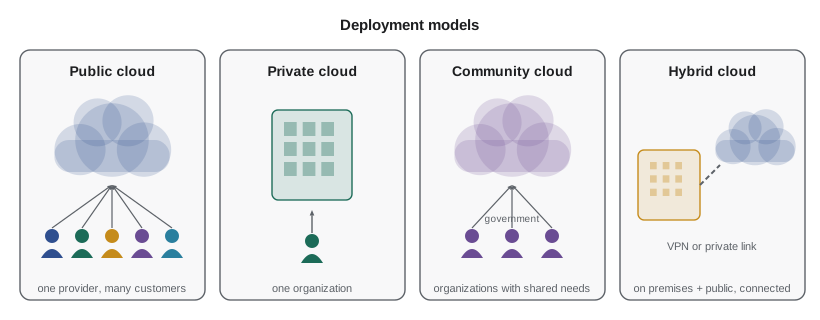
A public cloud is owned and operated by a provider and offered to the general public. Anyone with a payment card can sign up. AWS, Microsoft Azure, Google Cloud, Oracle Cloud Infrastructure and IBM Cloud are public clouds. Customers share the provider's physical infrastructure, but their resources are isolated from each other by the virtualization layer, by networking controls and by identity and access rules. The industry word for this sharing is multi-tenancy: each customer is a tenant, many tenants share the same building, and the provider's job is to make sure no tenant can see into another's rooms.
The advantages of the public cloud are the ones lesson 1 described: no up-front hardware cost, rapid provisioning, almost unlimited capacity, and a huge range of managed services, from databases to machine learning, that would be impossible for a small organization to build. The disadvantages are less control over the physical environment, dependence on the provider's prices and decisions, and the need to trust the provider's security and its handling of legal requests for data. For most small and medium businesses, the advantages win clearly.
Private cloud
A private cloud provides cloud characteristics, such as self-service, pooling and elasticity, for a single organization. It can run in the organization's own data center or be hosted for it by a provider, but the infrastructure is dedicated to that one organization. Software such as VMware Cloud Foundation, Microsoft Azure Stack HCI, OpenStack and Nutanix is used to build private clouds. Some public providers also sell dedicated hardware that sits in the customer's building but is managed like part of their cloud, such as AWS Outposts and Azure Local.
Organizations choose private clouds for control, for predictable costs on steady workloads, for low latency to equipment on site, and for regulatory reasons. Large banks, hospitals, governments and manufacturers often run private clouds. The price is that the organization buys and maintains the hardware, and its capacity is limited to what it has bought, so elasticity has a ceiling. A private cloud that is just a room of virtualized servers with no self-service portal and no metering is not really a cloud in the NIST sense, however it is marketed.
Community cloud
A community cloud is shared by several organizations with common needs, such as government agencies, universities or health authorities, and is run by one of them or by a provider on their behalf. Government cloud regions, which public providers build to meet government security requirements and restrict to government customers, are a modern form of community cloud. In the United States, examples include AWS GovCloud (US), Azure Government and Google Cloud's government offerings, built to meet FedRAMP and other federal requirements. In Canada, providers seek assessment against the Government of Canada's cloud security requirements, often at the level called Protected B, before federal departments can use their Canadian regions for sensitive information.
Hybrid cloud
A hybrid cloud combines two or more of the other models, typically on-premises or private infrastructure with a public cloud, connected so that data and applications can move between them. Hybrid is extremely common, because few organizations move everything to the public cloud at once. A business might keep an old accounting server on site while running its website in the cloud, or keep sensitive records on premises while using cloud services to analyze anonymized copies.
One classic hybrid pattern is called cloud bursting: an application normally runs on owned infrastructure, and when demand exceeds that capacity, the extra work spills over into the public cloud. Another is using the cloud for backup and disaster recovery while production stays on premises. Ridgeline is already hybrid in a small way: its office network storage box keeps the nightly backups, and a copy of those backups goes to cloud storage every night, as NET-101 described.
Hybrid clouds need careful networking, which lesson 7 introduces: a secure connection between the office or data center and the cloud, usually a site-to-site VPN over the internet or a dedicated private link such as AWS Direct Connect, Azure ExpressRoute or Google Cloud Interconnect. They also need consistent identity, so that the same people have the same permissions in both places, and consistent management tools, so that staff do not have to learn two of everything.
Multicloud
Multicloud means using more than one public cloud provider, for example running the main application on AWS while using Google Cloud for data analytics and Microsoft 365 for email. Most large organizations are multicloud whether they planned it or not, because different departments chose different services, or because a company they acquired used a different provider.
Deliberate multicloud strategies aim to avoid dependence on a single provider, to use the best service from each, or to meet rules that require spreading risk. They also have real costs: staff must learn several platforms, data moving between providers incurs transfer charges, and security policies must be kept consistent in several places. For a small business like Ridgeline, using one main provider for infrastructure, plus a few SaaS applications from others, is usually the sensible balance.
Data residency and sovereignty
Where data is stored matters legally as well as technically. The United States has no single national privacy law for businesses; instead there are sector laws, such as HIPAA for health information, GLBA for financial information and COPPA for children's data, plus comprehensive state privacy laws, led by California's CCPA as amended by the CPRA, and similar laws in more than a dozen other states. Most of these laws focus on how personal information is collected, used and shared rather than requiring it to stay in a particular state, but contracts with service providers, security safeguards and notices to customers are standard requirements. Federal agencies use cloud services authorized under FedRAMP, and some contracts require data to remain in the United States.
All the large public providers operate many regions across the United States, so keeping data in the country is straightforward. Organizations that serve customers abroad face the opposite question: other countries' laws, such as the European Union's GDPR, Canada's PIPEDA and Quebec's Law 25, may require safeguards before personal information about their residents is transferred to the United States, and some customers prefer their data to stay in their own country. The United States CLOUD Act of 2018 allows American authorities, with proper legal process, to require American providers to produce data in their control even when it is stored abroad, which is one reason some foreign governments are interested in sovereign cloud offerings that add local control on top of local storage.
The terms are worth separating. Data residency is where data is physically stored. Data sovereignty is the idea that data is subject to the laws of the country where it is stored, and, more broadly, that a country or organization controls its own data. Data localization is a legal requirement that certain data stay inside a country. A business can meet a residency requirement simply by choosing a region; sovereignty questions also involve who operates the service and which courts can compel it.
For Ridgeline, Sam's advice was practical. The wholesale site holds business contact details and order histories, not health or financial account records, and its customers are mostly businesses in Idaho, Oregon and Washington. A region in the western United States keeps latency low for them and keeps data in the country. The privacy policy will name the cloud provider as a service provider, and Ridgeline will review Idaho's and its neighboring states' privacy laws as its customer list grows.
| Model | Who uses it | Main strengths | Main drawbacks |
|---|---|---|---|
| Public | Anyone | No up-front cost, elastic, huge range of services | Less physical control; trust in the provider |
| Private | One organization | Control, predictable cost for steady loads, on-site latency | Hardware cost; limited elasticity |
| Community | A group with shared needs (for example, government) | Meets shared regulatory requirements; costs shared | Limited to the community; fewer services |
| Hybrid | One organization across models | Flexibility; gradual migration; bursting | Networking, identity and management complexity |
| Multicloud | One organization across public providers | Best service from each; reduced dependence | More skills needed; data transfer costs |
Cloud bursting in numbers
Sam once helped a client, a small online retailer, that ran its own servers sized for a normal day and burst into the public cloud during sales. The calculation behind that design is a good example of how hybrid decisions are made. Owned capacity costs the same whether it is used or not; cloud capacity costs more per hour but only while it runs.
owned_capacity = 300          # orders per hour the owned servers can handle
cloud_rate = 0.18             # dollars per hour for each cloud server
orders_per_cloud_server = 60

hourly_orders = [180, 220, 260, 410, 640, 520, 300, 240]   # a sale day, busiest hours
cloud_servers = []
for orders in hourly_orders:
    overflow = max(0, orders - owned_capacity)
    cloud_servers.append(-(-overflow // orders_per_cloud_server))   # round up

cost = sum(cloud_servers) * cloud_rate
print("Cloud servers each hour:", cloud_servers)
print(f"Burst cost for these hours: {cost:.2f} dollars")Cloud servers each hour: [0, 0, 0, 2, 6, 4, 0, 0] Burst cost for these hours: 2.16 dollars
The expression `-(-overflow // orders_per_cloud_server)` is a compact Python trick for dividing and rounding up using whole numbers, equivalent to `math.ceil`. Press Edit and run and try raising the owned capacity to see how the burst cost falls.
Try it yourself
Burst capacity
Complete burst_servers(demand, owned_capacity, per_server), which returns a list giving the number of cloud servers needed in each hour: the demand above owned_capacity, divided by per_server and rounded up, or 0 when demand fits on the owned servers.
Then complete burst_cost(demand, owned_capacity, per_server, rate), which returns the total cost, rounded to 2 decimal places.
def burst_servers(demand, owned_capacity, per_server):
    return []

def burst_cost(demand, owned_capacity, per_server, rate):
    return 0

print(burst_servers([250, 380, 500], 300, 60), burst_cost([250, 380, 500], 300, 60, 0.18))
Choosing a deployment model
No model is best for everyone. The questions Sam asks clients are straightforward. How steady is the workload? Steady, predictable loads favor owned or private infrastructure; variable loads favor the public cloud. Are there rules about where data must be or who may operate the systems? Strict rules may point to a private, community or sovereign cloud. Does the system need to be physically close to equipment? Then some of it must stay on site. How much capital is available, and how many skilled staff? Small teams with little capital usually do best in the public cloud.
Try it yourself
Recommend a deployment model
Write recommend(steady, must_stay_on_site, government_only) that returns a recommended deployment model as a string, using these rules in order:
1. If government_only is true, return "community". 2. If must_stay_on_site is true and the workload is not steady, return "hybrid". 3. If must_stay_on_site is true, return "private". 4. Otherwise return "public".
def recommend(steady, must_stay_on_site, government_only):
    return "public"

print(recommend(False, False, False), recommend(True, True, False))
Worked problem
A clinic and a cafe
Sam has two clients this month. A physiotherapy clinic keeps patient records in a system that must stay on its own server under its professional body's guidance, but wants online booking that copes with spikes when it advertises. Ridgeline wants its wholesale site to cope with Monday rushes and has no on-site requirement. Which deployment model suits each?
Show solution
- The clinic has data that must stay on site and a variable public-facing workload. That combination is the classic case for hybrid: records on the private server, booking in the public cloud, connected securely.
- Ridgeline has no on-site requirement, a variable workload, little capital and a small team. All of these point to the public cloud.
- Neither needs a community cloud, since neither is a government body, and neither has enough work to justify a private cloud.
Answer: The clinic should use a hybrid cloud; Ridgeline should use the public cloud.
Common mistakes
MistakeCalling a room of virtualized servers a private cloud.
InsteadA private cloud needs cloud characteristics such as self-service, pooling, elasticity and metering.
MistakeAssuming multicloud is automatically more resilient.
InsteadIt also adds skills, transfer costs and security complexity; it must be designed deliberately.
MistakeAssuming data stored in a local region is beyond the reach of other countries' laws.
InsteadResidency is where data is stored; the provider's nationality and legal obligations still matter.
MistakeForgetting the network and identity work a hybrid cloud needs.
InsteadPlan secure connections and consistent identity and management before going hybrid.
MistakeChoosing a deployment model before understanding the workload.
InsteadAsk about steadiness, data rules, physical location, capital and staff first.
Summary and key terms
- Deployment models describe who owns and shares a cloud: public, private, community and hybrid.
- Public clouds are multi-tenant and open to anyone; private clouds serve one organization; community clouds serve a group with shared needs, such as government.
- Hybrid clouds connect on-premises or private infrastructure with a public cloud; cloud bursting and cloud backup are common patterns.
- Multicloud means using several public providers, which brings flexibility but also complexity.
- Data residency is where data is stored; sovereignty and localization add legal control and requirements.
- Choose a model from the workload's steadiness, data rules, physical needs, capital and staff.
- public cloud
- Cloud infrastructure offered by a provider to the general public.
- private cloud
- Cloud infrastructure dedicated to one organization.
- community cloud
- Cloud infrastructure shared by organizations with common requirements.
- hybrid cloud
- A combination of deployment models connected so data and applications can move between them.
- multicloud
- Using more than one public cloud provider.
- multi-tenancy
- Many customers sharing infrastructure while kept isolated from each other.
- cloud bursting
- Sending overflow work from owned infrastructure to a public cloud during peaks.
- data residency
- The physical location where data is stored.
- data sovereignty
- The principle that data is subject to the laws of the place where it is held, and control over one's own data.
- sovereign cloud
- A cloud offering with local control and legal structures as well as local storage.
Practice problems
Work each problem on paper first, then reveal the answer to check.
A city, a regional health authority and a university share a cloud run for their sector. Which model is it?
Show answer
Community cloud.
What is cloud bursting?
Show answer
Running normally on owned infrastructure and sending overflow demand to a public cloud during peaks.
Owned servers handle 300 orders an hour, demand reaches 460, and a cloud server handles 50. How many cloud servers are needed that hour?
Show answer
160 overflow / 50 = 3.2, so 4 cloud servers.
Give two costs of a multicloud strategy.
Show answer
Any two of: more skills needed, data transfer charges between providers, keeping security policies consistent, more complex management.
What is the difference between data residency and data localization?
Show answer
Residency is where data is stored; localization is a legal requirement that data stay in a country.
Why is Ridgeline's nightly cloud backup an example of a hybrid arrangement?
Show answer
Production data stays on premises while a copy is kept in the public cloud, connected by an automated process.
Lesson quiz · 5 questions
Score 60% or more to complete this lesson.
Create a free account to save your progress, take quizzes and earn a certificate.