
NET-120 · Lesson 11 of 12 · 24 min
Infrastructure as code
▶ Video coming soon A video version of this lesson is on the way.
By the time Jordan and Sam had the wholesale design on paper, it included a virtual network with four subnets, firewall rules, a container service, a managed database with a standby, object storage buckets with lifecycle rules, a CDN, a secrets entry, IAM roles, a budget and a dozen tags. They could build all of it by clicking through a provider's web console, and for learning that is fine. But clicking has serious drawbacks: nobody remembers exactly which boxes were ticked, building a second identical environment for testing means clicking it all again, and if something is deleted by mistake, rebuilding it depends on someone's memory. Infrastructure as code solves these problems by describing the infrastructure in text files that a tool reads and turns into real resources.
What infrastructure as code means
Infrastructure as code, usually shortened to IaC, means defining servers, networks, databases, permissions and every other piece of infrastructure in files, kept under version control, and using software to create and update the real resources from those files. The files become the single source of truth: if you want to know how the production network is set up, you read the code, and if you want to change it, you change the code.
The benefits are the same ones software developers get from writing programs rather than doing things by hand. Repeatability: the same files build the same environment every time, so test and production can be identical. Speed: a whole environment can be created or rebuilt in minutes. Review: changes are proposed, read and approved before they happen, using the same pull request process PYTH-110 taught for code. History: version control records who changed what, when and why, and lets you go back. Recovery: if a resource is deleted or a region fails, the code rebuilds it. And documentation: the code itself describes the infrastructure accurately, which a diagram drawn last year rarely does.
Declarative and imperative
There are two styles of IaC. Imperative code lists the steps to take: create this network, then create this subnet, then attach this gateway. A shell script of command-line calls, such as the launch commands in lesson 5, is imperative. It is easy to start with, but it is fragile: running the script twice may create two of everything, and if a step fails halfway, the script does not know how to continue.
Declarative code describes the desired end state instead: there should be a network with this address range, with these four subnets, with this gateway. The IaC tool compares that desired state with what actually exists and works out the steps itself, creating what is missing, changing what is different and, if asked, deleting what should no longer exist. Running declarative code twice changes nothing the second time, because the real state already matches. That property, where repeating an operation has no further effect, is called idempotence, and it is what makes declarative IaC safe to run again and again. Most modern IaC tools are declarative.
The tools
Each provider has its own IaC language. AWS CloudFormation uses templates written in JSON or YAML, and the AWS Cloud Development Kit, or CDK, lets developers write CloudFormation in Python, TypeScript and other languages. Azure Resource Manager templates are JSON, and Bicep is Microsoft's simpler language that compiles to them. Google Cloud's Infrastructure Manager runs Terraform configurations as a managed service.
The most widely used tool across providers is Terraform, created by HashiCorp in 2014, which uses its own HashiCorp Configuration Language, HCL, and supports hundreds of providers through plug-ins. In 2023 HashiCorp changed Terraform's license from an open-source license to the Business Source License, and in response the Linux Foundation launched OpenTofu, an open-source fork that remains largely compatible. Pulumi takes another approach, letting you define infrastructure in general-purpose languages, including Python. Configuration management tools such as Ansible, introduced in NET-250, overlap with IaC and are often used alongside it to configure software inside servers.
| Tool | Language | Scope |
|---|---|---|
| AWS CloudFormation | JSON or YAML templates | AWS |
| AWS CDK | Python, TypeScript, Java and others (generates CloudFormation) | AWS |
| Bicep / ARM templates | Bicep (compiles to ARM JSON) | Azure |
| Google Infrastructure Manager | Terraform configurations | Google Cloud |
| Terraform / OpenTofu | HCL | Many providers, multicloud |
| Pulumi | Python, TypeScript, Go, C# and others | Many providers, multicloud |
| Ansible | YAML playbooks | Configuring servers and network devices; some cloud resources |
Jordan and Sam chose OpenTofu, partly because the same skills work at any provider, which keeps Ridgeline's options open, and partly because there are thousands of public examples in its language. The snippet below creates the wholesale site's invoice bucket, blocks public access to it and adds the lifecycle rule from lesson 6. The syntax at another provider would differ in resource names but follow the same shape.
# invoices.tf -- the wholesale site's invoice bucket (OpenTofu / Terraform, AWS provider)
resource "aws_s3_bucket" "invoices" {
  bucket = "ridgeline-wholesale-invoices"
  tags = {
    project     = "wholesale"
    environment = "production"
    owner       = "jordan"
  }
}

resource "aws_s3_bucket_public_access_block" "invoices" {
  bucket                  = aws_s3_bucket.invoices.id
  block_public_acls       = true
  block_public_policy     = true
  ignore_public_acls      = true
  restrict_public_buckets = true
}

resource "aws_s3_bucket_lifecycle_configuration" "invoices" {
  bucket = aws_s3_bucket.invoices.id
  rule {
    id     = "age-out-invoices"
    status = "Enabled"
    filter {}
    transition {
      days          = 30
      storage_class = "STANDARD_IA"
    }
    transition {
      days          = 365
      storage_class = "DEEP_ARCHIVE"
    }
    expiration {
      days = 2555
    }
  }
}
Plan, apply and state
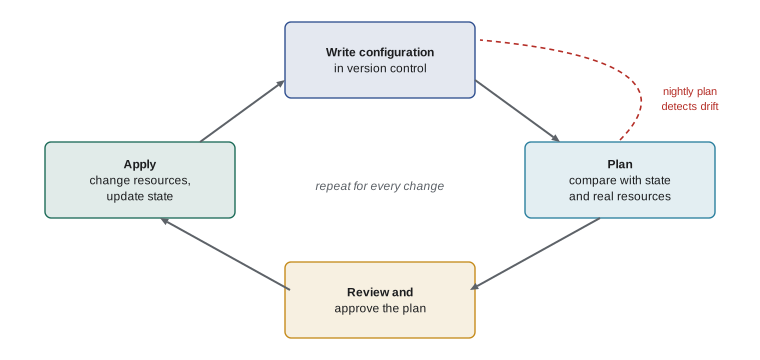
Declarative tools work in a cycle. You write or change the configuration. You run a plan, which shows what the tool would do: which resources it would create, change or destroy, and how. You review the plan, which is the most important step, because it catches mistakes such as a change that would destroy and recreate a database. Then you apply, and the tool makes the changes. With Terraform and OpenTofu, the commands are literally `tofu plan` and `tofu apply`.
To know what already exists, the tool keeps a state file that records each resource it manages and the provider's identifier for it. The state file is precious and sensitive: it must be stored safely, usually in a remote back end such as an object storage bucket with versioning and locking so two people cannot apply at once, and it may contain secrets, so access to it must be restricted. CloudFormation and Bicep keep state inside the provider's own service, which removes that chore.
The heart of planning is a comparison between the desired resources and the current ones. The listing below shows the idea in a few lines: resources that are desired but missing are created, resources whose settings differ are updated, and resources that exist but are no longer desired are deleted.
desired = {
    "bucket/invoices":  {"tier": "standard", "public": False},
    "bucket/photos":    {"tier": "standard", "public": False},
    "db/wholesale":     {"size": "small", "standby": True},
}
current = {
    "bucket/invoices":  {"tier": "standard", "public": True},     # someone made it public
    "db/wholesale":     {"size": "small", "standby": True},
    "vm/old-test":      {"size": "medium"},                       # left over from testing
}

for name in sorted(desired.keys() | current.keys()):
    if name not in current:
        print("create ", name)
    elif name not in desired:
        print("delete ", name)
    elif desired[name] != current[name]:
        changes = {k: (current[name].get(k), v) for k, v in desired[name].items() if current[name].get(k) != v}
print("update ", name, changes)update bucket/invoices {'public': (True, False)}
create bucket/photos
delete vm/old-testTry it yourself
Write a plan
Complete plan(desired, current), where both arguments map resource names to dictionaries of settings. Return a dictionary with three keys, "create", "update" and "delete", each holding a **sorted list** of resource names.
A resource is created if it is desired but not current, deleted if current but not desired, and updated if it is in both but its settings differ. Resources that match exactly appear in none of the lists.
def plan(desired, current):
    return {"create": [], "update": [], "delete": []}

print(plan({"a": {"x": 1}, "b": {"x": 2}}, {"b": {"x": 3}, "c": {"x": 1}}))
Drift
Drift is the difference between what the code says and what really exists, usually because someone changed a resource by hand in the console. In the listing above, someone made the invoice bucket public, which is exactly the kind of quick fix during troubleshooting that is forgotten afterwards. Running a plan regularly detects drift, because the plan proposes to change the resource back. Many teams run a scheduled plan every night and alert on any proposed change they did not expect. The best cure for drift is a rule that production changes go through code, not the console, with console access for production limited to reading.
Pipelines and policy as code
Infrastructure code is usually applied through an automated pipeline rather than from someone's laptop. When Jordan opens a pull request that changes the configuration, the pipeline runs a plan and posts it on the pull request, so Sam can review both the code and its effect. When the change is approved and merged, the pipeline applies it. The pipeline uses its own workload identity with the permissions it needs, as lesson 8 recommended, so individuals do not need powerful permissions at all. This approach is often called GitOps when the version control repository is treated as the definitive description of the system.
Pipelines can also check infrastructure code automatically before it is applied, which is called policy as code. Tools such as Checkov, tfsec and Open Policy Agent read the configuration and reject changes that break the rules: a bucket without public access blocked, a database without encryption, a security group open to the whole internet on SSH, or a resource missing required tags. Catching a mistake in a pull request is far cheaper than finding it in production.
Try it yourself
Check required tags
Ridgeline requires every resource to have the tags project, environment and owner, and environment must be one of "production", "test" or "development".
Complete problems(resources), where resources maps names to tag dictionaries. Return a **sorted list** of strings, one per problem, in the form "name: missing project" for each missing required tag and "name: bad environment" when the environment tag is present but not allowed.
REQUIRED = ["project", "environment", "owner"]
ALLOWED_ENVIRONMENTS = {"production", "test", "development"}

def problems(resources):
    return []

print(problems({"bucket/invoices": {"project": "wholesale", "environment": "prod"}}))
Habits of good IaC
A few habits separate maintainable infrastructure code from a mess. Keep it in version control from day one. Never put secrets in the code; reference them from a secrets manager instead. Split large configurations into modules, reusable building blocks such as a standard network or a standard database, so that each environment is a short file that combines modules with different settings. Use the same code for test and production, with variables for the differences, so test really is a rehearsal. Pin the versions of tools and provider plug-ins so a new release cannot change behavior unexpectedly. And protect important resources, such as databases, from accidental deletion with the tool's lifecycle settings and the provider's deletion protection.
Worked problem
A forgotten console change
On Thursday the nightly plan for the wholesale production environment reports: update security group app-sg, remove rule allowing TCP 22 from 0.0.0.0/0. Nobody remembers adding such a rule. What happened, and what should Sam do?
Show solution
- The plan proposes removing a rule that is not in the code, so the rule was added outside the code: drift.
- An SSH rule open to the whole internet is a serious risk; bots try such ports within minutes.
- Check the provider's audit log to see who added it and when, and whether there were any logins through it.
- Apply the plan, which removes the rule, then tighten console permissions so production changes must go through code, and add a policy-as-code check that rejects SSH open to 0.0.0.0/0.
Answer: Someone added an SSH rule by hand. Investigate with the audit log, apply the plan to remove it, and prevent repeats with read-only production console access and a policy check.
Common mistakes
MistakeFixing production in the console and forgetting to update the code.
InsteadMake changes through code; scheduled plans will reveal drift.
MistakeApplying without reading the plan.
InsteadAlways review the plan, especially for resources that would be destroyed and recreated.
MistakeCommitting secrets or the state file to a public repository.
InsteadKeep secrets in a secrets manager and state in a protected remote back end.
MistakeWriting imperative scripts that create duplicates when run twice.
InsteadUse declarative tools, which are idempotent.
MistakeCopying and pasting the same configuration for every environment.
InsteadUse modules and variables so environments share one tested definition.
Summary and key terms
- Infrastructure as code defines cloud resources in version-controlled files that a tool turns into real resources.
- IaC gives repeatability, speed, review, history, recovery and accurate documentation.
- Declarative tools describe the desired state and are idempotent; imperative scripts list steps.
- Tools include CloudFormation and CDK, Bicep, Google Infrastructure Manager, Terraform and OpenTofu, and Pulumi.
- The cycle is write, plan, review and apply; the state file records managed resources and must be protected.
- Drift is when reality differs from the code; scheduled plans detect it.
- Pipelines apply reviewed changes, and policy-as-code tools reject insecure or untagged configurations.
- infrastructure as code
- Defining and managing infrastructure through version-controlled configuration files.
- declarative
- Describing the desired end state and letting the tool work out the steps.
- imperative
- Listing the steps to perform in order.
- idempotence
- The property that repeating an operation has no further effect.
- plan
- A preview of the changes an IaC tool would make.
- apply
- Carrying out the changes in a plan.
- state file
- A record of the resources an IaC tool manages.
- drift
- Differences between the infrastructure code and the real resources.
- module
- A reusable block of infrastructure code.
- policy as code
- Automated rules that check infrastructure code before it is applied.
- GitOps
- Operating infrastructure by treating a version control repository as the source of truth.
Practice problems
Work each problem on paper first, then reveal the answer to check.
A script that creates a server is run twice and creates two servers. Is it declarative or imperative?
Show answer
Imperative; a declarative tool would see the server already exists and do nothing.
What is the purpose of running a plan before applying?
Show answer
To preview and review the exact changes, catching mistakes before they happen.
Why must the state file be protected?
Show answer
It records every managed resource, may contain secrets, and losing or corrupting it breaks the tool's view of reality.
Name the IaC languages or tools native to each of AWS, Azure and Google Cloud.
Show answer
AWS CloudFormation (and CDK), Azure Bicep and ARM templates, Google Infrastructure Manager (running Terraform).
Desired: buckets a and b. Current: buckets b and c. What does the plan do?
Show answer
Create a, delete c, and leave b alone if its settings match.
Give one rule a policy-as-code check might enforce.
Show answer
Examples: buckets must block public access; databases must be encrypted; no SSH open to 0.0.0.0/0; required tags present.
Lesson quiz · 5 questions
Score 60% or more to complete this lesson.
Create a free account to save your progress, take quizzes and earn a certificate.