
NET-120 · Lesson 2 of 12 · 23 min
Service models: IaaS, PaaS and SaaS
▶ Video coming soon A video version of this lesson is on the way.
When Jordan first looked at the cloud providers' websites, the number of services was overwhelming. AWS alone lists more than two hundred, and Azure and Google Cloud are not far behind. The way through the list is to sort services by how much of the work the provider takes on and how much is left to the customer. That sorting gives the three classic service models from the NIST definition: infrastructure as a service, platform as a service and software as a service, usually shortened to IaaS, PaaS and SaaS.
Each model draws the line between provider and customer in a different place. Choosing a model is really choosing how much control you want and how much work you are willing to do. More control means more responsibility; less responsibility means accepting the provider's choices. Ridgeline already uses all three models without having named them, and the wholesale site will use at least two.
The stack of responsibilities
Any running application depends on a stack of layers. At the bottom are the physical data center, its power and cooling, and the network that connects it. Above those sit the physical servers, storage and network equipment, then the virtualization layer that divides them into virtual machines. Each virtual machine runs an operating system. On top of the operating system sits the runtime and middleware, such as the Python interpreter, a web server or a database engine. Then comes the application itself, and finally the data and the user accounts that the application holds.
On premises, the organization manages every one of those layers. In the cloud, the provider takes over the bottom layers, and the service model decides how far up the provider's responsibility reaches. The diagram below is the most common picture in cloud training, and it is worth memorizing.
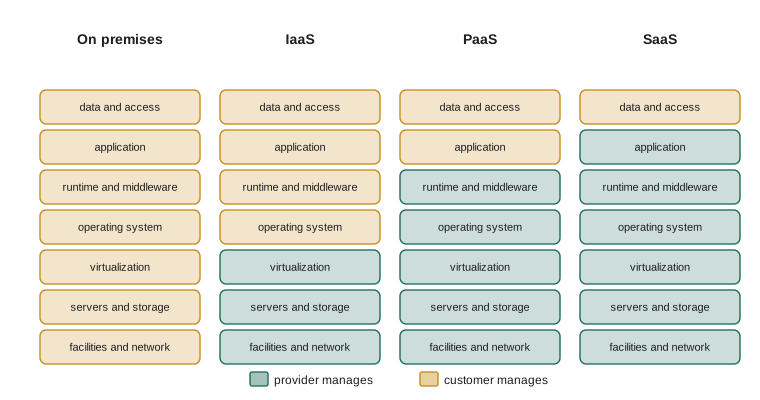
Look at the top layer in every column. Whatever the model, the customer remains responsible for its own data and for who has access to it. A SaaS provider runs the whole application, but if a Ridgeline employee shares a spreadsheet of customer addresses with the whole internet, that is still Ridgeline's problem.
Infrastructure as a service
With IaaS, the provider supplies the raw building blocks: virtual machines, block storage disks, virtual networks and load balancers. The customer chooses the operating system, installs and patches it, installs the runtime and the application, and configures everything. IaaS feels most like owning servers, except that the hardware is someone else's and you can create or delete it in minutes.
IaaS is the right choice when you need full control: a particular operating system version, software that must be installed in a specific way, or an existing application moved from on premises without changes, which is often called lift and shift. The cost of that control is work. Somebody must apply security updates to every virtual machine, monitor its disk space, configure its firewall and back it up. The main IaaS compute services are Amazon EC2, Azure Virtual Machines and Google Compute Engine.
Platform as a service
With PaaS, the provider also runs the operating system and the runtime. The customer brings application code and data, and the platform handles servers, patching, scaling and often load balancing. Jordan could hand the wholesale application's Python code to a PaaS and let the platform worry about which servers run it.
PaaS is attractive for small teams because it removes most of the maintenance work. Nobody at Ridgeline wants to spend Sunday mornings patching operating systems. The trade-off is reduced control: you must accept the platform's supported languages and versions, its limits on memory and run time, and its way of doing things. Moving an application from one PaaS to another can take real effort, which is called lock-in. Examples include AWS Elastic Beanstalk, Azure App Service and Google App Engine, and managed databases such as Amazon RDS, Azure SQL Database and Google Cloud SQL are usually counted as PaaS too, because the provider runs the database engine and the customer only manages databases, tables and users.
Software as a service
With SaaS, the provider runs a complete application and the customer simply uses it, usually through a web browser or a mobile app. The customer configures settings, manages user accounts and owns the data, but never sees a server. Email services such as Microsoft 365 and Google Workspace, accounting packages, customer relationship management systems and Ridgeline's own point-of-sale and online shop platforms are all SaaS.
SaaS involves the least technical work and the least control. If the vendor changes a feature, the customer gets the change. If the vendor has an outage, the customer waits. SaaS is usually priced per user per month, which makes costs predictable. For most common business functions, from email to payroll, SaaS is the default choice for a small business, and building your own would make little sense.
| Model | Provider manages | Customer manages | Ridgeline examples | Examples at AWS, Azure, Google Cloud |
|---|---|---|---|---|
| IaaS | Facilities, hardware, virtualization | Operating system, runtime, application, data, access | A virtual machine for Kai's roast dashboard, if built that way | EC2, Azure Virtual Machines, Compute Engine |
| PaaS | Everything up to the runtime | Application code, data, access | The wholesale site's application and its managed database | Elastic Beanstalk, App Service, App Engine; RDS, Azure SQL Database, Cloud SQL |
| SaaS | The whole application | Configuration, users, data | Email, accounting, the point-of-sale system, the online shop | Amazon WorkMail, Microsoft 365, Google Workspace |
The everyday comparison
A popular way to remember the models is the pizza comparison, adapted here for coffee. Brewing at home from beans you roast yourself is on premises: you own the roaster, the grinder, the machine and the cups. Buying Ridgeline's roasted beans and brewing them at home is like IaaS: someone else did the heavy industrial part, but you still grind, brew and clean up. Ordering a coffee to take away is like PaaS: the cafe runs the equipment and you just choose what you want and carry it. Sitting down in the cafe and being served is like SaaS: everything is handled for you, and you only decide what to order and who to share it with.
Like all comparisons it breaks down if pushed, but it captures the essential point: each step up hands more of the work, and more of the decisions, to someone else.
More things as a service
The success of the three main models produced many more acronyms. Functions as a service, or FaaS, runs small pieces of code in response to events, such as a new order arriving, and charges only for the milliseconds the code runs; lesson 9 covers it under the name serverless computing. Containers as a service, sometimes CaaS, runs packaged applications called containers without managing servers. Database as a service, storage as a service and desktop as a service describe themselves. Backup as a service and disaster recovery as a service handle copies of data and standby systems. Security vendors sell firewalls and identity services as a service.
You do not need to memorize every acronym. The useful habit is to ask the question behind all of them: for this service, which layers does the provider run, and which do I run? Once you know that, you know what you must patch, monitor, back up and secure.
# Which layers does the customer manage under each model?
LAYERS = ["facilities", "hardware", "virtualization", "operating system",
          "runtime", "application", "data and access"]
PROVIDER_UP_TO = {"on premises": -1, "IaaS": 2, "PaaS": 4, "SaaS": 5}

for model, top in PROVIDER_UP_TO.items():
    customer = LAYERS[top + 1:]
print(f"{model:<12} customer manages {len(customer)} layer(s): {', '.join(customer)}")on premises customer manages 7 layer(s): facilities, hardware, virtualization, operating system, runtime, application, data and access IaaS customer manages 4 layer(s): operating system, runtime, application, data and access PaaS customer manages 2 layer(s): application, data and access SaaS customer manages 1 layer(s): data and access
Try it yourself
Who manages this layer?
Use the LAYERS list and the PROVIDER_UP_TO dictionary from the listing above. Complete manager(model, layer) so that it returns "provider" or "customer" for the given layer under the given model.
For example, manager("PaaS", "operating system") is "provider" and manager("IaaS", "operating system") is "customer".
LAYERS = ["facilities", "hardware", "virtualization", "operating system",
          "runtime", "application", "data and access"]
PROVIDER_UP_TO = {"on premises": -1, "IaaS": 2, "PaaS": 4, "SaaS": 5}

def manager(model, layer):
    # find the layer's position and compare it with PROVIDER_UP_TO[model]
    return "customer"

print(manager("PaaS", "operating system"), manager("IaaS", "operating system"))
Choosing a model for the wholesale site
Jordan and Sam listed what the wholesale site needs: a small web application written in Python, a database of customers, prices and orders, storage for invoices as PDF files, and sign-in for wholesale customers. They then went through each piece, asking what model would give enough control with the least maintenance.
For invoicing and email they chose SaaS without much discussion: Ridgeline already uses a SaaS accounting package that can produce invoices, and Ridgeline's email is SaaS. For the database they chose a managed database service, which is PaaS, because Sam did not want to patch and back up a database server himself. For the application they considered IaaS, a virtual machine Jordan would configure, against a platform that runs Python code or containers. They chose a container platform, covered in lesson 9, because it gives Jordan control over the Python version and libraries while leaving the servers to the provider. Only one piece remained a virtual machine: a small server to receive data from Kai's roast logger, because the logger's software needs a particular operating system setting.
The result is typical. Real systems are rarely pure IaaS or pure SaaS; they combine models, choosing for each part the model that gives just enough control. A common rule of thumb is to prefer SaaS, then PaaS, then IaaS, moving down only when the higher model cannot do what you need.
Try it yourself
SaaS or build it?
A SaaS ordering tool costs a flat monthly fee plus a fee per user. Write saas_monthly(users, base, per_user) that returns the monthly cost.
Then write break_even_users(base, per_user, build_monthly) that returns the smallest whole number of users at which the SaaS monthly cost is **greater than** the monthly cost of running a home-built system (build_monthly). If the SaaS tool can never cost more (because per_user is 0 and base is not more than build_monthly), return None.
def saas_monthly(users, base, per_user):
    return 0

def break_even_users(base, per_user, build_monthly):
    # smallest users where saas_monthly(...) > build_monthly
    return None

print(saas_monthly(12, 40, 9), break_even_users(40, 9, 180))
Worked problem
Matching services to models
Sort these into IaaS, PaaS or SaaS: (a) a virtual machine on which Sam installs Ubuntu and a monitoring agent; (b) a managed PostgreSQL database where Jordan creates tables but never logs in to the server; (c) Ridgeline's accounting package used through a browser; (d) a service that runs Jordan's Python web code, scales it automatically and applies operating system updates itself.
Show solution
- (a) Sam chooses and patches the operating system, so the customer manages everything from the operating system up: IaaS.
- (b) The provider runs the database engine and its server; Jordan manages only the data and users: PaaS.
- (c) The whole application is the provider's; Ridgeline only configures it and owns the data: SaaS.
- (d) The provider manages servers, operating system and runtime; Jordan supplies code: PaaS.
Answer: (a) IaaS, (b) PaaS, (c) SaaS, (d) PaaS.
Common mistakes
MistakeThinking SaaS means the provider is responsible for the data.
InsteadIn every model the customer remains responsible for its data and for who has access.
MistakeChoosing IaaS by habit because it feels like familiar servers.
InsteadPrefer SaaS, then PaaS, then IaaS, moving down only when you need the extra control.
MistakeForgetting that IaaS virtual machines need patching, monitoring and backups.
InsteadWith IaaS the customer manages the operating system and everything above it.
MistakeIgnoring lock-in when adopting a PaaS.
InsteadCheck how hard it would be to move the application elsewhere before depending on platform-specific features.
MistakeTreating every new acronym as a new idea.
InsteadAsk which layers the provider runs and which you run; that tells you what the service really is.
Summary and key terms
- The service models differ in how far up the stack the provider's responsibility reaches.
- IaaS supplies virtual machines, storage and networks; the customer runs the operating system and everything above it.
- PaaS also runs the operating system and runtime; the customer supplies code and data. Managed databases are usually PaaS.
- SaaS is a complete application; the customer configures it and manages users and data.
- In every model the customer is responsible for its data and for access to it.
- Real systems combine models; a common rule is to prefer SaaS, then PaaS, then IaaS.
- FaaS, CaaS and other "as a service" terms are variations on the same question of who manages which layer.
- IaaS
- Infrastructure as a service: virtual machines, storage and networks managed by the customer from the operating system up.
- PaaS
- Platform as a service: the provider runs servers, operating system and runtime; the customer supplies code and data.
- SaaS
- Software as a service: a complete application run by the provider.
- FaaS
- Functions as a service: small pieces of code run on demand and billed per execution.
- lift and shift
- Moving an existing application to the cloud with few or no changes, usually onto IaaS.
- lock-in
- Dependence on one provider's features that makes moving elsewhere difficult.
- managed service
- A service where the provider handles the operation of the underlying software, such as a managed database.
- runtime
- The software environment an application needs to run, such as the Python interpreter.
Practice problems
Work each problem on paper first, then reveal the answer to check.
Under IaaS, who applies operating system security updates?
Show answer
The customer.
Ridgeline uses a browser-based payroll service. Which model is it?
Show answer
SaaS.
Why are managed databases usually counted as PaaS?
Show answer
The provider runs the database server, operating system and engine; the customer manages only databases, tables, users and data.
Give one reason to choose IaaS over PaaS.
Show answer
Examples: a specific operating system or setting is needed, software must be installed in a particular way, or an existing application must move without changes.
A SaaS tool costs 30 dollars a month plus 6 dollars per user. What does it cost for 15 users?
Show answer
30 + 15 x 6 = 120 dollars a month.
In the coffee comparison, which option corresponds to PaaS?
Show answer
Buying a coffee to take away: the cafe runs the equipment, you choose and carry the drink.
Lesson quiz · 5 questions
Score 60% or more to complete this lesson.
Create a free account to save your progress, take quizzes and earn a certificate.