
NET-110 · Lesson 9 of 12 · 31 min
Core services: DNS, DHCP and NTP
▶ Video coming soon A video version of this lesson is on the way.
Three quiet services keep Ridgeline's network usable, and most staff have never heard of them. When a new tablet joins the cafe Wi-Fi, DHCP gives it an address, a mask, a gateway and the addresses of its DNS servers, all within a second. When Mei opens the online shop's admin page, DNS turns shop.ridgelinecoffee.example into an address. And when a card payment is approved, the receipt, the till and the processor all agree on the time to the second, thanks to NTP. When any of the three fails, the symptoms look like a network outage, even though cables, switches and routers are all fine.
This lesson explains how each service works, the records, messages and settings you will meet when configuring them, and how to recognize their failures. By the end you will be able to read a DNS zone, follow a DHCP exchange step by step, design an address pool with reservations, and explain why clocks matter for security as much as for convenience.
DNS: names to addresses
The Domain Name System translates names that people use, such as shop.ridgelinecoffee.example, into the IP addresses that computers use, and does many related jobs, such as telling mail servers where to deliver mail for a domain. It is a distributed database: no single server knows every name. Instead, the namespace is a tree. At the top is the root, then top-level domains such as .com, .ca, .org and country codes, then domains registered by organizations, such as ridgelinecoffee.example, and then any names the owner creates beneath, such as shop or mail. Each part of the tree is served by authoritative name servers run by whoever controls it.
When a device needs an address, it asks a recursive resolver, usually run by the provider, by a public service, or by the local firewall-router, which forwards to one of those. If the resolver does not have the answer cached, it walks the tree: it asks a root server, which refers it to the servers for the top-level domain, which refer it to the authoritative servers for the domain, which give the answer. The resolver returns the answer to the device and caches it for as long as the record's time to live allows, so the next request for the same name is answered instantly.
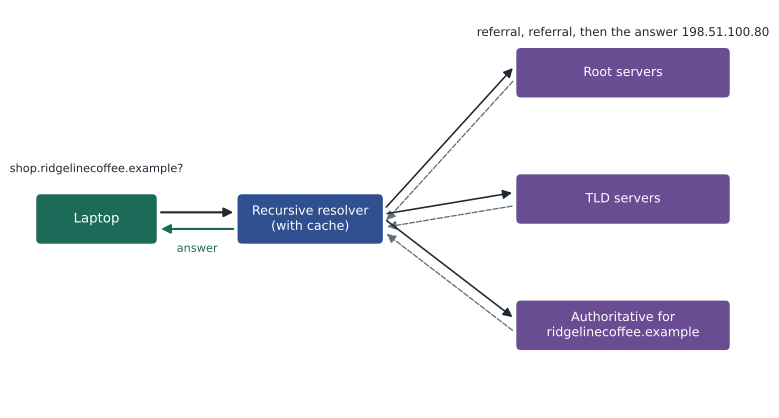
Answers are cached at several levels: in the resolver, in the operating system and often in the browser. Caching makes DNS fast and keeps the load on authoritative servers small, but it also means changes take time to spread. If Ridgeline moves its online shop to a new address, devices that cached the old record keep using it until the record's TTL expires. The usual practice is to lower the TTL to a few minutes a day before a planned change, make the change, and raise the TTL again afterwards.
DNS records
Each name in a DNS zone has one or more resource records of different types. A handful of types cover almost everything a network technician meets.
| Type | Purpose | Example |
|---|---|---|
| A | Name to IPv4 address | shop -> 198.51.100.80 |
| AAAA | Name to IPv6 address | shop -> 2001:db8:77::80 |
| CNAME | Alias: this name is another name | www -> shop.ridgelinecoffee.example |
| MX | Mail servers for the domain, with priorities | 10 mail.provider.example |
| TXT | Free text, used for email security (SPF, DKIM, DMARC) and domain verification | v=spf1 include:mail.provider.example -all |
| NS | Authoritative name servers for the zone | ns1.dnshost.example |
| PTR | Reverse lookup: address to name | 80.100.51.198.in-addr.arpa -> shop.ridgelinecoffee.example |
| SOA | Start of authority: zone serial number and timers | One per zone |
| SRV | Location of a service by name, port and priority | Used by some voice and directory services |
zone = """
; zone file for ridgelinecoffee.example
@      3600  IN  NS     ns1.dnshost.example.
@      3600  IN  MX     10 mail.provider.example.
@      3600  IN  TXT    "v=spf1 include:mail.provider.example -all"
shop   300   IN  A      198.51.100.80
shop   300   IN  AAAA   2001:db8:77::80
www    3600  IN  CNAME  shop
"""

records = []
for line in zone.strip().splitlines():
    if line.startswith(';'):
        continue
    name, ttl, cls, rtype, *value = line.split()
    records.append((name, int(ttl), rtype, ' '.join(value)))

for name, ttl, rtype, value in records:
    print(name.ljust(5), rtype.ljust(6), str(ttl).rjust(5), value)
print('names with an address record:', sorted({n for n, t, r, v in records if r in ('A', 'AAAA')}))@ NS 3600 ns1.dnshost.example. @ MX 3600 10 mail.provider.example. @ TXT 3600 "v=spf1 include:mail.provider.example -all" shop A 300 198.51.100.80 shop AAAA 300 2001:db8:77::80 www CNAME 3600 shop names with an address record: ['shop']
Two details in that zone matter in practice. The shop's address records have a 300-second TTL, short because the shop's hosting may change; the others use an hour. And www is a CNAME pointing at shop, so a change to shop's address automatically applies to www. A CNAME cannot be used at the bare domain itself, the name written @, because that name must also hold the NS and other records, which is why many DNS hosts offer a substitute record type for that one case.
Try it yourself
Resolve a name in a small zone
RECORDS is a list of (name, type, value) tuples for one zone. Write resolve(name, rtype, records) that returns the list of values for the given name and record type. If the name has no record of that type but has a CNAME, follow the CNAME to its target and look again, repeating as needed. Return an empty list if nothing is found. Stop after 5 CNAME steps to avoid loops.
def resolve(name, rtype, records):
    return [v for n, t, v in records if n == name and t == rtype]

print(resolve('www', 'A', RECORDS))
When DNS fails
DNS failures are among the most common network complaints and among the most misdiagnosed. The classic symptom is that addresses work and names do not: ping 8.8.8.8 succeeds, but ping shop.ridgelinecoffee.example reports that the host cannot be found. Causes include a device given the wrong DNS server address, a resolver that is down or unreachable through the firewall, a firewall that blocks TCP 53 so large answers fail, a stale cached record after a change, or a typing mistake in a record. Tools such as nslookup and dig, covered in Lesson 11, query specific servers directly and show exactly what each one answers, which separates the device's configuration from the record itself.
DNS is also a security concern. Attackers can try to poison resolver caches with false answers, or register names that look like real ones. DNSSEC adds digital signatures to records so resolvers can check that answers are genuine, and encrypted DNS, carried over TLS or HTTPS, keeps queries private from anyone watching the network. Many organizations also run filtering resolvers that refuse to resolve known malicious domains, a cheap and effective protection that Ridgeline uses for its guest Wi-Fi.
DHCP: automatic addressing
The Dynamic Host Configuration Protocol gives IPv4 devices their network settings automatically. Without it, someone would have to type an address, mask, gateway and DNS servers into every phone, laptop and till, and keep a list to avoid duplicates. A DHCP server holds a pool of addresses for each network and hands them out as leases, valid for a set time, after which the device must renew them or give them up. The server also hands out options: the subnet mask, the default gateway (option 3), DNS servers (option 6), the domain name and, where needed, NTP servers and other settings.
Getting a lease takes four messages, remembered as DORA. The client, which has no address yet, broadcasts a Discover from 0.0.0.0 to 255.255.255.255 on UDP port 67. Each DHCP server that hears it replies with an Offer of an address and options. The client broadcasts a Request for the offer it chooses, which also tells any other servers that their offers were declined. The chosen server sends an Acknowledgment, and the client configures itself. Halfway through the lease, the client asks its server directly to renew; if the server has gone, it tries any server later on.
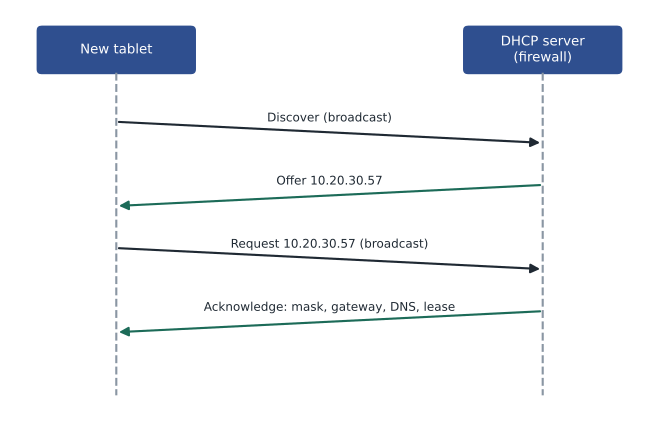
Because the first messages are broadcasts, and routers do not forward broadcasts, a DHCP server can only hear clients on networks where it has an interface. In larger networks, routers are configured as DHCP relay agents, often with a command called ip helper-address, which pick up the broadcasts on each network and forward them as unicast to a central DHCP server. At Ridgeline the firewall-router has an interface in every VLAN, so it runs a separate DHCP scope for each one directly.
import ipaddress

class Scope:
    def __init__(self, network, first, last, gateway, dns, lease_hours=8):
        self.net = ipaddress.ip_network(network)
        self.pool = [ipaddress.ip_address(int(ipaddress.ip_address(first)) + i)
                     for i in range(int(ipaddress.ip_address(last)) - int(ipaddress.ip_address(first)) + 1)]
        self.gateway, self.dns, self.hours = gateway, dns, lease_hours
        self.leases = {}                                  # MAC -> address

    def dora(self, mac):
        if mac not in self.leases:                         # Discover / Offer: pick the first free address
            used = set(self.leases.values())
            free = [a for a in self.pool if a not in used]
            if not free:
                return mac + ': no free addresses (pool exhausted)'
            self.leases[mac] = free[0]
        a = self.leases[mac]                               # Request / Acknowledge
        return (mac + ': ' + str(a) + '/' + str(self.net.prefixlen) + ' gw ' + self.gateway
                + ' dns ' + self.dns + ' for ' + str(self.hours) + 'h')

guest = Scope('10.20.30.0/24', '10.20.30.50', '10.20.30.52', '10.20.30.1', '10.20.30.1', lease_hours=2)
for mac in ('aa:01', 'bb:02', 'aa:01', 'cc:03', 'dd:04'):
print(guest.dora(mac))aa:01: 10.20.30.50/24 gw 10.20.30.1 dns 10.20.30.1 for 2h bb:02: 10.20.30.51/24 gw 10.20.30.1 dns 10.20.30.1 for 2h aa:01: 10.20.30.50/24 gw 10.20.30.1 dns 10.20.30.1 for 2h cc:03: 10.20.30.52/24 gw 10.20.30.1 dns 10.20.30.1 for 2h dd:04: no free addresses (pool exhausted)
The last line shows pool exhaustion, a real problem on busy guest networks. Phones that join for a minute keep their lease until it expires, so a long lease on a small pool runs out during a busy weekend, and new guests get no address at all. Guest networks therefore use short leases, a few hours, and generous pools; office networks, where the same devices return every day, can use leases of a day or more.
Reservations and exclusions
Some devices need an address that never changes, because other devices or firewall rules refer to it: printers, the storage box, the tills, card terminals and network equipment. There are two ways to do this. A static address is typed into the device itself, and must then be excluded from the DHCP pool so the server never hands it to someone else. A DHCP reservation keeps the device on DHCP but tells the server always to give it the same address, matched by its MAC address. Reservations are usually better, because all the settings live in one place and changing the DNS server or gateway later needs no visit to each device. Network devices themselves, such as switches, access points and the router, are normally given static addresses so they work even when DHCP does not.
Try it yourself
Check a DHCP scope design
Write check_scope(network, first, last, gateway, reserved) that returns a list of problems with a DHCP scope design, as strings, in this order: 'pool outside network' if first or last is not inside the network; 'gateway in pool' if the gateway address lies between first and last inclusive; and 'reservation in pool: X' for each reserved address X (in the order given) that lies inside the pool, because reservations should sit outside the dynamic range. Return an empty list if there are no problems.
def check_scope(network, first, last, gateway, reserved):
    return []

print(check_scope('10.20.20.0/24', '10.20.20.100', '10.20.20.199', '10.20.20.1', ['10.20.20.21', '10.20.20.150']))
A device that cannot reach any DHCP server falls back to a 169.254 link-local address, as Lesson 4 described. Rogue DHCP servers cause the opposite problem: someone plugs in a home router, it starts answering Discovers, and devices receive wrong gateways and lose their connections. Managed switches offer a feature called DHCP snooping that allows DHCP offers only from trusted ports, the ones leading to the real server, and drops them from everywhere else.
NTP: agreeing on the time
The Network Time Protocol keeps device clocks synchronized, usually to within a few milliseconds on a LAN. Computer clocks drift by seconds a day, and that matters more than it seems. Security depends on time: certificates are valid only between two dates, and a laptop whose clock is a few days wrong will reject every secure website. Login systems such as Kerberos refuse clients whose clocks are more than a few minutes off. Logs from different devices can only be correlated during an investigation if their timestamps agree. And payment systems, like Ridgeline's, record transactions with times that must match the processor's.
NTP is organized in strata. Stratum 0 are reference clocks, such as atomic clocks and GPS receivers. Stratum 1 servers are connected directly to them; stratum 2 servers synchronize with stratum 1, and so on down the hierarchy. A client asks one or more servers for the time over UDP port 123, measures how long the exchange took, and adjusts for that delay so the round trip does not make the clock wrong. Using several servers lets a client spot and ignore one that is wrong. Ridgeline's firewall-router synchronizes with public NTP pool servers and serves time to every device on the LAN, so all clocks agree with each other even if the internet connection drops.
def ntp_offset(t1, t2, t3, t4):
    """t1 client sends, t2 server receives, t3 server replies, t4 client receives (seconds)."""
    delay = (t4 - t1) - (t3 - t2)
    offset = ((t2 - t1) + (t3 - t4)) / 2
    return offset, delay

# The till's clock is behind; the server is accurate. Times as each clock reads them.
t1, t2, t3, t4 = 100.000, 102.517, 102.518, 100.041
offset, delay = ntp_offset(t1, t2, t3, t4)
print('round-trip delay:', round(delay * 1000, 1), 'ms')
print('clock offset:', round(offset, 3), 's (positive means the till is behind)')round-trip delay: 40.0 ms clock offset: 2.497 s (positive means the till is behind)
The formula assumes the delay is the same in both directions, which is close enough on most networks. Precision Time Protocol, PTP, achieves sub-microsecond accuracy with help from the network hardware, and is used where that matters, such as in financial trading, broadcasting and telecommunications.
Worked problem
A new tablet that cannot open the shop site
A new staff tablet on the office Wi-Fi shows the address 10.20.10.163, mask 255.255.255.0, gateway 10.20.10.1 and DNS 10.20.30.1. It can reach the storage box by address but cannot open the online shop by name. What is wrong?
Show solution
- The address, mask and gateway are correct for the office network, so DHCP is working and layers 1 to 3 are fine.
- The DNS server, 10.20.30.1, is the guest network's gateway, not the office one. The office scope has the wrong DNS option.
- The firewall rules block the office network from reaching anything in the guest network, including its resolver, so every lookup times out.
- Correct option 6 in the office DHCP scope to 10.20.10.1, the office gateway, which runs the resolver for that network.
- Renew the tablet's lease and check that names resolve; then check the other scopes for the same copy-and-paste mistake.
Answer: The office DHCP scope hands out the guest network's DNS server, which the office cannot reach. Fixing the DNS option and renewing the lease fixes name resolution.
Common mistakes
MistakeAssuming the network is down when only names fail.
InsteadTest by address and by name to separate DNS problems from connectivity.
MistakeChanging a DNS record without lowering its TTL first.
InsteadLower the TTL in advance so cached copies expire quickly after the change.
MistakeUsing long leases on a busy guest network.
InsteadUse short leases and a large pool where many devices come and go.
MistakeGiving devices static addresses inside the DHCP pool.
InsteadUse reservations, or exclude static addresses from the pool.
MistakeForgetting that DHCP broadcasts do not cross routers.
InsteadUse a DHCP relay or a server interface on each network.
MistakeIgnoring clock accuracy.
InsteadSynchronize every device with NTP; certificates, logins and logs depend on correct time.
Summary and key terms
- DNS translates names into addresses through a distributed tree of authoritative servers, queried by recursive resolvers.
- Answers are cached for each record's TTL; lower TTLs before planned changes.
- Common records are A, AAAA, CNAME, MX, TXT, NS, PTR and SOA.
- DHCP leases addresses and options (mask, gateway, DNS) using Discover, Offer, Request and Acknowledge.
- DHCP broadcasts stay on the local network unless a relay forwards them; reservations give fixed addresses from DHCP.
- NTP synchronizes clocks through a hierarchy of strata over UDP 123, correcting for network delay.
- Correct time is essential for certificates, authentication, logs and transactions.
- DNS
- Domain Name System: translates names into addresses and related information.
- Recursive resolver
- A server that looks up names on behalf of clients and caches the answers.
- Authoritative server
- A server that holds the official records for a zone.
- A record
- A DNS record mapping a name to an IPv4 address; AAAA does the same for IPv6.
- CNAME
- A DNS record that makes one name an alias of another.
- TTL (DNS)
- How long a DNS answer may be cached.
- DHCP
- Dynamic Host Configuration Protocol: assigns addresses and settings automatically.
- Lease
- The period for which a DHCP address is assigned.
- Reservation
- A DHCP setting that always gives a particular device the same address.
- DHCP relay
- A router function that forwards DHCP broadcasts to a server on another network.
- NTP
- Network Time Protocol: synchronizes clocks over the network.
- Stratum
- An NTP server's distance from a reference clock.
Practice problems
Work each problem on paper first, then reveal the answer to check.
Which DNS record maps a name to an IPv6 address?
Show answer
AAAA.
What does an MX record tell a mail server?
Show answer
Which servers receive mail for the domain, with priorities.
A record has a TTL of 3600. How long may a resolver cache it?
Show answer
Up to one hour.
Name the four DHCP messages in order.
Show answer
Discover, Offer, Request, Acknowledge (DORA).
Which UDP ports does DHCP use?
Show answer
67 for the server, 68 for the client.
Why do DHCP Discover messages not reach a server on another network?
Show answer
They are broadcasts, which routers do not forward, unless a relay is configured.
What is the advantage of a reservation over a static address?
Show answer
Settings stay managed in one place on the DHCP server.
Which port does NTP use?
Show answer
UDP 123.
Why might a laptop with the wrong date fail to open secure websites?
Show answer
Certificates appear not yet valid or expired.
What does a stratum 2 NTP server synchronize with?
Show answer
A stratum 1 server.
Lesson quiz · 5 questions
Score 60% or more to complete this lesson.
Create a free account to save your progress, take quizzes and earn a certificate.