
NET-110 · Lesson 10 of 12 · 32 min
Wireless networking basics
▶ Video coming soon A video version of this lesson is on the way.
The complaint Sam hears most often at Ridgeline has nothing to do with tills or routing: the Wi-Fi is slow at the back tables. Customers with laptops drift toward the front window, staff phones drop their connection in the walk-in cooler, and on Saturday mornings the guest network crawls. Wireless networks behave very differently from cables. The medium is shared air, signals fade through walls and bodies and bounce off espresso machines, neighboring networks compete for the same channels, and every device takes turns to talk. Understanding those properties is the only way to fix the back tables.
This lesson covers the basics of Wi-Fi: the IEEE 802.11 standards and generations, the 2.4, 5 and 6 GHz bands and their channels, how signal strength is measured, how devices find and join a network, how airtime is shared, how Wi-Fi is secured, and how a small site like Ridgeline places and tunes its access points.
The 802.11 standards
Wi-Fi is the trade name for wireless LANs built on the IEEE 802.11 standards; the Wi-Fi Alliance certifies equipment and, since 2018, gives each generation a simple number. Each generation added speed and efficiency, and devices remain backwards compatible, so a new access point still serves old phones, at their speed.
| Generation | Standard | Year | Bands | Notable features |
|---|---|---|---|---|
| Wi-Fi 4 | 802.11n | 2009 | 2.4 and 5 GHz | MIMO (several antennas), 40 MHz channels |
| Wi-Fi 5 | 802.11ac | 2013 | 5 GHz | Wider channels up to 160 MHz, downlink multi-user MIMO |
| Wi-Fi 6 | 802.11ax | 2019 | 2.4 and 5 GHz | OFDMA for many devices at once, better efficiency in crowds |
| Wi-Fi 6E | 802.11ax | 2020 | Adds 6 GHz | Wide, clean 6 GHz channels; WPA3 required |
| Wi-Fi 7 | 802.11be | 2024 | 2.4, 5 and 6 GHz | 320 MHz channels, multi-link operation across bands |
Advertised speeds, such as several gigabits per second for Wi-Fi 6 or 7, are the theoretical maximum for one device very close to the access point, using every antenna and the widest channel. Real throughput is far lower, often a half or a quarter of the device's connected rate, because airtime is shared, the protocol has overhead and signals weaken with distance. A phone two walls away from the access point may connect at 100 megabits per second and achieve 40.
Frequency bands and channels
Wi-Fi uses unlicensed radio bands, open to anyone who follows the power and channel rules set by each country's regulator. Each band is divided into channels, and devices on the same channel share its airtime.
In the United States, radio spectrum rules, including the Wi-Fi bands and the power limits for each, are set by the Federal Communications Commission (FCC). The FCC opened the 6 GHz band to Wi-Fi in 2020, and equipment must be FCC certified.
| Band | Channels | Strengths | Weaknesses |
|---|---|---|---|
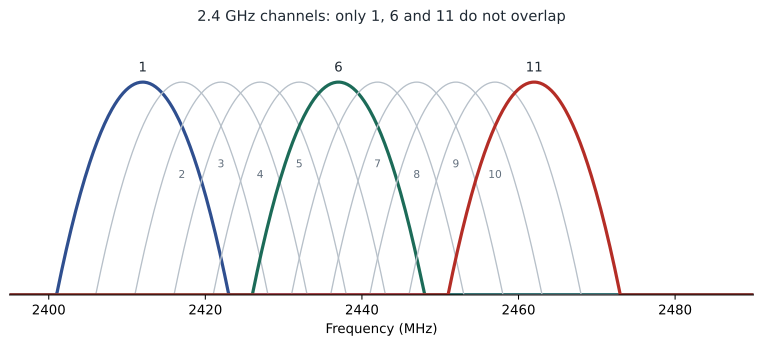
| 2.4 GHz | 1 to 11 in North America; only 1, 6 and 11 do not overlap | Longest range, passes walls best, every device supports it | Few channels, crowded, interference from microwaves and Bluetooth |
| 5 GHz | About 25 non-overlapping 20 MHz channels | Many channels, much faster, less crowded | Shorter range; some channels require radar detection (DFS) |
| 6 GHz | Up to 59 non-overlapping 20 MHz channels | Large, clean band, very wide channels | Shortest range; only newer devices (6E and 7) |
In the 2.4 GHz band each channel is 20 MHz wide but channels are only 5 MHz apart, so neighboring channels overlap. Only channels 1, 6 and 11 are far enough apart not to interfere with each other, which is why every well-designed 2.4 GHz network uses only those three. Two access points on channels 1 and 3 interfere more badly than two on the same channel, because devices on the same channel at least wait for each other politely, while partly overlapping signals just look like noise.
def mid_mhz(channel):
    return 2407 + 5 * channel           # 2.4 GHz channels 1 to 13

def overlap(a, b, width=20):
    return abs(mid_mhz(a) - mid_mhz(b)) < width

print('mid frequencies in MHz:', {c: mid_mhz(c) for c in (1, 6, 11)})
for a, b in ((1, 6), (6, 11), (1, 3), (6, 8), (1, 11)):
print(a, 'and', b, 'overlap' if overlap(a, b) else 'do not overlap')mid frequencies in MHz: {1: 2412, 6: 2437, 11: 2462}
1 and 6 do not overlap
6 and 11 do not overlap
1 and 3 overlap
6 and 8 overlap
1 and 11 do not overlapWider channels carry more data but use up more of the band. In 5 GHz, bonding two 20 MHz channels into 40, four into 80 or eight into 160 MHz roughly doubles the speed each time, but leaves fewer separate channels for neighboring access points. In busy places such as a cafe surrounded by apartments, 20 or 40 MHz channels in 5 GHz often give better overall results than 80 or 160, because fewer access points end up sharing a channel. The 6 GHz band has enough room for wide channels without that trade-off, at least for now.
Try it yourself
Pick non-overlapping 2.4 GHz channels
Write conflicts(plan) where plan is a dictionary mapping access point names to 2.4 GHz channel numbers (1 to 11). Two channels conflict when they are different but their center frequencies are less than 20 MHz apart (channel centers are 5 MHz apart). Return a sorted list of (name_a, name_b) pairs, with names in each pair in alphabetical order, for every conflicting pair.
Access points on the same channel do not count as conflicts here, because they share airtime politely.
def conflicts(plan):
    return []

print(conflicts({'cafe': 1, 'roastery': 3, 'office': 6}))
Signal strength and coverage
Wi-Fi signal strength is measured in dBm, decibels relative to one milliwatt. The numbers are negative for received signals and the scale is logarithmic: every 3 dB is a doubling or halving of power, and every 10 dB a factor of ten. A reading of -45 dBm is excellent, -67 dBm is the usual target for reliable voice and video, -75 dBm is weak and -85 dBm is barely usable. Just as important is the signal-to-noise ratio, the gap between the signal and the background noise: a -65 dBm signal over a -95 dBm noise floor gives a healthy 30 dB, while the same signal near a noisy microwave oven may give only 10.
| Signal (dBm) | Quality | What to expect |
|---|---|---|
| -30 to -50 | Excellent | Maximum rates; usually only near the access point |
| -50 to -67 | Good | Reliable for voice, video and payment terminals |
| -67 to -75 | Fair | Web and email work; calls may break up |
| -75 to -85 | Poor | Slow, frequent retries, drops |
| Below -85 | Unusable | Connections fail |
Signals weaken with distance and with everything in the way. Drywall costs a few dB, a brick or concrete wall 10 to 15, a metal door or the walk-in cooler's insulated steel far more. Water absorbs 2.4 GHz energy well, which is why a crowded room of people, mostly water, weakens Wi-Fi noticeably. Higher frequencies lose more through walls: a wall that 2.4 GHz passes easily may block most of a 6 GHz signal. Those effects explain Ridgeline's complaints: the back tables sit behind the brick wall of the old building, and the walk-in cooler is a steel box.
import math

def free_space_loss_db(distance_m, freq_mhz):
    return 20 * math.log10(distance_m) + 20 * math.log10(freq_mhz) - 27.55

def received_dbm(tx_dbm, antenna_gain_db, distance_m, freq_mhz, walls_db=0):
    return tx_dbm + antenna_gain_db - free_space_loss_db(distance_m, freq_mhz) - walls_db

# The back tables are 18 m from the cafe access point, behind a brick wall and a busy room.
for label, freq, wall in (('2.4 GHz', 2437, 14), ('5 GHz', 5180, 20), ('6 GHz', 5975, 22)):
    open_room = received_dbm(17, 4, 18, freq)
    back_tables = received_dbm(17, 4, 18, freq, walls_db=wall + 6)
print(label.ljust(8), 'at 18 m open:', round(open_room), 'dBm at the back tables:', round(back_tables), 'dBm')2.4 GHz at 18 m open: -44 dBm at the back tables: -64 dBm 5 GHz at 18 m open: -51 dBm at the back tables: -77 dBm 6 GHz at 18 m open: -52 dBm at the back tables: -80 dBm
Free-space loss is only a starting point; real buildings add reflections and obstacles, which is why professionals do site surveys, walking the space with measuring software to build a heat map of actual signal strength. For Ridgeline, the numbers above already make the case: through the brick wall and a busy room, the cafe access point gives the back tables a borderline 2.4 GHz signal and a poor 5 GHz one, so a third access point is needed there.
Try it yourself
Rate a signal reading
Write quality(dbm) that returns 'excellent' for -50 dBm or stronger, 'good' for -67 or stronger, 'fair' for -75 or stronger, 'poor' for -85 or stronger, and 'unusable' below -85. Remember that -45 is stronger than -60.
Then write snr(signal_dbm, noise_dbm) that returns the signal-to-noise ratio in dB.
def quality(dbm):
    if dbm <= -50:
        return 'excellent'
    return 'unusable'

def snr(signal_dbm, noise_dbm):
    return signal_dbm + noise_dbm

print(quality(-62), snr(-65, -95))
How devices find and join a network
An access point advertises each wireless network it serves by sending beacon frames about ten times a second. Each network has a name, the SSID or service set identifier, such as Ridgeline-Staff or Ridgeline-Guest, and each radio on each access point has its own hardware address, called the BSSID. Devices discover networks by listening for beacons or by sending probe requests and collecting the replies. Joining takes several steps: authentication and association with an access point, then the security handshake that sets up encryption keys, and finally, now that the device is on the network, DHCP for its IP address.
One access point can broadcast several SSIDs, each mapped to a different VLAN. Ridgeline's access points broadcast Ridgeline-Staff, mapped to the office VLAN, Ridgeline-Guest, mapped to the guest VLAN, and a hidden SSID for the card terminals, mapped to the payments VLAN, which is why the link from the switch to each access point is a trunk carrying several VLANs. Each extra SSID costs some airtime for its beacons, so the usual advice is to keep the number to three or four.
When a site has several access points broadcasting the same SSID, devices roam between them as they move. The device, not the network, decides when to roam, and phones are often reluctant to let go of a weak access point, which is one cause of drops in the walk-in cooler. Standards such as 802.11k, v and r help: the network tells devices about nearby access points, suggests when to move and lets them reconnect quickly without repeating the whole security handshake. Lowering the transmit power of access points so their coverage areas overlap only modestly also encourages devices to roam sooner.
Sharing airtime
Only one device can usefully transmit on a channel at a time in a given area, so Wi-Fi uses carrier sense multiple access with collision avoidance, CSMA/CA. A device listens before transmitting; if the channel is busy it waits a random back-off time and tries again, and every successful frame is acknowledged so lost ones can be resent. Because the channel is shared, every device on it slows the others down, and slow devices hurt most: a frame sent at 6 megabits per second occupies the air many times longer than the same frame at 600. One old phone at the edge of coverage can take a large share of the airtime. Wi-Fi 6's OFDMA divides a channel into smaller pieces so an access point can serve several devices in the same instant, which helps a lot in crowds.
# Airtime for 100 frames of 1,500 bytes from each device on one channel
devices = {'laptop near the AP': 600, 'phone at a table': 150, 'old tablet at the back': 12}
total = 0
times = {}
for name, rate_mbps in devices.items():
    seconds = 100 * 1500 * 8 / (rate_mbps * 1_000_000)
    times[name] = seconds
    total += seconds
for name, seconds in times.items():
print(name.ljust(24), str(round(seconds * 1000, 1)).rjust(7), 'ms share of airtime:', round(100 * seconds / total), 'out of 100')laptop near the AP 2.0 ms share of airtime: 2 out of 100 phone at a table 8.0 ms share of airtime: 7 out of 100 old tablet at the back 100.0 ms share of airtime: 91 out of 100
Securing Wi-Fi
Radio signals pass through walls, so anyone nearby can receive them; encryption is essential. The original WEP security was broken long ago, and WPA's first version is also obsolete. Current networks should use WPA2 with AES encryption at minimum, and WPA3 wherever devices support it. WPA3-Personal replaces the shared-password handshake with one called SAE, which resists password-guessing attacks against captured traffic, and WPA3 is mandatory in the 6 GHz band.
| Mode | How users authenticate | Suitable for |
|---|---|---|
| Open | No password; no encryption unless Enhanced Open (OWE) is used | Guest networks only, ideally with OWE encryption |
| WPA2 or WPA3 Personal | One shared passphrase | Homes and small businesses |
| WPA2 or WPA3 Enterprise | Each user or device logs in individually through a RADIUS server (802.1X) | Businesses that need per-user access and quick revocation |
Personal mode is simple but has a weakness for businesses: everyone shares the same passphrase, so when a staff member leaves, the passphrase should be changed on every device. Enterprise mode gives each person their own login, often with certificates, so one account can be disabled without affecting anyone else. Ridgeline's plan is pragmatic: WPA3 Personal with a long passphrase for staff, changed when someone leaves; a separate passphrase-protected network for the card terminals, which the payment industry's security standard requires to be kept apart from everything else; and an open guest network with Enhanced Open encryption, isolated in its own VLAN, with client isolation so guests cannot reach each other's devices either.
Other threats are worth knowing. A rogue access point is an unauthorized device plugged into the wired network, perhaps by an employee wanting better coverage, which bypasses all the careful security. An evil twin is an attacker's access point broadcasting the same SSID as a real one to lure devices into connecting. Business access points can scan for both and raise alerts. Hiding an SSID by not broadcasting it gives little protection, because the name still appears in other frames; real protection comes from strong encryption and authentication.
Planning access points
Good Wi-Fi design starts from the devices and the space, not from the access points. How many devices, of what kinds, in which areas, using what applications? Where are the walls, coolers and machines? The aim is enough signal everywhere that matters, -67 dBm or better for staff and payment devices, with access points on non-overlapping channels and moderate transmit power so their coverage overlaps a little for roaming but not so much that they interfere. Ceiling mounting usually gives the best coverage; access points hidden in cupboards or behind metal give the worst. For capacity, a common rule of thumb is no more than about 25 to 30 active devices per radio in busy places.
Try it yourself
How many access points for a crowd?
Write access_points_needed(devices, per_radio=25, radios_per_ap=2) that returns the number of access points needed so that no radio serves more than per_radio active devices, given that each access point has radios_per_ap radios. Round up, and always return at least 1.
Then write with_coverage(capacity_aps, coverage_aps) that returns the larger of the two numbers, because a design must satisfy both capacity and coverage.
def access_points_needed(devices, per_radio=25, radios_per_ap=2):
    return devices // per_radio

def with_coverage(capacity_aps, coverage_aps):
    return capacity_aps

print(access_points_needed(120))
Worked problem
Fixing the back tables
Sam measures -79 dBm on 5 GHz and -70 dBm on 2.4 GHz at the back tables, and finds both existing access points on 2.4 GHz channel 6, with the roastery one on 5 GHz channel 36 at 80 MHz width and the cafe one on channel 40 at 80 MHz. What changes should he make?
Show solution
- Coverage: -79 dBm is poor. The brick wall blocks the cafe access point, so add a third access point on the ceiling above the back tables, powered by PoE from the switch.
- 2.4 GHz channels: two access points on channel 6 share airtime, and a third would make it worse. Set the three to channels 1, 6 and 11.
- 5 GHz channels: 36 at 80 MHz covers channels 36 to 48, so it overlaps the cafe access point on 40. Use 40 MHz channels on separate frequencies, such as 36, 44 and 149, leaving room between them.
- Lower the transmit power slightly on the cafe access point so phones roam to the new one rather than clinging on.
- Survey again after the change: the target is -67 dBm or better at every table and at the counter.
Answer: Add a third access point for coverage, use 2.4 GHz channels 1, 6 and 11, use non-overlapping 40 MHz channels in 5 GHz, tune power for roaming and confirm with a new survey.
Common mistakes
MistakeUsing 2.4 GHz channels other than 1, 6 and 11.
InsteadUse only the three non-overlapping channels in North America.
MistakeChoosing the widest channels everywhere.
InsteadIn crowded places use 20 or 40 MHz in 5 GHz so neighboring access points do not overlap.
MistakeJudging Wi-Fi by the connected rate.
InsteadExpect real throughput to be a fraction of the rate; measure it.
MistakeTurning transmit power to maximum on every access point.
InsteadModerate power improves roaming and reduces interference.
MistakeRelying on a hidden SSID for security.
InsteadUse WPA2 or WPA3 encryption; hiding the name gives almost no protection.
MistakePutting card terminals on the same network as guests or staff laptops.
InsteadSeparate payment devices in their own SSID and VLAN, as payment security standards require.
Summary and key terms
- Wi-Fi is based on IEEE 802.11; generations 4, 5, 6, 6E and 7 bring higher speeds and better handling of crowds.
- 2.4 GHz reaches furthest but has only three non-overlapping channels: 1, 6 and 11. 5 and 6 GHz offer many more channels with shorter range.
- Signal strength is measured in negative dBm; aim for -67 dBm or better and a healthy signal-to-noise ratio.
- Devices find networks by SSID through beacons, associate, authenticate, then get an address by DHCP.
- Airtime is shared using CSMA/CA; slow and distant devices use a large share of it.
- Use WPA2 or WPA3; Enterprise mode gives per-user logins; guests belong in an isolated VLAN.
- Plan access points for both coverage and capacity, on non-overlapping channels with moderate power.
- 802.11
- The IEEE family of wireless LAN standards behind Wi-Fi.
- SSID
- The name of a wireless network.
- BSSID
- The hardware address of one access point radio.
- Channel
- A slice of a frequency band that devices use to communicate.
- dBm
- Decibels relative to one milliwatt, used for signal strength.
- Signal-to-noise ratio
- How far a signal stands above the background noise, in dB.
- Roaming
- A device moving its connection from one access point to another.
- CSMA/CA
- Carrier sense multiple access with collision avoidance: how Wi-Fi devices share a channel.
- WPA3
- The current Wi-Fi security standard, with stronger protection of passphrases.
- 802.1X
- Port-based authentication used by WPA Enterprise, usually with a RADIUS server.
Practice problems
Work each problem on paper first, then reveal the answer to check.
Which three 2.4 GHz channels do not overlap in North America?
Show answer
1, 6 and 11.
Which is stronger, -58 dBm or -72 dBm?
Show answer
-58 dBm.
What signal level is a common target for voice and payment devices?
Show answer
-67 dBm or better.
A signal is -68 dBm and the noise floor is -92 dBm. What is the SNR?
Show answer
24 dB.
Which Wi-Fi generation added the 6 GHz band?
Show answer
Wi-Fi 6E.
Why can one slow device reduce everyone's throughput?
Show answer
Its frames take longer to send, using a large share of the shared airtime.
What does WPA Enterprise add over Personal?
Show answer
Individual logins through 802.1X and a RADIUS server, instead of one shared passphrase.
What is an evil twin?
Show answer
An attacker's access point that imitates a real network's SSID.
Why map each SSID to a VLAN?
Show answer
So wireless users land in the right network, such as guests in an isolated VLAN.
An area needs 160 active devices; each access point has two radios and you allow 25 devices per radio. How many access points?
Show answer
160 / 50 = 3.2, so 4.
Lesson quiz · 5 questions
Score 60% or more to complete this lesson.
Create a free account to save your progress, take quizzes and earn a certificate.