
NET-110 · Lesson 4 of 12 · 30 min
IPv4 addressing
▶ Video coming soon A video version of this lesson is on the way.
Taped inside the network cabinet door is a sheet of paper, written by whoever installed the network, that reads: 192.168.1.1 router, .2 switch, .3 and .4 access points, .10 storage, .21 and .22 tills, .31 and .32 card terminals, .41 roaster, .50 printer, everything else automatic. Jordan asks why every number starts with 192.168.1, why the router is .1, and what the 255.255.255.0 printed under it means. Answering those three questions is most of what you need to know about IPv4 addressing.
This lesson explains how IPv4 addresses are built from 32 bits, how a subnet mask or prefix length divides an address into a network part and a host part, how to find the network address, broadcast address and usable host range of any network, which address ranges are private, public or special, and how a host uses its own address, mask and default gateway to decide whether a destination is local. Python's standard ipaddress module appears throughout as a reliable calculator and checker.
Thirty-two bits in four octets
An IPv4 address is a 32-bit number. Because long binary strings are hard for people to read, it is written in dotted-decimal notation: the 32 bits are split into four 8-bit groups called octets, and each octet is written as a decimal number from 0 to 255, separated by dots. The address 192.168.1.21 is the binary number 11000000 10101000 00000001 00010101. A 32-bit field allows 2 to the power 32, about 4.3 billion, different addresses, which seemed plenty when IPv4 was designed in 1981 and has long since run out, as Lesson 6 explains.
Converting between decimal and binary is a core networking skill, used every day in subnetting. Each bit position in an octet has a value, from 128 for the leftmost bit down through 64, 32, 16, 8, 4 and 2 to 1 for the rightmost. To convert a decimal number to binary, take the largest place value that fits, write a 1, subtract it, and continue with the remainder; every place value that does not fit gets a 0. So 168 is 128 plus 32 plus 8: 10101000.
| Place value | 128 | 64 | 32 | 16 | 8 | 4 | 2 | 1 | Decimal |
|---|---|---|---|---|---|---|---|---|---|
| 192 | 1 | 1 | 0 | 0 | 0 | 0 | 0 | 0 | 128 + 64 |
| 168 | 1 | 0 | 1 | 0 | 1 | 0 | 0 | 0 | 128 + 32 + 8 |
| 1 | 0 | 0 | 0 | 0 | 0 | 0 | 0 | 1 | 1 |
| 21 | 0 | 0 | 0 | 1 | 0 | 1 | 0 | 1 | 16 + 4 + 1 |
| 255 | 1 | 1 | 1 | 1 | 1 | 1 | 1 | 1 | all eight bits |
def to_binary(address):
    return '.'.join(format(int(octet), '08b') for octet in address.split('.'))

def to_int(address):
    value = 0
    for octet in address.split('.'):
        value = value * 256 + int(octet)
    return value

for a in ('192.168.1.21', '255.255.255.0', '10.20.40.1'):
print(a.ljust(15), to_binary(a), to_int(a))192.168.1.21 11000000.10101000.00000001.00010101 3232235797 255.255.255.0 11111111.11111111.11111111.00000000 4294967040 10.20.40.1 00001010.00010100.00101000.00000001 169093121
Treating the address as one integer, as to_int does, is how computers actually handle it, and it makes comparisons and ranges easy: an address is inside a range when its integer lies between the first and last integers of the range. Sorting a list of addresses as text gives nonsense, because 192.168.1.100 sorts before 192.168.1.21; sorting by integer gives the right order.
Try it yourself
Dotted decimal to binary and back
Write to_bits(address) that returns an IPv4 address in binary as four 8-digit groups separated by dots, for example 11000000.10101000.00000001.00010101 for 192.168.1.21.
Then write from_bits(bits) that does the reverse, turning such a string back into dotted decimal.
def to_bits(address):
    return '.'.join(bin(int(o)) for o in address.split('.'))

def from_bits(bits):
    return bits

print(to_bits('192.168.1.21'))
Network part and host part
Every IPv4 address is divided into two parts. The leftmost bits identify the network, and every device on the same network shares them. The remaining bits identify the host within that network. The dividing line is set by the subnet mask, a 32-bit value with 1s for every network bit followed by 0s for every host bit. The mask 255.255.255.0 is 24 ones followed by 8 zeros, so in 192.168.1.21 with that mask, the first three octets, 192.168.1, are the network part and the last octet, 21, is the host part.
Because a mask is always a block of 1s followed by 0s, it can be written more compactly as a prefix length: the number of 1 bits, written after a slash. 255.255.255.0 is /24, 255.255.0.0 is /16 and 255.255.255.192 is /26. This slash notation, called CIDR notation after Classless Inter-Domain Routing, is how networks are written in most configurations and documents today: 192.168.1.0/24 means the network whose first 24 bits are those of 192.168.1.0.
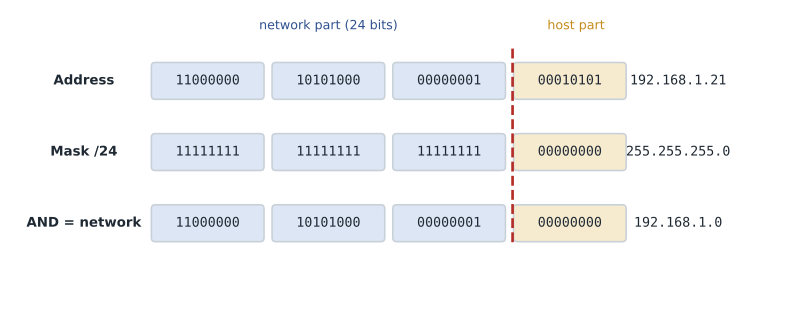
A host finds its network address by a bitwise AND of its address and its mask: wherever the mask has a 1 the address bit is kept, and wherever the mask has a 0 the result is 0. Two addresses are on the same network if they give the same result with the same mask. This one operation is how every computer decides whether a destination is local, a decision explored at the end of the lesson.
Network, broadcast and host addresses
Within every IPv4 network two addresses are reserved. The address with all host bits 0 is the network address, which names the network itself and is used in routing tables; it is not given to a device. The address with all host bits 1 is the broadcast address, used to send one packet to every host on the network. Everything in between is available for hosts. For 192.168.1.0/24, the network address is 192.168.1.0, the broadcast address is 192.168.1.255 and the usable hosts are 192.168.1.1 to 192.168.1.254, which is 254 addresses.
In general a network with h host bits contains 2 to the power h addresses, of which 2 to the power h minus 2 are usable. A /24 has 8 host bits, so 256 addresses and 254 hosts. A /26 has 6 host bits: 64 addresses, 62 hosts. A /30 has 2 host bits: 4 addresses, 2 hosts, the traditional size for a point-to-point link between two routers. The tiny exceptions are /31, which RFC 3021 allows for point-to-point links with no network or broadcast address, and /32, which names a single host.
import ipaddress

for text in ('192.168.1.0/24', '10.20.20.0/26', '172.16.5.4/30', '10.20.99.0/28'):
    net = ipaddress.ip_network(text, strict=False)
    hosts = list(net.hosts())
    print(str(net).ljust(16), 'mask', str(net.netmask).ljust(16),
          'broadcast', str(net.broadcast_address).ljust(14),
'hosts', hosts[0], '-', hosts[-1], '(' + str(len(hosts)) + ')')192.168.1.0/24 mask 255.255.255.0 broadcast 192.168.1.255 hosts 192.168.1.1 - 192.168.1.254 (254) 10.20.20.0/26 mask 255.255.255.192 broadcast 10.20.20.63 hosts 10.20.20.1 - 10.20.20.62 (62) 172.16.5.4/30 mask 255.255.255.252 broadcast 172.16.5.7 hosts 172.16.5.5 - 172.16.5.6 (2) 10.20.99.0/28 mask 255.255.255.240 broadcast 10.20.99.15 hosts 10.20.99.1 - 10.20.99.14 (14)
The strict=False argument lets ip_network accept an address with host bits set, such as 172.16.5.4/30, and quietly round it down to the network 172.16.5.4/30 contains. Without it, Python raises a ValueError, which is often what you want when checking configuration files, because a network written with host bits set is usually a typing mistake.
Try it yourself
Calculate a network by hand
Without using the ipaddress module, write network_info(address, prefix) that returns a tuple (network, broadcast, usable): the network address and broadcast address in dotted decimal, and the number of usable host addresses, for any prefix from 0 to 30.
Convert the address to a 32-bit integer, build the mask from the prefix, and use & (AND), | (OR) and ~ or subtraction to set the host bits to 0 or 1. Helper functions to_int and to_dotted are already defined.
def network_info(address, prefix):
    return address, address, 2 ** (32 - prefix)

print(network_info('192.168.1.21', 24))
Address classes and private ranges
Before CIDR, IPv4 addresses were divided into fixed classes by their first bits. Class A networks, with a first octet from 1 to 126, used a /8 mask; class B, 128 to 191, used /16; class C, 192 to 223, used /24. Class D, 224 to 239, is multicast, and class E, 240 to 255, is reserved. Classful addressing wasted enormous numbers of addresses, because an organization needing 500 addresses had to take a class B with 65,534, and it was replaced by CIDR in 1993. The class names survive in exam questions and in phrases such as a class C sized network, meaning a /24.
RFC 1918 sets aside three ranges as private addresses that anyone may use inside their own networks and that are never routed on the public internet: 10.0.0.0/8, 172.16.0.0/12 (172.16.0.0 to 172.31.255.255) and 192.168.0.0/16. Ridgeline, like almost every home and business, numbers its LAN from a private range and uses network address translation at its firewall-router to share one public address, 203.0.113.42, assigned by the provider. Private addresses can be reused by every organization because they never leave the private network without being translated.
| Range | Purpose | Notes |
|---|---|---|
| 10.0.0.0/8 | Private (RFC 1918) | Large organizations; Ridgeline's new design uses 10.20.0.0/16 |
| 172.16.0.0/12 | Private (RFC 1918) | 172.16.0.0 to 172.31.255.255 |
| 192.168.0.0/16 | Private (RFC 1918) | Home routers and small offices; Ridgeline's current LAN |
| 127.0.0.0/8 | Loopback | 127.0.0.1 is always the local host itself |
| 169.254.0.0/16 | Link-local (APIPA) | Self-assigned when DHCP fails |
| 100.64.0.0/10 | Carrier-grade NAT | Used inside some provider networks |
| 224.0.0.0/4 | Multicast | Group delivery, former class D |
| 192.0.2.0/24, 198.51.100.0/24, 203.0.113.0/24 | Documentation | Reserved for examples, as in this course |
An address beginning 169.254 is a useful clue. When a host is set to get its address automatically but no DHCP server answers, it picks a random link-local address in 169.254.0.0/16, a feature Windows calls Automatic Private IP Addressing. The host can then talk only to other link-local hosts on the same cable. Seeing 169.254 on a till therefore means DHCP failed, not that the till is broken.
Try it yourself
Classify an address
Write classify(address) that returns 'private' for addresses in the three RFC 1918 ranges, 'loopback' for 127.0.0.0/8, 'link-local' for 169.254.0.0/16 and 'public' for anything else. You may use the ipaddress module: ipaddress.ip_address(a) in ipaddress.ip_network('10.0.0.0/8') tests membership.
import ipaddress

def classify(address):
    if address.startswith('192.168'):
        return 'private'
    return 'public'

print(classify('172.20.1.5'))
Unicast, broadcast and multicast
IPv4 packets are delivered in three ways. Unicast sends a packet to one host, which is almost all traffic. Broadcast sends a packet to every host on a network: the directed broadcast address of a network, such as 192.168.1.255, or the limited broadcast 255.255.255.255, which means every host on this local network and is never forwarded by routers. DHCP relies on the limited broadcast, because a new device does not yet know any addresses. Multicast sends a packet to a group of hosts that have chosen to listen, using addresses from 224.0.0.0 to 239.255.255.255; it is used for streaming to many receivers, by routing protocols and by discovery services such as the one that lets phones find a printer. IPv6, in Lesson 6, drops broadcast altogether and uses multicast instead.
Is the destination local? The default gateway
Every host with an IPv4 address also needs a default gateway, the address of the router on its own network that forwards traffic to everywhere else. At Ridgeline that is 192.168.1.1, the firewall-router. When a host has a packet to send, it compares the destination with its own network. If the destination is in the same network, the host delivers the packet directly, finding the destination's MAC address with ARP, the Address Resolution Protocol, which broadcasts a question such as who has 192.168.1.50 and gets a reply from the printer. If the destination is on any other network, the host sends the frame to the default gateway's MAC address instead, and the router takes it from there.
A wrong mask or gateway produces confusing symptoms. A till with the right address but a /16 mask believes that 192.168.50.20, a guest device, is local and tries to reach it directly, which fails because the guest network is a different VLAN. A till with no gateway can print to the office printer but reach nothing on the internet. These are layer 3 problems, and the quick check is always the same: look at the host's address, mask and gateway together.
import ipaddress

def next_hop(host_ip, prefix, gateway, destination):
    my_net = ipaddress.ip_network(host_ip + '/' + str(prefix), strict=False)
    if ipaddress.ip_address(destination) in my_net:
        return 'deliver directly to ' + destination
    return 'send to gateway ' + gateway

till = ('192.168.1.21', 24, '192.168.1.1')
for dest in ('192.168.1.50', '192.168.50.20', '8.8.8.8', '203.0.113.80'):
print(dest.ljust(15), '->', next_hop(*till, dest))192.168.1.50 -> deliver directly to 192.168.1.50 192.168.50.20 -> send to gateway 192.168.1.1 8.8.8.8 -> send to gateway 192.168.1.1 203.0.113.80 -> send to gateway 192.168.1.1
Try it yourself
Same network or not?
Write same_network(a, b, prefix) that returns True when IPv4 addresses a and b are on the same network for the given prefix length, and False otherwise. You may use the ipaddress module or the integer method from earlier.
def same_network(a, b, prefix):
    return a.split('.')[:3] == b.split('.')[:3]

print(same_network('10.20.20.10', '10.20.20.100', 26))
Worked problem
Checking a till that cannot reach the payment service
Till 2 shows the settings 192.168.1.22, mask 255.255.0.0, gateway 192.168.1.1. It prints receipts to the office printer at 192.168.1.50 but cannot reach the internet reliably. What is wrong?
Show solution
- Convert the mask: 255.255.0.0 is /16, but the network is documented as 192.168.1.0/24.
- With /16 the till believes every address from 192.168.0.0 to 192.168.255.255 is local, including the guest network 192.168.50.0/24.
- Local delivery to the printer still works, because the printer really is on the same network.
- Any internet destination is outside 192.168.0.0/16, so traffic does go to the gateway, but replies or services that use 192.168 addresses on other VLANs fail, and the mismatch makes problems intermittent and confusing.
- Correct the mask to 255.255.255.0 (/24), or better, set the till to obtain its settings from DHCP with a reservation so the values come from one place.
Answer: The subnet mask is wrong: /16 instead of /24. Fixing the mask, ideally through DHCP, makes the till's idea of its network match the real one.
Common mistakes
MistakeGiving a host the network or broadcast address.
InsteadUse only addresses between them; the first and last addresses of a network are reserved.
MistakeDeciding whether hosts are on the same network by comparing the first three octets.
InsteadApply the prefix length; only for /24 does that shortcut work.
MistakeSorting or comparing IP addresses as text.
InsteadConvert them to integers or ipaddress objects first.
MistakeForgetting the default gateway when setting a static address.
InsteadA host needs address, mask, gateway and DNS servers together.
MistakeTreating a 169.254 address as a valid configuration.
InsteadIt means DHCP failed; fix the path to the DHCP server.
MistakeUsing public addresses picked at random on a private network.
InsteadUse the RFC 1918 private ranges inside your network.
Summary and key terms
- An IPv4 address is 32 bits, written as four decimal octets from 0 to 255.
- A subnet mask or prefix length splits the address into network bits and host bits.
- The network address has all host bits 0; the broadcast address has all host bits 1; hosts use the addresses between.
- A network with h host bits has 2 to the power h addresses and 2 to the power h minus 2 usable hosts.
- 10.0.0.0/8, 172.16.0.0/12 and 192.168.0.0/16 are private; 127/8 is loopback and 169.254/16 means DHCP failed.
- Hosts send local traffic directly, using ARP to find MAC addresses, and everything else to the default gateway.
- Python's ipaddress module calculates networks, masks, ranges and membership reliably.
- IPv4 address
- A 32-bit address written in dotted-decimal notation.
- Octet
- One of the four 8-bit groups of an IPv4 address.
- Subnet mask
- A 32-bit value marking which bits of an address are the network part.
- Prefix length
- The number of network bits, written after a slash, as in /24.
- CIDR
- Classless Inter-Domain Routing: variable-length prefixes instead of fixed classes.
- Network address
- The first address of a network, with all host bits 0.
- Broadcast address
- The last address of a network, with all host bits 1.
- Private address
- An address from the RFC 1918 ranges, used inside networks and not routed on the internet.
- Default gateway
- The router a host sends traffic to when the destination is on another network.
- ARP
- Address Resolution Protocol: finds the MAC address that belongs to an IPv4 address on the local network.
Practice problems
Work each problem on paper first, then reveal the answer to check.
Convert 172 to binary.
Show answer
10101100 (128 + 32 + 8 + 4).
What prefix length is 255.255.255.192?
Show answer
/26.
What is the broadcast address of 10.20.40.0/27?
Show answer
10.20.40.31.
How many usable hosts are in a /28?
Show answer
2^4 - 2 = 14.
Is 172.31.200.1 a private address?
Show answer
Yes; it is inside 172.16.0.0/12.
A laptop shows 169.254.88.3. What does that tell you?
Show answer
It could not get an address from DHCP and assigned itself a link-local address.
Are 192.168.1.130 and 192.168.1.10 on the same /25 network?
Show answer
No: .10 is in 192.168.1.0/25 and .130 is in 192.168.1.128/25.
What is the network address of 10.20.20.77/26?
Show answer
10.20.20.64.
Which protocol finds the MAC address for an IPv4 address on the local network?
Show answer
ARP.
Why does Ridgeline need only one public address?
Show answer
Its LAN uses private addresses, translated to the one public address at the firewall-router.
Lesson quiz · 5 questions
Score 60% or more to complete this lesson.
Create a free account to save your progress, take quizzes and earn a certificate.