
MSBA-331 · Lesson 7 of 12 · 20 min
Delivery and shipping
▶ Video coming soon A video version of this lesson is on the way.
Henrik Salo, the warehouse lead at Denver, had been quiet through the pricing session. When the topic turned to shipping, he stood up and drew his dock on the whiteboard: four doors, a staging lane for each, a packing bench, and a corner where pallets for the next morning's carrier waited. "Whatever the system does," he said, "it has to end with the right pallet on the right truck and a packing slip in the driver's hand." Annelise agreed, and the session followed the Prairieline order from the confirmed sales order to the truck.
Two ways to ship
How an order ships depends on whether the warehouse uses warehouse management. In a warehouse without it, shipping is document-driven: the clerk posts a picking list, the warehouse picks, the picking is registered, and the packing slip is posted. In a warehouse with warehouse management, the order is released to the warehouse, which creates shipments and loads, a wave creates work, workers pick and pack with mobile devices, and the load is shipped, which posts the packing slip. The next course in this program covers warehouse management in depth. This lesson explains both paths at the level a sales and procurement consultant needs.
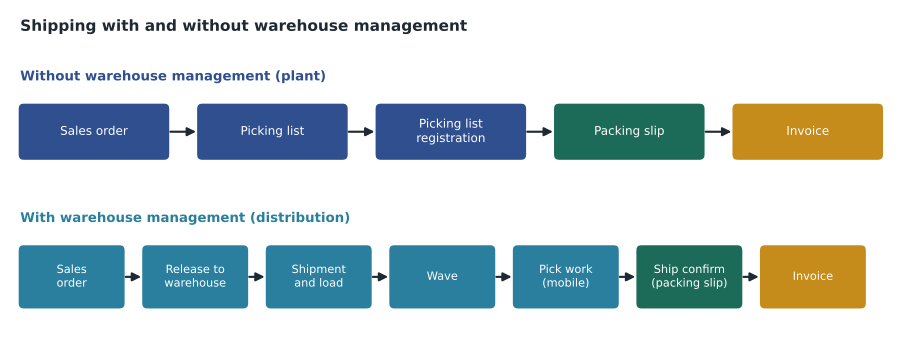
Cobalt Ridge uses both. The Akron plant ships finished pumps from a simple finished-goods warehouse without warehouse management, so pump orders use picking lists and packing slips. The distribution warehouse uses warehouse management, set up with the storage dimension group SWLSP-WMS from the product course, so distributor orders go through release, waves and mobile work.
The document path: picking list and packing slip
In a warehouse without warehouse management, the picking list is a posted document that tells the warehouse what to pick for one or more orders. Posting it creates output orders and picking routes, and the picked quantities are then confirmed through picking list registration, where the clerk records what was actually picked and from which dimensions, such as batch or serial number. The packing slip, also called the delivery note, is then posted; it is the physical issue from inventory, it records the shipment against the sales order, and it is the document the driver carries. If the item model group posts physical inventory to the ledger, the packing slip creates the physical ledger postings.
| Issue status on the inventory transaction | Meaning |
|---|---|
| On order | On a sales order, not yet reserved |
| Reserved ordered | Reserved against expected supply |
| Reserved physical | Reserved against on-hand stock |
| Picked | Picked by picking list registration or warehouse work |
| Deducted | Packing slip posted (physical update) |
| Sold | Invoice posted (financial update) |
Serial numbers matter for pumps. Each MC-150 has a serial number registered at production, and the tracking dimension group from the product course captures the serial at sales. When the plant posts the picking list registration for a utility order, the clerk scans each pump's serial number, and the packing slip records which serials went to which customer. That is what makes the seal-failure tracing from the product course possible in future: the team can tell which pumps went to which utility.
Partial picks and the packing slip quantity
The packing slip can be posted for less than the ordered quantity. The posting dialog shows the quantity parameter, such as Picked, All or Deliver now, and the clerk chooses which quantity to ship. Posting for Picked ships what was registered. The rest stays as a back order or, if the customer does not want it, the remaining quantity can be canceled by reducing the line or marking the remainder as closed in the posting dialog. Henrik's rule was simple: packing slips are always posted for the picked quantity, never for All, so the system never ships more than left the building.
The warehouse management path
In a warehouse management warehouse, the sales order is released to the warehouse, either manually from the order, in batch through Release to warehouse, or automatically when the order is confirmed. Release creates a shipment for the order lines going to the same address and a load that groups shipments for one truck. Wave templates decide how shipments are grouped into waves, which create work: pick work, put work to a staging location, and optionally packing work. Workers process the work on the Warehouse Management mobile app, scanning locations, items and license plates. When the load is loaded and ship confirmed, the packing slip is posted automatically or in batch.
| Warehouse management object | What it represents |
|---|---|
| Shipment | Lines going from one warehouse to one address on one date |
| Load | One or more shipments on one vehicle |
| Wave | A group of shipments released together for picking |
| Work | Instructions for a worker: pick from here, put there |
| Container | A box or pallet used in packing, with its own ID and weight |
Henrik's dock design fit this well. Each door has a staging location; the wave template for parcel and LTL shipments creates pick work that ends at the staging location for the assigned door; packing happens at the bench, where the packer scans items into containers and closes them. When the carrier arrives, the load is loaded, ship confirmed, and the packing slip and bill of lading print. The Prairieline order shipped on one load, with the four DU-40s on two pallets and the seal kits and impellers in a third container.
Transportation in outline
Transportation management adds carriers, rates, routes and appointments. It can rate a load, choose the cheapest carrier service for the weight and destination, book a dock appointment, and record freight charges that can be passed to the customer or reconciled against the carrier's invoice. The next course covers it properly. Cobalt Ridge uses transportation management only for the distribution warehouse, where it rates LTL shipments with two carriers. The pump plant arranges freight by phone with one carrier and records the freight charge on the sales order as a charge, which lesson 10 explains.
Calendars, transport days and confirmed dates
Confirmed dates in lesson 6 depend on calendars and transport times, and shipping is where those settings show whether they are right. Each warehouse has a shipping calendar with working days; each customer can have a receiving calendar; and transport days between a warehouse and a delivery address, by mode of delivery, tell the system how long goods take on the road. When delivery date control calculates a receipt date, it adds the transport days to the ship date and checks both calendars. If transport days are missing, the system assumes zero, and customers are promised next-day receipt for goods that take three days to arrive.
The team built a transport days table for the distribution warehouse by province or state and mode of delivery, using the carriers' published transit times plus one day of margin, and agreed to review it each spring. The pump plant, which ships far fewer orders, uses a sales lead time on the items instead. Henrik also asked that statutory holidays for both countries be in the warehouse calendars before go-live, because the first test order of the season would otherwise have been promised for a day when no carrier was working.
Delivery terms, modes and addresses
Each shipment carries terms of delivery and a mode of delivery. Terms of delivery, such as Incoterms, decide where risk and cost pass from seller to buyer; for domestic distributor orders, Cobalt Ridge ships under terms where it pays freight to the customer's door and bills it as a charge. The mode of delivery decides how the goods move, such as courier, LTL, full truckload or customer pickup, and can drive which carrier is used. Delivery addresses come from the customer's addresses with the delivery purpose, and a line can ship to a different address from the header, such as a job site.
Direct delivery from the sales side
Lesson 3 described direct delivery from the purchase side. From the sales order, the clerk selects lines and uses Direct delivery to create a linked purchase order to the vendor with the customer's address. When the vendor ships, the vendor's confirmation is entered, and the purchase order's product receipt and the sales order's packing slip can be posted together, because the goods never enter the company's warehouse. The sales invoice can be posted once the vendor confirms delivery. Cobalt Ridge uses direct delivery for large orders of third-party seal kits that a distributor wants shipped straight from the seal kit manufacturer.
Correcting a shipment
Shipments go wrong too. A packing slip that was posted for the wrong quantity or the wrong batch can be corrected or canceled from the packing slip journal, as long as it has not been invoiced. Canceling reverses the issue and returns the stock to its previous status; correcting posts a new version of the packing slip with the right values and reverses the difference. In a warehouse management warehouse, a shipped load can be reversed only under conditions, and some mistakes are fixed by a return instead. Henrik's team found that most errors in the first test were wrong batches on seal kits, which the mobile app's batch scanning prevents once workers are used to it.
A customer who receives the wrong goods is not a shipment correction but a return, which lesson 8 covers. The line between the two is whether the goods have left the company's control: a packing slip posted by mistake while the pallet is still on the dock is corrected; a pallet delivered to the customer is returned.
Shipping documents
The documents that travel with the goods are produced by print management, like purchase order confirmations. For sales, the main ones are the packing slip, the bill of lading for carrier shipments, container or pallet labels, and, for some items, certificates such as a certificate of analysis for seal kit batches, which the quality setup from the product course can print. Print management can send the packing slip by email to the customer as soon as it is posted, which distributors asked for so they can prepare to receive. Cobalt Ridge prints two packing slip copies for the driver and emails one to the customer, prints the bill of lading for every LTL load, and attaches the certificate of analysis for seal kits to the email.
| Document | Produced at | Who receives it |
|---|---|---|
| Order confirmation | Confirmation | Customer, by email |
| Picking list | Picking list posting | Warehouse (plant only) |
| Packing slip | Packing slip or ship confirm | Driver (two copies) and customer by email |
| Bill of lading | Ship confirm of an LTL load | Carrier |
| Certificate of analysis | Packing slip for seal kits | Customer, attached to the email |
| Invoice | Invoice posting | Customer, by email |
Consolidating shipments
Distributors often order several times a week. Sending each order separately costs freight and dock time. In a warehouse management warehouse, shipment consolidation policies can add lines from different orders for the same customer and address to one open shipment, as long as they are released before the load is shipped, and loads can carry shipments for several customers on the same route. Henrik set a consolidation policy for distributors: orders released on the same day for the same delivery address and mode of delivery are combined into one shipment, so Prairieline's Tuesday and Wednesday orders leave together on Wednesday's truck if both are released by noon.
The sales invoice
The sales invoice is the financial update for a sales line. It posts revenue, the receivable, tax and the cost of goods sold, and it changes the issue status to Sold. Invoices can be posted for each packing slip, for several packing slips together through summary update, or on a schedule. Pro forma documents can be printed before posting for customers who need them for customs or prepayment. Cobalt Ridge invoices distributors daily in batch for everything shipped that day, using summary update by customer so each distributor gets one invoice per day; utilities get one invoice per packing slip because their contracts require it.
| Posting | Physical or financial | Effect |
|---|---|---|
| Confirmation | Neither | Records the order version sent to the customer |
| Picking list | Neither | Creates pick instructions |
| Packing slip | Physical | Issues inventory; issue status Deducted |
| Invoice | Financial | Posts revenue, receivable, tax and cost; issue status Sold |
Taxes on shipments
Taxes are calculated on sales lines from the customer's and item's tax groups, which combine into the tax codes that apply. For customers of CRUS, that means state and local sales tax based on the ship-to address, depending on the delivery address. Tax is posted at invoice, not at packing slip. Thandeka's finance team owns the tax setup, but customer service must keep delivery addresses accurate, because the tax calculation follows the address, and exempt customers, such as some utilities, must have their exemption recorded before their first order.
Worked problem
Shipping the Prairieline order
The confirmed Prairieline order has 4 DU-40, 12 SK-90H and 2 impellers to ship from the distribution warehouse, which uses warehouse management.
Show solution
- Release the order to the warehouse; a shipment and a load are created.
- Process the wave; pick work is created for the three items, ending at the staging location for door 2.
- Workers pick on the mobile app; the seal kits are picked first-expiry, first-out by batch.
- Pack the seal kits and impellers into one container at the bench; the DU-40s stay on two pallets.
- Load the truck and ship confirm the load; the packing slip and bill of lading are posted and printed.
- The evening batch posts the daily invoice for Prairieline by summary update.
Answer: The goods leave on one load with a packing slip, and Prairieline receives one invoice for the day.
Common mistakes
MistakePosting packing slips for All instead of the picked quantity.
InsteadPost for the picked quantity so inventory matches what left the building.
MistakeSkipping serial registration on pumps at picking.
InsteadRegister serial numbers so each pump can be traced to its customer.
MistakeExpecting tax to post at the packing slip.
InsteadTax is posted at invoice; keep addresses accurate so the calculation is right.
MistakeRunning warehouse management processes in a warehouse not set up for them.
InsteadUse picking lists and packing slips where warehouse management is not enabled.
Summary and key terms
- Without warehouse management, orders ship through picking lists, picking registration and packing slips.
- With warehouse management, orders are released to the warehouse, grouped into shipments, loads and waves, picked as mobile work and ship confirmed.
- The packing slip is the physical issue; the invoice is the financial update with revenue, tax and cost.
- Transportation management rates loads and carriers; charges record freight on orders.
- Direct delivery ships from vendor to customer with linked purchase and sales orders.
- Picking list
- A posted document that tells a warehouse without warehouse management what to pick.
- Packing slip
- The posting that physically issues inventory for a sales order shipment.
- Release to warehouse
- The step that creates shipments and loads for warehouse management processing.
- Wave
- A group of shipments released together to create warehouse work.
- Summary update
- Posting one document, such as an invoice, for several orders or packing slips.
Practice problems
Work each problem on paper first, then reveal the answer to check.
Which issue status follows Picked when the packing slip is posted?
Show answer
Deducted.
What groups shipments onto one vehicle in warehouse management?
Show answer
A load.
When is tax posted on a sales order?
Show answer
At invoice.
Lesson quiz · 5 questions
Score 60% or more to complete this lesson.
Create a free account to save your progress, take quizzes and earn a certificate.