
MSBA-302 · Lesson 9 of 12 · 21 min
Artifact attestations
▶ Video coming soon A video version of this lesson is on the way.
Malik's trail-report validator had found an audience. Two other trail organizations installed it from its package registry, and one of them, a provincial parks volunteer network, asked a reasonable question before using it with their data: how could they be sure the package they downloaded was built from the public source code in Tidewater's repository, by Tidewater's workflow, and not by someone with a stolen publishing token on their own laptop? Pinning protects Tidewater from other people's code; artifact attestations let other people verify Tidewater's. The ninth session added them to the validator's release workflow.
What an attestation is
An artifact attestation is a signed statement about a file, the artifact, identified by its cryptographic digest. The most common kind is a build provenance attestation, which records where and how the artifact was built: the repository, the workflow file, the commit, the triggering event and the run. It is created inside the workflow that builds the artifact, signed using a certificate tied to that workflow run, and stored so anyone with access can check it later. Anyone holding the file can then verify that its digest matches an attestation signed for the expected repository and workflow.
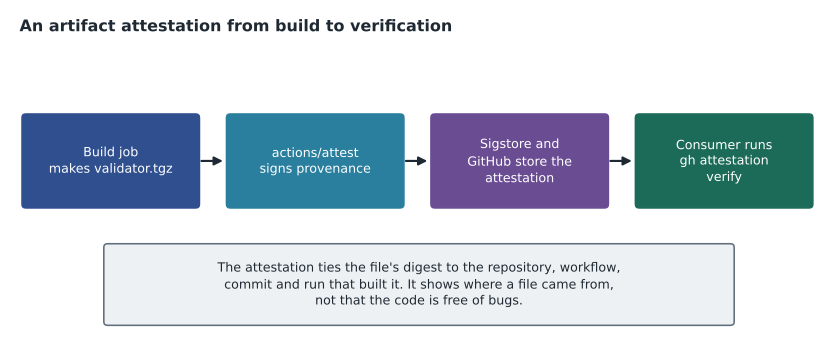
An attestation answers "where did this come from?". It does not answer "is this code safe?". A provenance attestation for a package built from a repository that contains a bug proves, accurately, that the buggy package came from that repository. Its value is in removing a whole class of attack: tampering between the source and the consumer, and builds made outside the trusted pipeline.
How signing works
GitHub's attestations use Sigstore, an open-source project for signing software without managing long-lived signing keys. During the run, the attest action uses the job's OIDC token to obtain a short-lived signing certificate that records the workflow's identity, signs the attestation, and stores it. For public repositories, the signing uses the Sigstore Public Good instance, and the signature is written to a transparency log that anyone on the internet can read. For private repositories, GitHub uses its own Sigstore instance, which shares the same code but has no public transparency log and only accepts identities from GitHub Actions. Either way, GitHub stores the attestation bundle so that it can be found by the artifact's digest.
| Repository visibility | Plan needed | Signing instance | Public transparency log |
|---|---|---|---|
| Public | Any current plan, including Free, Pro and Team | Sigstore Public Good instance | Yes |
| Private or internal | GitHub Enterprise Cloud | GitHub's Sigstore instance | No |
For Tidewater that meant a clear split. The validator and TrailCheck are public, so attestations work on the Team plan. The guidebook repository is private, so attesting its print files would need Enterprise Cloud. Rosa noted that as one of several reasons the team might consider an upgrade one day, and the session moved on.
Adding an attestation to a workflow
Creating an attestation takes one step after the build, plus three permissions on the job: id-token: write to obtain the signing certificate, attestations: write to store the attestation, and contents: read to check out code. For container images pushed to a registry, the job also needs packages: write. The action is actions/attest, which takes the path to the file or files to attest, or for images the image name and digest.
name: Release validator
on:
  release:
    types: [published]

permissions:
  contents: read

jobs:
  build:
    runs-on: ubuntu-latest
    permissions:
      contents: read
      id-token: write
      attestations: write
    steps:
      - uses: actions/checkout@08c6903cd8c0fde910a37f88322edcfb5dd907a8 # v5.0.0
      - uses: actions/setup-node@a0853c24544627f65ddf259abe73b1d18a591444 # v5.0.0
        with:
          node-version: "24"
      - run: npm ci && npm test && npm pack
      - name: Attest build provenance
        uses: actions/attest@v4   # pin to a SHA in your own workflow
        with:
          subject-path: "trail-validator-*.tgz"
      - uses: actions/upload-artifact@v7
        with:
          name: package
          path: "trail-validator-*.tgz"
The attest step computes the digest of each matching file, creates the provenance statement and signs it. In the run summary, GitHub links to the new attestation, and the repository's Attestations page lists every attestation created, with the artifact names, digests and the workflow runs that made them.
Verifying an attestation
Consumers verify with the GitHub CLI. The command computes the file's digest, finds attestations for that digest, checks the signatures, and confirms that the signer identity matches the repository or owner you name. If someone rebuilt the package elsewhere, or changed a single byte, verification fails.
# Verify a downloaded package came from Tidewater's validator repository
gh attestation verify trail-validator-2.3.0.tgz --repo tidewater/validator

# Accept any repository owned by the organization
gh attestation verify trail-validator-2.3.0.tgz --owner tidewater

# Container image example
gh attestation verify oci://ghcr.io/tidewater/trail-api:2.3.0 --owner tidewater
Verification can be tightened further with options that require a particular workflow file, branch or ref, so the parks network could insist that the package came from release.yml in the validator repository, not just from any workflow there. Lena added a short Verification section to the validator's README with the exact command, because a security feature that consumers do not know how to use protects nobody.
Attestations, SLSA and reusable workflows
Supply-chain frameworks describe build integrity in levels. GitHub states that artifact attestations by themselves provide SLSA v1.0 Build Level 2: the build ran on a hosted platform that generated signed provenance. Reaching Build Level 3 adds isolation between the build and the definition the developer controls. GitHub's guidance is to build in a reusable workflow that the organization controls, so the provenance records the shared workflow as the builder, and a developer cannot alter the build steps from their own repository. Verification can then require that specific reusable workflow as the signer.
Skerry follows that pattern for everything that ships to stores: every store service builds through one reusable build workflow, attestations name that workflow, and deployment to production verifies the attestation, refusing images that were not built by it. Yevgenia described it as turning the question "who built this?" from a matter of trust into a check a computer does on every deploy.
| Practice | Benefit |
|---|---|
| Attest in the job that builds the artifact | The provenance describes the real build |
| Build through an organization-owned reusable workflow | Supports SLSA Build Level 3 and stricter verification |
| Verify at the point of use, such as deployment or installation | Untrusted builds are stopped automatically |
| Document the verification command for consumers | Outside users can actually check |
| Attest only what you publish | Fewer attestations to manage, clearer evidence |
Other kinds of attestations
Provenance is the most common attestation, but the same mechanism can sign other statements about an artifact. A software bill of materials attestation binds an SBOM, the list of components inside the artifact, to its digest, so consumers know the SBOM really describes that file. Organizations can also create attestations with custom statements, such as the result of a security review. Check the actions/attest documentation for the options supported by the version you use, since this area has been growing.
Attestations in a release process
An attestation is most useful when it is part of a routine that people follow without thinking. For the validator, Lena wrote the release process as four steps: a maintainer creates a release from a tag on main; the release workflow builds, tests, packs and attests the package; the workflow uploads the package to the release and publishes it to the package registry; and the release notes include the verification command with the version filled in. Because the attestation is created by the same run that publishes the package, a package in the registry without a matching attestation is itself a warning sign, worth investigating before anyone installs it.
Malik asked what happens if the release workflow is run again for the same tag. The answer: a new build produces a new file, often with a different digest because of timestamps inside the archive, and a new attestation for that digest. Both attestations remain valid for their own files. Teams that want a rebuild to produce an identical file, and therefore the same digest, work toward reproducible builds, which is a separate discipline; attestations do not require it, but they make any difference between two builds visible.
| Step | Who or what | Evidence produced |
|---|---|---|
| Create release from tag on main | Maintainer | Release and tag in the repository |
| Build, test, pack | Release workflow on a hosted runner | Run logs and test results |
| Attest provenance | actions/attest in the same job | Signed attestation linked to the run |
| Publish package and notes | Release workflow | Package with matching digest; verification command |
| Verify before use | Consumers and deploy jobs | Successful gh attestation verify |
Managing and inspecting attestations
Each repository has an attestations view that lists what has been attested, with the subject names, digests, the workflow and the run. Attestations can also be fetched through the REST API by digest, which is how verification tools find them. Organizations can see attestations across repositories, which helps security teams answer questions such as "which builds of this service exist, and from which workflows?". Because attestations are tied to digests rather than file names, renaming a downloaded file does not affect verification, but changing any byte does.
Lena noted one practical limit for consumers: verification needs the GitHub CLI or another tool that understands the format, and network access to fetch the attestation. For the parks network that was easy. For a printer receiving PDFs, or a user installing an app on a phone, it is not, which is why attestations matter most for software that other software installs and deploys automatically.
# Show attestation details as JSON, then filter the workflow that signed it
gh attestation verify trail-validator-2.3.1.tgz --repo tidewater/validator --format json \
  | jq '.[0].verificationResult.signature.certificate.buildSignerURI'

# Require that a specific workflow file produced the artifact
gh attestation verify trail-validator-2.3.1.tgz --repo tidewater/validator \
  --signer-workflow tidewater/validator/.github/workflows/release.yml
Attestations and other signatures
People sometimes ask how attestations relate to other ways of signing. Signed commits and tags prove who created a commit; they say nothing about what was built from it. Package registry signatures, where a registry signs packages it publishes, prove the registry published the file, not how it was built. Checksums published with a release let users detect corruption, but anyone who can change the release page can change the checksum too. A build provenance attestation fills the gap between source and artifact: it binds a specific file to a specific workflow run on a specific commit, signed with an identity that only that run could obtain. The methods complement each other; Tidewater signs its release tags, publishes checksums and attests its packages, and each answers a different question.
Attestations also help internally. When a bug report names a package version, the attestation leads straight to the commit and run that built it, so the team can reproduce the build environment and check whether the bug was in the source or in the build.
Worked problem
A verification that fails
The parks network runs gh attestation verify trail-validator-2.3.0.tgz --repo tidewater/validator and gets an error that no attestations were found. The release workflow did run attest. What are the likely causes?
Show solution
- They may have downloaded a different file, for example a repackaged copy from a mirror, so its digest does not match.
- The release may have been published before the attest step was added, so that version has no attestation.
- The repository name could be wrong, for example a fork rather than tidewater/validator.
Answer: Compare digests and versions: a changed file, an older release without attestation, or the wrong repository all produce "no attestations found".
Worked problem
Deciding whether attestations fit
Owen asks whether Tidewater should attest the guidebook's print-ready PDFs before sending them to the printer. The guidebook repository is private and Tidewater is on GitHub Team. What would you tell him?
Show solution
- On Free, Pro and Team plans, attestations are available only for public repositories.
- The guidebook is private, so attesting its PDFs would require GitHub Enterprise Cloud.
- For now, publish checksums of the PDFs with the release and send them to the printer by a separate channel; revisit attestations if the plan changes.
Answer: Not on the Team plan for a private repository; use checksums sent separately, and revisit with Enterprise Cloud.
Common mistakes
MistakeTreating a provenance attestation as proof that the code is safe.
InsteadIt proves where and how the artifact was built, not that the code is free of flaws.
MistakeForgetting id-token: write or attestations: write on the build job.
InsteadBoth are needed, plus packages: write for container images.
MistakeExpecting attestations in private repositories on the Team plan.
InsteadPrivate and internal repositories need GitHub Enterprise Cloud.
MistakeCreating attestations that nobody verifies.
InsteadVerify at deployment or installation and document the command for consumers.
Version 2.3.1 of the validator was the first released with an attestation. The parks network verified it, added the command to their own installation script, and sent Malik a thank-you note that he printed and pinned above his desk.
Summary and key terms
- An artifact attestation is a signed statement about a file's digest; build provenance records the repository, workflow, commit and run.
- Attestations use Sigstore: the Public Good instance with a public log for public repositories, GitHub's instance for private ones.
- Public repositories can use attestations on any current plan; private and internal ones need Enterprise Cloud.
- The build job needs id-token: write and attestations: write, plus packages: write for images; the action is actions/attest.
- Consumers verify with gh attestation verify, naming the repository or owner and optionally the workflow.
- Attestations alone give SLSA Build Level 2; building in an organization-owned reusable workflow supports Level 3.
- Artifact attestation
- A signed statement about an artifact, identified by its digest.
- Build provenance
- An attestation describing how and where an artifact was built.
- Digest
- A cryptographic hash that identifies a file's exact contents.
- Sigstore
- An open-source signing system that uses short-lived certificates instead of long-lived keys.
- Transparency log
- A public, append-only record of signatures used by the Sigstore Public Good instance.
- SLSA
- Supply-chain Levels for Software Artifacts, a framework of build integrity levels.
Practice problems
Work each problem on paper first, then reveal the answer to check.
Which three permissions does an attesting build job need for a file artifact?
Show answer
id-token: write, attestations: write and contents: read.
What does gh attestation verify check?
Show answer
That the file's digest matches a validly signed attestation from the named repository or owner.
How do you move from SLSA Build Level 2 toward Level 3 with GitHub?
Show answer
Build in an organization-owned reusable workflow and verify that it signed the attestation.
Lesson quiz · 5 questions
Score 60% or more to complete this lesson.
Create a free account to save your progress, take quizzes and earn a certificate.