
MSBA-302 · Lesson 5 of 12 · 21 min
Secrets and variables at each level
▶ Video coming soon A video version of this lesson is on the way.
Rosa Delgado keeps Tidewater's accounts, and in the fifth session she arrived with a spreadsheet. It listed every credential she paid for or had signed up for: the map-tile service, the print vendor's upload portal, the newsletter platform, the domain registrar, the cloud storage account. "Which of these are in GitHub," she asked, "and who can use them?" Lena opened the settings and found the same map-tile key stored three times: once as an organization secret, once as a repository secret in the guidebook repository, and once as an environment secret on the production environment. Two of the three copies were out of date. Nobody could say which one the deploy job actually used. This session was about where secrets and configuration variables live, who can use them, and which copy wins.
Secrets and configuration variables
GitHub Actions stores two kinds of named values. A secret is an encrypted value, such as an API key or password. You can write it but never read it back through the interface or API; workflows read it through the secrets context, and GitHub masks it in logs. A configuration variable is a plain value, such as a region name, a site URL or a feature flag, read through the vars context and shown in logs and settings like any other text. The rule is simple: if exposure would matter, it is a secret; if not, a variable keeps it visible and easy to review.
Both kinds can be defined at three levels. Organization secrets and variables are shared across repositories according to an access policy. Repository secrets and variables belong to one repository. Environment secrets and variables belong to one deployment environment in one repository and are released only to jobs that target that environment, after its protection rules pass.
| Level | Defined in | Available to | Good for |
|---|---|---|---|
| Organization | Organization settings | All repositories, private repositories, or selected repositories, by policy | Values many repositories share, such as a registry token |
| Repository | Repository settings | Workflows in that repository | Values only one project needs |
| Environment | An environment in a repository | Jobs that target that environment, after protection rules pass | Deployment credentials that need approval or branch rules |
Which value wins
When the same name exists at more than one level, the most specific level wins: an environment value overrides a repository value, which overrides an organization value. A job that targets the production environment sees the production value; a job with no environment sees the repository value; a repository without its own value falls back to the organization's, if the organization shares it with that repository.
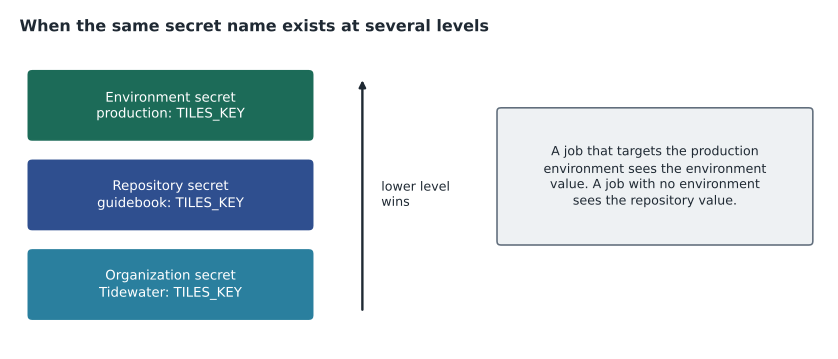
That explained Rosa's puzzle. The deploy job targeted production, so it used the environment copy, which happened to be current. The preview job had no environment and used the stale repository copy, which is why previews had shown blank map tiles since the key was rotated in the summer. Lena deleted the repository and organization copies, kept one production environment secret, and created a separate, read-only tile key for previews as a staging environment secret, so a leaked preview credential could not change anything.
Organization access policies
An organization secret or variable has an access policy: all repositories, private repositories only, or selected repositories. Choose selected repositories unless a value genuinely belongs everywhere. "All repositories" includes public ones, and every new repository created later. A public repository's workflows cannot hand secrets to fork pull requests, but they can still use them in pushes and other trusted events, so a public repository with access to a broad secret is one more place the secret can be misused. Plan matters here too: organizations on the free plan have restrictions on using organization secrets and variables from private repositories, so check your plan's documentation.
# GitHub CLI: set an organization secret visible only to selected repositories
gh secret set REGISTRY_TOKEN --org tidewater \
  --visibility selected --repos "guidebook,trail-importer" < token.txt

# Repository variable
gh variable set TILE_REGION --repo tidewater/guidebook --body "east"

# Environment secret
gh secret set TILES_KEY --repo tidewater/guidebook --env production < key.txt

# List names (values are never shown)
gh secret list --org tidewater
Using secrets safely in workflows
A secret is only as safe as the workflow that uses it. Pass secrets to the steps that need them, through env or with, rather than setting them at the workflow level where every step, including third-party actions, can read them. Never echo a secret, even masked, and remember that masking works on exact strings: a secret that is transformed, for example base64-encoded or split into parts, may print unmasked. If a step generates a sensitive value at run time, mask it with the add-mask workflow command before anything prints it.
jobs:
  deploy:
    runs-on: ubuntu-latest
    environment: production
    permissions:
      contents: read
    steps:
      - uses: actions/checkout@v5
      - name: Upload tiles
        # only this step receives the key
        env:
          TILES_KEY: ${{ secrets.TILES_KEY }}
          TILE_REGION: ${{ vars.TILE_REGION }}
        run: ./scripts/upload-tiles.sh
      - name: Create a short-lived token and mask it
        run: |
          token="$(./scripts/mint-token.sh)"
          echo "::add-mask::$token"
          echo "UPLOAD_TOKEN=$token" >> "$GITHUB_ENV"
Secrets have limits that occasionally matter. They cannot be used directly in an if condition; put the secret in an environment variable and test that instead. Fork pull_request runs receive no secrets at all. Reusable workflows receive secrets only if the caller passes them explicitly or with secrets: inherit. Individual secrets have a maximum size, and there are maximum counts per organization, repository and environment; when a credential is large, such as a certificate bundle, the documentation suggests storing it encrypted in the repository and keeping only the decryption passphrase as a secret.
Other kinds of secrets
Actions secrets are not the only secrets GitHub stores. Dependabot secrets are a separate store used when Dependabot runs updates, for example to reach a private package registry, and workflows triggered by Dependabot read Dependabot secrets rather than Actions secrets. Codespaces secrets are another separate store for development environments. When a Dependabot pull request fails because a registry token is "missing", the usual cause is that the token exists only as an Actions secret.
| Secret store | Used by | Common surprise |
|---|---|---|
| Actions secrets | Workflow runs | Not available to Dependabot-triggered runs or fork pull requests |
| Dependabot secrets | Dependabot updates and Dependabot-triggered workflow runs | Must be set separately from Actions secrets |
| Codespaces secrets | Codespaces development environments | Not available to workflows at all |
| Environment secrets | Jobs that target the environment | Released only after protection rules pass |
Replacing long-lived secrets
The best secret is one you do not need to store. Three replacements remove most long-lived credentials from Actions settings. For the repository the workflow runs in, the automatic GITHUB_TOKEN covers most GitHub API work and expires at the end of the job. For other repositories or organization-wide operations, a GitHub App installation token, created during the run with actions/create-github-app-token, replaces a personal access token tied to one person's account. For cloud providers, OpenID Connect replaces stored cloud keys with short-lived credentials issued per job. The next two lessons cover OpenID Connect and the GITHUB_TOKEN; Skerry used all three to replace about 170 stored cloud keys and dozens of personal access tokens.
Rotation and ownership
Every secret that remains needs an owner and a rotation plan. Lena added two columns to Rosa's spreadsheet, owner and last rotated, and a rule that any secret older than a year is rotated or justified. Rotation in GitHub is a simple overwrite, but the credential must also be changed at the provider, and the old one revoked, or rotation achieves nothing. Secret scanning with push protection, covered in the Advanced Security courses, adds a safety net by blocking pushes that contain recognized credentials before they reach the repository.
Variables for configuration, not just secrets
Configuration variables often get less attention than secrets, but they solve a real problem: values that differ between environments yet are not sensitive. The storage account name, the site's public address, the Azure tenant and client identifiers used for OIDC, a feature flag that turns on a new map layer: none of these needs to be hidden, and hiding them makes reviews harder, because nobody can see what a workflow will use. Lena moved six values that had been stored as secrets "to be safe" into variables, so the deploy workflow's settings could be read on one page and differences between staging and production were obvious.
Variables follow the same three levels and the same precedence as secrets. A useful pattern is to define a default at the repository or organization level and override it per environment only where needed. Tidewater's TILE_REGION variable lives at the repository level, and only the staging environment overrides it to point at a test container. Variables are read with the vars context, can be used in if conditions and in job-level settings where secrets cannot, and are visible in logs, so they also appear when someone debugs a run.
jobs:
  deploy:
    runs-on: ubuntu-latest
    environment: ${{ github.ref == 'refs/heads/main' && 'production' || 'staging' }}
    # vars resolve from the chosen environment, then the repository, then the organization
    if: vars.DEPLOY_ENABLED == 'true'
    steps:
      - run: echo "Deploying to ${{ vars.SITE_URL }} in region ${{ vars.TILE_REGION }}"
Who can manage secrets
Being able to use a secret and being able to manage one are different. Repository administrators manage repository and environment secrets; organization owners manage organization secrets and their access policies. On Enterprise Cloud, custom organization roles can grant secret management to a security or platform team without making them owners. Anyone who can push a workflow file to a repository can, in practice, use that repository's secrets, because they can write a workflow that uses them. That is the strongest argument for environment secrets with protection rules for anything important: an environment secret is released only when the job targets that environment and its rules pass, so pushing a new workflow is not enough to obtain it.
Secrets in reusable workflows and composite actions
Shared automation adds two more rules. A reusable workflow cannot read the caller's secrets unless the caller passes them, one by one under secrets or all at once with secrets: inherit, and environment secrets are available only if the called job itself declares the environment. A composite action has no secrets context of its own: the caller must pass secret values as inputs or environment variables, and the action's steps then receive them like any other input. Both rules exist for the same reason, to make every flow of a secret into shared code visible in the caller's workflow file. Tidewater's node-ci.yml declares one optional secret, registry_token, so callers decide explicitly whether to pass it; Lena changed the two callers that used secrets: inherit to pass only that secret, which documents exactly what the shared workflow receives.
Worked problem
Tracing a stale value
A preview deploy shows an old newsletter sign-up URL. The workflow reads vars.SIGNUP_URL. The organization variable is current, the repository has no variable of that name, and the preview job targets the staging environment. Where should Lena look?
Show solution
- The job targets staging, so an environment variable named SIGNUP_URL on staging would override everything else.
- Open the guidebook repository's staging environment and check its variables.
- If a stale environment value exists, delete it so the organization value applies, or update it if staging genuinely needs a different URL.
Answer: Check the staging environment's variables: an environment value overrides repository and organization values.
Worked problem
Choosing a level for a new credential
The print vendor issues an upload token that only the guidebook's release job should use, and Grace wants a person to approve each upload. Where should the token go?
Show solution
- Only one repository and one job need it, so the organization level is too broad.
- Approval is required, which is an environment protection rule.
- Store it as an environment secret on a print-release environment. On GitHub Team, required reviewers are not available for environments in private repositories, and guidebook is private.
- So add a deployment branch rule allowing only the main branch, and start the release job with workflow_dispatch, which a workflow execution protection limits to Grace and Owen. On Enterprise Cloud, Grace could simply be a required reviewer.
Answer: An environment secret on a print-release environment, with branch rules and a restricted manual trigger standing in for required reviewers on the Team plan.
Common mistakes
MistakeStoring the same secret at several levels and expecting the organization copy to be used.
InsteadThe most specific level wins: environment, then repository, then organization.
MistakeGiving an organization secret access to all repositories by default.
InsteadUse selected repositories unless a value truly belongs everywhere.
MistakePutting a non-sensitive URL in a secret.
InsteadUse a configuration variable so it stays visible and reviewable.
MistakeExpecting Dependabot-triggered runs to see Actions secrets.
InsteadSet the value as a Dependabot secret.
Rosa's spreadsheet ended the session with eleven rows instead of nineteen. Four credentials were gone entirely, replaced by the GITHUB_TOKEN or an app token, and every remaining secret had one home, one owner and a date.
Summary and key terms
- Secrets are encrypted and masked; configuration variables are plain values for non-sensitive settings.
- Both exist at organization, repository and environment levels.
- Environment values override repository values, which override organization values.
- Organization values have an access policy: all, private, or selected repositories; prefer selected.
- Scope secrets to the steps that need them; masking works on exact strings; secrets cannot be used directly in if.
- Dependabot and Codespaces have separate secret stores; GITHUB_TOKEN, GitHub App tokens and OIDC replace many stored secrets.
- Secret
- An encrypted value that workflows read through the secrets context and GitHub masks in logs.
- Configuration variable
- A plain named value that workflows read through the vars context.
- Environment secret
- A secret released only to jobs that target an environment, after its protection rules pass.
- Access policy
- The setting deciding which repositories may use an organization secret or variable.
- add-mask
- A workflow command that masks a value in all later log output.
- Dependabot secret
- A secret in a separate store used by Dependabot and Dependabot-triggered runs.
Practice problems
Work each problem on paper first, then reveal the answer to check.
A secret exists at the organization and environment levels. Which value does a job targeting that environment see?
Show answer
The environment value.
Why scope a secret to a step rather than the whole workflow?
Show answer
So only that step, not every step or third-party action, can read it.
Where should a registry token used by Dependabot updates be stored?
Show answer
As a Dependabot secret.
Lesson quiz · 5 questions
Score 60% or more to complete this lesson.
Create a free account to save your progress, take quizzes and earn a certificate.