
MSBA-302 · Lesson 10 of 12 · 20 min
Usage limits and billing
▶ Video coming soon A video version of this lesson is on the way.
In the Actions clinic, Rosa Delgado had received a budget alert, and the fixes Lena made then cut Tidewater's Actions minutes by about forty percent. In the tenth hardening session Rosa came back with a broader question. The larger runner for the importer was new, artifacts from the validator's releases were piling up, and the print-room machine was free to run but not free to own. "I don't need to know every price," she said. "I need to know what can cost us money, what limits can stop our work, and how I find out before the invoice does." This session covered both halves: the usage limits that cap what Actions will do, and the billing model that decides what it costs.
Usage limits
GitHub sets limits on Actions to keep the service fair and stable. Most never matter to a small organization, but a few shape design decisions, and exam questions like to test them. The current values are on the Actions limits page of the documentation; these were the values when the course was written:
| Limit | Value at time of writing | Why it matters |
|---|---|---|
| Job run time on GitHub-hosted runners | 6 hours per job | Long jobs must be split or moved |
| Job run time on self-hosted runners | 5 days per job | Rarely reached |
| Workflow run time | 35 days | Includes time waiting for approvals |
| Waiting for environment approval | 30 days | Unapproved deployments eventually fail |
| Jobs generated by one matrix | 256 per workflow run | Large matrices must be split |
| Concurrent jobs, standard hosted runners | Free 20, Pro 40, Team 60, Enterprise 500 (macOS lower: 5 or 50) | Excess jobs queue rather than fail |
| Reusable workflows | 10 levels deep, 50 per run | Deep nesting is rarely wise anyway |
| Dependency cache | 10 GB per repository by default; more can be bought on paid plans since late 2025 | Old caches are evicted |
The concurrency limit is the one Tidewater feels. On the Team plan, up to sixty jobs on standard hosted runners can run at once across the whole organization. A big matrix in one repository can therefore delay a deploy in another. Lena's earlier concurrency settings, which cancel superseded runs on the same branch, help here as well as with cost, because canceled runs free their slots. Larger runners have their own concurrency settings, configured on each runner.
There are also API rate limits. Workflows that call the GitHub API with the GITHUB_TOKEN have a per-repository allowance per hour, and GitHub App installation tokens scale with the size of the installation. A workflow that loops over every issue and calls the API for each can hit the limit, which shows up as errors with a rate-limit message rather than as a bill.
What GitHub Actions costs
Billing for Actions depends on where jobs run, what they store and which plan the account is on.
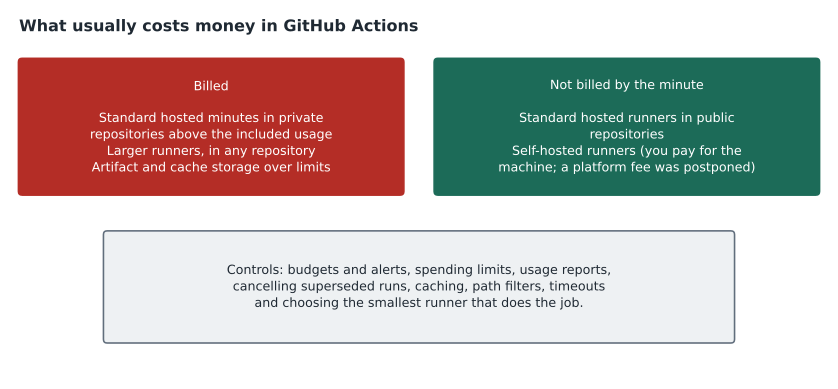
Standard GitHub-hosted runners in public repositories are free. That is why TrailCheck and the validator, both public, cost nothing for their regular checks however busy volunteers are. Standard runners in private repositories draw on the usage included with the account's plan; beyond that, each minute is billed at a rate that depends on the runner's operating system and size. GitHub reduced hosted runner prices by up to 39 percent from January 1, 2026, and describes included usage on its plans in terms of value rather than only minutes, so read the current pricing page rather than old blog posts with multipliers.
Larger runners are billed per minute in every repository, public or private, and are not covered by included usage. That is why Lena put the importer's 8-core runner in a group limited to one repository. Self-hosted runners are not billed per minute today. GitHub announced a small platform charge per self-hosted minute to start in March 2026 and then postponed it with no new date, so check the current billing documentation. The real cost of a self-hosted runner is the machine, its electricity, its network and, most of all, the time spent maintaining and securing it, which the earlier lesson made clear.
Storage for artifacts and caches is the third cost. Each plan includes some storage, and usage beyond it is billed. Artifacts are kept for a retention period, ninety days by default; organizations and repositories can shorten it, and private repositories can keep artifacts longer, up to 400 days, which costs more storage. Logs also have their own retention setting.
Budgets, alerts and usage reports
Billing settings let an organization or enterprise watch and limit spending. A budget sets an amount for a product, such as Actions, with alerts when spending reaches thresholds of the budget, and it can be set to stop further paid usage when reached. Usage that is free, such as standard runners in public repositories, is not affected. The usage report lists consumption by repository, workflow and runner type, and can be downloaded for a spreadsheet. Enterprises can also group usage into cost centers so that each department sees and pays for its own runs.
| Tool | Answers the question | Who uses it at Tidewater |
|---|---|---|
| Budget with alerts | Are we about to spend more than planned? | Rosa receives alerts at 75 and 90 percent |
| Usage report | Which repositories and workflows use the most? | Lena reviews it monthly |
| Actions usage metrics | Which workflows and jobs take the longest or fail most? | Dmitri, for performance work |
| Retention settings | How long do artifacts and logs stay? | Lena set 30 days for previews, 90 for releases |
| Runner group access | Who may use the expensive runners? | Lena, for the larger runner |
Rosa set a monthly Actions budget slightly above the usual spending, with alerts at seventy-five and ninety percent, and chose to stop paid usage at the limit. Priya argued against stopping: a blocked release on the last day of the month would cost more in delay than a small overage. They settled on a budget that alerts but does not stop, plus a second, higher budget that does stop, as a ceiling for runaway costs such as a loop that schedules thousands of jobs.
Reducing usage without reducing safety
Most savings come from the workflow techniques covered in the previous course, applied systematically:
| Technique | Effect |
|---|---|
| Concurrency with cancel-in-progress for checks | Superseded runs stop instead of finishing |
| Path filters and change detection | Jobs run only when relevant files change |
| Dependency caching | Install steps take seconds instead of minutes |
| timeout-minutes on every job | Hung jobs cannot run for six hours |
| Right-sized runners | Small jobs stay on standard runners; only proven bottlenecks get larger ones |
| Shorter artifact retention | Less storage, especially for previews |
| Running heavy jobs in public repositories where appropriate | Standard runners are free there |
One technique deserves a caution. Moving work from GitHub-hosted runners to self-hosted runners to "save money" often costs more once maintenance and security are counted, and in public repositories it is unsafe. Tidewater's single self-hosted machine exists because of licensed software, not price.
Estimating a cost
Lena's method for estimating any change was the same each time: jobs per run, times minutes per job, times runs per month, times the per-minute rate for the runner type, minus anything free. She kept the rates in a cell of the spreadsheet labeled with the date she copied them from the pricing page, so nobody would mistake an old rate for a current one.
Limits that look like failures
Some limits show up as errors that seem unrelated to limits, which makes them hard to recognize. A job that stops at exactly six hours has hit the hosted job limit, not a hang in the code at that moment. A matrix that refuses to start with a message about too many jobs has exceeded 256 combinations. A step that fails with secondary rate-limit messages has made too many API calls too quickly. A cache that suddenly misses after weeks of hits may have been evicted because the repository reached its cache size limit, often because a feature branch created many large caches. Lena added a short section to Tidewater's troubleshooting page listing these patterns, with the limit each one points to.
| Symptom | Limit probably reached | Typical fix |
|---|---|---|
| Job canceled at 6 hours | Hosted job run time | Split the job, cache more, or use a larger runner |
| Matrix fails to start | 256 jobs per matrix | Reduce dimensions or split into several workflows |
| Jobs queued while runners are healthy | Concurrent jobs for the plan | max-parallel, cancel superseded runs, separate runner |
| API calls fail with rate-limit messages | API rate limit | Batch calls, cache results, use an app token |
| Cache hits drop suddenly | Cache size limit and eviction | Narrower keys, fewer branch caches, raise the limit on paid plans |
| Deployment fails after a long wait | 30-day approval wait | Approve or reject sooner; cancel stale deployments |
Who pays in an enterprise
In a single organization, the bill is simple: the organization pays. In an enterprise, the organizations share one bill, and finance teams usually want to know which department ran what. Enterprise Cloud supports cost centers, which group usage by organization or repository, so that each department sees its own Actions spending and can have its own budget. Skerry's data science group, which uses GPU larger runners, has its own cost center and budget, so a training job that runs longer than expected shows up in that team's report rather than as a surprise in the platform team's.
Rosa also asked about the print-room machine's true cost. Lena estimated it with the same honesty as the hosted runners: the machine's purchase spread over four years, the typesetting license it needs anyway, and about two hours a month of Owen's time for patching and reviews. The result was more than the hosted minutes the same jobs would use, which confirmed that the machine exists for the licensed software and the print workflow, not to save money.
Worked problem
Estimating the larger runner
The full import takes 40 minutes on a standard runner and 12 minutes on the 8-core larger runner. It runs 20 times a month in the private trail-importer repository. Suppose the standard runner's rate is r per minute after included usage is used up, and the larger runner's rate is 4r. Which is cheaper per month?
Show solution
- Standard: 40 minutes times 20 runs is 800 minutes, costing 800r once included usage is exhausted.
- Larger: 12 minutes times 20 runs is 240 minutes at 4r, which is 960r, and larger runners are never covered by included usage.
- The larger runner costs about 20 percent more but saves 28 minutes per run, 560 minutes of waiting a month.
Answer: The standard runner is slightly cheaper (800r against 960r); the larger runner buys speed, which the team decided was worth it during the spring data load only.
Worked problem
A job that queues on a busy morning
On a Monday morning, a deploy job in the guidebook repository waits for several minutes before starting, while TrailCheck runs a matrix of 48 jobs and the validator runs another 20. No runner is broken. What is happening, and what can be done?
Show solution
- On the Team plan, at most 60 standard hosted jobs run at once across the organization.
- The two matrices use 68 slots worth of jobs, so the deploy waits for a free slot.
- Options: limit each matrix with max-parallel, cancel superseded runs, or run the deploy on a separate larger runner, which has its own concurrency.
Answer: The organization's concurrent-job limit was reached; limit matrix parallelism or give urgent jobs a separate runner.
Common mistakes
MistakeAssuming larger runners are free in public repositories.
InsteadLarger runners are billed per minute in all repositories.
MistakeUsing old pricing posts with minute multipliers to estimate costs.
InsteadUse the current pricing page; prices changed in January 2026.
MistakeSetting a budget that stops usage without thinking about urgent releases.
InsteadCombine an alerting budget with a higher stopping ceiling.
MistakeMoving public repositories to self-hosted runners to save money.
InsteadStandard runners are free for public repositories, and self-hosted runners are unsafe there.
Rosa left with two budgets, a monthly usage review on Lena's calendar, and a single line she could explain to the board: public projects are free to build, private ones draw on the plan, and the one fast runner is used on purpose.
Summary and key terms
- Limits include 6 hours per hosted job, 35 days per run, 256 matrix jobs and per-plan concurrent job caps (Team: 60).
- Standard hosted runners are free in public repositories; private repositories use included usage, then per-minute rates.
- Larger runners are billed per minute everywhere; self-hosted runners have no per-minute charge today (a fee was postponed).
- Artifact and cache storage beyond included amounts is billed; retention settings control it.
- Budgets with alerts, optional stops, usage reports and cost centers keep spending predictable.
- Savings come from concurrency, path filters, caching, timeouts, right-sized runners and shorter retention.
- Usage limit
- A cap GitHub places on Actions, such as job duration or concurrent jobs.
- Included usage
- The amount of hosted runner use and storage that comes with a plan.
- Budget
- A spending amount with alerts and an optional stop when reached.
- Usage report
- A breakdown of Actions consumption by repository, workflow and runner.
- Cost center
- An enterprise grouping that assigns usage and costs to a department.
- Retention period
- How long artifacts or logs are kept before deletion.
Practice problems
Work each problem on paper first, then reveal the answer to check.
How long can a job run on a GitHub-hosted runner?
Show answer
Up to 6 hours.
Which runners are billed per minute even in public repositories?
Show answer
Larger runners.
What happens to jobs above the concurrent-job limit?
Show answer
They wait in the queue until a slot frees up.
Lesson quiz · 5 questions
Score 60% or more to complete this lesson.
Create a free account to save your progress, take quizzes and earn a certificate.