
MSBA-302 · Lesson 7 of 12 · 21 min
Permissions for GITHUB_TOKEN
▶ Video coming soon A video version of this lesson is on the way.
Every workflow job at Tidewater receives a credential that nobody created: the GITHUB_TOKEN. Lena had used it all through the Actions clinic without thinking much about it. In the seventh session Priya asked her to find out what it could do in each repository. The guidebook repository, created years ago, still had the old default: the token could write to almost everything, including code, issues, pull requests and releases. TrailCheck, created more recently, had the newer read-only default. The validator repository had been changed to read and write by someone debugging a release script and never changed back. Three repositories, three different defaults, and every third-party action in every workflow receiving whatever the token allowed. This session was about making the token as weak as each job can tolerate.
What the GITHUB_TOKEN is
At the start of each job, GitHub creates an installation access token for a built-in GitHub App and makes it available as secrets.GITHUB_TOKEN, also reachable through the github.token context. Actions such as checkout use it by default. It is scoped to the repository that contains the workflow, its permissions are set by the repository's defaults and the workflow's permissions blocks, and it expires when the job finishes or after twenty-four hours, whichever comes first. You never store or rotate it.
Two behaviors of the token matter for design. First, events created with the GITHUB_TOKEN, such as a push or a new pull request made by a workflow, do not start new workflow runs, except for workflow_dispatch and repository_dispatch. This prevents accidental loops, and it is why a workflow that opens a pull request with the GITHUB_TOKEN does not trigger the pull request's checks. Second, the token can only act on the repository that runs the workflow; it cannot touch another repository, even in the same organization.
Default permissions
Each enterprise, organization and repository has a default for the token's permissions: read and write for most scopes, or read repository contents and packages only. GitHub made read-only the default for enterprises, organizations and repositories created on or after February 2, 2023; older ones keep whatever they had until someone changes it. A separate setting, off by default in newer accounts, decides whether GitHub Actions may create and approve pull requests. As with other Actions settings, a higher level can force the restrictive choice on the levels below it.
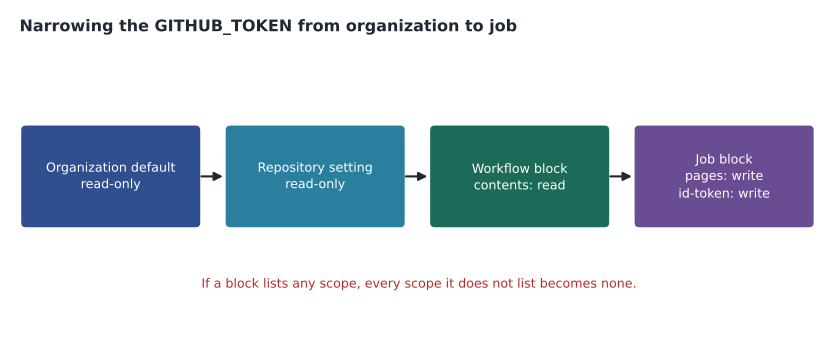
Lena set the organization default to read-only and turned off the pull request approval option, which forced every repository to the restrictive default. Two workflows broke immediately, which was the point: they had been relying on broad permissions nobody had chosen deliberately. Each got an explicit permissions block for exactly what it needed.
The permissions key
A workflow sets token permissions with the permissions key, at the top of the file for every job, or inside a job for that job alone. Each entry names a scope and a level. Most scopes take read, write or none; a few are restricted, such as id-token, which takes only write or none.
| Scope | Typical use |
|---|---|
| contents | Read code (checkout); write to push commits, create releases and tags |
| pull-requests | Comment on, label or update pull requests |
| issues | Create, comment on or label issues |
| actions | Manage workflow runs and artifacts through the API |
| checks, statuses | Create check runs or commit statuses |
| deployments | Create deployments and deployment statuses |
| packages | Publish to or read from GitHub Packages |
| pages | Deploy to GitHub Pages |
| id-token | Request an OIDC token (write or none) |
| attestations | Create artifact attestations |
| security-events | Upload code scanning results |
| discussions | Read or write discussions |
The rule that trips people up: as soon as a permissions block lists any scope, every scope it does not list is set to none. A job with permissions: issues: write cannot even check out code, because contents became none. Shortcuts exist: read-all and write-all set every scope at once, and permissions: {} removes all permissions. Job-level blocks replace, rather than add to, the workflow-level block for that job.
name: Release
on:
  push:
    tags: ["v*"]

permissions:
  contents: read          # default for every job in this file

jobs:
  test:
    runs-on: ubuntu-latest
    steps:
      - uses: actions/checkout@v5
      - run: npm ci && npm test

  publish:
    needs: test
    runs-on: ubuntu-latest
    permissions:
      contents: write     # create the GitHub release
      id-token: write     # OIDC for signing
      attestations: write # artifact attestation
    steps:
      - uses: actions/checkout@v5
      - run: npm pack
      - uses: actions/attest@v4
        with:
          subject-path: "*.tgz"
      - run: gh release create "$GITHUB_REF_NAME" *.tgz
        env:
          GH_TOKEN: ${{ github.token }}
Fork pull requests and the token
For workflows triggered by pull_request from a fork, the token is read-only whatever the permissions block requests, and secrets are not passed. That is what makes testing contributions safe. Private repositories can choose to send write tokens to fork workflows, which should stay off. The pull_request_target trigger, discussed earlier, runs with the base repository's normal permissions, which is why it must never run the contributor's code.
Reusable workflows and actions
Permissions flow in one direction through reusable workflows: a called workflow can keep or reduce the caller's permissions, never raise them. If a reusable deployment workflow needs pages: write, the caller must grant it on the calling job. Actions, by contrast, receive whatever the job's token allows when they use it, which is the main reason to keep job permissions narrow: a third-party action with write access to contents could push code, create a release or change a workflow file in a job that only needed to run tests.
When the GITHUB_TOKEN is not enough
Some tasks need more than the token offers: acting on another repository, triggering workflows with a push, or using organization-level APIs. The tempting fix is a personal access token stored as a secret. It works, but it acts as a person, often with that person's full access, and stops working when they leave. The better fix is a GitHub App owned by the organization and installed on the repositories it needs, with only the permissions it needs. A workflow creates a short-lived installation token at run time with actions/create-github-app-token, using the app's ID and private key stored as secrets. Installation tokens expire after an hour and can act only where the app is installed.
- uses: actions/create-github-app-token@v2
  id: app
  with:
    app-id: ${{ vars.TIDEWATER_BOT_APP_ID }}
    private-key: ${{ secrets.TIDEWATER_BOT_KEY }}
    owner: tidewater
    repositories: trailcheck,guidebook
- name: Open a sync pull request in TrailCheck
  env:
    GH_TOKEN: ${{ steps.app.outputs.token }}
run: gh pr create --repo tidewater/trailcheck --title "Sync closures" --body "Automated" --head sync/closures| Credential | Acts as | Scope | Lifetime | Triggers workflows? |
|---|---|---|---|---|
| GITHUB_TOKEN | The Actions app, for this repository | One repository, permissions block | Job end or 24 hours | No, except dispatch events |
| GitHub App installation token | The organization's app | Repositories where installed, app permissions | One hour | Yes |
| Fine-grained personal access token | A person | Chosen repositories and permissions, within the person's access | Up to the policy maximum | Yes |
| Classic personal access token | A person | Broad scopes across all their repositories | May not expire | Yes |
Finding what a job actually needs
Working out minimum permissions is mostly reading. Start every workflow at contents: read. When a step fails with an error like "Resource not accessible by integration", read which API call failed and add the single scope it needs to that job. Action documentation usually lists required permissions; GitHub's own deploy, attest and code scanning actions do. The log of each job also shows the token's effective permissions near the top, under the set-up job step, which is the quickest way to confirm what a job really received.
Where permissions are set, from top to bottom
Permissions combine in a predictable order. The enterprise can force read-only defaults on its organizations; the organization can force them on its repositories; the repository default applies to any workflow without a permissions block; a workflow-level block replaces the default for all its jobs; and a job-level block replaces the workflow-level block for that job. Fork pull requests then cap everything at read-only, and called reusable workflows can only keep or reduce what their caller has. Reading a workflow's effective permissions therefore means checking, in order, the defaults, the workflow block, the job block, and the triggering event.
| Layer | Set by | Effect |
|---|---|---|
| Enterprise or organization policy | Owners | Can force the restrictive default on everything below |
| Repository default | Repository administrators | Applies when a workflow has no permissions block |
| Workflow-level permissions | Workflow author | Replaces the default for every job in the file |
| Job-level permissions | Workflow author | Replaces the workflow-level block for that job |
| Trigger restrictions | GitHub | Fork pull_request runs are capped at read-only |
| Reusable workflow call | Caller | Called workflow can keep or reduce, never raise |
Reviewing permissions in pull requests
Permissions are easiest to control at review time. Tidewater's CODEOWNERS file sends every change under .github/workflows to Priya or Dmitri, and Lena gave reviewers three questions to ask of any workflow change: does every job have the narrowest permissions block that works; does any new write scope have a comment explaining why; and does any job with write access run third-party actions that do not need it? A job that publishes a release and also runs a third-party linter is better split into two jobs, so the linter runs with contents: read and the release job uses only trusted actions.
Automated help exists too. Linters for workflow files can flag jobs without a permissions block, write-all, and risky patterns such as untrusted input in run steps, and code scanning offers queries for workflow files. Tidewater added a workflow linter to the check that runs on changes under .github/workflows, so the most common mistakes are caught before a human reviews them.
The token in scripts and tools
Many steps use the token without naming it. The checkout action uses it to fetch code and, by default, stores it in the local Git configuration so later Git commands in the job can authenticate; setting persist-credentials: false on checkout removes it when later steps do not need to push, which keeps the token away from build scripts and third-party tools. The GitHub CLI reads a token from the GH_TOKEN environment variable, so a run step that calls gh needs GH_TOKEN set to github.token or an app token. Package managers publishing to GitHub Packages read it from their own configuration. In every case, the token can do only what the job's permissions allow, and it stops working when the job ends, which is why a token leaked from a job log is far less dangerous than a leaked personal access token, though still worth avoiding.
Worked problem
Fixing a failed label step
After the organization switched to read-only defaults, TrailCheck's labeling workflow fails with "Resource not accessible by integration" when it calls the API to add a label. The workflow has no permissions block. What should Lena add?
Show solution
- With no block, the job gets the repository default, now read-only.
- Adding a label to a pull request needs write access to pull requests (labels on issues need issues: write).
- Add permissions: pull-requests: write to the job; because listing a scope sets the rest to none, add contents: read too if the job checks out code.
Answer: Add a job-level permissions block with pull-requests: write (and contents: read if it checks out code).
Worked problem
Replacing a personal access token
The guidebook workflow uses Dmitri's classic personal access token, stored as DMITRI_PAT, to push generated maps to TrailCheck. Dmitri is moving to part-time. What should replace it?
Show solution
- The GITHUB_TOKEN cannot write to another repository.
- A classic token acts as Dmitri with broad scopes and may not expire.
- Create an organization-owned GitHub App with contents: write, install it on TrailCheck only, and mint an installation token in the job; then revoke the old token.
Answer: An organization-owned GitHub App installed on TrailCheck, with a token created per run, and the personal token revoked.
Common mistakes
MistakeListing one scope in permissions and expecting the others to keep their defaults.
InsteadEvery scope not listed becomes none once any scope is listed.
MistakeSetting permissions: write-all to make a failing workflow work.
InsteadAdd only the scope the failing call needs, at the job that needs it.
MistakeExpecting a push made with the GITHUB_TOKEN to start the target branch's workflows.
InsteadEvents from the GITHUB_TOKEN do not start runs, except dispatch events; use an app token if a run must follow.
MistakeUsing a personal access token for organization automation.
InsteadUse a GitHub App installation token.
By the end of the session every Tidewater repository had the read-only default, every workflow began with contents: read, and three jobs had small, commented job-level grants. Dmitri's personal token was revoked the following Monday.
Summary and key terms
- The GITHUB_TOKEN is created per job, scoped to the repository, and expires at job end or after 24 hours.
- Read-only is the default for accounts and repositories created on or after February 2, 2023; set it explicitly everywhere.
- The permissions key at workflow or job level sets scopes; any listed scope makes unlisted scopes none.
- Fork pull_request runs get a read-only token; called reusable workflows cannot raise permissions.
- Events made with the GITHUB_TOKEN do not start new runs, except workflow_dispatch and repository_dispatch.
- Use GitHub App installation tokens, not personal access tokens, for cross-repository automation.
- GITHUB_TOKEN
- The automatic, per-job token for the repository running the workflow.
- permissions key
- The workflow or job setting that grants token scopes.
- Scope
- One area of access for the token, such as contents or issues.
- read-all / write-all
- Shortcuts that set every scope to read or to write.
- Installation token
- A short-lived token for a GitHub App, limited to where the app is installed.
- Resource not accessible by integration
- The usual error when the token lacks a needed permission.
Practice problems
Work each problem on paper first, then reveal the answer to check.
A job has permissions: issues: write. Can it check out code?
Show answer
No, contents becomes none; add contents: read.
When does the GITHUB_TOKEN expire?
Show answer
When the job finishes, or after 24 hours at most.
Why do pushes made with the GITHUB_TOKEN not start workflows?
Show answer
GitHub prevents those events from creating runs, to avoid loops; dispatch events are the exception.
Lesson quiz · 5 questions
Score 60% or more to complete this lesson.
Create a free account to save your progress, take quizzes and earn a certificate.