
MSBA-280 · Lesson 5 of 12 · 18 min
Currencies and discounts
▶ Video coming soon A video version of this lesson is on the way.
Kestrelbay's head office is in Tacoma, but about a fifth of its sales cross the border: marinas on Vancouver Island and two fishing fleets in British Columbia pay in Canadian dollars. In the old system the counter staff converted prices on a calculator and wrote the rate on the invoice. Ottilie wanted those customers quoted in their own currency, and she wanted every report, pipeline and forecast to add up in United States dollars without anyone touching a calculator.
She also wanted order in discounts. Sellers gave discounts freely, often by typing a lower price, and nobody could say how much margin Kestrelbay gave away each quarter. This lesson covers how Dynamics 365 handles more than one currency and how volume discounts and manual discounts work, both of which the AB-210 outline lists under managing price lists.
Base and transaction currencies
Every Dataverse environment has one base currency, chosen when the environment is created with Dynamics 365 apps. It cannot be changed afterwards. Every amount in the system is also stored in the base currency, which is what lets reports, rollups and forecasts add values from different currencies together. Additional currencies are added as transaction currencies, each with an ISO code, a symbol, a precision and an exchange rate against the base.
Kestrelbay's base currency was United States dollars. Mirela added Canadian dollars as a transaction currency with the code CAD.
The exchange rate in Dataverse is expressed as the amount of the transaction currency that equals one unit of the base currency. It is not updated automatically. An administrator, or an automation built for the purpose, must update it. Many companies run a scheduled Power Automate flow that reads a published rate and updates the currency row weekly; others update it by hand at month end. Kestrelbay's finance lead chose a weekly update from the central bank's published rate, so that quotes would be close to the rate on the invoice.
How amounts are stored
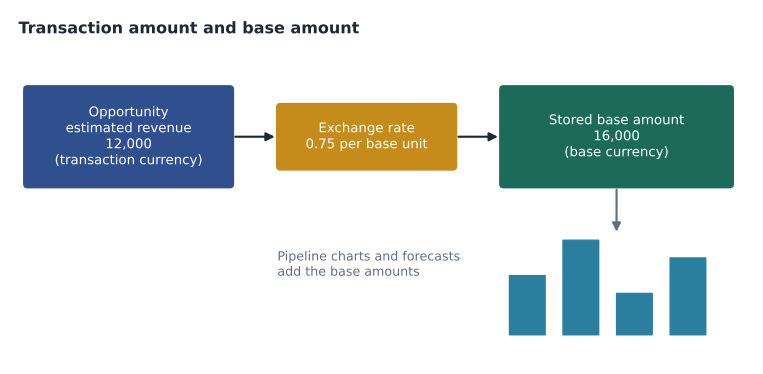
Each currency column, such as estimated revenue, has a companion base column. When a seller creates an opportunity in the transaction currency, the record captures the current exchange rate and calculates the base amount. The rate on the record is not recalculated every time the currency row changes; it is refreshed when the record is updated in certain ways, such as when its currency, price list or amounts change, or when its status changes. Old won deals therefore keep the rate from when they were closed, which is what finance wants.
Worked problem
Converting an opportunity to the base currency
Kestrelbay records an opportunity of 12,000 in the transaction currency. The currency row's exchange rate is 0.75, meaning 0.75 units of the transaction currency equal one unit of the base currency. What base amount is stored?
Show solution
- The rate is transaction units per base unit: 0.75 transaction = 1 base.
- Base amount = transaction amount divided by the rate.
- 12,000 / 0.75 = 16,000.
Answer: The base amount column stores 16,000. Pipeline charts and the forecast add this value.
Currency and price lists
A price list has exactly one currency, so a company that sells in two currencies needs price lists in both. Kestrelbay's Retail and Marina trade lists were in the base currency. Mirela created Retail (cross-border) and Marina trade (cross-border) in the transaction currency. She did not want to retype 4,000 prices, so she used fixed amounts only for services and used markup over cost for stock, with costs held in the base currency. That worked, but rounding mattered: she set the cross-border lists to round to the nearest 0.95, which matched the shop's pricing style.
A record's currency must match its price list's currency. An opportunity in the transaction currency can only use a price list in that currency, and the products added must have items in it. Mirela set the currency on each cross-border account, so that new opportunities, quotes and orders for those accounts started in the right currency, and set their default price list to the matching cross-border list.
| Price list | Currency | Pricing method | Used for |
|---|---|---|---|
| Retail | Base | Markup over current cost | Domestic retail customers |
| Marina trade | Base | 85 percent of Retail | Domestic marinas |
| Retail (cross-border) | Transaction | Markup over cost, rounded to .95 | Cross-border retail |
| Marina trade (cross-border) | Transaction | 85 percent of Retail (cross-border) | Cross-border marinas |
| Fleet contract | Base | Fixed amounts, end date | Three largest fleets |
Volume discounts with discount lists
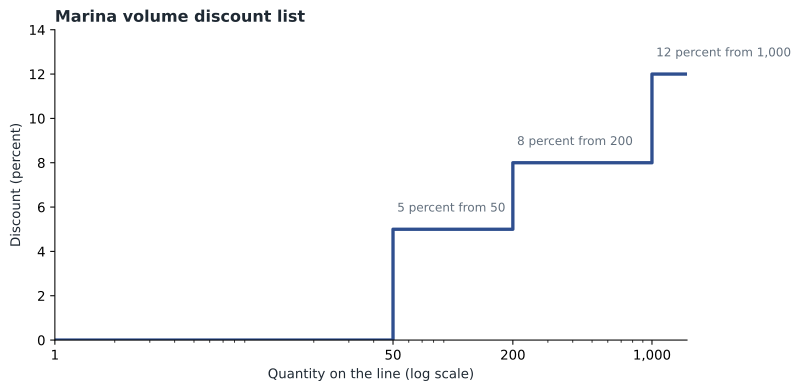
A discount list defines discounts that depend on quantity. Each list is either percentage or amount based, and each line in it sets a beginning quantity, an ending quantity and the discount for that range. A discount list is attached to a price list item, so the same product can have different volume breaks in different price lists. When a seller enters a quantity on an opportunity line, the system applies the matching discount automatically.
Ottilie's volume rules were simple. Mooring line and fenders bought in quantity for a whole marina deserved a break; engines did not. Mirela created one percentage discount list, Marina volume, and attached it to the rope and fender items in both Marina trade lists.
| Beginning quantity | Ending quantity | Discount |
|---|---|---|
| 1 | 49 | 0 percent |
| 50 | 199 | 5 percent |
| 200 | 999 | 8 percent |
| 1,000 | 100,000 | 12 percent |
Manual discounts
Sellers can also give manual discounts. On an opportunity product or quote line, a manual discount reduces the extended amount; at the header, a discount percent or discount amount applies to the whole quote. The product catalog setting chosen in lesson 4 decides whether line discounts are calculated per unit or per line. And sellers can add write-in products, which are not in the catalog and are priced by hand, for one-off items.
Manual discounts were where the margin went. Mirela proposed three controls, and Ottilie approved them. Sellers could give up to 10 percent at the header on their own. Above that, a Power Automate approval flow sent the quote to Ottilie before it could be activated. And write-in products were allowed only for the sales manager role, because a write-in line bypasses the price list entirely.
Trigger: When a row is modified (Dataverse)
  Table: Quote   Columns: discountpercentage, statecode
Condition: discountpercentage > 10 and status is Draft
Action: Start and wait for an approval
  Approver: Sales director   Details: account, total, discount, reason
If approved: allow activation (set kb_discountapproved = Yes)
If rejected: notify owner, keep quote in Draft
Precision and rounding
Each transaction currency has a currency precision, the number of decimal places shown for amounts in that currency. Separately, the environment has a pricing decimal precision for prices, which can be higher, so that a unit price such as a price per meter of rope can carry more decimals than a total. Mirela kept two decimal places for both currencies and four for unit prices on rope.
Reporting across currencies
With the base amounts in place, Ottilie's pipeline chart, the forecast and the goal rollups in lesson 6 all add up in the base currency. Sellers see the transaction amount on the record, so a cross-border yacht club sees prices in its own money. Reports that need the original currency can group by the currency column. When Copilot summarizes an opportunity, it reads the amounts as stored on the record, so a cross-border deal is summarized in its transaction currency.
Three months later finance reconciled Dynamics 365 against invoices for cross-border sales and found the differences were all within the week-to-week movement of the exchange rate, which was the intended result.
Quotes, prices and recalculation
Prices on a deal are copied from the price list when products are added, and recalculated in some situations. A quote starts as a draft, is activated when sent to the customer, and is later won, lost or closed. An active quote cannot be edited; to change it, the seller revises it, which creates a new draft revision and keeps the original. When a quote is won, an order can be created from it, carrying the quoted prices forward.
For a business like Kestrelbay that quotes stock items, an important order setting is price locking. An order can keep the prices from the quote even if the price list changes before fulfillment, or it can be recalculated from the current price list. Kestrelbay locked prices on orders created from quotes, so that a customer who accepted a quote paid what was quoted, and told sellers to set clear quote expiry dates. Mirela tested both behaviors in the sandbox, because the settings and their names have changed over releases.
A pricing test plan
Before releasing currencies and discounts, Mirela ran a test plan in Kestrelbay-Test with a finance colleague. Each test was a small, realistic deal, priced by hand on paper first and then in Dynamics 365. Any difference was investigated before release.
| Test | Expected result |
|---|---|
| Domestic marina buys 300 m of rope | Marina trade price, 8 percent volume discount, base currency |
| Cross-border yacht club buys an engine | Retail (cross-border) price, rounded to .95, transaction currency, base amount stored |
| Seller enters a 12 percent header discount | Quote cannot be activated until approved |
| Fleet contract deal after the contract end date | Price list not valid; seller prompted to renegotiate |
| Exchange rate updated after a quote is won | Won quote keeps its original base amount |
Two tests failed the first time. The fleet contract test showed that an expired price list could still be selected by hand, so Mirela added a view of expiring contracts for managers. The cross-border rounding test showed that services, priced as fixed amounts, were not rounded, which was correct but surprised finance. Both were documented before release.
How currency flows through a deal
Currency is chosen once and inherited down the chain. When a seller creates an opportunity for a cross-border account, the opportunity takes the account's currency and price list. A quote created from that opportunity inherits the same currency, and an order created from the quote does too. If a seller changes the currency on an opportunity that already has products, the products must match the new price list, so it is better to set the currency correctly at the start. Mirela added the currency column to the opportunity quick create form for cross-border sellers, read-only, so they could see which money a deal was in before adding products.
| Record | Currency comes from | Price list comes from |
|---|---|---|
| Opportunity | Account currency (or user default) | Account default price list |
| Quote | The opportunity | The opportunity |
| Order | The quote | The quote |
| Invoice | The order | The order |
Reviewing discount policy with data
Three months after the approval flow went live, Ottilie and the finance lead reviewed discounts with a simple report: average header discount by seller, the number of approvals requested and approved, and won rate for deals with and without discounts above 5 percent. Two findings changed the policy. Most approvals were for one fleet customer, so its price list was renegotiated instead. And deals with large discounts did not win more often than those without, which gave Ottilie the evidence she needed to tighten the rule further for small accessory orders.
Currency also affects how people read numbers. A cross-border yacht club manager reading a quote expects the symbol and decimal style of their own currency, and an inside seller switching between domestic and cross-border deals needs to see at a glance which one is open. Mirela added the currency name to the opportunity header fields and to the quote template, so that nobody mistook one currency for the other on a printed or emailed quote. The finance lead also asked that every cross-border order show the exchange rate it was created with, which the record already stored; adding it to the order form cost two minutes and saved an argument at month end.
Common mistakes
MistakePlanning to change the base currency later.
InsteadChoose the base currency carefully when the environment is created; it cannot be changed.
MistakeExpecting exchange rates to update themselves.
InsteadUpdate rates by hand or with a scheduled automation on an agreed cycle.
MistakeUsing a base-currency price list on a cross-border opportunity.
InsteadA record's price list must be in the record's currency.
MistakeLetting every seller add write-in products.
InsteadLimit write-ins, because they bypass the price list.
Summary and key terms
- Each environment has one base currency, set at creation, plus any number of transaction currencies with exchange rates.
- Money columns store both the transaction amount and a base amount, which reports and forecasts add together.
- Exchange rates are not updated automatically; update them by hand or with an automation.
- A price list has one currency, and a record's price list must match its currency.
- Discount lists set volume discounts by quantity range; manual discounts and write-in products need controls.
- Base currency
- The single currency in which every amount is also stored, set when the environment is created.
- Transaction currency
- A currency in which records can be entered, with an exchange rate to the base.
- Exchange rate
- The amount of a transaction currency equal to one unit of the base currency.
- Discount list
- A set of quantity ranges with a percentage or amount discount, attached to price list items.
- Manual discount
- A discount typed by the seller on a line or on the whole quote.
- Write-in product
- A product not in the catalog, added and priced by hand on a deal.
Practice problems
Work each problem on paper first, then reveal the answer to check.
Why can a pipeline chart add opportunities in different currencies?
Show answer
Every money column also stores a base amount, and the chart adds the base amounts.
A seller enters 250 meters of rope on a Marina trade line. Which discount from the Marina volume list applies?
Show answer
8 percent, because 250 falls in the 200 to 999 range.
Who updates exchange rates in Dataverse?
Show answer
An administrator or a scheduled automation; Dataverse does not update them by itself.
Lesson quiz · 5 questions
Score 60% or more to complete this lesson.
Create a free account to save your progress, take quizzes and earn a certificate.