
MSBA-280 · Lesson 4 of 12 · 18 min
Product catalog: products, families and price lists
▶ Video coming soon A video version of this lesson is on the way.
Kestrelbay sells about 4,000 stock lines, from spark plugs to outboard engines, plus services such as rigging inspections and dock surveys. In phase one Mirela had loaded only a handful of placeholder products so that sellers could practice quotes. Ottilie wanted the real thing: products sellers could add to an opportunity in seconds, prices that matched what the counter charged, and a separate trade price for marinas that resell parts to boat owners. The product catalog was the next job.
The AB-210 outline lists configuring products and product families, and creating and managing price lists, under its first domain. A clean catalog matters for AI too. Copilot's opportunity summary can include product insights drawn from the opportunity's products, and the Sales Close Agent covered in the next course works with the products and prices on a deal. If products are vague, so are the summaries.
The building blocks
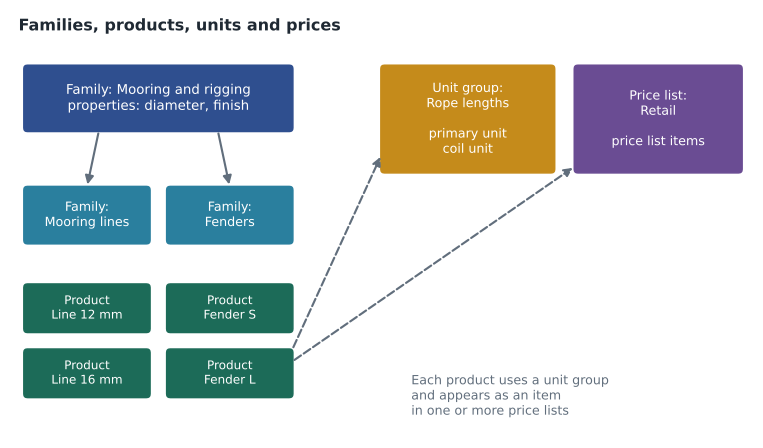
The Dynamics 365 Sales product catalog has five main pieces. A unit group lists the units a product can be sold in, such as each, box of ten or pallet, with one primary unit and conversions to it. A product is a single item or service. A product family groups related products and lets them share properties. A product bundle sells several products together. A price list holds the prices, as price list items, for products in particular units and a particular currency.
Product catalog settings
Before building the catalog, Mirela reviewed the product catalog settings in App Settings. They control whether new products are created in an active state or as drafts, the maximum number of properties a product can have, the maximum number of products in a bundle, whether the system calculates prices on opportunities, quotes, orders and invoices, and how discounts are calculated (per unit or per line). She chose drafts for new products, so that a product family could be completed and checked before sellers saw it, and kept system pricing on, because Kestrelbay had no separate pricing engine.
| Setting | Kestrelbay choice | Reason |
|---|---|---|
| Create products in active state | No (draft first) | Check families before publishing |
| Use system pricing calculation | Yes | No external pricing engine |
| Discount calculation method | Per line item | Matches how the counter quotes |
| Maximum products in a bundle | Left at the default | Bundles are small |
| Maximum properties per product | Left at the default | Few properties needed |
Unit groups
Most of Kestrelbay's stock sells as single items, so one unit group, Each, covered it. Rope was different: the warehouse bought it on coils and sold it by length.
Mirela created a unit group Rope lengths with a primary unit of one foot and a second unit, 300 ft coil, defined as 300 of the primary unit. A seller quoting a yacht club could then add 1,800 feet of mooring line or six coils, and the price list would price either correctly.
A product has a default unit from its unit group, which is what appears when a seller adds it to an opportunity. The unit group cannot be changed once products use it, so Mirela designed the two groups on paper before creating anything.
Products, families and properties
Each product has an ID, a name, a unit group, a default unit, a default price list and optional fields such as decimal precision, standard cost and current cost. Products can stand alone, but grouping them in product families pays off quickly. A family is a node in a hierarchy, and families can contain child families. Properties defined on a family, such as line diameter, color or engine horsepower, are inherited by every product in it, so sellers can record the exact variant on an opportunity line without a separate product for every color.
Mirela built the hierarchy with Ottilie and the warehouse lead: Engines and propulsion, Electronics and navigation, Mooring and rigging, Safety gear, and Services. Under Mooring and rigging sat Mooring lines, Fenders and Dock hardware. The Mooring lines family had two properties: Diameter, a choice of standard sizes, and Color, a choice of four colors. A seller adding mooring line to a quote picks the product, then sets the diameter and color on the line.
Families and products follow a lifecycle: draft, active, under revision and retired. Publishing a family publishes its draft children. To change a published family, a maker uses Revise, which puts it under revision, makes changes, and publishes again; until then sellers see the old version. Retiring a product stops it from being added to new deals while keeping it on old ones. Kestrelbay retired 300 discontinued lines this way rather than deleting them, because they appeared on past orders.
Worked problem
Product, property or family?
The warehouse sells a fender in three sizes and two colors, all at the same price per size. Should Mirela create six products, three products with a color property, or one product with two properties?
Show solution
- Ask whether price or stock differs: price differs by size but not by color.
- Products carry prices in price lists, so anything with its own price should be a separate product.
- Attributes that do not change price, such as color, fit well as properties.
- Create the products inside a Fenders family so the color property is defined once.
Answer: Three products (one per size) in a Fenders family, with Color as a family property inherited by all three.
Bundles and related products
A product bundle groups products sold together, with each item marked required or optional. Kestrelbay created a Dock safety kit bundle: a life ring, a throw bag and a first-aid kit, with an optional fire extinguisher. When a seller adds the bundle to an opportunity, its items appear as lines that can be priced individually or together. Older catalogs sometimes used kits for the same purpose; Microsoft has deprecated kits in favor of bundles.
Related products link one product to another as a substitute, cross-sell, up-sell or accessory. When a seller adds a product to an opportunity or quote, Sales can suggest the related ones. Mirela added accessories for engines (fuel filters, propellers) and an up-sell from the basic chartplotter to the larger model. These relationships became more valuable later, when Copilot and agents began suggesting products from the catalog.
Price lists
A price list defines prices for a set of products in one currency over an optional date range. Each price list item names a product, a unit and a pricing method. The method can be a fixed currency amount or a calculation: a percent of the list price from another price list, a percent markup over the product's current or standard cost, or a percent margin on that cost. Rounding options round calculated prices up, down or to the nearest value, to an amount ending in a chosen digit.
| Pricing method | How the price is found | Kestrelbay use |
|---|---|---|
| Currency amount | A fixed price entered by hand | Services such as dock surveys |
| Percent of list | A percent of the price on a base price list | Trade price list at 85 percent of retail |
| Percent markup, current cost | Current cost plus a markup percent | Retail prices for most stock |
| Percent margin, standard cost | A price that gives the stated margin on standard cost | Engines |
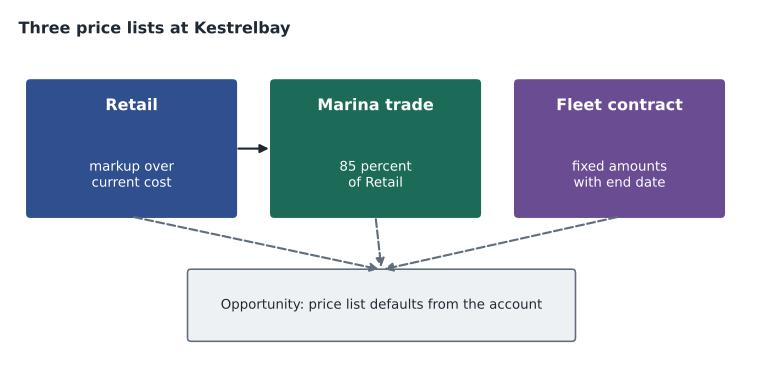
Kestrelbay ended with three price lists. Retail priced most stock at a markup over current cost, so prices followed supplier changes. Marina trade priced everything at 85 percent of retail, because marinas resell to boat owners. Fleet contract held negotiated fixed prices for the three biggest fishing fleets and had an end date, so that sellers were reminded to renegotiate each year. Each product's default price list was Retail.
Which price list a deal uses
An opportunity, quote or order has a price list column, and the prices of its lines come from that list. Sellers can choose it, but most companies set a default. A default price list can be set on the account, so every opportunity for that marina starts with Marina trade. Price lists can also be associated with territories, so that the right list is chosen from the seller's territory when the account has none. Mirela set the account default for all 140 marina accounts during a data update, and made the price list column read-only for sellers with a business rule, so that trade prices could not be applied to retail customers.
One trap catches many teams: a product must have a price list item in the price list used on the opportunity. If the seller adds a product that has no item in Marina trade, the line cannot be priced. Because Marina trade was a percent-of-list price list, Mirela made sure every product in Retail also had an item in Marina trade, and wrote a monthly check view of products missing from it.
Loading the catalog in bulk
Four thousand products are not typed in by hand. The catalog is loaded in dependency order, because each piece refers to the one before: unit groups and units first, then product families, then products, then price lists, then price list items, then discount lists and the links between items and discounts. Mirela used the import wizard with Excel templates downloaded from Dynamics 365 for small tables, and a dataflow for products and price list items, matching on product ID as an alternate key so that monthly cost updates could be reloaded without duplicates.
| Load order | Table | Matched on |
|---|---|---|
| 1 | Unit groups and units | Name |
| 2 | Product families | Product ID |
| 3 | Products | Product ID |
| 4 | Price lists | Name |
| 5 | Price list items | Price list, product and unit |
| 6 | Discount lists and links | Name |
Products were loaded as drafts and published family by family after the warehouse lead had checked a sample of each. Mirela also scheduled a monthly cost update from the purchasing system, which refreshed the current cost column on products. Because Retail used markup over current cost, retail and trade prices on new quotes followed supplier changes automatically, while quotes already sent kept the prices they had when issued.
Why the catalog matters for AI
Copilot's opportunity summary includes product insights and quote insights drawn from the products on the deal. A deal with one write-in line called "parts as discussed" gives Copilot nothing to say; a deal with three catalog products and a bundle gives it a clear picture. The same is true for the Sales Close Agent in the next course, which works with the products and prices on an opportunity. Mirela put it to the sellers simply: if it is in the catalog, use the catalog.
Services and charges in the catalog
Not everything Kestrelbay sells sits on a shelf. Rigging inspections, dock surveys and engine winterization are services with a price per job or per hour, and freight is a charge added to orders. Products can be marked by type, such as sales inventory, services or miscellaneous charges, and services can use a unit group based on hours. Mirela created a Services family with an Hours unit group and fixed prices in each price list, so that sellers could quote a dock survey alongside the fenders it would recommend. Freight was handled as a separate amount on the quote rather than as a product, which matched how the accounting system recorded it.
Catalog governance
A catalog decays quickly without an owner. Mirela named the warehouse lead as catalog owner, with the right to create and revise products, and gave sellers read access only. A monthly routine checked for products missing from Marina trade, products with no current cost, families with draft children never published, and bundles containing retired products. The checks were saved views, so the routine took twenty minutes.
Common mistakes
MistakeCreating a separate product for every color or variant.
InsteadUse family properties for attributes that do not change price or stock.
MistakeDeleting discontinued products.
InsteadRetire them so they stay on historical deals but cannot be added to new ones.
MistakeEditing a published family directly.
InsteadUse Revise, make changes, then publish again.
MistakeAdding products that have no item in the deal's price list.
InsteadKeep price lists complete and check for missing items regularly.
Summary and key terms
- The catalog is built from unit groups, products, product families, bundles and price lists.
- Families organize products and pass properties down to every product they contain.
- Products move through draft, active, under revision and retired states; publishing makes them available to sellers.
- Price list items set prices by fixed amount, percent of list, markup or margin, with rounding options.
- A deal's price list can default from the account or territory, and every product used must have an item in that list.
- Unit group
- A set of units, with one primary unit, in which a product can be sold.
- Product family
- A node in the product hierarchy that groups products and defines inherited properties.
- Property
- An attribute defined on a family, such as color, set on each opportunity line.
- Product bundle
- A group of products sold together, each marked required or optional.
- Price list item
- The price of one product in one unit within a price list.
- Related product
- A link from one product to another as a substitute, cross-sell, up-sell or accessory.
Practice problems
Work each problem on paper first, then reveal the answer to check.
Why did Kestrelbay create its products as drafts?
Show answer
So families could be completed and checked before sellers could add the products to deals.
A marina trade price list is set at 85 percent of retail. What pricing method does that use?
Show answer
Percent of list, based on the Retail price list.
What happens when a seller adds a product with no item in the opportunity's price list?
Show answer
The line cannot be priced from the price list; the item must be added to the list.
Lesson quiz · 5 questions
Score 60% or more to complete this lesson.
Create a free account to save your progress, take quizzes and earn a certificate.