
MSBA-280 · Lesson 2 of 12 · 19 min
The sales data model
▶ Video coming soon A video version of this lesson is on the way.
Before Mirela touched any AI setting, she spent a morning with Ottilie and two inside sellers drawing Kestrelbay's selling on a whiteboard. A marina manager phones about a refit of the fuel dock. A yacht club asks for a quote on twenty sets of mooring lines. A fishing fleet reorders the same filters every spring. Each story had to land in the right Dataverse tables, because every intelligent feature in Sales reads those tables. Predictive scoring learns which leads became customers. Copilot summarizes the fields on an opportunity. The forecast adds up estimated revenue. If the model is wrong, the AI is confidently wrong.
The AB-210 outline asks candidates to design the sales data model in Dataverse. This lesson covers the standard tables Dynamics 365 Sales uses, how records flow from one to the next, where to extend the model safely, and how the timeline shows the activity history that Copilot and sellers both rely on.
The lead-to-cash tables
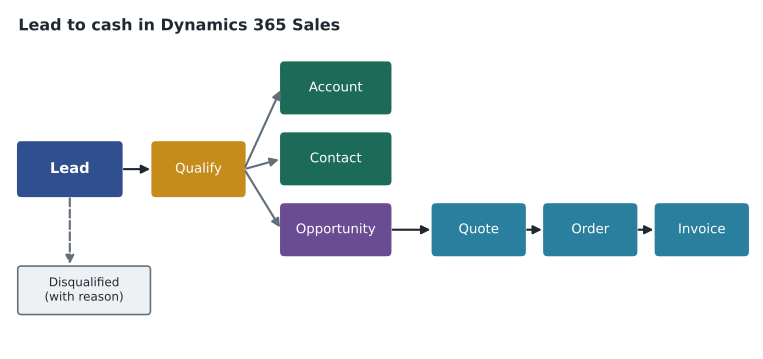
Dynamics 365 Sales is built around a chain of tables. A lead is a person or company that might buy, not yet qualified. When a seller qualifies a lead, Sales can create an account, a contact and an opportunity from it in one step, and the lead is closed with a status of qualified. A lead that is not worth pursuing is disqualified with a reason such as "no longer interested" or "cannot contact". Those reasons matter later, because predictive lead scoring learns from both outcomes.
An opportunity is a potential sale with an estimated revenue, an estimated close date, a probability and a pipeline phase. It can hold opportunity products, the line items being sold. From an opportunity a seller creates a quote, which copies the products and prices. When the customer accepts, the quote becomes an order, and an order can become an invoice. Each step copies data forward so that the history of a deal is preserved even if prices change later.
| Table | What it represents | Key columns for AI features |
|---|---|---|
| Lead | An unqualified prospect | Source, rating, status reason, created on, owner |
| Opportunity | A potential sale | Estimated revenue, estimated close date, probability, forecast category, pipeline phase |
| Opportunity product | A line item on a deal | Product, quantity, price per unit, discount |
| Quote | A formal offer | Status (draft, active, won, closed), effective dates |
| Order | An accepted sale | Status, fulfilled date |
| Invoice | A bill to the customer | Status, paid date |
| Competitor | A rival on a deal | Linked to opportunities |
Mapping Kestrelbay's selling to the model
On the whiteboard, the fuel dock refit was clearly an opportunity: a large, one-off project with a close date and a probability. The mooring lines quote was an opportunity too, though a small one that would move from quote to order in a week. The spring filter reorder was harder. It was not new business and nobody needed to forecast it deal by deal. Ottilie's old spreadsheets had treated it as an opportunity anyway, which inflated the pipeline every March.
Mirela proposed a rule. Repeat orders from existing customers would go straight to an order using the "Repeat parts order" business process flow from phase one, without an opportunity. Only new business and projects above about 2,000 in value would be opportunities. The pipeline would then show real sales effort, and the scoring model would learn from deals that sellers actually worked. Ottilie agreed after seeing that the March pipeline would shrink by about a third and become believable.
Kestrelbay records amounts in United States dollars by default. Lesson 5 adds Canadian dollars for the marinas and fleets across the border in British Columbia that pay in their own currency.
Lead qualification settings
Sales has settings that control what qualification does. An administrator can choose whether qualifying a lead creates an account, a contact and an opportunity automatically, or whether the seller is asked each time. There is also a setting to check for duplicates during qualification, so that a lead for an existing marina links to the existing account instead of creating a second one. Mirela turned on the duplicate check and set qualification to ask the seller, because many Kestrelbay leads came from people at marinas that were already customers.
A lead also carries a source, such as web, trade show, referral or phone. The source column became important for Ottilie's reports and for the scoring model. In phase one, sellers had left it blank on almost half the leads. Mirela made it required on the quick create form, and added one value, "Boat show", because the spring boat shows produce more leads than any other channel.
Extending the model safely
The standard tables cover most of selling, but every business has something extra. Designing the data model means deciding what to add and where. The guidance Mirela followed is the same as in any Dataverse project: reuse a standard column if one fits, add a custom column to a standard table if the information belongs to that record, and create a custom table only when the information has its own life and relationships.
Kestrelbay needed three additions for selling. First, a choice column Deal type on the opportunity, with values New customer, Refit project, Fleet contract and Accessory upsell, so that reports and the scoring model could tell different kinds of deals apart. Second, a lookup from the opportunity to the custom Vessel table from phase one, so that a refit could name the boat being refitted. Third, a whole number column Berths on the account, holding the number of berths at a marina, because Ottilie's best predictor of a big customer was marina size.
Table: Opportunity
  kb_dealtype     Choice: New customer | Refit project | Fleet contract | Accessory upsell
  kb_vesselid     Lookup -> kb_vessel (optional)
Table: Account
  kb_berths       Whole number (0 to 5000)
Solution: Kestrelbay Core   Publisher prefix: kb_
All three were added in the Kestrelbay Core solution in the Kestrelbay-Test sandbox and moved to production as a managed solution. Mirela avoided one tempting shortcut: a free-text "Notes about the deal" column. Free text already lives in notes and emails, which Copilot can read; a duplicate field would split the story across two places.
Data quality for AI
Machine learning features need consistent history. Microsoft's documentation states that predictive lead scoring needs at least 40 qualified and 40 disqualified leads created within the past two years, and opportunity scoring needs at least 40 won and 40 lost opportunities in the same period. Kestrelbay had enough in raw numbers, but phase one had migrated old deals with a single status of "Lost" whatever the real reason. Mirela set expectations: the first model would be rough, and it would improve as sellers closed deals with honest reasons.
Worked problem
Is there enough history to train a scoring model?
In the past two years Kestrelbay recorded 610 leads: 220 qualified, 95 disqualified and 295 still open. It recorded 180 opportunities: 70 won, 52 lost and 58 open. Can it train lead scoring and opportunity scoring models?
Show solution
- Lead scoring needs at least 40 qualified and 40 disqualified leads from the past two years: 220 and 95 meet that.
- Opportunity scoring needs at least 40 won and 40 lost opportunities: 70 and 52 meet that.
- Open records do not count toward training, because their outcome is unknown.
- Check quality, not just count: lost opportunities migrated with no real reason weaken the model.
Answer: Both models can be trained. Mirela trained them, but planned to retrain after six months of cleaner closing data.
The timeline
Every lead, opportunity, account and contact form has a timeline, the running history of activities and notes linked to the record: emails, phone calls, appointments, tasks, notes and posts. Sellers read it before a call, and Copilot uses the same activities when it summarizes a record. The exam lists configuring the timeline as a separate skill, because a cluttered timeline hides what matters.
The timeline is a component on the form, so it is configured in the form designer in Power Apps. A maker can choose which activity types appear, the default sort order, whether notes and posts show, how many records load at first, and filters that users can apply. Mirela simplified the opportunity timeline for Kestrelbay: emails, phone calls, appointments and notes only, newest first, with system posts hidden. She left posts on the account timeline, where Ravi's service team used them for short updates.
Who owns what
Ownership drives much of what follows in this course. Leads and opportunities are owned by a user or a team, and the owner is the person the sales accelerator assigns work to, the person the forecast credits, and the person whose security role decides who else can see the record. In phase one, migrated leads had all been owned by Mirela's import account. Before switching on any AI, she reassigned them to the right sellers by territory, because a scoring model is far more useful when each seller sees his or her own top leads.
Ottilie asked whether she could see everyone's deals. She already could: the sales manager security role from phase one gave business unit read access to leads and opportunities. The same model would let Copilot summarize any opportunity she could open, and none she could not, since Copilot works within the signed-in user's permissions.
Competitors, stakeholders and the sales team
Three more parts of the model matter for AI features. The competitor table records rival companies, and a competitor can be linked to an opportunity or a lead. Copilot's competitor insights section draws on those links, and conversation intelligence flags competitor names in calls, so a short, consistent list of competitors pays off. Mirela loaded the four rivals Kestrelbay met most often and made the list editable only by sales managers, so that sellers would not create "Online retailer", "online shop" and "web store" as three competitors.
An opportunity also has stakeholders, the contacts involved in the decision and their roles, and a sales team, the colleagues working the deal with the owner. Both are built on connections. Ottilie liked the stakeholder list because it made the decision maker step in the process flow visible: a refit at a large marina often involved the harbor manager, the finance officer and a board member. Recording them gave Copilot's summary something to say about who mattered.
Closing opportunities honestly
When a seller closes an opportunity as won or lost, the close opportunity dialog records the actual revenue, the close date, a status reason and, for lost deals, the competitor who won. Those fields are history for every model trained later. Mirela added Kestrelbay's own status reasons for lost deals: Price, Delivery time, Chose competitor, Project canceled and No decision. She asked sellers to choose No decision only when the customer really did nothing, because a vague reason teaches the model nothing. Close reasons became a standing item in the Friday review.
| Lost reason | What it tells Kestrelbay |
|---|---|
| Price | Pricing or discount policy may need review |
| Delivery time | Stock or supplier lead times lost the deal |
| Chose competitor | Which rival won, recorded on the close dialog |
| Project canceled | Not a selling failure |
| No decision | The customer did nothing; use sparingly |
Activities and the Regarding column
Activities are the raw material for Copilot, relationship intelligence and the timeline. Every email, phone call, appointment and task has a Regarding column that links it to the record it concerns, such as an opportunity or an account. An activity regarding an opportunity appears on the opportunity's timeline and rolls up to the account; an activity regarding only a contact does not appear on the opportunity at all. Mirela taught sellers one habit: when tracking an email or logging a call about a deal, set Regarding to the opportunity. That single habit decided whether Copilot's opportunity summary knew about the conversation.
Views sellers actually use
Finally, Mirela replaced the many system views sellers had collected with four personal starting points: My open leads by score, My open opportunities by close date, Deals past close date and Opportunities in Propose. Each became a filter in the sales accelerator later. Fewer, better views meant sellers looked at the same records the AI features ranked.
Common mistakes
MistakeCreating an opportunity for every repeat order.
InsteadUse opportunities for deals that need selling effort and forecasting; route routine reorders straight to orders.
MistakeAdding a free-text field that duplicates notes and emails.
InsteadKeep narrative in activities and notes, where the timeline and Copilot already read it.
MistakeClosing lost deals without a real reason.
InsteadRecord honest close reasons; scoring models learn from them.
MistakeLeaving migrated records owned by the import account.
InsteadReassign records to the right sellers before turning on work lists and scoring.
Summary and key terms
- Sales uses a chain of tables: lead, opportunity, opportunity product, quote, order and invoice, with accounts and contacts at the center.
- Qualifying a lead can create an account, contact and opportunity; disqualifying it records a reason that scoring models learn from.
- Extend the model by reusing standard columns first, then adding custom columns, and only then custom tables.
- Scoring models need at least 40 positive and 40 negative outcomes from the past two years, and benefit from clean reasons.
- The timeline is configured in the form designer and should show the activities sellers and Copilot need.
- Lead
- An unqualified prospect that may become a customer.
- Qualify
- The action that closes a lead as qualified and can create an account, contact and opportunity.
- Opportunity product
- A line item on an opportunity, with product, quantity and price.
- Timeline
- The form component showing activities and notes linked to a record.
- Deal type
- Kestrelbay's custom choice column that classifies opportunities for reports and scoring.
- Owner
- The user or team that owns a row and receives work, credit and access based on it.
Practice problems
Work each problem on paper first, then reveal the answer to check.
What three records can be created when a lead is qualified?
Show answer
An account, a contact and an opportunity.
Why did Mirela add a Deal type column instead of a custom table?
Show answer
Deal type is a property of each opportunity, not information with its own life and relationships.
Where is the timeline configured?
Show answer
In the form designer in Power Apps, on the timeline component of the form.
Lesson quiz · 5 questions
Score 60% or more to complete this lesson.
Create a free account to save your progress, take quizzes and earn a certificate.