
MSBA-222 · Lesson 8 of 12 · 19 min
Calling policies and caller ID
▶ Video coming soon A video version of this lesson is on the way.
On the first morning of the Teams Phone pilot, the scheduling team made 140 calls to clients to confirm visit times. By lunchtime, Felix had three complaints. One client had called back the number that appeared on her phone and reached a scheduler's direct line while the scheduler was at lunch, so the call went to a personal voicemail nobody else could check. A second client said she never answered calls from unknown numbers and had ignored the call. A third complaint came from inside: a scheduler wanted to forward her calls to her mobile phone when she worked from home and could not find the option.
All three problems had the same kind of answer. Teams Phone behaves according to policies, and the default policies had not been designed for a scheduling team. This lesson covers calling policies, caller ID policies, dial plans and the other voice settings an administrator uses to make Teams Phone fit the way people work, which the MS-700 outline describes as managing voice settings and policies for users and creating and managing calling policies.
Calling policies
A calling policy controls what a user can do with calls in Teams: private calls, call forwarding and simultaneous ringing, voicemail, call groups, delegation, what happens when the user is already on a call, web PSTN calling, music on hold, and recording, transcription and Copilot in calls. Like other Teams policies, calling policies are assigned directly, by group with ranks, through policy packages, or fall back to the Global policy. Microsoft provides some preset calling policies as well.
The settings are easier to understand in groups. Making and receiving calls covers whether the user can make private calls at all, which is the switch that turns calling on or off for a user. Forwarding and ringing covers whether the user can forward calls to other users or to phone numbers, set simultaneous ringing, and send unanswered calls elsewhere. Inbound call routing covers voicemail and busy on busy, which decides whether a second call to someone already on a call rings, goes to voicemail or gets a busy signal. Delegation and groups covers whether users can set up delegates and call groups. Recording and AI in calls covers whether calls can be recorded and transcribed and whether Copilot can be used in calls.
| Setting group | Examples | Corvallin's Scheduling-Calling choice |
|---|---|---|
| Making and receiving calls | Make private calls; web PSTN calling | On; web PSTN calling off |
| Forwarding and ringing | Forward to users or phone numbers; simultaneous ring | Forwarding to work mobiles allowed |
| Inbound call routing | Voicemail; busy on busy | Voicemail on; busy on busy sends second calls to voicemail |
| Delegation and groups | Delegates; call groups | Call groups on |
| Recording and AI in calls | Recording, transcription, Copilot in calls | Recording off; transcription off |
| Music on hold | Default music or organization's own | Organization's own message |
# Create a calling policy for the scheduling team
New-CsTeamsCallingPolicy -Identity "Scheduling-Calling" `
    -AllowPrivateCalling $true -AllowCallForwardingToPhone $true `
    -AllowWebPSTNCalling $false -BusyOnBusyEnabledType Unanswered `
    -AllowCloudRecordingForCalls $false
# Assign it to the scheduling group
New-CsGroupPolicyAssignment -GroupId $schedulingGroupId `
    -PolicyType TeamsCallingPolicy -PolicyName "Scheduling-Calling" -Rank 1
The web PSTN calling setting deserves attention. Teams on the web can make PSTN calls, but the web client does not support dynamic emergency calling, as lesson 10 explains. Microsoft's guidance is to turn off web PSTN calling in the calling policy where emergency location matters. Felix turned it off in every calling policy at Corvallin.
Caller ID policies
By default, when a Teams Phone user calls an ordinary number, the recipient sees the user's own phone number. A caller ID policy changes that. It can show the number of a resource account, such as the main line or the scheduling queue, instead of the user's number; it can block the number entirely so the call appears as anonymous; it can let users choose to hide their number; and it can set the name shown with the number, where the receiving network supports it.
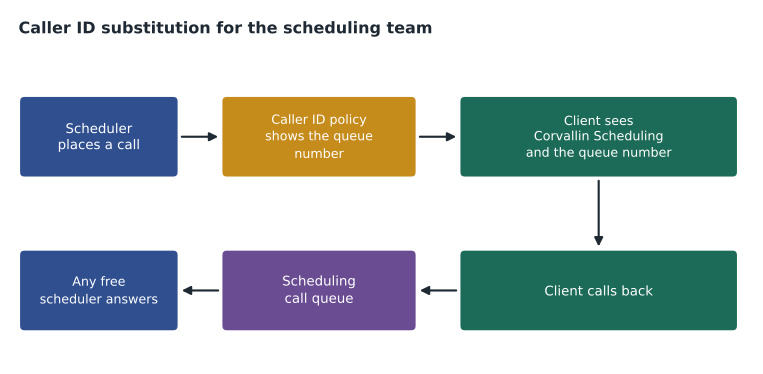
For the scheduling team, the caller ID policy fixed two of the three morning complaints at once. Calls from schedulers now show the scheduling queue's number. When a client calls back, the call reaches the queue, where whichever scheduler is free can answer it, rather than a personal line. And because the queue's number is the one printed on Corvallin's appointment cards, clients recognize it and are more likely to answer.
# Show the scheduling queue's number when schedulers call out
New-CsCallingLineIdentity -Identity "Scheduling-CallerID" `
    -CallingIDSubstitute Resource -ResourceAccount $schedulingRaObjectId `
    -EnableUserOverride $false -CompanyName "Corvallin Scheduling"
Grant-CsCallingLineIdentity -Group $schedulingGroupId -PolicyName "Scheduling-CallerID" -Rank 1
Caller ID substitution has rules worth knowing. The resource account whose number is shown must have a phone number, and the user's calls must go out through a route that allows the substitution; with Calling Plans and Operator Connect this is normally straightforward, while with Direct Routing the SBC and carrier must accept it. Showing a number the organization does not own, or misrepresenting who is calling, is not allowed by phone regulators, and in North America the FCC requires carriers to authenticate caller ID under the STIR/SHAKEN framework, so calls with mismatched caller ID may be labeled as suspicious on the recipient's phone.
Dial plans
A dial plan contains normalization rules that turn the digits a user dials into a full international phone number in E.164 format, such as +15550101234. Teams has a service country dial plan for each country, based on the user's usage location, and administrators can add tenant dial plans with extra rules. The most common use is extension dialling: if Corvallin staff are used to dialling four-digit extensions, a normalization rule can turn 1234 into the full number of the person with that extension.
Tenant dial plans are assigned to users or to the organization. For the pilot, Felix added a rule so that head office staff could keep dialling the four-digit extensions they knew from the old system, and another rule that turned seven-digit local numbers into full numbers. Dial plans affect only how numbers are written; whether the call is allowed and how it is routed is decided elsewhere.
# Four-digit extensions 1000-1999 become head office DIDs
$rule = New-CsVoiceNormalizationRule -Parent Global -Name "HO-Extensions" `
    -Pattern '^(1\d{3})$' -Translation '+1555010$1' -InMemory
New-CsTenantDialPlan -Identity "HeadOffice" -NormalizationRules @{Add=$rule}
Grant-CsTenantDialPlan -Identity "t.klimaszewski@corvallincare.example" -PolicyName "HeadOffice"
Outbound calling restrictions
Organizations often want to stop expensive or risky calls. For users, an outbound calling restriction policy (dial-out policy for PSTN calls) can allow calls to any destination, only to domestic numbers, or block PSTN calling altogether, separately from the dial-out policy for meetings that lesson 4 described. Calling Plans themselves also limit what users can call: a domestic Calling Plan includes minutes for domestic calls, and international calls need an international plan or Communications Credits.
Corvallin's pilot users have domestic Calling Plans and a policy that allows domestic calls only, apart from the intake team, which sometimes calls family members abroad and has Communications Credits enabled with a monthly limit.
Voice settings for users
Beyond policies, each user has voice settings that an administrator can view and change in the Teams admin center under Users: the phone number and its type, the emergency address, the calling policy, caller ID policy, dial plan, voicemail policy and, for Direct Routing, the voice routing policy. Users manage their own call answering rules in Teams settings, such as forwarding to a mobile, simultaneous ringing, voicemail greetings and call groups, within what their calling policy allows. The scheduler who wanted to forward calls to her mobile phone was able to do so once her policy allowed forwarding to phone numbers.
Worked problem
Fixing the three morning complaints
Recap the three complaints from the first pilot morning and match each to the policy change that fixed it.
Show solution
- Callbacks reached personal voicemail: caller ID policy substituting the scheduling queue number.
- Clients ignored unknown numbers: the same caller ID policy, because clients recognize the queue number from appointment cards.
- A scheduler could not forward to her mobile: the Scheduling-Calling policy allowing forwarding to phone numbers.
Answer: Two complaints were fixed by a caller ID policy and one by a calling policy, all assigned to the scheduling group.
Delegation and call groups
Two calling features came up repeatedly in the pilot. Delegation lets a person, the delegator, choose someone, the delegate, who can make and receive calls on their behalf. Ishbel Abelard's executive assistant became her delegate, so calls to Ishbel's number ring both of them and the assistant can place calls that show as being on Ishbel's behalf. Call groups let a user share incoming calls with a group of colleagues, ringing all of them at once or in order. The intake nurses set up a call group so that calls to any intake nurse's direct line ring the others if she does not answer.
Both features depend on the calling policy allowing them, and both are configured by users rather than administrators. The administrator's job is to allow them in the right policies, explain how they work and check that a person's calls go where they expect after a change. Delegation also needs the delegate and delegator to have Teams Phone licenses.
| Feature | Who sets it up | Typical use at Corvallin |
|---|---|---|
| Delegation | The delegator, in Teams settings | Executive assistant answers for the executive director |
| Call group | The user, in Teams settings | Intake nurses cover each other's direct lines |
| Simultaneous ring to mobile | The user, within policy | Schedulers working from home |
| Call park | Any user, during a call | Reception parks a call for a manager to pick up |
Testing policy changes
Felix tested every voice policy change with a test user before assigning it to a group, because a mistake in a calling policy can stop someone from receiving calls. His test list for a new calling policy had five calls: an internal call, an outbound PSTN call, an inbound PSTN call, a forwarded call and a call while busy. He recorded the result of each in the change ticket. After assigning the policy, he waited for it to reach the group and repeated two of the tests with a real member of the team, because policy changes can take several hours to apply.
Music on hold and other small settings
Small settings shape how callers feel about an organization. Music on hold is played when a user puts a caller on hold or parks a call. Teams has default music, and a calling policy can let the organization use its own audio file instead. Corvallin recorded a short message reminding callers that visit times can also be confirmed through the family portal, followed by quiet music, and set it in the calling policies for scheduling and intake.
Other settings in the calling policy decide whether users can use the Teams client to call while their status is Do not disturb, whether calls can be redirected to voicemail when the user does not answer within a time, and whether call answering rules can send calls to delegates. Each one sounds minor, but a wrong choice can mean that a client's call rings out with nobody to answer it. Felix's test list from the previous section exists to catch exactly that.
Voicemail policies in practice
Voicemail is set by a voicemail policy, assigned like other policies. It controls whether voicemail transcription is on, whether transcriptions are translated, whether profanity is masked in transcriptions, the maximum recording length, and whether users can set custom greetings and choose to play a greeting and then send callers somewhere else. For the scheduling and intake teams, Felix created a policy with transcription on and a maximum length of five minutes, because clients sometimes leave long, detailed messages about care needs.
Shared voicemail for call queues and auto attendants works differently. It belongs to a Microsoft 365 group, and messages arrive in the group's mailbox, where any member can read or listen to them. That is what the scheduling and intake queues use for timeouts and overflow. Felix asked both teams to agree who checks the shared voicemail and how often, and to mark each message with who handled it, because a shared mailbox that everyone can read is also a mailbox that everyone can assume someone else has read.
| Voicemail type | Belongs to | Where messages arrive | Controlled by |
|---|---|---|---|
| Personal voicemail | A user | The user's mailbox, Teams and Outlook | Voicemail policy |
| Shared voicemail | A Microsoft 365 group | The group mailbox | Auto attendant or call queue settings |
Common mistakes
MistakeLeaving web PSTN calling on where emergency location matters.
InsteadTurn off web PSTN calling, because the web client does not support dynamic emergency calling.
MistakeUsing a caller ID policy to show a number the organization does not own.
InsteadSubstitute only numbers of your own resource accounts.
MistakeExpecting a dial plan to block expensive calls.
InsteadDial plans only normalize numbers; use outbound calling restrictions to limit calls.
MistakeEditing the Global calling policy for one team's needs.
InsteadCreate a custom policy and assign it to the team's group.
Summary and key terms
- Calling policies control calling, forwarding, voicemail, busy on busy, delegation, call groups, web PSTN calling, music on hold and recording or AI in calls.
- Caller ID policies can show a resource account's number, hide the number or let users choose.
- Dial plans normalize dialled digits into E.164 numbers, for example for extension dialling.
- Outbound calling restrictions and Calling Plan types limit where users can call.
- User voice settings bring together number, emergency address and voice policies; users set their own answering rules within policy.
- Calling policy
- A Teams policy that controls calling features for users.
- Caller ID policy
- A policy that controls which number and name recipients see when a user calls out.
- Busy on busy
- A setting that decides what happens to a new call when the user is already on a call.
- Dial plan
- A set of normalization rules that turn dialled digits into full phone numbers.
- E.164
- The international phone number format, starting with + and the country code.
- Normalization rule
- A pattern and translation that rewrites dialled digits.
- STIR/SHAKEN
- A North American framework that authenticates caller ID on phone calls.
Practice problems
Work each problem on paper first, then reveal the answer to check.
Which policy makes outbound calls show the main line number?
Show answer
A caller ID policy that substitutes the main line resource account's number.
A user dials a four-digit extension and the call fails. What do you check?
Show answer
Whether the user's tenant dial plan has a normalization rule for extensions.
What does busy on busy do?
Show answer
It decides whether a new call to a user already on a call rings, goes to voicemail or gets a busy signal.
Lesson quiz · 5 questions
Score 60% or more to complete this lesson.
Create a free account to save your progress, take quizzes and earn a certificate.