
MSBA-222 · Lesson 4 of 12 · 19 min
Audio conferencing
▶ Video coming soon A video version of this lesson is on the way.
Corvallin's home-care nurses spend much of their day in cars and in clients' homes, and in the rural parts of the North Branch area mobile data is patchy. A nurse who needs to join the morning huddle from a farmhouse driveway often has two bars of voice signal and no usable data. For her, a Teams meeting is only useful if she can phone into it. The same is true for some family members who join care planning meetings from a landline. That is what Audio Conferencing provides: dial-in phone numbers for Teams meetings, and the ability for a meeting to call a phone number out of the meeting.
This lesson explains how Audio Conferencing works, how it is licensed, how conferencing bridges and phone numbers are managed, and which policies control dial-in and dial-out. The MS-700 outline lists provisioning phone numbers for conferencing bridges among the Teams Phone skills, so expect at least one exam question on it.
How dial-in works
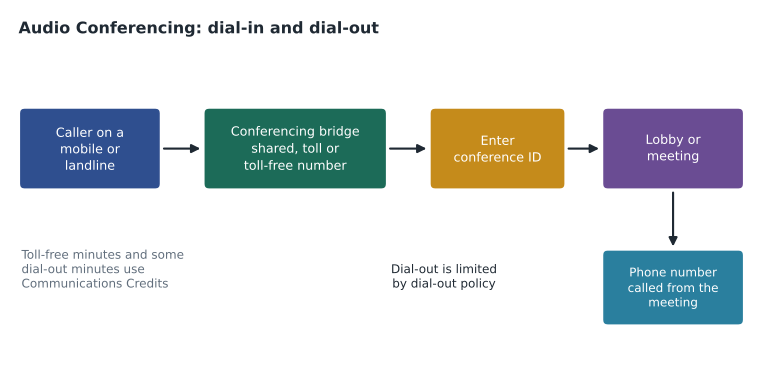
When Audio Conferencing is turned on for an organizer, every meeting they schedule includes one or more dial-in phone numbers and a conference ID in the invitation. A caller dials the number, enters the conference ID, and is placed in the meeting, usually in the lobby first, depending on the meeting policy. Callers appear in the participant list by phone number, which can be partly masked for privacy if the administrator turns on number masking.
The numbers in the invitation belong to the organization's conferencing bridge. Microsoft provides shared dial-in numbers in many cities and countries, which every customer can use. An organization can also add dedicated service numbers, either toll numbers or toll-free numbers, that belong only to it. A toll-free number costs the organization for each minute used, so it needs Communications Credits, a prepaid balance used for toll-free calls and for some dial-out calls.
Licensing
Audio Conferencing is included in some licenses, such as Microsoft 365 E5 and Office 365 E5, and is available as an add-on for others. Microsoft has also offered a no-cost Audio Conferencing license with dial-out limited to the United States and Canada for eligible organizations that do not otherwise have it. Licenses and prices change, so an administrator should check the current licensing pages before buying. What does not change is the rule that Audio Conferencing is licensed per organizer: the person who schedules the meeting needs the license for its invitation to include dial-in numbers. People who dial in do not need a license.
Corvallin's licensing reflected this. The 120 office staff and managers on E3 got the no-cost Audio Conferencing license with United States and Canada dial-out, because they organize most meetings. The 340 home-care staff on F3 do not usually organize meetings, so they did not need it; they dial in to meetings that others organize. The clinical leads with Teams Premium already had what they needed through their E3 licenses.
| Who | Needs an Audio Conferencing license? | Why |
|---|---|---|
| Organizer whose invitations should include dial-in numbers | Yes | The license is per organizer |
| Person who dials in | No | Callers use the organizer's bridge |
| Person who dials out from a meeting to a phone | The organizer's license and dial-out policy apply | Dial-out uses the organizer's bridge |
| Guest who joins by app | No | App joiners do not use the bridge |
Conferencing bridge settings
In the Teams admin center, under Meetings and then Conference bridges, an administrator sees the numbers available to the organization: shared numbers provided by Microsoft and any dedicated numbers acquired or ported. The administrator can set the default number that appears first in invitations, change the bridge's language and greeting order, and set whether callers hear entry and exit tones and announcements. Dedicated service numbers are obtained through the Phone numbers page, either from Microsoft, through an Operator Connect partner, or by porting existing numbers, and then assigned to the conferencing bridge.
For each organizer, the default toll and toll-free numbers that appear in their invitations can be set individually, which is useful for organizations in several regions. Corvallin set its Hartford head office number as the default and added a toll-free number for its caregiver webinars, because some families were reluctant to call a long-distance number.
# See the numbers on the conferencing bridge
Get-CsOnlineDialInConferencingBridge
# Set the default toll number shown in one organizer's invitations
Set-CsOnlineDialInConferencingUser -Identity "p.verlaine-osei@corvallincare.example" `
    -ServiceNumber 15550101000
# Check a user's Audio Conferencing settings
Get-CsOnlineDialInConferencingUser -Identity "p.verlaine-osei@corvallincare.example"
Audio conferencing policies
The audio conferencing policy in Teams controls which numbers appear in meeting invitations for the users it is assigned to. An organization with numbers in several countries can create policies that show the numbers each group of organizers needs, and can choose whether toll-free numbers appear in invitations. This keeps invitations short and avoids showing a toll-free number to every organizer when only some events justify the cost.
Two other settings affect callers. In the meeting policy, administrators decide whether dial-in users can bypass the lobby and whether they can start a meeting before the organizer arrives. Corvallin lets dial-in callers bypass the lobby in ordinary staff meetings, so nurses in their cars are not left waiting, but keeps them in the lobby in clinical meetings, because a phone number alone does not show who is calling. Organizers can also require callers to say their name on entry, which helps the person admitting them from the lobby.
Dial-out
From a meeting, an organizer or presenter can call a phone number to bring someone into the meeting, for example a family member who cannot use the app. Dial-out uses the organizer's bridge and is controlled by the dial-out policy for conferencing, which can allow calls to any destination, only to domestic numbers, or not at all. A second dial-out setting controls calls that users make through Teams Phone, which lesson 8 covers.
Dial-out to some destinations uses Communications Credits, so organizations that allow international dial-out should set limits and monitor use. Corvallin allowed dial-out from meetings to numbers in the United States only, which covered every family it worked with and avoided surprise charges.
Worked problem
A nurse cannot dial into the morning huddle
A North Branch nurse says the dial-in number in the huddle invitation connects, but after she enters the conference ID she hears that the ID is not recognized. The huddle is a recurring meeting created two years ago by a manager who has since left. What is happening?
Show solution
- The conference ID belongs to the organizer's bridge settings and the meeting.
- The organizer left and her account was removed, so her meetings and their conference IDs no longer work.
- The new branch manager needs to create a new recurring huddle, with her own Audio Conferencing license, and send fresh invitations.
- Corvallin adds a step to its leaver process: transfer or recreate recurring meetings owned by departing managers.
Answer: The meeting belonged to a deleted organizer. Recreate the huddle under the new manager, whose license gives the invitation working dial-in details.
Number masking and caller privacy
By default, other participants may see a caller's phone number in the participant list. Teams can mask the numbers of dial-in callers so that only part of the number is visible to attendees, while organizers in the organization can still see enough to identify who joined. For Corvallin, this mattered for care planning meetings, where a family member might not want others to see their personal mobile number. The setting is in the meeting policy, and Felix turned masking on for external participants in the Global policy.
Planning numbers for several offices
Corvallin has one head office and four branches, all in the same region, so one default number and one toll-free number were enough. Organizations spread over several countries plan more carefully. The usual pattern is to give each region a local toll number as the default in that region's invitations, through audio conferencing policies and per-user default numbers, and to add toll-free numbers only where callers would otherwise pay long-distance charges. Listing too many numbers makes invitations long and confusing; listing too few makes callers pay or give up.
An administrator also plans for the people who run large calls. A director who regularly holds meetings with 200 dial-in participants needs a bridge that can handle them, a clear way for callers to identify themselves, and a policy that keeps callers muted on entry. Teams lets organizers mute everyone and prevent attendees from unmuting, which works for callers too; callers unmute with a keypad command when they are allowed to speak.
| Keypad command | What it does for a caller |
|---|---|
| *6 | Mute or unmute yourself |
| *5 | Raise or lower your hand |
| *1 | Hear the list of available commands |
Felix printed these commands on a small card that nurses keep in their cars, together with the head office dial-in number. It was a low-tech fix, but it ended the weekly complaints about nurses who could not unmute themselves in the huddle.
Monitoring use and cost
The Teams admin center reports on Audio Conferencing use, showing how many minutes were used on dial-in and dial-out, which numbers were called and which organizers used the most. Felix reviews this report monthly with the finance office. In the first month, the toll-free number for webinars used fewer than 400 minutes, which cost far less than the budget allowed, so the toll-free number stayed. If a report shows unexpected international dial-out, the administrator should check the dial-out policy and the users concerned.
Callers and the lobby in practice
Lobby settings for callers caused more discussion than any other Audio Conferencing setting. If callers wait in the lobby, someone in the meeting has to notice and admit them, and a caller who cannot be seen is easy to forget. If callers bypass the lobby, anyone with the number and the conference ID can join. Corvallin's compromise was to let callers bypass the lobby in internal staff meetings, where the invitation goes only to staff, and to keep them in the lobby in any meeting with external participants. Organizers of external meetings were also shown how to see the lobby list on a phone, so that a nurse running a meeting from her car could admit a family member who dialled in.
Conference IDs are not secret in the way a password is: they appear in every invitation and are often forwarded. For meetings where it matters who joins, the lobby is the real protection, and the meeting chat or a quick spoken check confirms who each caller is. Teams can also ask callers to record their name before they enter, which is played to the people in the meeting when the caller is admitted, and Corvallin turned this on for meetings with external participants.
Audio Conferencing and Teams Phone
Audio Conferencing and Teams Phone are separate services, which confuses people because both involve phone numbers. Audio Conferencing connects phones to meetings: callers dial a bridge number and enter a conference ID. Teams Phone connects phones to people and services: callers dial a user's number, an auto attendant or a call queue. A person can have one without the other. Corvallin's office staff have Audio Conferencing so their meetings include dial-in numbers, but only the 30 head office pilot users have Teams Phone so far. A pilot user who escalates a phone call into a meeting uses both: the call starts on Teams Phone and the meeting may then use the bridge for other callers.
Service numbers for the conferencing bridge are acquired and managed on the same Phone numbers page as numbers for auto attendants and call queues, and they come from the same sources: Microsoft, an Operator Connect operator, or a port from another phone company. The difference is what they are assigned to. Felix kept a simple spreadsheet listing every number, what it was assigned to and why, because once an organization has a few dozen numbers, nobody remembers which toll-free number belongs to which service.
| Question | Audio Conferencing | Teams Phone |
|---|---|---|
| What do callers reach? | A meeting | A person, auto attendant or call queue |
| What identifies the destination? | Bridge number plus conference ID | The phone number itself |
| Who needs a license? | The meeting organizer | The person or service receiving calls |
| Typical number type | Service number on the bridge | User numbers and service numbers on resource accounts |
Common mistakes
MistakeBuying Audio Conferencing for every user.
InsteadLicense organizers who need dial-in numbers in their invitations; callers need no license.
MistakeAdding a toll-free number without Communications Credits.
InsteadSet up and monitor Communications Credits before using toll-free numbers.
MistakeLetting dial-in callers bypass the lobby in sensitive meetings.
InsteadKeep callers in the lobby where identity matters, and ask them to record their name.
MistakeLeaving recurring meetings owned by people who have left.
InsteadRecreate them under a current organizer so dial-in details keep working.
Summary and key terms
- Audio Conferencing adds dial-in numbers and a conference ID to meeting invitations and allows dial-out from meetings.
- It is licensed per organizer; callers need no license.
- The conferencing bridge has shared Microsoft numbers and can have dedicated toll and toll-free numbers.
- Toll-free and some dial-out minutes use Communications Credits.
- Audio conferencing policies choose which numbers appear in invitations; meeting policies control whether callers bypass the lobby.
- Dial-out policies limit where meetings can call.
- Audio Conferencing
- The Teams service that lets people join meetings by phone and lets meetings call phone numbers.
- Conferencing bridge
- The set of dial-in numbers and settings an organization uses for Audio Conferencing.
- Conference ID
- The number a caller enters to reach a particular meeting.
- Service number
- A phone number used by a service such as a conferencing bridge, auto attendant or call queue.
- Communications Credits
- A prepaid balance used for toll-free calls and some dial-out calls.
- Dial-out
- A call placed from a meeting to a phone number.
- Audio conferencing policy
- A policy that controls which dial-in numbers appear in a user's meeting invitations.
Practice problems
Work each problem on paper first, then reveal the answer to check.
Does a family member who dials into a care meeting need a license?
Show answer
No; only the organizer needs Audio Conferencing.
What is needed before using a dedicated toll-free number on the bridge?
Show answer
Communications Credits set up and funded.
Where do you set which numbers appear in a group of organizers' invitations?
Show answer
In an audio conferencing policy assigned to those organizers.
Lesson quiz · 5 questions
Score 60% or more to complete this lesson.
Create a free account to save your progress, take quizzes and earn a certificate.