
MSBA-222 · Lesson 3 of 12 · 18 min
Webinars and town halls
▶ Video coming soon A video version of this lesson is on the way.
Pascale Verlaine-Osei, Corvallin's communications coordinator, had been running two kinds of event in ordinary Teams meetings. Every month she held a one-hour education session for family caregivers, people looking after a parent or partner at home, with a nurse presenting and families asking questions. Every quarter she organized an all-staff update from the executive director, Ishbel Abelard, for roughly 450 people. Both worked, more or less, but both had problems. Caregivers joined with cameras and microphones on, someone always shared the wrong screen, and the all-staff meeting reached the point where a single unmuted microphone at a branch could interrupt everyone.
Teams has event types designed for these situations. This lesson explains webinars and town halls, how they differ from meetings, how administrators enable and control them with events policies, and how to choose the right one, which the MS-700 outline asks candidates to recommend based on business requirements.
Meetings, webinars, town halls and appointments
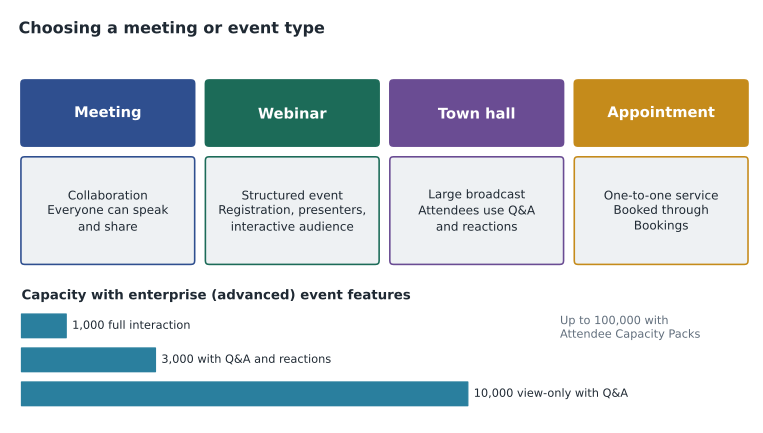
The MS-700 outline lists four types: meetings, webinars, town halls and Appointments (virtual appointments booked through the Bookings app, for one-to-one services such as a consultation). They differ mostly in audience size, interactivity and structure.
A meeting is for collaboration. Everyone can, by default, speak, share and use their camera, and the organizer manages the session from inside it. A webinar is a structured event for an audience who can interact: it has a registration page, presenters and attendees with different roles, and options such as Q&A, polls and the ability to bring an attendee on stage. A town hall is a broadcast for a large audience: attendees watch and can take part through Q&A, reactions and chat if allowed, but they do not use their microphones or cameras. Town halls have production features such as a green room for presenters and the ability to queue content.
In 2026 Microsoft brought these together in the Events experience in the Teams calendar. Instead of choosing a fixed event type at the start, the organizer creates an event and sets its size and options. Events of up to 1,000 attendees use webinar policy settings, and an option called Optimize for large audience turns on the town hall behavior. For events of more than 1,000 attendees, that option is on by default and cannot be turned off. The names webinar and town hall still appear in the admin center, in policies and on the exam.
Capacity by license
Microsoft's events documentation, updated in September 2026, sets out capacity by license. Organizers with advanced event features, which come with Microsoft 365 and Office 365 E3 and E5 and some education licenses, can run events with up to 1,000 attendees using full interaction, including microphones and cameras; up to 3,000 attendees with chat, reactions, raise hand, polls and Q&A; and up to 10,000 view-only attendees with Q&A. Organizers with foundational event features, which come with licenses such as Microsoft 365 Business plans and F3, have the same 1,000 and 10,000 limits, but their engaged events stop at 1,000 attendees.
For larger events, the Attendee Capacity Pack add-on, assigned to organizers, raises the limit up to 100,000 attendees, and Microsoft recommends its events services for audiences above 20,000. Before April 1, 2026, some of these capabilities required Teams Premium; Microsoft moved them into the enterprise licenses on that date, and Teams Premium licenses bought after April 1 no longer add event capacity by themselves.
| Event size and style | Foundational features (for example Business plans, F3) | Advanced features (for example E3, E5) |
|---|---|---|
| Full interaction with mic and camera | Up to 1,000 | Up to 1,000 |
| Chat, reactions, polls and Q&A with registration | Up to 1,000 | Up to 3,000 |
| View-only with Q&A | Up to 10,000 | Up to 10,000 |
| Larger events | Not available | Up to 100,000 with Attendee Capacity Packs |
Pascale's events fitted easily. The caregiver webinar rarely drew more than 120 families, so it used webinar settings. The all-staff update had 450 attendees, so it could have been a webinar too, but Ishbel wanted a broadcast with a production team and Q&A rather than an interactive session, so it became a town hall with Optimize for large audience turned on.
Webinar features
A webinar has a registration page that the organizer customizes with a title, description, speaker biographies and, if the policy allows, branding. Registration can be open to anyone, limited to people in the organization, or turned off. The organizer can set a registration limit, require manual approval, keep a waitlist and set when registration opens and closes. Registrants receive a confirmation email with a personal join link, and reminders before the event.
During the webinar, the organizer controls whether attendees can use their microphones and cameras, whether chat is on and whether Q&A is available. Presenters are added by the organizer; attendees can be brought on stage temporarily if the organizer allows it. After the event, the organizer can download a registration report and an attendance report showing who registered, who attended and for how long, which is the kind of information a communications team uses to plan the next event.
Corvallin's caregiver webinars use public registration, a cap of 300, attendee microphones and cameras off, and moderated Q&A. A nurse presents, Pascale moderates questions and the clinical lead for the topic answers the harder ones. Because some families join on a phone during a break from caring, Pascale added a dial-in number, which lesson 4 covers.
Town hall features
A town hall is built for a production team. Organizers, co-organizers and presenters join a green room before the event begins, where they can test audio and video, chat privately and arrange content without attendees seeing it. When the organizer starts the event, attendees see what the producers put on screen. The organizer can spotlight presenters, queue shared content and end the event for attendees while staff stay on to debrief.
Attendees in a town hall watch rather than speak. They can take part through Q&A, which can be moderated so that questions appear only once a moderator publishes them, through reactions and, if allowed, through chat. Captions and transcription are available, and the recording can be published for people who could not attend. For large audiences, Microsoft's eCDN (enterprise content delivery network), now on by default for large-audience events, shares the video stream between viewers on the same network so that a branch with 40 people watching does not download 40 separate streams.
Town halls also support producing the event from external software or hardware encoders through RTMP-In and SRT-In, and streaming out to other platforms through RTMP-Out, if administrators allow these. Corvallin did not need them; Pascale produced the town hall from Teams itself.
# Allow webinars and town halls for the communications team
New-CsTeamsEventsPolicy -Identity "External-Events" `
    -AllowWebinars Enabled -AllowTownhalls Enabled
Grant-CsTeamsEventsPolicy -Identity "p.verlaine-osei@corvallincare.example" `
    -PolicyName "External-Events"
# Check which events policy a user has
Get-CsUserPolicyAssignment -Identity "p.verlaine-osei@corvallincare.example" `
    -PolicyType TeamsEventsPolicy
Events policies
Events policies (Teams events policies) are where administrators control who can create webinars and town halls and what those events can do. Typical settings are whether the user can create webinars, whether they can create town halls, who can register (everyone or only people in the organization), whether Q&A and other engagement features are on, whether RTMP-In is allowed, recording and publishing options, and limits on attendee capacity. Meeting policies still govern the core features inside the event, such as recording, while events policies govern features specific to events.
Corvallin's Global events policy allows webinars for internal audiences only and does not allow town halls, so ordinary staff do not create broadcasts by accident. The External-Events policy, assigned to the four-person communications team, allows public registration for webinars and allows town halls. This matches the principle the earlier courses used for every Teams feature: give most people a sensible default and give the people with a real need the extra capability.
Worked problem
Choosing the event type
Three requests reach the IT office in one week. The finance manager wants a 30-person budget workshop with breakout discussions. A partner hospital wants to invite 800 of its staff to a session on home-care referrals, with registration and questions. The executive director wants to address all 450 Corvallin staff with a moderated Q&A. Recommend a type for each.
Show solution
- Workshop: people must speak, share and work in groups, so it is a meeting with breakout rooms.
- Partner session: external registration, presenters and questions from 800 people, so it is a webinar with registration open to everyone and microphones off.
- All-staff address: a broadcast with production and moderated questions, so it is a town hall (Optimize for large audience on).
Answer: Meeting for the workshop, webinar for the partner session, town hall for the all-staff address.
Running the first caregiver webinar
Pascale's first webinar under the new settings took place on September 24, 2026. She built the registration page a month earlier, with a short description of the topic (managing medications safely at home), a photo and biography of the presenting nurse, and a cap of 300 registrants. The page link went out in Corvallin's family newsletter and on its website. By the day of the event, 164 people had registered and 112 attended.
Two practical lessons came out of it. First, several families registered with personal email addresses that they did not check often, so they missed the join link; Pascale added a line to the registration page asking people to use the address they read most. Second, the Q&A filled with questions that were really about individual clients, which the nurse could not answer in public. Pascale kept Q&A moderated, so questions were published only after review, and the nurse answered individual questions privately after the event through the intake line.
| Setting | Caregiver webinar | Quarterly town hall |
|---|---|---|
| Registration | Public, cap 300, reminders on | None; staff join from the calendar invitation |
| Attendee mic and camera | Off | Not available to attendees |
| Q&A | Moderated | Moderated, with anonymous questions allowed |
| Recording | On, published to the family resources page | On, published to staff for 30 days |
| Dial-in | Yes, toll number | Not needed |
Retiring the old approach
Older guidance for large broadcasts pointed to Teams live events, an earlier broadcast feature. Microsoft has positioned town halls as the replacement and published guidance on switching from live events to town halls. For a new administrator, the practical advice is to build new broadcasts as town halls and to check Microsoft's current documentation before relying on any older live events setting.
Roles in an event
Events have more roles than meetings, and each role has different powers. The organizer creates the event, sets its options and owns its reports. Co-organizers can manage almost everything the organizer can, including starting the event and managing presenters, which matters when the organizer is also presenting. Presenters can speak and share content but do not control the event settings. Moderators manage Q&A in town halls. Attendees watch and take part through the features the organizer allows. Assigning these roles carefully avoids the classic failure in which the only person who can start the event is stuck in traffic.
Pascale always adds a co-organizer from the communications team, so two people can start and run the event, and she joins as a producer rather than as a presenter for large events, so she is free to manage the screen and the queue of content. For the caregiver webinars, the presenting nurse is a presenter, the clinical lead answering questions is a presenter, and Pascale is the organizer and moderator.
| Role | Can start the event | Can share content | Can change event options |
|---|---|---|---|
| Organizer | Yes | Yes | Yes |
| Co-organizer | Yes | Yes | Most options |
| Presenter | No | Yes | No |
| Moderator (town hall Q&A) | No | No | Q&A only |
| Attendee | No | No (unless brought on stage) | No |
Common mistakes
MistakeRunning a 450-person all-staff update as an ordinary meeting.
InsteadUse a town hall so attendees cannot unmute and producers control the screen.
MistakeAssuming a new Teams Premium license raises event capacity.
InsteadSince April 1, 2026, capacity comes from the enterprise license and Attendee Capacity Packs.
MistakeGiving everyone permission to create town halls.
InsteadAssign an events policy that allows town halls only to the people who run them.
MistakeForgetting eCDN for a large internal audience on shared networks.
InsteadKeep eCDN on for large-audience events, especially at offices with limited bandwidth.
Summary and key terms
- Meetings are for collaboration, webinars for structured interactive events with registration, town halls for large broadcasts, and appointments for one-to-one services.
- The Events experience creates events by size and options; Optimize for large audience gives town hall behavior and is always on above 1,000 attendees.
- Enterprise licenses give up to 1,000 interactive, 3,000 engaged and 10,000 view-only attendees; Attendee Capacity Packs go up to 100,000.
- Webinars have registration pages, approvals, waitlists and reports; town halls have a green room, spotlight, moderated Q&A and eCDN.
- Events policies control who can create webinars and town halls and which event features they can use.
- Webinar
- A structured Teams event with registration, presenters and an interactive audience.
- Town hall
- A Teams broadcast event for a large audience who take part through Q&A, reactions and chat rather than microphones.
- Green room
- The backstage area where organizers and presenters prepare before attendees see them.
- Events policy
- A Teams policy that controls who can create webinars and town halls and which event features are available.
- eCDN
- Enterprise content delivery network technology that shares a video stream among viewers on the same network.
- Attendee Capacity Pack
- An add-on license that raises Teams event capacity up to 100,000 attendees.
- Optimize for large audience
- An event option that turns on town hall behavior.
Practice problems
Work each problem on paper first, then reveal the answer to check.
An organizer with an E3 license wants an event for 2,500 people with polls and Q&A but no attendee cameras. Is it possible?
Show answer
Yes; advanced event features allow up to 3,000 attendees with engagement features.
Where do presenters wait before a town hall starts?
Show answer
In the green room.
Which policy decides whether a user can create town halls?
Show answer
Their Teams events policy.
Lesson quiz · 5 questions
Score 60% or more to complete this lesson.
Create a free account to save your progress, take quizzes and earn a certificate.