
MSBA-201 · Lesson 2 of 12 · 20 min
Custom domains and DNS records
▶ Video coming soon A video version of this lesson is on the way.
For the first two days of the 2022 trial every Corvallin test account signed in with an address like teodor@corvallincare.onmicrosoft.com. That was fine for Teodor, but the agency's clients, hospitals and referral partners all knew it as corvallincare.example, and nobody was going to print onmicrosoft.com on a business card. The next job was to add the agency's own domain to the tenant, prove that Corvallin owned it, and point the right DNS records at Microsoft 365, without breaking the on-premises mail system that was still carrying every real message.
The domain was registered years earlier through a local web company, and its DNS zone was hosted by the same company. Felix Okonkwo-Reyes, who looks after Corvallin's network, had the login. He and Teodor spent an afternoon on it, and the order in which they did things is the lesson.
What adding a domain involves
Adding a custom domain to Microsoft 365 has three stages. First, the administrator adds the domain name in the Microsoft 365 admin center under Settings, then Domains. Second, Microsoft asks for proof of ownership, usually a TXT record with a unique value in the domain's DNS zone. Third, once the domain is verified, Microsoft shows the DNS records each service needs, such as mail routing and client discovery, and the administrator creates them, either by hand or, for some DNS hosts, by letting Microsoft configure them automatically through a sign-in to the host.
Verification and service records are deliberately separate. A domain can be verified, and users can be given addresses on it, long before mail is pointed at Exchange Online. That separation is what makes a staged migration possible: Corvallin could verify corvallincare.example on day one but leave mail flowing to its on-premises Exchange servers until the mailboxes had moved.
Proving ownership with a TXT record
Microsoft generates a verification value for each domain in each tenant, in the form MS=ms followed by digits. The administrator creates a TXT record at the root of the domain with that value, waits for DNS to publish it, and clicks Verify. Microsoft looks up the record from the public internet; if the value matches, the domain is verified and can be used for user names and email addresses. The record can be removed afterwards, though many organizations leave it in place as documentation.
A domain can only be verified in one Microsoft Entra tenant at a time. If an old trial tenant, a former contractor or another department has already verified it somewhere else, the admin center reports that the domain is in use. The fix is to remove it from the other tenant, or, if nobody knows who owns that tenant, to follow Microsoft's process for taking over an unmanaged directory. Felix found exactly this problem: years earlier, someone in finance had signed up for a free Power BI trial with a corvallincare.example address, which had quietly created a self-service tenant. Microsoft's admin takeover process, which again relies on proving DNS ownership, resolved it in an afternoon.
Type:  TXT
Host:  @          (the root of corvallincare.example)
Value: MS=ms48201937
TTL:   3600 seconds (one hour)
DNS changes are not instant. Every record has a time to live (TTL), the number of seconds other DNS servers may cache an answer before asking again. A new record usually appears within minutes, but a changed record may take as long as the old TTL to reach everyone. Felix had a useful habit: a day before any planned change to a record that mattered, such as the MX record, he lowered its TTL to five minutes, so that if a change went wrong it could be reversed quickly.
The records Microsoft 365 uses
Once the domain was verified, the admin center showed the records for the services Corvallin had selected. The exact list depends on the services in use and changes over time, which is why administrators should always copy values from the domain setup page rather than from a blog post. The main records are:
| Record | Name | Points to or contains | Purpose |
|---|---|---|---|
| TXT | @ (root) | MS=ms followed by digits | Proves the tenant controls the domain |
| MX | @ (root) | A tenant-specific Exchange Online host | Tells other mail servers where to deliver mail |
| CNAME | autodiscover | autodiscover.outlook.com | Lets Outlook and phones find the mailbox settings |
| TXT (SPF) | @ (root) | v=spf1 include:spf.protection.outlook.com -all | Lists servers allowed to send mail for the domain |
| CNAME (DKIM) | selector1._domainkey and selector2._domainkey | Tenant-specific keys hosted by Microsoft | Lets receivers verify mail was signed by the domain |
| TXT (DMARC) | _dmarc | A policy such as v=DMARC1; p=quarantine | Tells receivers what to do with mail that fails checks |
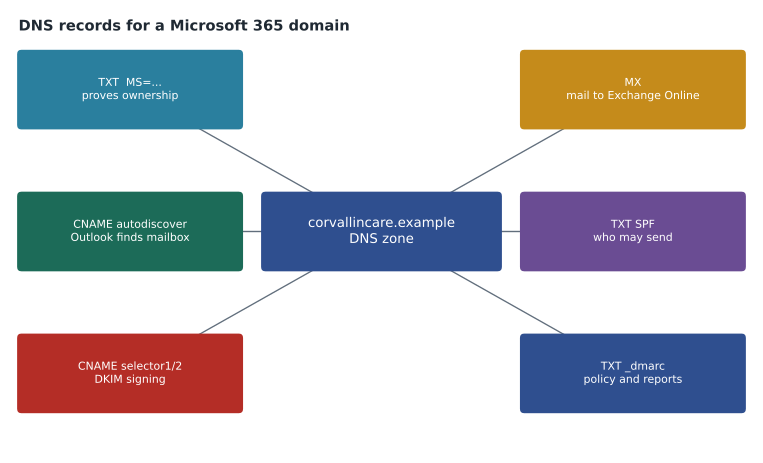
The MX record and the timing of mail cutover
The MX record decides where the world sends email for a domain. For Microsoft 365, it points to an Exchange Online Protection host that is specific to the tenant and domain. The traditional format ends in mail.protection.outlook.com, built from the domain name with dots replaced by dashes. Microsoft has introduced a newer MX format under the mx.microsoft domain that supports DNSSEC and DANE, two standards that let receiving servers verify DNS answers and the identity of the mail server they connect to. Which format a domain receives depends on when it was added and whether the organization has opted in, so the admin center's domain page is the authority on the value to use.
Changing the MX record is the moment mail starts arriving in Exchange Online. In a cutover migration that is the end of the project; in a hybrid migration like Corvallin's, mail can keep arriving at the on-premises servers and be routed onward to mailboxes that have moved. Teodor left the MX record pointing at the on-premises servers until the last mailbox was in the cloud. The admin center flagged the domain as having "possible service issues" because its MX record did not match, which was expected; he noted it in the decision log so nobody would "fix" it early.
Autodiscover
Outlook, the Outlook mobile app and other mail clients use Autodiscover to find a mailbox's settings from just an email address and password. For Exchange Online, the autodiscover CNAME points to autodiscover.outlook.com. In hybrid deployments the on-premises Exchange servers usually stay authoritative for Autodiscover until the migration ends, because they know whether each mailbox is on-premises or in the cloud and can redirect clients accordingly. Changing the autodiscover record too early is a classic cause of "Outlook keeps asking for my password" calls.
SPF, DKIM and DMARC
Three records protect a domain from being impersonated. They are increasingly mandatory in practice: several large mailbox providers now reject or junk bulk mail from domains that do not publish them.
SPF (Sender Policy Framework) is a TXT record that lists the servers allowed to send mail using the domain in the envelope sender address. For a domain that sends only through Microsoft 365, the record is short. Real organizations usually have other senders too, such as a payroll service, a marketing tool or a scanner that emails documents, and each needs an include or IP address in the record. A domain may have only one SPF record, and SPF evaluation is limited to ten DNS lookups, so long chains of includes can break it.
v=spf1 include:spf.protection.outlook.com include:_spf.payrollprovider.example -allDKIM (DomainKeys Identified Mail) adds a digital signature to outgoing messages. Receivers fetch the public key from DNS and check that the message was signed by the domain and not altered in transit. For a custom domain in Microsoft 365, the administrator publishes two CNAME records, selector1._domainkey and selector2._domainkey, that point to keys Microsoft hosts and rotates, and then enables DKIM signing for the domain in the Microsoft Defender portal or with Exchange Online PowerShell. Publishing the records alone does not turn signing on.
Connect-ExchangeOnline
# Show the CNAME targets Microsoft expects for the domain
Get-DkimSigningConfig -Identity corvallincare.example | Format-List Selector1CNAME, Selector2CNAME, Enabled
# After both CNAME records are published:
Set-DkimSigningConfig -Identity corvallincare.example -Enabled $true
DMARC (Domain-based Message Authentication, Reporting and Conformance) ties the two together. It is a TXT record at _dmarc that tells receivers what to do with mail claiming to be from the domain that fails both SPF alignment and DKIM alignment: nothing (p=none), quarantine it (p=quarantine) or reject it (p=reject). It also asks receivers to send aggregate reports to an address the domain owner controls. The usual path is to start at p=none, read the reports for a few weeks to find legitimate senders that are not yet covered, fix them, and then move to quarantine and finally reject.
Worked problem
Counting SPF lookups
Corvallin's draft SPF record includes Microsoft 365, a payroll service, a marketing platform and a survey tool. Felix checks each include: the Microsoft 365 include causes 2 lookups in total, the payroll include 1, the marketing include 4 and the survey include 3. Will the record pass the ten-lookup limit?
Show solution
- Add the lookups each include triggers: 2 + 1 + 4 + 3 = 10.
- SPF allows at most 10 DNS lookups during evaluation, so 10 is exactly at the limit.
- Any new sender added later would push it over and cause SPF to fail for every message.
Answer: It passes, but with no room to spare. Felix asked the survey vendor whether it could send from its own domain instead, which removed 3 lookups and left headroom for future services.
Other records you may see
Depending on the services in use, the admin center may suggest more records. Organizations enrolling Windows devices into Intune often add the enterpriseregistration and enterpriseenrollment CNAME records so devices can find the registration and enrollment services from the user's address. Older Skype for Business deployments used SRV and CNAME records for sign-in and federation; organizations that are Teams-only generally follow whatever the domain setup page currently shows rather than copying old lists. If a record the page suggests is not needed for a service the organization uses, the setup wizard lets the administrator choose which services to configure.
Domains in daily administration
Once a domain is set up, a few administrative tasks recur. The default domain decides the address suffix new users receive by default; Teodor set corvallincare.example as default so that new accounts would not accidentally get onmicrosoft.com addresses. Subdomains, such as referrals.corvallincare.example, can be added and verified separately and inherit verification from the parent in some cases. A domain cannot be removed from the tenant while any user, group or app still uses it, so removing an old domain after a rebrand means reassigning every address first. Domains can also be managed with Microsoft Graph PowerShell, which is useful for checking status across many domains at once.
Connect-MgGraph -Scopes "Domain.Read.All"
Get-MgDomain | Select-Object Id, IsVerified, IsDefault, SupportedServices
Corvallin owned two other domains: an old one from a merger, corvallinhomehealth.example, and corvallin-careers.example, used for job advertisements. Teodor added and verified both so that mail to old addresses would still reach people, adding each as a secondary address on the relevant mailboxes, but kept corvallincare.example as the only domain used for sign-in. One user name domain keeps the sign-in experience simple and avoids confusion when people move between devices. Domains need lifecycle care too: by 2026 the careers domain was no longer used for anything, and the tenant review in the MSBA-101 course removed it as stale.
At the end of the afternoon Felix raised the TTL on the records back to an hour, and Teodor updated the decision log: corvallincare.example verified, default domain set, SPF and DKIM ready for later, MX and Autodiscover deliberately unchanged until cutover.
Troubleshooting domain problems
Most domain problems fall into a few patterns. If verification fails, the usual causes are a typing error in the TXT value, a record created on the wrong host name (for example on www instead of the root), or a DNS change that has not yet published; public DNS lookup tools show what the internet actually sees. If the admin center reports that the domain is already in use, another tenant has verified it, as Felix discovered. If users report that Outlook keeps prompting for credentials after a migration, the autodiscover record is often still pointing at an old server. And if outside recipients start receiving Corvallin's messages in junk folders, the SPF, DKIM and DMARC results recorded in the message headers usually explain why.
The admin center helps with a built-in check. Opening a domain and choosing to check its DNS records compares what is published with what Microsoft expects, and lists any records that are missing or wrong. Teodor ran the check after every change and copied the result into the decision log, which meant that during the final cutover he could compare the new state with a known good baseline in seconds.
Common mistakes
MistakePointing the MX record at Exchange Online as soon as the domain is verified.
InsteadVerification and mail routing are separate; change MX only when mailboxes are ready to receive mail.
MistakePublishing a second SPF record for a new mail service.
InsteadA domain may have only one SPF record; add the new sender to it and keep under ten lookups.
MistakeAssuming DKIM is on because the CNAME records exist.
InsteadPublish both CNAMEs, then enable signing for the domain in Defender or with PowerShell.
MistakeJumping straight to a DMARC reject policy.
InsteadStart at p=none, read the aggregate reports, fix legitimate senders, then tighten.
Summary and key terms
- Adding a domain means adding it in the admin center, proving ownership with a TXT record, then creating service records.
- A domain can be verified in only one tenant; unmanaged trial tenants can be taken over by proving DNS ownership.
- The MX record routes inbound mail; change it only at mail cutover, and copy its current format from the admin center.
- SPF lists permitted senders, DKIM signs messages and DMARC tells receivers how to treat failures.
- Lower TTLs before important changes, set the right default domain, and manage domains with Graph PowerShell when needed.
- TXT record
- A DNS record holding text, used for domain verification, SPF and DMARC.
- MX record
- The DNS record that tells mail servers where to deliver a domain's email.
- Autodiscover
- The service mail clients use to find mailbox settings from an email address.
- SPF
- A TXT record listing the servers allowed to send mail for a domain.
- DKIM
- A signature added to outgoing mail that receivers verify with a public key in DNS.
- DMARC
- A policy record telling receivers how to treat mail that fails SPF and DKIM alignment, with reporting.
- TTL
- Time to live: how long other DNS servers may cache a record.
Practice problems
Work each problem on paper first, then reveal the answer to check.
Why can a domain be verified long before the MX record is changed?
Show answer
Verification only proves ownership; mail keeps flowing wherever the MX record points until it is changed at cutover.
What two steps are needed to turn on DKIM for a custom domain?
Show answer
Publish the two selector CNAME records, then enable DKIM signing for the domain.
What is the purpose of lowering a record's TTL before a change?
Show answer
So the change, or a rollback, reaches other DNS servers quickly.
Lesson quiz · 5 questions
Score 60% or more to complete this lesson.
Create a free account to save your progress, take quizzes and earn a certificate.