
MSBA-201 · Lesson 1 of 12 · 20 min
Planning a Microsoft 365 tenant
▶ Video coming soon A video version of this lesson is on the way.
Corvallin Home Care has been fully in the cloud since 2022, but it did not start there. This course follows how it got there, because the decisions made during that move still shape the tenant Teodor Klimaszewski administers today. In early 2022 the agency had run its own email for fifteen years. A pair of Exchange Server 2016 machines sat in a closet at the Hartford head office, next to a file server and two domain controllers. Mainstream support for Exchange 2016 had already ended, extended support would end in 2025, and the servers carried every referral, care plan question and payroll message the agency sent. Ines Duvernay-Sato, the IT manager, persuaded the board that the answer was Microsoft 365. The work belonged to Teodor, newly hired as the agency's systems administrator, and the first thing Ines asked him for was not a migration date but a plan for the tenant itself.
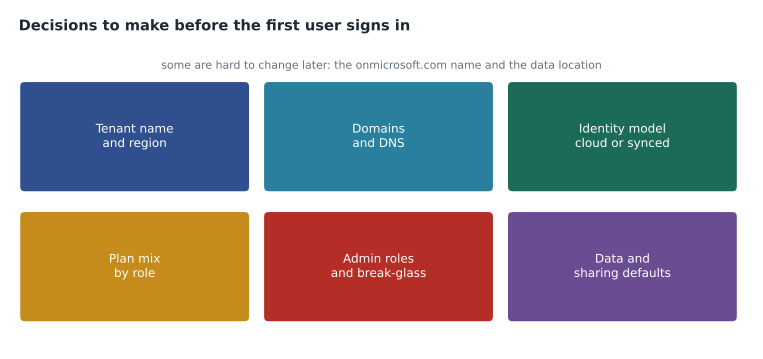
"Everything we decide in the first week, we live with for years," Ines told him. "Some of it we can never change. Write it down before anyone signs up for a trial."
This lesson follows that advice, using the plan Teodor wrote in 2022 and the notes he has added since. It explains what a Microsoft 365 tenant is, which decisions are permanent, how subscriptions and licenses fit together, and how to choose a license mix for an organization where most staff never sit at a desk. Later lessons in this course take each piece in turn: domains, settings, users, groups, roles, synchronization and the three big workloads, Exchange Online, SharePoint and Teams.
What a tenant is
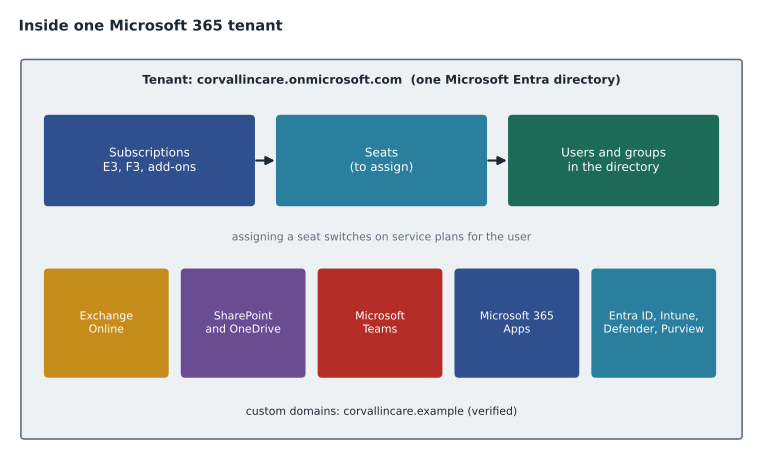
A tenant is a dedicated, isolated instance of Microsoft's cloud services that belongs to one organization. When someone signs up for Microsoft 365, Microsoft creates a tenant and, inside it, a Microsoft Entra ID directory that holds every user, group, device registration and application for that organization. The tenant is the security boundary: an administrator in one tenant has no rights in another unless someone deliberately grants access through features such as guest accounts or cross-tenant settings.
Every tenant receives an initial domain ending in onmicrosoft.com. Corvallin's became corvallincare.onmicrosoft.com. That name matters more than it looks. Users can sign in with it until a custom domain is added, and it forms part of the addresses Microsoft creates behind the scenes. Most visibly, the SharePoint address for the tenant is built from it: Corvallin's sites live under corvallincare.sharepoint.com and its OneDrive accounts under corvallincare-my.sharepoint.com. The original onmicrosoft.com domain cannot be deleted, and renaming the SharePoint address later is a disruptive project, so the tenant name should be short, recognizable and free of anything likely to change, such as a product name or a department.
Decisions that are hard or impossible to change
Teodor started a decision log, a simple document with one line per decision, the date, who made it and why. Ines wanted it for audit reasons; Teodor found it useful for a simpler reason, because he could point to it whenever someone asked "who decided that?" The first entries were the decisions that cannot easily be reversed.
| Decision | Why it is hard to change | Corvallin's choice |
|---|---|---|
| Country at sign-up | It sets the tenant's default data location and cannot be changed afterwards | United States, where the agency operates and where its privacy obligations apply |
| Initial onmicrosoft.com name | Permanent; it shapes the SharePoint and OneDrive addresses | corvallincare |
| Identity model | Moving between cloud-only and synchronized identities later means reworking every account | Synchronize from on-premises Active Directory for now |
| Tenant structure | Merging or splitting tenants later is a large migration project | One tenant for the whole agency |
The data location deserves a closer look because clinical directors always ask about it. Microsoft stores core customer data for Exchange Online, SharePoint, OneDrive and Teams in the geography associated with the country chosen at sign-up, and publishes where each service stores data at rest. Organizations with staff in several countries can buy the Multi-Geo add-on to place individual users' data in other geographies, and some countries are covered by local data residency commitments. Dr. Marguerite Ostrander-Bey, Corvallin's clinical director, wanted to know where client information would sit before she agreed to anything, and Teodor found the answer on the data location page in the Microsoft 365 admin center under Settings and the organization profile. It listed each service and the geography that held its data.
"So nothing about our clients leaves the country?" she asked. Teodor was careful with his answer. Data at rest for the core services stays in the listed geography, but support access, some telemetry and certain optional services follow their own rules, which Microsoft documents in its data residency and privacy commitments. He promised her a one-page summary with links, and added it to the plan as a deliverable rather than a reassurance.
Single tenant or several
Some organizations run separate tenants for testing, for subsidiaries or for regulatory reasons. Each extra production tenant means separate directories, separate licenses and a harder time collaborating, because people in different tenants appear to each other as external users. Microsoft provides cross-tenant features for organizations that genuinely need several tenants, but the default advice is simple: one production tenant per organization unless there is a clear legal or business reason for more.
Corvallin chose one production tenant. Teodor also asked for a small developer or test tenant where he could try settings without touching real users. A test tenant is a separate tenant with a handful of licenses, used only for rehearsals. It never holds client information.
Subscriptions, licenses and service plans
Microsoft sells Microsoft 365 as subscriptions. A subscription is a purchase of a product, such as Microsoft 365 E3, for a number of seats and a term. Each seat is a license that an administrator assigns to one user. A license is not one thing: it is a bundle of service plans, the individual switches for Exchange Online, SharePoint, Teams, the desktop apps, Intune and so on. When Teodor assigns a license, every service plan in it turns on for that user unless he deliberately clears some of them.
Three related ideas cause confusion on every administrator's first day:
| Term | What it means | Example at Corvallin |
|---|---|---|
| Subscription | What the organization buys: a product, a seat count and a term | 120 seats of Microsoft 365 E3 for one year |
| License | One seat of that product, assigned to one user | Teodor's own E3 license |
| Service plan | One service switched on by a license | Exchange Online (Plan 2) inside E3 |
| Add-on | An extra subscription that adds capabilities to an existing license | Microsoft 365 Copilot for a pilot group |
Licenses can be assigned directly to a user or through group-based licensing, where a license is assigned to a group and every member receives it automatically. Group-based licensing scales far better: when Ama Owusu-Pratt on the help desk adds a new nurse to the Frontline Staff group, the right license follows without anyone opening the Licenses page. Lesson 4 shows both methods and the errors to watch for when a group has more members than available seats.
Licensing also has a billing side. Subscriptions can be paid monthly or annually and bought directly from Microsoft, through a reseller in the Cloud Solution Provider program, or under an enterprise agreement. Some newer services, including certain Copilot and agent capabilities and Microsoft 365 Backup, can also be billed on a pay-as-you-go basis through an Azure subscription linked to the tenant, so the organization pays for what it uses rather than for seats. Teodor wrote down which services Corvallin would buy which way, because the AB-650 skills outline explicitly expects administrators to manage and monitor both seat-based and pay-as-you-go licensing.
Choosing a license mix for a frontline workforce
About 330 of Corvallin's 450 staff are home care aides, personal support workers and visiting nurses. They spend their days in clients' homes, use an agency phone or tablet, and need mail, Teams chat, schedules and a few forms, but not the desktop versions of Word or Excel. The rest work in offices: intake coordinators, schedulers, finance, human resources, IT and management.
Microsoft designs its frontline plans for exactly this pattern. Frontline licenses such as Microsoft 365 F3 include web and mobile versions of the Office apps, Teams, a smaller mailbox and security features, at a much lower price than the enterprise plans used by office workers. The enterprise plans, such as Microsoft 365 E3 and E5, include the full desktop apps, larger mailboxes and archives, and more security and compliance features, with E5 adding advanced capabilities such as Microsoft Entra ID P2, Defender for Office 365 Plan 2 and more Purview tools. Microsoft adjusts these bundles regularly, and in some markets sells suites with and without Teams, so Teodor compared current plan descriptions on Microsoft's site rather than relying on old blog posts.
Worked problem
Building a license plan by role
In 2022 Corvallin had 330 frontline workers and 112 office workers, including a six-person IT team. The board approved Microsoft 365 F3 for frontline staff, Microsoft 365 E3 for office staff, and the Microsoft 365 E5 Security add-on for the six IT administrators only. It wanted 10 spare F3 seats and 8 spare E3 seats for hiring over the year. How many seats of each should Teodor request?
Show solution
- Frontline: 330 people plus 10 spare = 340 seats of Microsoft 365 F3.
- Office: 112 people plus 8 spare = 120 seats of Microsoft 365 E3.
- Add-on: 6 seats of the E5 Security add-on, assigned on top of the administrators' E3 licenses.
- Base licenses: 340 + 120 = 460, covering 442 people with 18 spares.
Answer: Request 340 F3, 120 E3 and 6 E5 Security add-ons. Those base numbers have held since, with spares absorbing growth; Corvallin still owns 340 F3 and 120 E3 licenses in 2026.
Licensing is not only a cost question. Some features depend on the license a user holds. Conditional Access needs Microsoft Entra ID P1, which E3 and F3 include. Privileged Identity Management needs Entra ID P2, which comes with E5, with the E5 Security add-on Corvallin bought for its administrators, or as a separate add-on. Retention and data loss prevention features differ by plan. Teodor added a column to his plan listing, for each security feature the agency wanted, which license made it available, so that nobody would design a policy around a feature only a few people had.
The admin team and break-glass accounts
Before the tenant held any real users, Ines and Teodor agreed who would administer it. The person who signs up for a tenant becomes its first Global Administrator, the role with complete control. Microsoft advises keeping the number of Global Administrators small, generally fewer than five, and giving everyone else narrower roles. Lesson 6 covers roles in depth; the planning decision is simply who needs which kind of access on day one.
The plan also called for two emergency access accounts, often called break-glass accounts. These are cloud-only accounts on the onmicrosoft.com domain, holding the Global Administrator role, protected with phishing-resistant multifactor authentication such as FIDO2 security keys stored in a safe, and used only if normal admin sign-in fails, for example because a Conditional Access policy locks everyone out or the federation service goes down. Their sign-ins are monitored and alerted on, so any use is noticed immediately. Teodor's 2026 note in the margin is honest: the plan was right, but the number of Global Administrators crept back up over four years until the security review described in the MSBA-101 course reduced it again.
Identity model: cloud-only or synchronized
Every Microsoft 365 user needs an identity in Microsoft Entra ID. There are three broad models. In the cloud-only model, accounts exist only in Entra ID and are managed there. In the synchronized model, accounts are created in on-premises Active Directory and copied to Entra ID by a synchronization tool, with passwords checked either in the cloud (password hash synchronization) or on-premises (pass-through authentication). In the federated model, Entra ID hands sign-in to another identity provider such as Active Directory Federation Services. Microsoft's current guidance favors password hash synchronization or cloud-only identities over federation for most organizations, because they remove on-premises dependencies from every sign-in.
In 2022 Corvallin's on-premises Active Directory still ran the office PCs, the file server and a scheduling system. Teodor chose the synchronized model with password hash synchronization for the migration, so office staff kept one password, with the goal of becoming cloud-only once the file server and on-premises applications were retired. That happened at the end of 2022, and Corvallin has had no directory synchronization since. Lesson 7 explains how synchronization works and how it ended, along with Microsoft's 2026 guidance to move from Microsoft Entra Connect Sync to Microsoft Entra Cloud Sync.
Writing the tenant plan
By the end of the first week Teodor's plan had become a short document with eight headings. It is a good template for any organization:
| Section | What it records |
|---|---|
| Purpose and scope | Why the organization is moving and what is in and out of scope |
| Tenant facts | Country, onmicrosoft.com name, test tenant, data location summary |
| Domains | Which domains will be added and who controls their DNS |
| Identity | Cloud-only, synchronized or federated, and the sign-in method |
| Licensing | Subscriptions by role, spares, add-ons and how they are bought |
| Administration | Who holds which admin role, plus the emergency access accounts |
| Workloads | Mail, files, Teams and apps, with the order they will move |
| Risks and decisions | The decision log and open questions |
Ines read it on a Friday afternoon and signed the first page. "Now we can buy the trial," she said.
Common mistakes
MistakeSigning up for a trial with a throwaway tenant name and planning to fix it later.
InsteadChoose the onmicrosoft.com name deliberately; it is permanent and shapes SharePoint and OneDrive addresses.
MistakeBuying the same enterprise license for everyone.
InsteadMatch licenses to roles; frontline plans suit staff who work on phones and tablets.
MistakeGiving several managers the Global Administrator role so they can "help out".
InsteadKeep Global Administrators to a handful plus two monitored emergency access accounts, and use narrower roles.
MistakeDesigning a security policy around a feature without checking which licenses include it.
InsteadMap each planned feature to the license that provides it before promising it to the business.
Summary and key terms
- A tenant is an organization's isolated instance of Microsoft cloud services, with one Microsoft Entra ID directory.
- The country chosen at sign-up and the initial onmicrosoft.com name are effectively permanent.
- Subscriptions provide licenses; each license switches on a bundle of service plans; add-ons extend licenses.
- Frontline, enterprise and premium plans suit different roles, and features such as Conditional Access depend on license.
- Plan a small set of Global Administrators and two monitored emergency access accounts before adding users.
- Tenant
- An isolated instance of Microsoft cloud services belonging to one organization.
- Initial domain
- The permanent onmicrosoft.com domain created with the tenant.
- Subscription
- A purchase of a product for a number of seats and a term.
- Service plan
- An individual service, such as Exchange Online, switched on by a license.
- Emergency access account
- A cloud-only, closely monitored Global Administrator account used only when normal admin access fails.
- Data location
- The geography where Microsoft stores an organization's data at rest for each service.
Practice problems
Work each problem on paper first, then reveal the answer to check.
Name two tenant decisions that cannot easily be changed after sign-up.
Show answer
Any two of: the country (and so the default data location), the initial onmicrosoft.com name, and in practice the identity model and tenant structure.
What is the difference between a license and a service plan?
Show answer
A license is a seat of a product assigned to a user; a service plan is one service that the license switches on.
Why do emergency access accounts use the onmicrosoft.com domain and cloud-only identities?
Show answer
So they keep working if federation, synchronization or a custom domain fails.
Lesson quiz · 5 questions
Score 60% or more to complete this lesson.
Create a free account to save your progress, take quizzes and earn a certificate.