
MSBA-140 · Lesson 5 of 12 · 19 min
Security roles and business units
▶ Video coming soon A video version of this lesson is on the way.
Ravi's rule from the first workshop, "Nobody sees a customer's credit notes except finance and me", was only the first of many. In the security workshop Ottilie added that each branch should see its own counter sales but sellers should see every account; Joaquim asked that field reps not be able to delete anything; and the finance lead wanted to read everything and change nothing except credit limits. Mirela wrote each request on a sticky note, grouped them on the wall and said, "Every one of these can be done. We just need to choose the right tool for each." This lesson explains the Dataverse security model that Dynamics 365 uses and how a functional consultant applies it.
The building blocks
Dataverse security answers one question for every request: may this user perform this action on this row? It combines several building blocks.
| Building block | What it controls |
|---|---|
| Environment security group | Who can be added to the environment at all |
| License | Which apps and features a user is entitled to |
| Business unit | Where users and rows sit in the organization structure |
| Security role | Which actions a user can take on which tables, and how widely |
| Teams | Groups of users that can own rows and hold roles |
| Sharing and access teams | Exceptions: access to individual rows |
| Column security profiles | Who can read or update specific sensitive columns |
| Hierarchy security | Managers' access to their reports' rows |
Security is additive. A user's access is the union of every role they hold, directly or through teams, plus anything shared with them. There is no role that subtracts access. That is why the safest approach is to start from minimal roles and add what each group needs.
Business units
A business unit is a node in the organization's security structure. Every environment has one root business unit, created with the environment, and administrators can add child units beneath it to any depth. Every user belongs to exactly one business unit, and every user- or team-owned row has an owning business unit. Business units need not match the org chart; they exist to divide data. Mirela proposed a simple structure: Kestrelbay at the root, with child units for Head office, North branch and South branch.
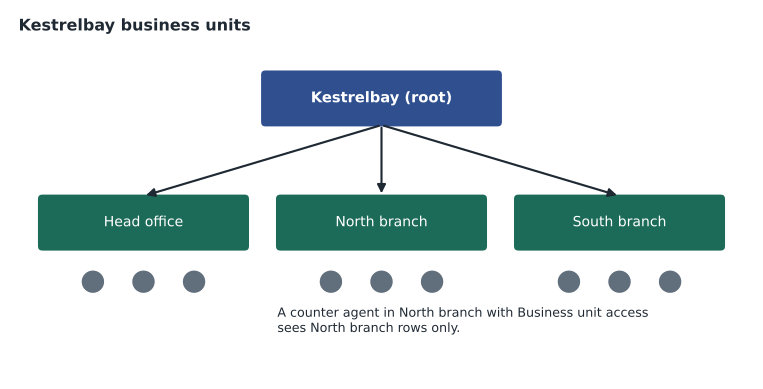
With modernized business units, turned on through the matrix data access setting in the environment, a user can hold security roles from business units other than their own, and can choose the owning business unit when creating a row. That makes it possible to give a head-office manager a role in North branch only, without moving the manager or creating teams just to cross the boundary. New designs should consider it, because it removes a lot of workarounds that older designs needed.
Security roles and privileges
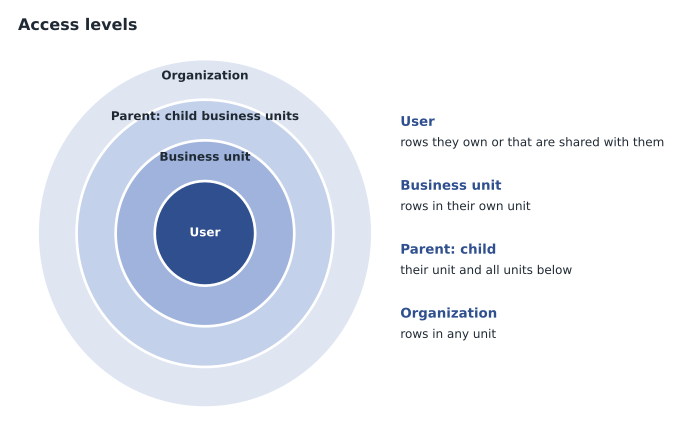
A security role is a set of privileges on tables, each with an access level. The privileges are Create, Read, Write, Delete, Append, Append To, Assign and Share. Append and Append To deserve a note: to link a contact to an account, the user needs Append on the contact and Append To on the account. The access levels are:
| Access level | The user can act on rows that |
|---|---|
| None | No rows |
| User | They own, or that are shared with them or a team they belong to |
| Business unit | Belong to their business unit |
| Parent: child business units | Belong to their business unit or any unit below it |
| Organization | Belong to any business unit |
Roles also hold miscellaneous privileges, such as permission to export to Excel, to go mobile, to use Dataverse search or to publish customizations. Exporting deserves attention: a role that allows reading every account and exporting to Excel lets a user take the whole customer list home.
Dynamics 365 installs many predefined roles, such as Salesperson, Sales Manager, Customer Service Representative and Customer Service Manager, plus platform roles such as System Administrator, System Customizer, Environment Maker and Basic User. Microsoft can update predefined roles, so the usual practice is to copy a predefined role and change the copy, leaving the original intact. Roles are assigned to users or teams in the Power Platform admin center or from a user's record in the app.
Worked problem
Turning sticky notes into roles
Kestrelbay needs: sellers can read all accounts but edit only their own; counter agents can read and create cases only in their own branch; field reps cannot delete anything; finance can read everything. How should Mirela set the access levels?
Show solution
- Seller role (copied from Salesperson): Account Read at Organization, Write at User, Delete at None for field reps.
- Counter agent role (copied from Customer Service Representative): Case Create and Read at Business unit, so each branch sees only its own cases.
- Field rep role: remove Delete on every table; Joaquim's team also loses Assign so records are not handed off by mistake.
- Finance role: Read at Organization on the customer and sales tables, Write only where finance edits data.
Answer: Four copied roles with access levels chosen per privilege. Credit limits and credit notes still need column security, because roles control whole rows, not individual columns.
Teams
Teams group users for security and collaboration. An owner team can own rows and hold security roles; members inherit the team's roles, which makes it easy to grant a set of permissions by adding someone to a team. An access team cannot own rows or hold roles; it is used to give a few people access to a particular row, often created automatically from an access team template on an opportunity or case. Microsoft Entra ID group teams are owner or access teams whose membership comes from a security group or Microsoft 365 group in Entra ID, so membership is managed in one place.
Kestrelbay created an Entra ID group team for each branch, linked to the branch's security group. When the North branch hired a new counter agent, IT added the person to the group in Entra ID and the right Dynamics 365 role followed automatically.
Sharing, hierarchy and column security
Roles handle the general rules; three tools handle the exceptions. Sharing grants one user or team access to one row with chosen rights, for example sharing a large opportunity with a technical specialist. It is easy to use but hard to audit at scale, so it should be the exception. Hierarchy security lets managers see the rows of the people who report to them, either by the Manager column on users (the manager hierarchy) or by a position hierarchy, to a chosen depth. Column security protects individual columns: a column is enabled for column security, then column security profiles grant read, update or create permission on it to selected users and teams.
Ravi's credit notes were stored in a column on the account and in a custom table. Mirela secured the account column with a profile granted to Ravi and the finance team, and gave the custom table a role with Read at None for everyone else. The rule from the first workshop was met with two tools working together.
Who can sign in at all
Before any role is considered, a user has to reach the environment. Users are created in Microsoft Entra ID, usually by the Microsoft 365 administrator, and given a license for the right Dynamics 365 app in the Microsoft 365 admin center. Dataverse then synchronizes the user into each environment they are allowed into. If the environment is restricted to a security group, only members of that group are added, which keeps the accounts team at Kestrelbay out of the sales sandbox and keeps former employees out of production once they are removed from the group.
A synchronized user who holds no security role can sign in but sees nothing useful. Dataverse gives every user a minimal Basic User style role in many environments, but meaningful access starts when a consultant assigns the roles designed for that person's job. Users who have left the organization should be disabled in Entra ID, which also disables them in Dataverse; their rows remain and can be reassigned to someone else in bulk.
Owner and ownership changes
Every user- or team-owned row has an Owner, which can be a user or a team, and the owner decides which business unit the row belongs to unless modernized business units let the creator choose. When a seller leaves or a territory moves, rows are assigned to a new owner. Assignment follows the cascade rules on relationships: with the common Cascade User-Owned setting, assigning an account also reassigns the related rows that the old owner owned, such as their open opportunities and activities, but not rows owned by other people. Mirela reviewed those cascades with Ottilie, who wanted a seller's closed opportunities to stay with the seller who won them, for commission reports.
Bulk reassignment is common after organizational change. From a user's record, an administrator can reassign all of that user's rows to another user or team in one step. Kestrelbay used team ownership for some rows from the start: the branch counter queue items and the shared accounts for walk-in customers were owned by the branch teams, so nothing broke when individual counter staff changed shifts or left.
Designing for least privilege
Mirela followed one principle through every role: each user gets the least access that lets them do their job, and nothing more. In practice that meant three habits. She built roles around jobs, not people, so the North branch counter agent and the South branch counter agent held the same role and differed only by business unit. She set Delete to None for almost everyone and gave a small admin team the right to delete when a genuine mistake needed fixing. And she reviewed the miscellaneous privileges in every copied role, removing Export to Excel from roles that had no reason to take bulk data away.
She also documented each role in a short table for Kestrelbay's IT team: the role name, which job it serves, the tables it touches and the access level for each privilege, plus any column security profiles that go with it. When a new request came in six months later, the table showed at once which role to change.
Testing security
Security mistakes are invisible to administrators, who can see everything. Mirela tested every role with a test user in the sandbox before go-live, logging in as that user and running a checklist: can they see the right accounts, edit only their own opportunities, open cases in their branch only, and never see credit notes? She also used the Check access feature on rows to see why a particular user could or could not reach a particular row, which lists the roles, shares and teams involved. Any surprise was fixed before real data arrived.
A security model on one page
By the end of the workshop, Kestrelbay's whole security model fitted on one page. Three business units under the root. Six copied roles: seller, sales manager, counter agent, service manager, warehouse lookup and finance. Branch teams linked to Entra ID groups, each holding the counter agent role. One column security profile for credit fields, granted to finance and Ravi. Hierarchy security turned off, because managers already read at organization level. Sharing allowed for the occasional large opportunity, and reviewed quarterly. When Ottilie asked whether that was enough, Mirela answered that the best security model is the simplest one that meets every rule on the wall.
Privileges for apps and features
Some privileges control access to features rather than tables. A role must include privileges on the model-driven app table to let users open an app at all, and apps are shared with roles in the app's sharing settings. Features such as the Dynamics 365 app for Outlook, Teams integration, Copilot and agents also need role privileges, which the predefined sales and service roles include. When a copied role is missing a feature privilege, users see a confusing message or nothing at all, so Mirela compared each copied role with its original after every release wave to catch new privileges Microsoft had added to the predefined roles.
Privileges also decide who can change the system. The System Customizer role can change forms, views and tables but not data security; the System Administrator role can do everything. Kestrelbay gave System Administrator to two people in IT and the partner's consultant, and System Customizer to one trained key user in the sandbox only.
Common mistakes
MistakeEditing the predefined Salesperson role directly.
InsteadCopy it and change the copy so Microsoft updates do not overwrite your changes.
MistakeUsing sharing as the main way to grant access.
InsteadDesign roles and business units for the general rules; keep sharing for exceptions.
MistakeExpecting a role to hide one sensitive column.
InsteadRoles control rows; use column security profiles for individual columns.
MistakeTesting security as an administrator.
InsteadTest with ordinary user accounts that hold only the roles you designed.
Summary and key terms
- Access combines the environment security group, licenses, business units, security roles, teams, sharing, column security and hierarchy security.
- Security is additive: a user gets the union of all their roles and shares.
- Privileges (Create, Read, Write, Delete, Append, Append To, Assign, Share) have access levels from None to Organization.
- Owner teams hold roles and own rows; access teams grant access to specific rows; Entra ID group teams sync membership.
- Copy predefined roles, test with real user accounts and use Check access to explain results.
- Business unit
- A node in the security structure that users and rows belong to.
- Security role
- A set of privileges with access levels on tables, plus miscellaneous privileges.
- Access level
- How widely a privilege applies: User, Business unit, Parent: child business units or Organization.
- Owner team
- A team that can own rows and hold security roles for its members.
- Access team
- A team used to grant several users access to one row without owning it.
- Column security profile
- A grant of read, update or create permission on secured columns.
Practice problems
Work each problem on paper first, then reveal the answer to check.
A user has one role with Account Read at User level and another with Account Read at Organization level. Which applies?
Show answer
Organization level, because security is additive.
What two privileges are needed to link a contact to an account?
Show answer
Append on the contact and Append To on the account.
How can a new branch employee get the right role automatically when IT adds them to a security group?
Show answer
Use a Microsoft Entra ID group team linked to that group, with the role assigned to the team.
Lesson quiz · 5 questions
Score 60% or more to complete this lesson.
Create a free account to save your progress, take quizzes and earn a certificate.