
MSBA-140 · Lesson 2 of 12 · 19 min
Dataverse in Dynamics 365
▶ Video coming soon A video version of this lesson is on the way.
Before Mirela configured a single form for Kestrelbay, she spent an afternoon at the whiteboard with Ottilie and Ravi drawing the data. "Every screen you will ever see in Dynamics 365 is a window onto a table in Dataverse," she said. "If we get the tables and relationships right, the screens are easy. If we get them wrong, no amount of form design will save us." This lesson explains how Dataverse stores data and what that means for someone configuring the customer engagement apps.
Tables, rows and columns
Dataverse stores data in tables. Each table holds one kind of thing, such as accounts, contacts or cases. A row is one record in the table, such as the account for Harbor View Marina. A column is one piece of information about each row, such as the account name or the main phone number. Older documentation calls these entities, records and fields, and you will still meet those words in some screens and in conversation, so it helps to know both.
Tables come in several kinds. Standard tables are created by Microsoft as part of Dataverse or an app, such as Account, Contact, User and Team. Custom tables are created by a company for its own needs. At Kestrelbay, Mirela planned a custom table called Vessel, because a marina customer might own dozens of boats and service history often depends on the boat, not the person. A virtual table shows data that lives in another system without copying it into Dataverse, and an elastic table is designed for very large volumes of fast-changing data.
Every table also has an ownership type, chosen when it is created and not changeable afterwards. User or team owned tables have an Owner column on every row, and security can limit users to the rows they or their business unit own. Organization owned tables have no owner; access is all or nothing. Most business tables, including Vessel, should be user or team owned so that security can work row by row. Lesson 5 returns to this.
Column types
Each column has a data type that controls what it can hold and how it appears on a form. Choosing the right type matters because some types cannot be changed later without creating a new column and moving the data.
| Data type | Holds | Kestrelbay example |
|---|---|---|
| Single line of text | Short text, with formats such as email, phone or URL | Hull identification number |
| Multiple lines of text | Long text | Notes on a vessel's refit |
| Whole number, decimal, currency | Numbers; currency columns also store a base-currency value | Credit limit |
| Choice and choices | One value or several values from a fixed list | Customer type: marina, fleet, retail |
| Yes/no | Two options | Has a service contract |
| Date and time | A date, or a date and time, with a time zone behavior | Last haul-out date |
| Lookup | A reference to a row in another table | The account that owns the vessel |
| File and image | A document or picture | Photo of the vessel |
Some columns are calculated by the platform. A formula column works out its value from other columns using Power Fx each time a row is read, for example the number of days since the last haul-out. Rollup columns total values from related rows, such as the sum of open opportunity amounts for an account. Columns can also be marked as required (business required or recommended) and can be protected with column security, which hides or locks the value for users without permission. Ravi's rule about credit notes could be met partly with column security on the credit fields.
Data types in practice
Two column types caused more discussion at Kestrelbay than all the others. The first was currency. Kestrelbay invoices most customers in its home currency but sells to some yacht owners from across the border in the other currency. Dataverse handles this with a base currency, set when the environment is created and never changeable, plus any number of transaction currencies with exchange rates. Every currency column on a row stores both the amount in the row's transaction currency and a matching base amount, so reports can total sales across currencies. Mirela asked the finance team to keep the exchange rates up to date, because the base amounts are recalculated from the rate when a row is saved.
The second was date and time. A date and time column has a behavior. User local stores the value in a universal time and shows it in each user's own time zone, which suits appointments. Date only stores a calendar date with no time zone, which suits birthdays and contract end dates. Time zone independent shows exactly the same date and time to everyone, which suits a ferry departure printed on a ticket. Kestrelbay's branches span one time zone today, but Mirela set the haul-out date as date only, because a boat hauled out on the 3rd should never appear as the 2nd to a user in another time zone.
Text formats matter too. A single line of text formatted as email becomes clickable and can be used by email features; formatted as phone, it can start a call through Teams; formatted as URL, it opens a web page. Choosing the right format is a small step that makes every later integration easier.
Relationships
Tables connect through relationships. A one-to-many relationship links one row in a parent table to many rows in a child table: one account has many contacts, and each contact has one parent account. On the child table the relationship appears as a lookup column. A many-to-many relationship links many rows on each side, for example contacts and marketing lists, and Dataverse stores it in a hidden intersect table.
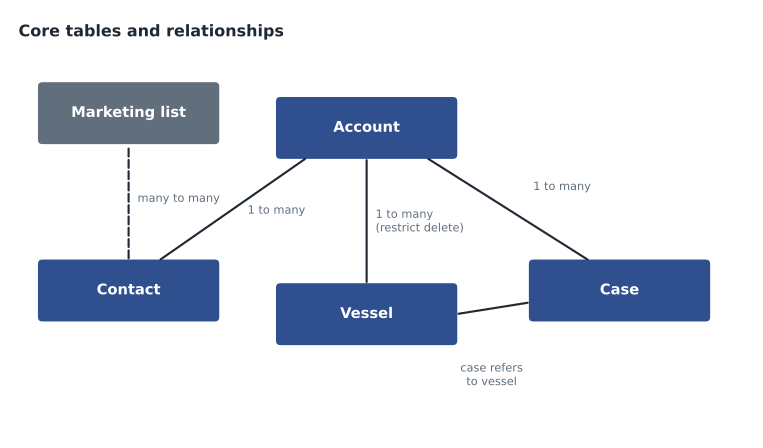
Relationships also carry behavior. When a parent row is assigned, shared, deleted or reparented, the relationship decides what happens to the children. A parental relationship cascades every action: delete the account and its contacts are deleted too. A referential relationship keeps the children and can either remove the link or block the deletion. Mirela set the Account-to-Vessel relationship to referential with "restrict delete", so nobody could delete a marina account while vessels were still attached to it.
Worked problem
Choosing a relationship
A marina can own many vessels, but a vessel sometimes changes hands between marinas, and several Kestrelbay contacts may be responsible for the same vessel at different times. Which relationships should Mirela create?
Show solution
- Each vessel has one current owning account, so create a one-to-many from Account to Vessel, which adds an Owning account lookup on Vessel.
- Changing owners means updating that lookup, so the relationship must not delete vessels when an account is deleted: use referential, restrict delete.
- Several contacts can relate to several vessels over time, so a many-to-many between Contact and Vessel fits, or a custom "Vessel contact" table if Kestrelbay wants to record a role and dates for each link.
Answer: One-to-many Account to Vessel with restrict delete, and either a many-to-many Contact to Vessel or a custom linking table when extra details such as role and dates are needed.
Business logic in Dataverse
Dataverse does more than store data. It runs business rules, which set values, show errors, make columns required or hide them without code. It runs Power Automate cloud flows triggered when rows are added, modified or deleted. It runs classic workflows and plug-ins written by developers. And it enforces security on every request, whichever app or tool makes it. That last point is important: a user who opens Dataverse data in Excel, Power BI or Copilot sees only what their security roles allow, exactly as in the app.
Because logic lives in the platform rather than in a single screen, rules apply consistently. A business rule set at the table level runs on every form for that table; a flow runs whether the row was created by a seller in Sales, an agent in Customer Service or an import.
Primary names, keys and choices
Every table has a primary name column, a text column that identifies a row to people: the account name, the contact's full name, the case title. It is what appears in lookups and search results, so it should be meaningful. For Vessel, Mirela used the vessel's name and hull number together, such as "Sea Wren (HIN 4471)", because several boats share a name.
Behind the scenes every row also has a unique identifier, a GUID, which never changes. People never type GUIDs, so when data comes from another system an alternate key is useful: a column or set of columns that must be unique, such as the customer number from Kestrelbay's old database. Imports and integrations can then match rows by that key instead of creating duplicates, and a key also prevents two rows with the same value being saved.
Choice columns draw their values from a list. A list can be local, used by one column only, or global, defined once and shared by many columns. Kestrelbay's list of coastal regions was global, because accounts, leads and cases all needed the same regions and a change should apply everywhere. Each choice has a label and a numeric value; reports and integrations use the value, so values should not be reused for a different meaning later.
Working with Dataverse outside the app
Dataverse data is reachable from many tools, and security applies in all of them. Users can export to Excel from a view, edit in Excel and import the changes back; a static export is a snapshot, while a dynamic worksheet refreshes. Power BI reads Dataverse directly for reports. Power Automate flows create and update rows. Developers use the Web API, and data engineers can link Dataverse to Microsoft Fabric to analyze large volumes without copying them by hand.
Mirela reminded Ottilie that this reach is a strength and a responsibility. A security role that lets a seller read all accounts in the app also lets that seller export them all to Excel. Security design, covered in lesson 5, therefore has to assume that whatever a user can see, the user can also take away in a spreadsheet.
Capacity and auditing
Dataverse storage is measured in three pools across the tenant: database, file and log capacity. Rows use database capacity, attachments and images use file capacity, and audit records use log capacity. Licenses add capacity to the tenant, and extra capacity can be bought. Administrators watch capacity in the Power Platform admin center, because environments that run out of space cannot be copied or restored.
Auditing records who changed what and when. It is switched on for the environment, then for each table and column that needs it. Kestrelbay turned on auditing for accounts, opportunities and cases, and for the credit limit column, so that any change to a customer's limit would show who made it. Audit data has a retention period and consumes log capacity, so it is not wise to audit everything.
Dataverse and Dynamics 365 together
When Dynamics 365 Sales is installed, it adds its own tables to Dataverse, such as Lead, Opportunity, Quote, Order, Invoice, Product and Price List. Customer Service adds Case, Queue, Entitlement, SLA and Knowledge Article. These sit alongside the standard tables and any custom ones. A Power Apps maker can build a canvas app or a model-driven app on the same tables, and a Power BI report can read them, all under the same security.
For an exam candidate, the key idea is that design decisions are data decisions. Whether to use a choice column or a lookup to a table, whether a table should be user owned, and how relationships should cascade will shape forms, views, security, reporting and Copilot's answers for years.
Standard tables first
Mirela followed one rule when Kestrelbay asked for new tables: use a standard table if one fits, and create a custom table only when the thing is genuinely new. Standard tables come with forms, views, relationships, security and features already wired up, and Microsoft's AI features know how to use them. A request for a "Customer contacts" table was answered with the standard Contact table; a request for a "Service tickets" table was answered with the standard Case table. Only Vessel, which had no standard equivalent, became a custom table.
Common mistakes
MistakeMaking a new business table organization owned to keep it simple.
InsteadUse user or team ownership so row-level security is possible; ownership cannot be changed later.
MistakeUsing a choice column for something that has its own details, such as a vessel.
InsteadIf the thing has its own columns or history, make it a table and use a lookup.
MistakeLeaving every relationship as parental.
InsteadChoose cascade behavior deliberately so deletes and reassignments do what the business expects.
MistakeTurning on auditing for every table and column.
InsteadAudit what matters for accountability; audit logs consume log capacity.
Summary and key terms
- Dataverse stores data in tables of rows and columns; older names are entities, records and fields.
- Table ownership (user or team versus organization) is fixed at creation and decides how row security works.
- Column data types, formula and rollup columns, required levels and column security shape every form.
- One-to-many and many-to-many relationships link tables; cascade behavior controls what happens to children.
- Business logic and security are enforced in the platform, so they apply in every app and tool.
- Table
- A set of rows of one kind of data, such as accounts or cases.
- Lookup column
- A column that refers to a row in another table, created by a one-to-many relationship.
- Cascade behavior
- Rules for what happens to child rows when a parent row is deleted, assigned, shared or reparented.
- Formula column
- A column whose value is calculated with Power Fx when the row is read.
- Rollup column
- A column that aggregates values from related rows.
- Column security
- A profile-based control that restricts who can read or update a column.
Practice problems
Work each problem on paper first, then reveal the answer to check.
Why should most business tables be user or team owned?
Show answer
So that security roles can limit access to rows by owner and business unit; organization-owned tables are all or nothing.
What column does a one-to-many relationship add, and to which table?
Show answer
A lookup column on the child (many) side that points to the parent row.
Kestrelbay wants to stop anyone deleting an account that still has vessels. What setting does this?
Show answer
A referential relationship with restrict delete on the Account-to-Vessel relationship.
Lesson quiz · 5 questions
Score 60% or more to complete this lesson.
Create a free account to save your progress, take quizzes and earn a certificate.