
MSBA-140 · Lesson 11 of 12 · 18 min
Data import and duplicate detection
▶ Video coming soon A video version of this lesson is on the way.
The old Kestrelbay database held 6,400 customer companies and 11,000 people, collected over fifteen years by dozens of hands. Mirela's first export from it was humbling. There were 212 rows for companies whose name started with "Harbor", and when she grouped them by phone number, about a third turned out to be the same marinas typed in different ways. "If we import this as it is, the CRM will be broken on day one," she told Ottilie. "And everyone will blame the CRM." This lesson covers how data gets into Dataverse, how to stop duplicates, and how to clean up the ones that get through.
Planning a migration
A data migration has four phases, and most failures come from skipping the first. Profile the source: count rows, check which columns are filled, look for duplicates and odd values. Clean and map: decide which source columns go to which Dataverse columns, how choice values translate, and how relationships will be rebuilt. Load in the right order, parents before children. Verify: compare counts, spot-check rows and let key users try the data before go-live.
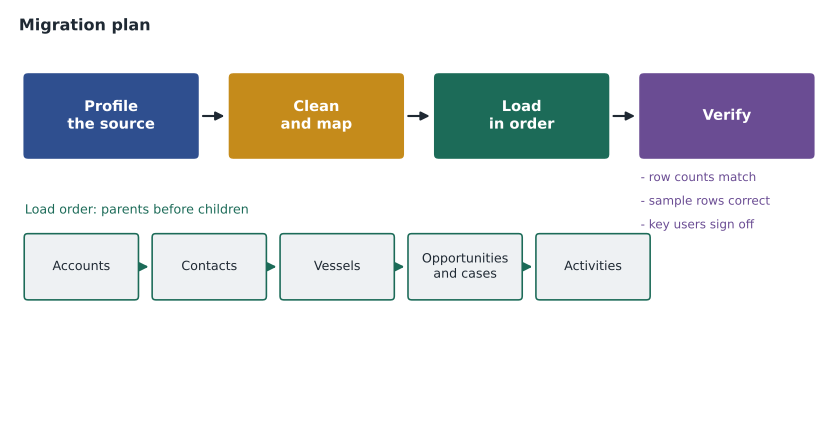
Load order matters because of lookups. A contact's parent account can be set only if the account already exists, and a case's vessel only if the vessel exists. Kestrelbay's order was accounts, then contacts, then vessels, then open opportunities and cases, then historic activities. Closed opportunities older than three years were left in the archive and not migrated at all; Ottilie decided they had no use in daily work.
Import options
There are several ways to bring data into Dataverse, and the right one depends on volume, complexity and whether the import is one-off or repeated.
| Method | Best for | Notes |
|---|---|---|
| Import from Excel or CSV in the app | One-off loads of thousands of rows by a consultant | Uses the import wizard with column mapping; can use data maps and alternate keys |
| Import from Excel template | Users adding rows in a known layout | Download a template from a view, fill it, import it back |
| Dataflows (Power Query) | Repeatable loads and transformation from many sources | Can run on a schedule; good for cleaning during load |
| Configuration Migration tool | Moving reference and configuration data between environments | Keeps GUIDs consistent across environments |
| Power Automate or integration tools | Ongoing synchronization with other systems | Usually built with a developer or integration partner |
The import wizard, opened from Import from Excel or Import from CSV on a list, reads a file, suggests mappings between file columns and table columns and lets the user change them. It can map text values in a source column to choice values, and it creates a data map that can be saved and reused. If the file includes a column that matches an alternate key, the wizard can update existing rows rather than create new ones. Each import creates an import job whose results, including any failed rows with reasons, can be reviewed afterwards from the imports area in settings.
For Kestrelbay's migration, Mirela used dataflows in Power Apps. A dataflow connects to a source (the old database, exported files or a SharePoint folder), uses Power Query to transform the data (trim spaces, split names, standardize phone numbers, translate customer types into the new choice values) and loads it into Dataverse tables, matching existing rows by alternate key. Because a dataflow can be rerun, she could load into the sandbox, fix problems, and rerun the same dataflow into production on go-live weekend.
Worked problem
Mapping a messy column
The old database has a free-text "Type" column with values such as "Marina", "marina", "Mar.", "Yacht club", "Fleet", "Fishing fleet" and "Retail". Kestrelbay's new Customer type choice column has Marina, Yacht club, Fleet and Retail. How should Mirela map it?
Show solution
- Profile the column and list every distinct value with its count.
- Agree a mapping with Ottilie: Marina, marina and Mar. become Marina; Fleet and Fishing fleet become Fleet; Yacht club and Retail map directly.
- Apply the mapping in the dataflow with a Power Query step, and send any unmapped values to a review list.
- Load, then check the counts of each choice value against the profile.
Answer: Normalize values before loading, using a mapping the business has agreed, and verify the result by comparing counts.
Duplicate detection
Even after cleaning, new duplicates arrive every day: a counter agent creates a contact for a customer who is already there under a nickname. Dataverse offers duplicate detection to catch them. Duplicate detection is turned on for the environment in its data management settings, with options to check when rows are created or updated, when offline users go back online, and during data import.
Duplicate detection rules define what counts as a duplicate. Each rule names a base table and a matching table (often the same), and one or more conditions: for example, account name exact match, or the first six characters of the account name plus an exact match on main phone. Rules can ignore blank values and can be case-sensitive or not. After a rule is created it must be published, which builds a matchcode for each row. Dynamics 365 ships with some rules, such as accounts with the same account name and contacts with the same email address, which can be kept, changed or replaced.
When a user saves a row that matches a published rule, the app shows a Duplicate records detected dialog listing the possible matches. The user can cancel, open the existing row, or save anyway. Duplicate detection warns; it does not block. For a hard block, a consultant uses an alternate key, which makes the database refuse a second row with the same key value.
Duplicate detection jobs and merging
Duplicates already in the data are found with a duplicate detection job, which runs the published rules across existing rows, optionally on a schedule, and produces a list of matches. Users then merge duplicates. Merging accounts or contacts (and leads, and in some environments other tables enabled for merge) asks the user to choose a master row and pick, column by column, which values to keep. Related rows such as activities, opportunities and cases move to the master, and the other row is deactivated rather than deleted, so the history is preserved.
Mirela set up three rules for Kestrelbay before go-live: accounts with the same main phone, accounts with the same first eight characters of name in the same city, and contacts with the same email or the same mobile phone. She published them, ran a duplicate detection job against the migrated data, and Ravi's team spent two afternoons merging about 380 duplicate accounts. After that, a weekly job caught the few that slipped through.
Bulk updates and deletion
Data work does not end at go-live. Users can update many rows at once with bulk edit, selecting rows in a view and changing a column for all of them, or by editing in Excel Online. Administrators can schedule bulk deletion jobs that delete rows matching a query, such as completed tasks older than five years, to save capacity, and can configure retention policies for some tables to move old data out of active storage while keeping it available for compliance. Every bulk change should be tried in a sandbox first.
Testing the migration
Mirela ran the full migration into the sandbox three times before go-live weekend. The first run failed on 900 contacts whose parent accounts had been merged away during cleaning; the fix was to load the merged account numbers as a lookup table and remap them. The second run succeeded but loaded every phone number with spaces in different places, which broke duplicate detection on phone; a Power Query step to strip spaces and punctuation fixed that. The third run was clean, and it took four hours from start to finish, which told the team how long to book on go-live weekend. Each run ended with the same verification: row counts per table compared with the source, twenty random accounts checked by Ottilie and twenty random contacts checked by Ravi, and a short list of known problem customers looked up by name.
Rehearsal also produced a cutover plan: freeze changes in the old database on Friday evening, export, run the dataflows into production, verify, switch on duplicate detection and the integrations, and open the system to users on Monday morning. A rollback step was written down too, in case verification failed: the old database would stay read-only until Wednesday so that nothing was lost.
Reference data and configuration data
Not all data is customer data. Kestrelbay also needed reference data in production before users arrived: the product catalog and price lists, the list of territories, the subjects used to categorize cases, currencies and exchange rates, and the queues. Some of this was configured by hand in the sandbox and then had to appear, identically, in production. Because rows created by hand in two environments get different unique identifiers, a lookup that works in the sandbox can break in production. The Configuration Migration tool solves this by exporting configuration data with its identifiers and importing it into the target environment, so references stay intact.
Data quality after go-live
Duplicate detection catches only the duplicates its rules describe, so Mirela added a few habits to keep data clean after go-live. A weekly duplicate detection job emailed a summary to Ravi. A data quality view on each manager's dashboard listed accounts with no phone, contacts with no email and opportunities with no close date. Required columns and business rules prevented the most common gaps at the point of entry. And every three months a key user spent an afternoon reviewing the oldest inactive accounts with the sales team, deactivating those that had closed or merged.
Imports and security
An import runs as the user who starts it, and creates rows owned by that user unless the file sets an owner. Rows created by an import follow the same security rules as rows created on a form, so a user can import only into tables where they have Create privileges. During migration Mirela ran the dataflows with a dedicated migration account that had a System Administrator role in the sandbox and production, then set the owners from the file so that each customer belonged to the right seller or branch team. After go-live the migration account was disabled.
Choosing what to migrate
One of the most useful conversations in the project was about what not to migrate. The old database held fifteen years of history, and the natural instinct was to bring all of it. Mirela asked, for each kind of data, who would use it and how often. Active customers and their contacts were essential. Open opportunities and open cases had to move. Closed cases from the last three years helped agents with warranty questions, so they moved too, as read-only history. Closed opportunities older than three years, old marketing lists and the notes field from a long-retired loyalty scheme stayed in an archive that finance could still query. The decision cut the migration volume by more than half and made every load faster.
History that does move should look like history. Mirela loaded closed cases with their original created and resolved dates by setting the platform's Record Created On override column during import, and set their status to resolved, so reports and timelines showed them in the right place rather than as hundreds of cases all created on go-live day.
Common mistakes
MistakeImporting contacts before their accounts.
InsteadLoad parents before children so lookups resolve.
MistakeRelying on duplicate detection to block duplicates.
InsteadDuplicate detection warns; use alternate keys when duplicates must be refused.
MistakeCreating a duplicate detection rule and forgetting to publish it.
InsteadPublish rules so matchcodes are built and checks run.
MistakeMigrating every historical row because it exists.
InsteadAgree with the business which history is useful and archive the rest.
Summary and key terms
- Migrations profile, clean and map, load in parent-to-child order and verify.
- Import options include the import wizard, Excel templates, dataflows with Power Query, the Configuration Migration tool and integrations.
- Alternate keys let imports update matching rows and block true duplicates.
- Duplicate detection rules warn users about likely duplicates on create, update and import, once published.
- Duplicate detection jobs find existing duplicates; merging moves related rows to a master and deactivates the rest.
- Data map
- A saved mapping between a file's columns and a table's columns for imports.
- Dataflow
- A Power Query process that extracts, transforms and loads data into Dataverse, and can be rerun.
- Alternate key
- A column or set of columns that must be unique, used to match and block duplicate rows.
- Duplicate detection rule
- A published set of matching conditions that identifies likely duplicates.
- Duplicate detection job
- A run of the rules across existing rows to find duplicates.
- Merge
- Combining duplicate rows into a master row, moving related records and deactivating the others.
Practice problems
Work each problem on paper first, then reveal the answer to check.
Why must accounts be imported before contacts?
Show answer
Contacts refer to their parent accounts through a lookup, which can only be set if the account exists.
What is the difference between a duplicate detection rule and an alternate key?
Show answer
A rule warns the user about likely duplicates; an alternate key makes Dataverse refuse a second row with the same key.
What happens to the activities of an account that is merged into another?
Show answer
They move to the master account; the merged account is deactivated.
Lesson quiz · 5 questions
Score 60% or more to complete this lesson.
Create a free account to save your progress, take quizzes and earn a certificate.